Business Challenge
The last three posts were about what things cost, who owes it, and who gets the discount. This one is about the control that was supposed to prevent the conversation: the budget alert.
A misconfigured job runs over a weekend and spends four figures. The postmortem action is predictable and reasonable — create a budget, alert at 80%, tell the team. It gets done. The next incident still surfaces as a line on the invoice, and the alert either arrived too late to matter or did not arrive at all.
Three separate things went wrong, and only the third is a configuration mistake. The first two are properties of the platform that no threshold setting changes.
Neither tool watches your resources. Both watch your bill, and the bill is assembled on its own schedule. AWS Budgets information is updated up to three times a day, with updates typically 8–12 hours apart. Cost Anomaly Detection runs approximately three times a day, on data from Cost Explorer, “which has a delay of up to 24 hours.”
AWS states the consequence directly for Anomaly Detection: “it can take up to 24 hours to detect an anomaly after a usage occurs.” A Friday-evening runaway is a Saturday detection at best. Nothing you configure moves this.
FixNone. Design around the floor — and stop describing these as real-time controls in your runbook.
This one surprises people who assume a threshold breach keeps nagging. AWS is explicit: “Actual alerts are only sent out once per budget, per budget period, when a budget first reached the actual alert threshold.”
One email at 80%, and then silence while spend goes to 300% of budget. The alert told you that a line was crossed. It is not telling you how far past it you now are, and a team that treats quiet as safe has misread the contract.
FixMultiple budgets at laddered thresholds, or forecast alerts — which can re-fire — or Anomaly Detection alongside.
The postmortem said “add a budget” and everyone heard “add a limit”. A budget alert notifies. It does not restrict, throttle, or stop. Spend continues at exactly the rate it would have without it.
There is a mechanism that stops things — budget actions — and it is a separate feature that must be configured deliberately, with its own IAM role. Most budgets in most accounts do not have one.
FixBudget actions, with the two failure modes in the Architecture section read first.
Architecture
The useful mental model is a pipeline with a fixed latency floor, two different detectors reading off the end of it, and exactly one enforcement point.
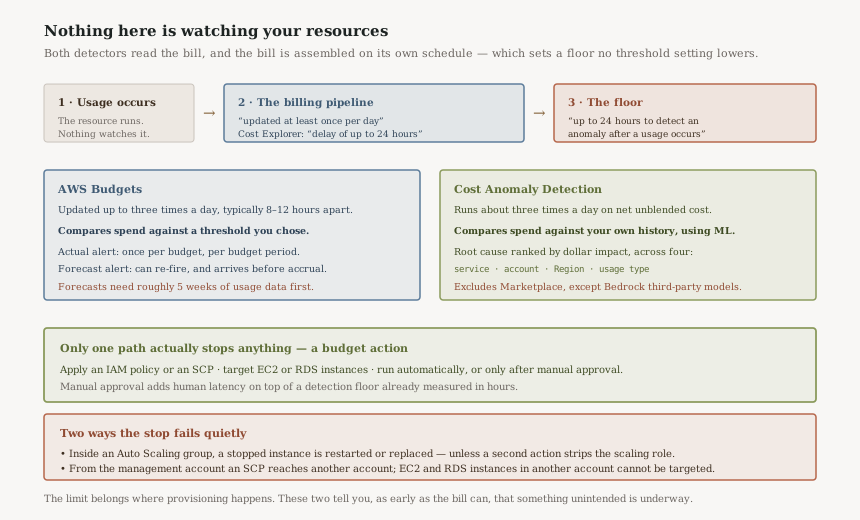
The two detectors answer different questions
They are routinely described as alternatives. They are not, because they compare against different reference points, and the reference point is the whole distinction.
A budget compares spend against a number you chose. It is an expression of intent — this team gets $40,000 a month — and it is right or wrong only relative to that intent. A Cost Anomaly Detection monitor compares spend against your own history, using “machine learning models to detect and alert on anomalous spend patterns.” It has no opinion about what you should spend, only about what is unlike you.
The practical consequence: a budget will never catch a $900 surprise inside a $40,000 budget, and anomaly detection will never tell you that a perfectly stable, perfectly normal $40,000 is more than the business agreed to. Running one and calling it cost control leaves an obvious hole, and which hole you have depends on which one you picked.
Enforcement is one feature, and it has two quiet failure modes
Budget actions are genuinely capable. AWS lists “applying an IAM policy or a service control policy (SCP)” and “targeting specific Amazon EC2 or Amazon RDS instances”, and an action runs “either automatically or after your manual approval”. That last choice matters more than it looks: manual approval adds human response time on top of a detection floor already measured in hours.
AWS documents this in the budgets best-practice guide, and it invalidates the most common design: “If a budget action is used to stop an Amazon EC2 instance in an Auto Scaling Group (ASG), Amazon EC2 Auto Scaling restarts the instance, or launches new instances to replace the stopped instance.” The remedy AWS gives is a second budget action that removes permissions on the role used by the Launch Configuration managing the ASG. A single stop action pointed at instances in an ASG is not a control — it is a restart loop with a bill attached.
From the management account, “you can apply an SCP to another account. However, you can't target Amazon EC2 or Amazon RDS instances in another account.” Centralised enforcement therefore has exactly one shape: deny future provisioning via SCP. Stopping what is already running has to be actioned from inside the account that owns it, which means the account teams need the role and the runbook — central FinOps cannot do it for them.
Why This Architecture Holds Up
The forecast alert is the only pre-emptive signal, and it needs history
Budgets alert on “both actual (after accruing) and forecasted (before accruing)” spend, and only the second is a warning rather than a report. Forecast alerts also behave better under sustained overspend: they “might alert more than once in a budgeted period if the forecasted values exceed, dip below, and then exceed the alert threshold again”, unlike the once-per-period actual alert.
The constraint is the one worth planning around. “AWS requires approximately 5 weeks of usage data to generate budget forecasts. If you set a budget to alert based on a forecasted amount, this budget alert isn't triggered until you have enough historical usage information.”
Read that against when teams actually create budgets. A new account in a landing zone. A new workload. Week one of a migration. A sandbox handed to a team that has never had one. Every one of those is a cold start, and for the first five weeks the only alert that would have arrived before the money did is silent. Anomaly Detection has the same shape of limitation from the other side: a new monitor “can take 24 hours to begin detecting”, and a new service subscription needs “10 days of historical service usage data” first.
For the first five weeks, the useful control is not a budget at all — it is the one that does not depend on history. An SCP that denies expensive instance families, a Service Quota left deliberately low, or a sandbox with no NAT gateway all act at provisioning time with no learning period. Budgets and Anomaly Detection are what you switch to once there is a baseline for them to reason about.
Root cause is where Anomaly Detection earns its place
Detection is only half of an incident. Anomaly Detection ranks root causes “by their dollar impact” across four dimensions — service, account, Region, usage type — which is the decomposition an on-call engineer needs and a budget alert never provides. A budget email says the number is too big. This says which service, in which account, in which Region, on which usage type, and how much of the total each explains.
Region is the one that repeatedly justifies the feature. A spend anomaly isolated to a Region nobody deploys to is a different incident from the same dollar amount in your primary Region, and the second dimension tells you that without a Cost Explorer session.
Key Architecture Decisions
| Decision | Choice | Reasoning |
|---|---|---|
| Expected detection time | Plan for up to 24 hours | Both tools read the billing pipeline. AWS states it can take up to 24 hours to detect an anomaly after usage occurs. |
| Budget or anomaly monitor | Both, for different questions | A budget tests spend against intent you set. A monitor tests it against your own history. Neither catches the other's case. |
| Alert type | Forecast, laddered with actual | Actual alerts fire once per budget period. Forecast alerts can re-fire and arrive before the spend accrues. |
| First five weeks | SCPs and quotas, not budgets | Forecasts need roughly 5 weeks of usage data. Provisioning-time controls have no learning period. |
| Enforcement | Budget action, automatic | Alerts do not restrict anything. Manual approval adds human latency to an already lagging signal. |
| Stopping ASG instances | Pair with a permissions action | Auto Scaling restarts or replaces a stopped instance unless a second action removes the scaling role's permissions. |
| Central enforcement | SCP only | The management account can apply an SCP cross-account but cannot target EC2 or RDS instances in another account. |
| Marketplace spend | Budgets, not monitors | Anomaly Detection excludes AWS Marketplace products except third-party Bedrock models. AWS directs you to Budgets. |
Three operational details that decide whether anyone acts on the alert
The people who can fix it may not be able to see it. AWS is clear that a management account can create a budget tracking a member account's cost, “but the member account can only view the same budget if they receive access to the management account.” A central budget over a team's spend, with no corresponding visibility for that team, produces an alert that lands with the only group who cannot act on the workload.
The notification fan-out is small. Up to 10 email addresses and one SNS topic per alert. Ten addresses is a distribution list that rots; the SNS topic is the one worth wiring, because it is the only path to chat, ticketing or an automated response.
Budgets quietly change meaning when the org changes. When a member account leaves an organisation, Budgets “only track costs incurred after a member account leaves”, historical data before the departure is excluded, and “no notification is sent when this tracking behavior changes.” A budget that looks healthy after a divestiture may be healthy only because it forgot the first three weeks of the month.
Closing Thought
Cost controls get adopted in the aftermath of a surprise, which is the worst moment to reason about them. The instinct is to put a number somewhere and feel covered, and the tooling is accommodating enough to let that feeling survive until the next incident.
What the documentation describes is narrower and more useful than the instinct. These are reporting instruments with an optional enforcement attachment, reading a ledger that is assembled once or a few times a day. Used as reporting, they are good: a forecast alert with five weeks of history behind it is a genuinely early warning, and anomaly root-cause ranking is the fastest path from “the bill is wrong” to “it is this usage type in that Region”. Used as a guardrail, they are hours late and, unless you configured an action, entirely advisory.
The architectural move is to stop asking these tools to be the limit. The limit belongs where provisioning happens — an SCP, a quota, a permission that was never granted — because that is the only layer that acts before the usage exists. Budgets and anomaly monitors then do the job they are actually built for: telling you, as soon as the bill can tell anyone, that something you did not intend is already underway.
Application patterns — idempotency: why at-least-once is the delivery contract you actually have, what an idempotency key's scope and expiry window really cover, and why the retry that duplicates your transaction is usually one the platform issued on your behalf rather than one you wrote.
Official AWS Reference
- Managing your costs with AWS Budgets — the three-times-a-day refresh and the notification-delay note
- Best practices for AWS Budgets — the 5-week forecast requirement, once-per-period actual alerts, and the Auto Scaling caveat
- Configuring budget actions — IAM, SCP and instance actions, and the cross-account boundary
- Detecting unusual spend with AWS Cost Anomaly Detection — the 24-hour detection ceiling, cold-start requirements and Marketplace exclusion
Comments