Business Challenge
#117 ended on the limit of managed data identifiers: detection for some of them “depends on also finding certain keywords in proximity with the sensitive data”, which means coverage depends on how your application happens to phrase a log line. The documented answer is to bring your own pattern. “Custom data identifiers (CDIs) let you define your own custom regular expressions that can be used in your data protection policy”, so you can “target business-specific personally identifiable information (PII) use cases that managed data identifiers can't provide” — employee IDs, tenant references, internal account numbers.
The constraints page is short. It is also the most consequential page in the feature, because of how the regex restriction is written.
AWS does not name a regex dialect or list unsupported constructs. It publishes the characters you may use:
“RegEx has a maximum length of 200 characters. The following characters are
supported:” — alphanumerics; the symbols
_ # = @ / ; , - plus space, apostrophe and double quote; and the regex reserved
characters ^ $ ? [ ] { } | \\ * + .
Now read the reserved list again and notice what is not on it. There is no opening or closing parenthesis.
Parentheses are how a regular expression expresses structure, so their absence removes a family
of constructs at once: grouping, alternation scoped to part of a pattern, quantifiers applied to
a sequence, capture groups, non-capturing groups, and both lookahead and lookbehind. The
alternation character | is permitted — but without parentheses it can
only separate whole top-level patterns, never a bounded choice inside one. You can write
cat|dog; you cannot write (cat|dog)-\d{4}.
Square brackets and braces are present, which is what makes the feature useful at all: character
classes like [A-Z] and counted repetition like \d{9} cover most
fixed-format identifiers. But brackets are a character class, not a group — they choose one
character from a set, and no amount of them substitutes for grouping a sequence.
Design identifiers whose formats are flat and fixed, and expect to write one custom identifier per format variant rather than one clever pattern covering several. Where a managed identifier already exists for the data type, use it and keep your 10 custom slots for the formats only you have. And treat the 200-character ceiling as a real design constraint, not a safety margin — it is shorter than one careless character class expansion.
Managed identifiers are not pure patterns. The service “allows you to leverage pattern matching and machine learning models to detect sensitive data”, and for some types “the detection depends on also finding certain keywords in proximity with the sensitive data”. That inference is doing real work: it is what stops a nine-digit number being masked everywhere it appears.
A custom data identifier has none of it. It is the regex you wrote, matching exactly what the regex matches. That cuts both ways, and both directions matter:
No missed detections from phrasing. A managed identifier that needs a nearby keyword will miss your data when the log line does not supply one. A custom identifier will not, because it is not looking for one.
No protection from a bare number. If your employee IDs are nine digits with no
prefix, a custom identifier for \d{9} masks every nine-digit number in the log group
— request IDs, byte counts, timestamps. The feature gives you no way to say
only when it looks like an employee ID, because that judgement is exactly what the
managed identifiers' keyword proximity provides and custom ones lack.
AWS's own example quietly encodes the fix. The recommended pattern is
EmployeeID-\d{9}, which
“will detect and mask log events with nine numbers after EmployeeID-”. The
literal prefix is the context, written by hand because the service will not infer it.
Anchor every custom identifier on a literal that only appears with the sensitive value — a field name, a prefix, a delimiter. If your data format has no such literal, the honest conclusion is that this feature cannot distinguish it from ordinary numbers, and the fix belongs upstream in how the application logs the value rather than in the policy.
“A maximum of 10 custom data identifiers are supported for each data protection policy.” Ten is a small number once each one is a single flat pattern covering a single format variant.
The combination rule softens it, and introduces a different problem: “Custom data identifiers can be specified within an account-level data protection policy or in log group-level data protection policies”, and “Similar to managed data identifiers, custom data identifiers defined within an account-level policy work in combination with custom data identifiers defined in a log group-level policy.”
So the effective set for a log group is the union of two policies — up to ten from the account and up to ten of its own — which is generous. But it also means no single document shows what is actually being detected in that log group, and #117's rule that “Each log group can have only one log group-level data protection policy” means a team adding one identifier must own the whole local list.
Two smaller constraints shape the naming:
“Custom data identifier names have a maximum length of 128 characters” with
only alphanumerics, underscore and hyphen permitted, and
“Custom data identifiers cannot share the same name as a managed data
identifier.” That second rule is a real trap for the obvious naming choice: calling
yours EmailAddress or DriversLicense-US collides with the managed set.
Keep custom identifiers at the account level where they are organisation-wide, and reserve log-group policies for genuinely local formats. Prefix every custom name with something that cannot collide with AWS's catalogue — a company or team token — and remember that the whole policy document, identifiers included, shares the “30,720 characters” limit.
Architecture
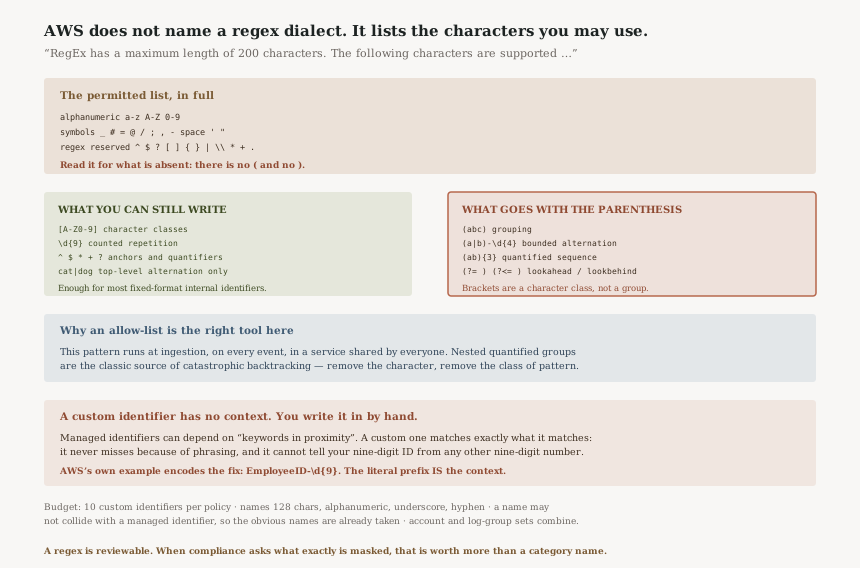
What the permitted-character list does and does not allow
| Construct | Available? | Why |
|---|---|---|
Character class — [A-Z0-9] | Yes | [ and ] are listed |
Counted repetition — \d{9} | Yes | {, } and \\ are listed |
Anchors — ^, $ | Yes | Both listed |
Quantifiers — *, +, ? | Yes | All three listed |
Top-level alternation — a|b | Yes | | is listed |
Grouping — (abc) | No | ( and ) are not on the list |
Bounded alternation — (a|b)x | No | Needs grouping |
Quantified sequence — (ab){3} | No | Needs grouping |
| Lookahead / lookbehind | No | Built from parentheses |
This is a reading of an explicit allow-list — AWS says which characters are supported, and parentheses are not among them. It is worth testing against your own patterns rather than taking anyone's word for it, but the list is unambiguous about what it contains.
The practical shape that falls out: a custom data identifier is a flat pattern with a literal anchor, a character class or two, and a count. That covers an enormous proportion of real internal identifiers, and covers almost none of the clever ones.
Managed against custom, as detectors
| Managed data identifier | Custom data identifier | |
|---|---|---|
| How it decides | “pattern matching and machine learning models” | Your regex, exactly |
| Uses surrounding context | Sometimes — “keywords in proximity” | Never |
| Misses data when phrasing changes | Possible | No |
| Masks things you did not mean | Less likely | As likely as your pattern is loose |
| Budget | Many per policy | 10 per policy |
| You can read what it will do | Not exactly | Yes — it is the pattern |
The last row is the real argument for custom identifiers even where a managed one exists. A regex is reviewable. A model with keyword proximity is not, and when a compliance question asks what exactly is masked, a pattern you can read aloud is a better answer than a category name.
Where custom identifiers sit in the policy
They are declared once in a Configuration block and then referenced by name in the
statements, which means the #117 rule applies to them unchanged:
“The DataIdentifer array must exactly match the DataIdentifer array in the first block of
the policy.” A custom identifier that appears in the audit statement and not the
deidentify statement is a policy that will not be accepted, which is the same guard against
audit-one-thing-mask-another applied to your own patterns.
And the timing rule from #117 is unchanged too: “log events ingested to the log group before that time are not masked”. Adding a custom identifier for a format you just discovered leaking does nothing about the events already written.
Why This Architecture Holds Up
An allow-list is the right way to constrain a regex you will run on every log event
This pattern is evaluated at ingestion, on every event, in a managed service shared by every customer. Catastrophic backtracking is a real denial-of-service vector, and the constructs that cause it — nested quantified groups, in particular — are exactly what parentheses enable. Removing the character removes the class of pattern, with no need to analyse submitted expressions for pathological behaviour. A restriction that looks arbitrary is doing specific work.
Making you write the context is more honest than inferring it
A custom identifier could have tried to infer proximity the way managed ones do, and would then have the same failure mode: coverage depending on phrasing nobody chose. Instead the pattern is the whole specification, which makes a custom identifier auditable in a way a model is not.
Combining account and log-group identifiers keeps the baseline additive
The two levels work in combination rather than one replacing the other, matching the cumulative rule for everything else in data protection. A team can add detection for its own formats without being able to remove the organisation's.
Key Architecture Decisions
| Decision | Choose this | Because |
|---|---|---|
| Pattern design | Flat patterns with a literal anchor | Parentheses are absent from the permitted-character list, so grouping is unavailable |
| Format variants | One identifier per variant | Bounded alternation needs grouping; top-level | cannot be scoped |
| Data with no distinguishing literal | Fix the logging, not the policy | A bare number cannot be told apart from any other number without context |
| Naming | Prefix with a company or team token | Names cannot collide with managed identifiers, and the obvious names are taken |
| Where to declare them | Account level for organisation-wide formats | The two levels combine, and one log-group policy must carry every local identifier |
| Budget | Spend the 10 on formats only you have | Managed identifiers cover the standard types without using the quota |
| Compliance evidence | Prefer a custom identifier where the answer must be exact | A regex is reviewable; keyword-proximity detection is not |
The audit worth running
Test each custom identifier against a line in your real log format. Not a synthetic ideal case — the actual shape your application emits, including the surrounding fields. The pattern either matches it or does not, and that is the whole of its behaviour.
Check every pattern for an anchoring literal. Any identifier that is purely a character class and a count will mask unrelated values of the same shape, and the symptom is masked request IDs rather than a reported error.
Count your identifiers against the 10-per-policy limit, per policy rather than in total. An account policy at the limit leaves no room for the next organisation-wide format.
Confirm no custom name collides with a managed identifier, since the natural names for common data types are the ones AWS has already used.
Verify each custom identifier appears in both policy statements. The arrays must match exactly, and a custom identifier is just as subject to that as a managed one.
Closing Thought
This is the seventh post in a row inside CloudWatch Logs, and the thread through all of them has been the same: the documented behaviour is narrower than the name, and the narrowing is written down somewhere unglamorous. An index that covers only what arrived after it. A class whose discount is only at ingestion. A subscription whose permissions error skips the logs. A retention policy that deletes. A mask that is applied on the way out.
Custom data identifiers put that lesson in its smallest possible form. There is no architectural subtlety here at all — just a list of characters, published without comment, whose omissions decide which of your business formats you are able to protect. Nobody will tell you that a pattern you cannot write is a pattern you needed; you find out by trying to write it, or by reading the list carefully enough to notice the parenthesis is missing.
So the rule for this feature is to design within flat patterns anchored on literals, spend the ten slots on formats only you have, and accept the one thing it genuinely cannot do: tell your nine-digit number apart from everyone else's. That problem is solved where the log line is written, not where it is masked.
Operational Excellence — AWS Lambda runtime deprecation and the shared responsibility model: what AWS patches and what it does not, what happens to a function left on a deprecated runtime, and how the new customer-managed runtimes change where that responsibility sits.
Official AWS Reference
- Custom data identifiers — the definition and purpose, the complete constraints list including the 200-character regex limit and its permitted-character allow-list, the 128-character name limit and permitted name characters, the maximum of 10 per data protection policy, the rule against sharing a name with a managed data identifier, the combination of account-level and log-group-level custom identifiers, and the
EmployeeID-\d{9}worked example - Help protect sensitive log data with masking — that detection uses pattern matching and machine learning models and that some managed identifiers depend on keywords in proximity, the 30,720-character policy limit, the one-policy-per-log-group rule, the cumulative combination of account and log-group policies, and that events ingested before the policy are not masked
- PutAccountPolicy — that the audit and deidentify blocks must carry exactly matching data identifier arrays, which applies to custom identifiers as well as managed ones
- CloudWatch Logs managed data identifiers for sensitive data types — further reading on the catalogue whose names a custom identifier may not reuse; no claims in this post are drawn from it
- Types of data that you can protect — further reading on which managed identifiers require nearby keywords; no claims in this post are drawn from it
Comments