AgentCore Identity will now take an OAuth 2.0 authorization server's discovery URL, not only an OIDC one. The feature is a single alternation in a validation pattern, and the interesting part is what it implies about the identity layer underneath.
“Authorization servers that implement OAuth 2.0 without OIDC publish their metadata at a different well-known path and could not be used with AgentCore.”
Executive summary
“AgentCore Identity now supports OAuth 2.0 authorization server discovery URLs for both inbound JWT authorization and outbound OAuth credential providers.” It is “available in all AWS Regions where Amazon Bedrock AgentCore is available, at no additional cost”.
The mechanism is visible in the field's own validation. A discovery URL is
“A string that must match the pattern
^[^\s?#]+/\.well-known/(openid-configuration|oauth-authorization-server)(/[^\s?#]+)?$ for
OpenID Connect (OIDC) or OAuth 2.0 Authorization Server Metadata (RFC 8414) discovery
URLs”. Two document names, one alternation. Before this, only the first was accepted.
The announcement states the before-state and the reason without hedging: “Previously, AgentCore Identity accepted only OIDC discovery URLs”, and “Authorization servers that implement OAuth 2.0 without OIDC publish their metadata at a different well-known path and could not be used with AgentCore.” Now “you can use either OIDC or OAuth 2.0 authorization server discovery URLs when you configure a JWT authorizer or a custom OAuth credential provider on AgentCore.” So an authorization server that issues access tokens and publishes RFC 8414 metadata, but has no OIDC layer and no ID tokens, can now sit in front of an AgentCore Runtime or Gateway. Plenty of internal authorization servers are exactly that.
Everything else about the contract is unchanged, and the part worth reading twice is how the authorizer combines the fields you give it.
What changed
AgentCore's inbound authorizer was already provider-neutral in intent: “The authorizer is Identity Provider (IdP) agnostic and works with any OAuth 2.0 compatible identity provider.” But the discovery URL is how that neutrality is implemented — “When AgentCore Runtime or AgentCore Gateway receives an inbound request, the authorizer will use the configured discovery URL to fetch the public keys and authorization server endpoint to perform the JWT validation” — and until now that URL had to be an OIDC document.
The value of discovery, stated plainly in the documentation, is that it removes a registration step: “A discovery URL is a specific web address that AgentCore Identity can use to find information about the authentication endpoint details. It allows AgentCore Identity to dynamically accept tokens issued by your identity provider without explicit onboarding.” No key upload, no rotation choreography — AgentCore reads the metadata and finds the keys.
Widening the accepted document name extends that to a class of authorization server that was previously excluded on a technicality. The server was OAuth 2.0 compliant; AgentCore simply would not accept the address of its metadata.
Architecture
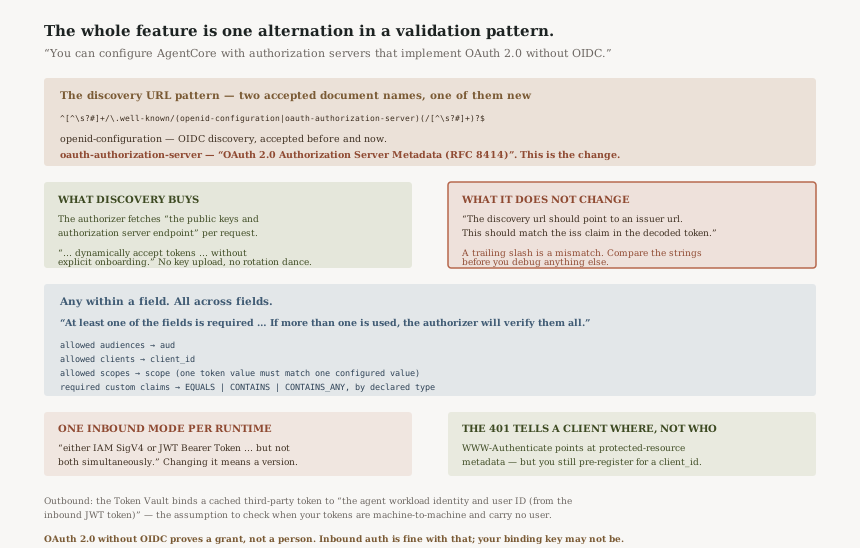
The pattern is the feature
| Well-known document | Specification | Accepted before | Accepted now |
|---|---|---|---|
openid-configuration |
OpenID Connect discovery | Yes | Yes |
oauth-authorization-server |
“OAuth 2.0 Authorization Server Metadata (RFC 8414)” | No | Yes |
The pattern also permits an optional path segment after the well-known component — the
(/[^\s?#]+)? at the end. That matters for RFC 8414 servers whose issuer carries a path,
because the specification places the well-known segment before the issuer's path rather than after it.
An authorization server at https://auth.example.com/tenant-a does not publish its metadata
where an OIDC reader would look for it, and the trailing group is what lets that address pass
validation.
The validation contract, which did not change
The authorizer resolves the discovery URL to an issuer and then checks the token against it: “The discovery url should point to an issuer url. This should match the iss claim in the decoded token.” That is the one piece of configuration that is not optional and not a list.
Then there are four optional fields, and this note is the one to read carefully:
“At least one of the fields is required for the configuration: allowed audiences, allowed clients, allowed scopes, or required custom claims. If more than one is used, the authorizer will verify them all.”
| Field | Claim checked | Rule |
|---|---|---|
| Allowed audiences | aud |
“a list of permitted audiences” validated against the claim |
| Allowed clients | client_id |
“a list of permitted client identifiers” validated against the claim |
| Allowed scopes | scope |
“If configured, at least one scope value in the incoming token must match one of the configured values” |
| Required custom claims | Any named claim | EQUALS for STRING; CONTAINS or CONTAINS_ANY for STRING_ARRAY |
Note the asymmetry. Within a field the semantics are any — one matching audience is enough. Across fields the semantics are all. So adding a second field tightens the gate rather than opening another way through it, and the runtime documentation restates it for the pair people most often set together: “If both client_id and aud is provided, the agent runtime authorizer will verify both.”
The same configuration, two resources, one exclusive choice
The authorizer configuration “is the same for either AgentCore Runtime or AgentCore Gateway”, which is why this one change lands on both inbound paths at once. But a runtime picks one inbound mode and keeps it: “An AgentCore Runtime can support either IAM SigV4 or JWT Bearer Token based inbound auth, but not both simultaneously.” The documented way to have both is versions: “You can always create different versions of your AgentCore Runtime and configure them for different inbound authorization types.”
What a client learns when it is turned away
The unauthenticated path is specified rather than improvised. When no bearer token is supplied the service returns “a 401 Unauthorized response with a WWW-Authenticate header” per RFC 7235, and “The PRM API enables clients to discover which authorization servers protect this agent and their OAuth endpoint URLs.”
With one limit that is easy to miss when reading that as full self-service: “You must pre-register your OAuth client in Cognito (via AWS Console or CLI) to obtain a client_id before using the discovered endpoints.” Discovery tells a client where to go; it does not get it an identity to go with.
Business value
For anyone running an internal authorization server, this removes a conversion project. The alternative to OAuth 2.0 metadata support was standing up an OIDC layer, or fronting the agent with Cognito and federating into it — both of which add an identity hop whose only purpose was to satisfy a validation pattern.
It also matters for the agent-to-agent case. An authorization server issuing machine-to-machine access tokens through the client credentials grant has no user to authenticate and therefore no reason to implement OIDC at all. That shape is now a first-class citizen for inbound AgentCore auth, which is arguably where most agent traffic is heading.
And it is free: “at no additional cost”, in every Region AgentCore runs in.
Security considerations
The issuer match is the anchor, so get it exactly right.
“The discovery url should point to an issuer url. This should match the iss claim in the
decoded token.” The troubleshooting guidance is to read the issuer value out of
the published metadata and compare it against the token's iss claim character for
character. A trailing slash is a mismatch.
Configure more than one check, deliberately. Only one of the four fields is required,
and the weakest valid configuration is a single allowed client. Since the authorizer
“will verify them all”, adding allowed audiences and a required custom claim costs
nothing in permissiveness and buys defence in depth. A token minted by the right issuer for a different
API passes an issuer-and-client check; the aud claim is what rejects it, and the
documentation says exactly why that claim exists —
“preventing a token from being reused at a different API it was not issued for.”
OAuth 2.0 without OIDC means no identity layer, by definition. The access token proves a grant, not a person. AgentCore's outbound side binds cached third-party tokens by user: “AgentCore Identity Service stores the Google access token in the AgentCore Token Vault using the agent workload identity and user ID (from the inbound JWT token, such as Amazon Cognito token) as the binding key”. If your authorization server's tokens carry no user identifier, work out what that binding key becomes before you rely on per-user token caching.
The JWT path is the one with cryptographic proof. Worth restating because the alternative exists and is tempting: “The JWT path (GetWorkloadAccessTokenForJWT) validates the token's issuer, signature, and expiry, providing cryptographic proof of the user's identity”, whereas the user-id header path “does not verify the userId against an authenticated end-user identity”. Discovery-based JWT auth is the production answer; the header is for development and for callers that bring their own identifiers.
Cost considerations
“at no additional cost” for the feature itself, and “When you create a runtime with Amazon Bedrock AgentCore, a Workload Identity is created automatically for your runtime with AgentCore Identity service” — no separate resource to budget for.
The cost of this change is operational rather than metered: one more externally hosted document that AgentCore fetches on the inbound path. If your authorization server's metadata endpoint is slow, rate-limited, or inside a network AgentCore cannot reach, that is now on your request path. For the private case there is a documented route — AgentCore Identity supports connecting to OAuth 2.0 identity providers hosted inside your VPC — and it is a different configuration from a public discovery URL.
Operational considerations
Token lifetime is short and will bite during testing. “Tokens are only valid for several minutes (the default Amazon Cognito expiry is 60 minutes). Fetch a new token as needed.” Most first failures after a configuration change are an expired token rather than a wrong authorizer.
Decode the token before you debug the config. The documented check order is: issuer
URL from the discovery document against iss, then client_id against allowed
clients, then aud against allowed audiences. Three string comparisons, in that order,
resolve most of it.
Switching inbound auth mode is a new version, not an edit. Because a runtime cannot hold both modes, moving an existing SigV4 runtime to JWT means creating a version configured for it. Plan that as a deployment, not a setting change.
Custom claim rules are typed, and the operator depends on the type.
EQUALS for a STRING; CONTAINS or CONTAINS_ANY for a
STRING_ARRAY. A group claim that an IdP emits sometimes as a string and sometimes as an
array is the case to test before relying on it.
Tradeoffs
| Choice | What you gain | What it costs |
|---|---|---|
| Point at your own OAuth 2.0 server | No OIDC layer, no federation hop, no explicit onboarding | Its metadata endpoint is now on your agent's inbound path |
| Keep Cognito in front | Known issuer behaviour and a documented sample path | An extra identity system to operate and federate into |
| One authorizer field | Minimum configuration, fastest to stand up | The weakest gate the service will accept |
| Several authorizer fields | Every one is verified, so the gate narrows | More claims your IdP must emit consistently, or valid callers fail |
| JWT inbound auth | Issuer, signature and expiry are verified | The runtime gives up SigV4 for that version |
Implementation guidance
Check which well-known path your server publishes. If the metadata lives at
/.well-known/oauth-authorization-server, this release is the one that unblocks you. If it
publishes both, nothing needs to change.
Confirm the issuer in the metadata equals the iss in a real token before
creating the runtime, not after the first 401.
Set at least two of the four fields. Allowed clients plus allowed audiences is the cheap pairing, and both are verified.
If your tokens are machine-to-machine, decide what your user binding means. The Token Vault's binding key uses the user ID from the inbound token; a client-credentials token may not carry one.
Expect to create a version if the runtime exists already, because inbound auth mode is exclusive per runtime.
Best practices
Treat the discovery URL as a dependency with an SLA, not a string. It is fetched to validate inbound requests, so its availability is your agent's availability.
Write down which claims your gate depends on. Because every configured field is verified, each one is a way for a legitimate caller to be rejected after an IdP change nobody told you about.
Prefer the JWT path over the user-id header for anything production, on the documentation's own reasoning: one provides cryptographic proof of identity and the other does not verify the identifier at all.
Keep the 401 behaviour in mind when building clients. The WWW-Authenticate header and the
protected-resource metadata make discovery possible, but a client still needs a pre-registered
client_id.
Who should adopt this and when
Adopt now if you run an OAuth 2.0 authorization server without OIDC — a self-hosted server, a gateway-issued token service, or anything built for machine-to-machine grants. This is the release that removes the blocker, and it costs nothing.
Adopt now if you were about to add an OIDC layer purely to satisfy AgentCore. Stop that work and check the well-known path instead.
Nothing to do if you use Cognito, Entra ID or any OIDC provider. Your discovery URL was already accepted and the validation rules are unchanged.
Think first if your tokens carry no user identity. Inbound auth will work; the outbound per-user token caching is the part that assumes a user ID in the inbound token.
Key takeaways
The change is one alternation in a validation pattern — the discovery URL may now end in
oauth-authorization-server as well as openid-configuration — and that is
what lets an OAuth 2.0 server with no OIDC layer authorize an agent, in every AgentCore Region, at no
cost.
The validation contract is unchanged and is worth knowing exactly: “At least one of the fields is required for the configuration: allowed audiences, allowed clients, allowed scopes, or required custom claims. If more than one is used, the authorizer will verify them all.” Any-within-a-field, all-across-fields.
And the thing to settle before shipping: OAuth 2.0 without OIDC means the token proves a grant rather than a person, while the Token Vault binds cached outbound tokens using the user ID from that inbound token.
Official AWS references
- Amazon Bedrock AgentCore Identity now supports OAuth 2.0 discovery URLs — the announcement: acceptance of OAuth 2.0 authorization server discovery URLs for inbound JWT authorization and outbound OAuth credential providers, support for authorization servers that implement OAuth 2.0 without OIDC, and availability in all AgentCore Regions at no additional cost
- Configure inbound JWT authorizer — the discovery URL pattern accepting
openid-configurationoroauth-authorization-server, the IdP-agnostic statement, how the discovery URL is used to fetch public keys and endpoints, the four authorizer fields and their claim validations, the requirement that at least one be present and that all configured fields are verified, and the custom-claim value types and match operators - Authenticate and authorize with Inbound Auth and Outbound Auth — that the discovery URL must point to an issuer matching the
issclaim, that bothclient_idandaudare verified when both are provided, the exclusivity of SigV4 and JWT inbound auth per runtime, automatic workload identity creation, the 401 andWWW-Authenticatebehaviour and the client pre-registration requirement, the Token Vault binding key, the cryptographic-proof comparison with the user-id header, and token expiry guidance - Connect to private identity providers — further reading on OAuth 2.0 identity providers hosted inside your VPC for both inbound JWT authorization and outbound credential providers; no claims in this post are drawn from it
- Set up inbound authorization for your gateway — further reading on the gateway side of the same authorizer configuration; no claims in this post are drawn from it
Comments