Executive summary
Aurora MySQL gained two replication features yesterday, on version 8.4.8 and higher, in all AWS Regions where Aurora MySQL is available. Multi-source replication is the one with the obvious use case. Delayed replication is the one worth rearranging a recovery plan around.
Delayed replication allows a binlog replica to intentionally lag behind its source by a set period of time, giving you a simple safeguard against human error and logical data corruption. You set a delay — say an hour — and the replica applies each change an hour after the source did.
That sounds like a defect until you consider the failure it addresses. A DROP TABLE run against production is not a fault; it is a valid statement, executed correctly, and replicated correctly to every standby you own within milliseconds. Multi-AZ does not help. A read replica does not help. Every high-availability mechanism you have faithfully reproduces the mistake. A delayed replica is the only copy that has not been told yet.
What changed
| Feature | What it does | Named use |
|---|---|---|
| Delayed replication | A binlog replica intentionally lags the source by a set period | Safeguard against human error and logical data corruption; a fallback during upgrades; inspecting earlier data states |
| Multi-source replication | One cluster replicates from several sources at once | Merging shards, or aggregating regional and departmental databases into a central location for reporting and backups |
The recovery claim is the part to read carefully: it enables quick recovery by stopping replication to the replica before the change is applied and promoting it, without performing a full database restore. That last clause is where the operational value sits, and the rest of this post is about what it costs you.
Architecture
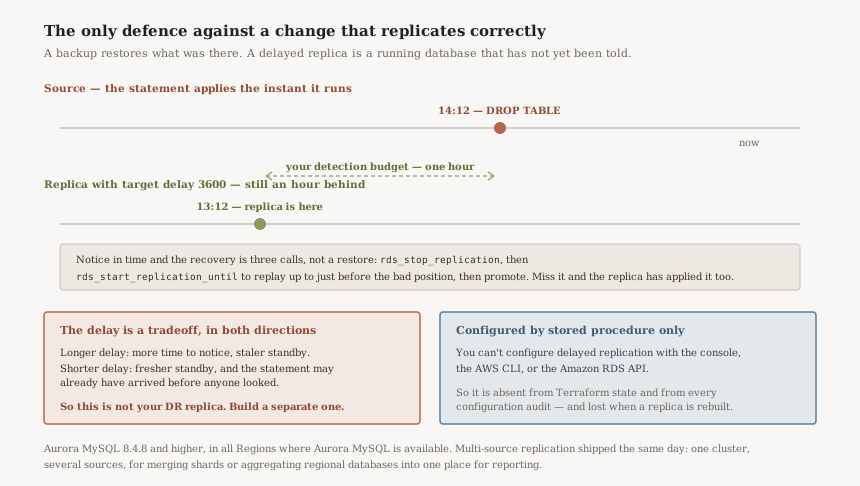
The delay is a detection budget
Set target delay to 3600 and you have bought exactly one hour. Within that hour a destructive statement exists on the source and has not reached the replica, and the whole recovery is available. After it, the replica has applied the statement too and you are back to restoring from a snapshot.
So the number is not a performance setting, it is an answer to "how long does it take us to notice a bad statement" — and most teams have not measured that. An hour is the common default and is optimistic for a data corruption discovered by a downstream report. Twenty-four hours is defensible for a database whose damage surfaces in the next day's reconciliation, and expensive for other reasons below.
Recovery is three procedure calls, not a restore
The documented sequence is short, and the middle step is the interesting one:
- Stop replication with
mysql.rds_stop_replication, before the bad change is sent. - Replay forward to just before the damage. After stopping replication to the read replica, you can start replication and then stop it at a specified binary log file location using the
mysql.rds_start_replication_untilstored procedure. On GTID-based replication, usemysql.rds_start_replication_until_gtidinstead. - Promote the replica to a standalone instance.
That middle step is what makes this better than a point-in-time restore rather than merely faster. You are not choosing a timestamp and hoping; you are replaying the binary log up to a named position and stopping there. And AWS emits a specific RDS event when it lands — Replication has been stopped since the replica reached the stop point specified by the rds_start_replication_until stored procedure — so the stop is observable rather than something you infer.
The configuration lives somewhere your tooling cannot see
This is the detail most likely to cause trouble later, and it is stated flatly in the documentation: use stored procedures to configure delayed replication. You can't configure delayed replication with the AWS Management Console, the AWS CLI, or the Amazon RDS API.
Two calls, depending on timing. Before creating replicas, call mysql.rds_set_configuration('target delay', 3600) on the source, and any replica created afterwards inherits it. For a replica that already exists, stop replication, call mysql.rds_set_source_delay(3600), start it again.
Because none of that is an API call, the delay does not appear in Terraform state, in a CloudFormation template, in Config, or in any drift report. A replica rebuilt by a pipeline comes back with no delay and nothing anywhere says so — the resource exists, is healthy, and is silently no longer the thing your recovery plan assumes.
Business value
The value is a class of incident that currently has no good answer. Ask what happens today if someone runs a destructive statement against production at 14:12 and it is noticed at 14:40. The honest answer in most estates is a point-in-time restore: a new cluster, a wait proportional to database size, a cutover, and an RTO measured in hours during which the application is down or serving stale data.
With an hour of delay the answer becomes: stop replication, replay to 14:11, promote. The database is already running and already warm. AWS's phrase for it — without performing a full database restore — is the entire difference, and it is the difference between an RTO of hours and one of minutes.
Multi-source is a smaller story but a real one: merging shards or aggregating data from separate databases, such as regional or departmental instances, into a central location for operational workflows, such as reporting and backups. It removes a category of ETL that exists only to move rows between MySQL instances.
Security considerations
Delayed replication is a control against insider action as much as against accident, and it is unusual in being effective against a legitimate credential doing a legitimate thing. Nothing in IAM distinguishes an authorised DELETE from a malicious one; the delay does, by giving you time to reach a different conclusion before the second copy is affected.
Two consequences follow. The delayed replica must be reachable by fewer people than the source, or it is simply a second copy an attacker deletes second. And the promotion path needs its own authorisation: promoting a replica is a data-plane decision with production consequences, so it belongs behind the same approval as any other break-glass action rather than in the hands of whoever noticed.
Worth noting for regulated estates: because the replica holds an earlier state of the data, it also holds data that may have been deleted for a reason. A subject-erasure request executed on the source is, for the length of the delay, not executed on the replica.
Cost considerations
A delayed replica is a full replica and costs like one: instance hours plus storage plus I/O. There is no discount for being behind.
The decision that actually costs money is whether this replica can double as something else, and the answer is usually no. It cannot serve current reads, because its data is deliberately stale. It should not be your disaster-recovery standby, because promoting it in a Region failure loses the delay period. It cannot be the reporting replica if the reports need today's numbers. In practice it is a dedicated instance whose only job is to be behind, which is a real line item to justify — and the justification is the RTO difference, so put a number on both sides before proposing it.
The headroom is there if you want several: you can create up to 15 read replicas from one DB instance within the same Region. Two delays — one short for fast-noticed errors, one long for slow-noticed ones — is a defensible pattern where the data justifies it.
Operational considerations
Three things to get right, in descending order of how likely they are to be missed.
The configuration is invisible to infrastructure as code. Since the delay is set by stored procedure, add an explicit check that reads the current delay on a schedule and alerts if it is zero or absent. Without it, the failure mode is a replica that looks correct in every dashboard and provides no protection at all.
The runbook has to be written before the incident. The recovery involves finding a binary log position just before a specific statement, under time pressure, with the delay counting down. That is not a thing to work out at 14:40. Write the sequence, including how you locate the position, and rehearse it — the rehearsal is cheap because it does not touch the source.
Monitor the delay as a value, not as lag. Standard replica lag alarms will fire continuously on a delayed replica, and the usual response is to silence them — which also silences the alarm for a replica that has genuinely fallen further behind than configured. Alert on the difference between actual lag and intended delay, not on lag itself.
Tradeoffs
| Recovery mechanism | Handles a valid destructive statement? | RTO | Cost |
|---|---|---|---|
| Multi-AZ failover | No — the statement is on both | Seconds | Included |
| Ordinary read replica | No — replicated within milliseconds | Minutes | An instance |
| Point-in-time restore | Yes | Hours, scaling with size | Included, plus the new cluster |
| Delayed replica | Yes, within the delay window | Minutes | A dedicated instance that can do nothing else |
Implementation guidance
Set the delay on the source before creating the replica, which is the simpler of the two paths.
-- On the SOURCE, as the master user. Applies to replicas created after this.
call mysql.rds_set_configuration('target delay', 3600);

-- On an EXISTING replica, as the master user:
call mysql.rds_stop_replication;
call mysql.rds_set_source_delay(3600);
call mysql.rds_start_replication;
The recovery path, which is the one to rehearse. Replication is already stopped by the delay, so the first move is to make sure it stays stopped while you find the position.
-- 1. Stop, so the delay cannot expire while you work.
call mysql.rds_stop_replication;

-- 2. Replay forward to just before the damaging statement.
call mysql.rds_start_replication_until(
  'mysql-bin-changelog.000777',
  120);
-- GTID-based replication uses rds_start_replication_until_gtid instead.
-- Replication stops automatically at the position and RDS emits an event.

-- 3. Promote the replica to a standalone instance, then repoint the app.
Then add the check that infrastructure as code cannot give you: a scheduled query confirming the configured delay is still what you intended, alerting if it is zero.
Best practices
- Choose the delay from your measured detection time, not from a round number. The delay is how long you have to notice; if nobody knows how long that takes today, that is the first thing to find out.
- Do not make this replica do a second job. Not DR, not reporting, not read scaling. Each of those wants current data and this one is deliberately not current.
- Alert on delay drift, not on lag. A delayed replica always looks lagged; the alarm you need is that actual lag no longer matches intended delay.
- Rehearse the replay-and-promote path. Finding a binlog position under pressure is the step that goes wrong, and rehearsing it costs nothing on the source.
- Check the delay exists on a schedule. It is set by stored procedure, so no drift detection, template or Config rule will tell you it went missing.
Who should adopt this
Anyone on Aurora MySQL 8.4.8 or higher whose worst realistic database incident is a bad statement rather than an infrastructure failure — which, for most mature estates, it is. If your existing answer to "someone dropped a table" is a point-in-time restore with an RTO in hours, this converts that to minutes for the cost of one instance.
Multi-source replication is for teams currently running ETL whose only purpose is moving rows between MySQL databases: sharded platforms consolidating for reporting, or a group with per-region databases and central analytics.
Skip it if your database is small enough that a point-in-time restore already meets your RTO. The dedicated instance is real money and the gain is proportional to how long a restore takes you.
Key takeaways
- Delayed replication is the only mechanism that survives a correct-but-destructive statement. Multi-AZ and ordinary replicas reproduce it faithfully within milliseconds.
- The delay is a detection budget. Pick it from how long your team actually takes to notice, and accept that the replica is that much staler as a result.
- Recovery is stop,
rds_start_replication_until, promote — replaying to a named binlog position rather than guessing a timestamp, and without performing a full database restore. - It is configured by stored procedure only — not console, CLI or RDS API — so it is invisible to IaC and to drift detection, and a rebuilt replica silently comes back unprotected.
- Do not let it double as your DR replica. Promoting it during a Region failure throws away the delay period.
Official AWS references
- AWS What's New — Aurora MySQL supports multi-source replication and delayed replication
- AWS Documentation — Configuring delayed replication with MySQL
- AWS Documentation — Working with MySQL read replicas
- AWS Documentation — MySQL stored procedures for replicating
- AWS Documentation — Promoting a read replica to be a standalone DB instance
Comments