Executive summary
AWS is redesigning the console sign-in page. The visible change is the entry point: instead of choosing Root user or IAM user before you type anything, you enter an email address and AWS determines the appropriate sign-in flow from it. Eligible accounts gain the option of signing in with a Google, GitHub, Apple or Amazon.com account. There is also a redesigned session page showing multiple active sessions with their account, role and sign-in details.
For people, this is close to a non-event and AWS says so plainly: existing customers “will continue using the same sign-in methods and credentials they use today”. IAM Identity Center users keep using their organization's access portal. Federated sign-in is unchanged. The rollout is phased, with a banner offering an opt-in preview before it becomes the default.
There is one group for whom this is a breaking change, and it is the one that cannot read the banner: anything driving the console with browser automation. AWS's advice is not to make the automation work again — it is to stop automating the interface and use supported programmatic access instead.
What changed
The old flow asked you to classify yourself before it asked who you were. Root user or IAM user, decided on the first screen, with an IAM user then needing the account ID or alias before the user name and password.
The new flow inverts that. You give an email address; AWS works out which kind of sign-in that address implies and routes you accordingly. The credential you end up typing is the same one you type today.
| Who you are | What changes |
|---|---|
| Root user | Entry screen only. Same credentials. |
| IAM user | Entry screen only. Same credentials. |
| IAM Identity Center user | Nothing. Continue through your organization's access portal. |
| Federated user | Nothing. Your existing sign-in process does not change. |
| Browser automation | The page it was written against no longer has the same shape. |
Two additions come with it. Eligible accounts can sign in with a Google, GitHub, Apple or Amazon.com account. And the session management page has been redesigned to show multiple active sessions together, with the account, role and sign-in details for each.
Why AWS built this
The old first screen asked a question that only makes sense once you already understand AWS's identity model. "Root user or IAM user" is not a question about you; it is a question about a distinction internal to the platform, asked before you have typed anything.
An email address is a thing every person knows about themselves. Deriving the flow from it moves the platform's internal distinction out of the user's way, which is the same reason almost every other service now starts with an email field.
The multi-session view addresses a different and real problem: people hold several AWS sessions at once, across accounts and roles, and until now there was no single place showing what was currently signed in where.
Architecture
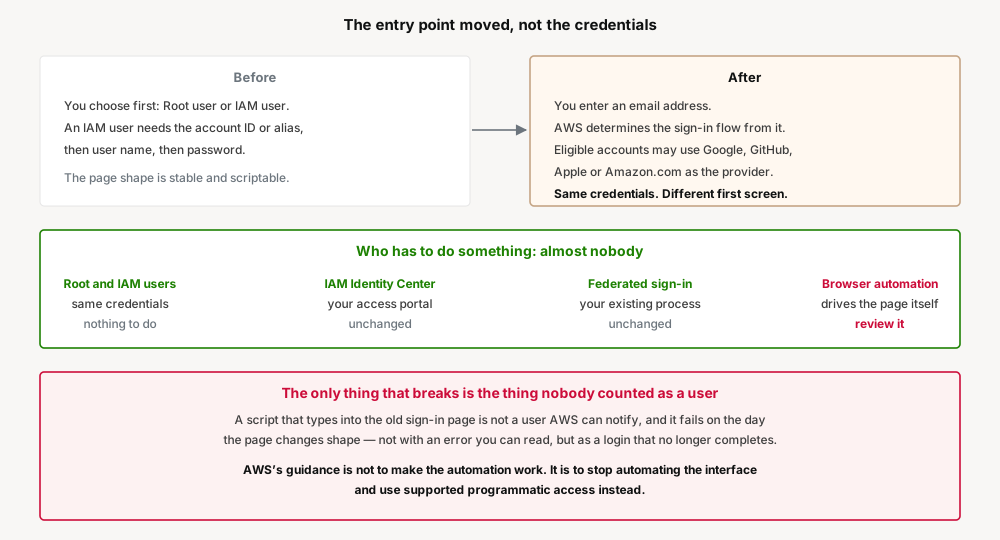
The important structural point is what did not change. This is a change to the front door, not to the identity model behind it. There is no new principal type, no credential migration, and no change to how permissions are evaluated once you are in.
That is why the guidance for every human category is the same word: nothing. It is also why the impact is concentrated so narrowly. When a change is confined to the shape of a web page, the only things affected are the things that depend on the shape of that web page.
The rollout is phased to a limited number of customers, and a banner offers an opt-in preview before the new experience becomes the default. Practically, that means two versions of the page exist at once, and which one you get depends on your account and whether anyone clicked the banner.
The trap: the user that cannot read a banner
Every mechanism AWS has for warning people about this — the blog post, the opt-in banner, the phased rollout — assumes a human is looking at the screen. That assumption holds for every category in the table above except one.
Somewhere in most large estates there is a script that signs into the console by driving a browser. It exists because something was only available in the console, or because an API was inconvenient, or because someone left five years ago and it kept working. It has a password in a secret store, it selects the IAM user option, it types the account alias, and it has run every night since.
That script does not read banners. It does not opt in to previews. It will run against the new page on the day the new page arrives, and what happens then is worth being precise about:
- It will not error in a way that names the cause. A selector that no longer matches produces a timeout, an empty field, or a click on nothing — not a message saying the sign-in page was redesigned.
- It may fail intermittently first. With a phased rollout and an opt-in preview, the page can differ between accounts and over time. A job that works on Monday and fails on Tuesday looks like flakiness, and flakiness gets retried rather than investigated.
- The failure is silent where it matters most. The scripts most likely to do this are unattended overnight jobs, which is exactly where nobody is watching when the login stops completing.
AWS's guidance is worth reading carefully, because it is not what people usually expect from a compatibility note. It does not offer selectors, a stable test hook, or a supported way to script the page. It recommends using “supported options to grant programmatic access” instead.
That is the real message. Console automation has never been a supported interface, and this change is a reminder rather than a regression. A script that logs into a web page is depending on a UI contract that was never offered, and it will break again the next time the page changes — which nobody will announce, because a web page redesign is not a breaking change to anything AWS supports.
Business value
The direct value is a lower barrier for people who do not already know AWS's identity vocabulary — new starters, contractors, and anyone who signs in rarely enough to have forgotten which option they need.
The session management page is the more quietly useful half. Seeing every active session with its account, role and sign-in details in one place answers a question that previously required checking each session individually, and it is the kind of thing that matters most at the moment you suspect something is wrong.
The third-party sign-in options are worth naming carefully: they apply to eligible accounts, and for most organisations the recommended path to the console remains IAM Identity Center, which this change does not touch.
Security considerations
The change is to the entry point, not to authentication itself, and the blog does not describe any change to multi-factor authentication. Do not read a redesigned page as a reason to revisit MFA posture in either direction.
The one genuinely new surface is the option for eligible accounts to sign in with a Google, GitHub, Apple or Amazon.com account. Where that is available and used, the security of the AWS account becomes partly a function of the security of that external account, including its own MFA and recovery process. That is a normal federation trade-off, and it is worth making deliberately rather than because it appeared as a button.
There is also a mundane operational risk in the transition: users who do not recognise a changed sign-in page are exactly the users who report it as suspicious, or who go looking for the "real" page and find a lookalike. A short internal note before the rollout reaches your accounts costs nothing and prevents both.
The automation cleanup has a security upside. A script that drives console sign-in is holding a long-lived human credential, usually a root or IAM user password, in order to impersonate a person. Replacing it with supported programmatic access replaces that with a role and short-lived credentials. This change is a good reason to do work that was worth doing anyway.
Cost considerations
None. Sign-in is not a metered service and nothing here changes what you are charged for.
The cost that exists is engineering time, and it lands entirely on whoever has to find and replace console automation. That work is not created by this change — it was always owed — but this is the event that makes it urgent, and it is worth booking rather than absorbing.
Operational considerations
Two versions of the page exist during the rollout. Phased delivery plus an opt-in preview means behaviour can differ by account and change without notice from your side. Anything that depends on the page should be assumed to be in an inconsistent state for the duration.
Bookmarks and saved sign-in URLs deserve a check. The blog does not state that saved URLs break, and this post does not claim they do — but the entry point is the thing that changed, so a bookmark pointing at a specific sign-in path is the first thing to verify once the new experience reaches an account you control.
Password managers key on page structure too. A saved credential that autofilled reliably may stop matching when the fields change, which presents to a user as "my password manager is broken" rather than as a sign-in change.
Nothing here affects the CLI, SDKs or IaC. Programmatic access is unchanged, which is precisely why it is the recommended destination for anything currently automating the console.
Tradeoffs
| Gain | Cost |
|---|---|
| The first screen no longer asks a question only AWS-literate users can answer | Long-familiar muscle memory changes for everyone at once |
| Multiple active sessions visible in one place | None material |
| Third-party sign-in for eligible accounts | Account security becomes partly a function of an external provider's |
| Phased rollout with an opt-in preview | Two page versions coexist, so page-dependent things fail intermittently |
| No credential migration, no identity model change | The narrow blast radius makes it easy to assume it affects nobody |
Implementation guidance
1. Find the console automation before it finds you. Look for stored root or IAM user passwords in secret managers, headless browser dependencies in scheduled jobs, and any runbook step that says "log into the console and…". Long-lived human credentials held by a machine are the signature.
2. Replace it with programmatic access rather than repairing it. This is AWS's stated recommendation, and repairing it only buys time until the next redesign, which will not be announced as a breaking change.
3. Use the opt-in preview deliberately. The banner is the one chance to see the new page on your own schedule rather than on AWS's. Take it in an account where you can test what depends on sign-in.
4. Tell your users before the page changes. One short note prevents both the "is this phishing?" tickets and the users who go searching for the old page.
5. Verify saved sign-in URLs and password manager entries in the first account that gets the new experience, rather than discovering them across the organisation at once.
6. Decide about third-party sign-in explicitly. If Google, GitHub, Apple or Amazon.com sign-in is offered for an eligible account, treat allowing it as a federation decision with an owner — not as a UI option users discover for themselves.
Best practices
- Never automate the console. It is not a supported interface and never was. This change is the reminder, not the cause.
- A machine should not hold a human credential. If a script knows a password, that is the finding, independent of any page redesign.
- Prefer IAM Identity Center for human console access. It is unaffected here, and it is the path AWS keeps pointing at.
- Communicate UI changes to users before they see them, because an unfamiliar sign-in page is indistinguishable from a phishing page to someone who was not told.
- Treat "no action required" as scoped to humans. It is accurate and it is not the whole estate.
Who should adopt, who should wait
There is no adoption decision for the change itself — it arrives on AWS's schedule. The decision is whether to take the preview early, and the answer is yes for anyone who runs anything that touches sign-in, because early is the only time you get to choose when it breaks.
Act now if you have unattended jobs that sign into the console, a helpdesk that will receive the "is this real?" calls, or users who sign in rarely and will not recognise the page.
This is genuinely a non-event if your console access is through IAM Identity Center or federation, your automation uses roles and the SDKs, and nothing in your estate types into a login form.
Key takeaways
- Sign-in now starts from an email address, and AWS determines the appropriate flow from it rather than asking you to pick root or IAM user first.
- Existing customers continue with the same sign-in methods and credentials. Nothing to migrate.
- IAM Identity Center users keep using their organization's access portal. Federated sign-in does not change.
- Eligible accounts can sign in with a Google, GitHub, Apple or Amazon.com account — a federation decision worth making deliberately.
- A redesigned session page shows multiple active sessions with account, role and sign-in details.
- The rollout is phased, with a banner offering an opt-in preview before the new experience becomes the default.
- Browser automation is the one thing that breaks, and it is the one category that cannot read the banner warning it.
- AWS's guidance is to use supported programmatic access instead of automating the interface — not to repair the automation.
- During the phased rollout two page versions coexist, so page-dependent failures will look like flakiness before they look like a change.
- The blog describes no change to MFA.
Official AWS references
- Updates to your AWS Sign-In experience — AWS Security Blog: the redesigned flow, who is affected, and the browser automation guidance
- What is AWS Sign-In? — AWS Sign-In User Guide
- What is IAM Identity Center? — the recommended path for human console access, unaffected by this change
- Temporary security credentials in IAM — the supported alternative to a machine holding a human password
Comments