CloudWatch alarms can now put their tags into the payloads they send. The useful part is not the feature, it is the difference between the two ways of filtering which tags travel — because they disagree about tags that do not exist yet.
“Exclude tag keys – CloudWatch includes all of the alarm's tags except the keys that you specify. Any tags that you add later are also included, unless their keys are in the exclude list.”
Executive summary
“When enabled on an alarm, CloudWatch adds the alarm tags to the messages it sends to Amazon SNS, AWS Lambda, and Amazon EventBridge each time the alarm changes state.” The problem it solves is real and tedious: routing hundreds of alarms through one topic previously meant a lookup per event to find the owning team.
“The setting is off by default and configurable per alarm”, with three modes — all tags, an include list, or an exclude list. And one of those three is the only one that is closed by default for tags added in future.
The other thing to know before enabling it: “For Amazon SNS, CloudWatch includes the tags in the notification message that it delivers to the topic's subscribers, including those that use the HTTP/HTTPS and email protocols.” Your tags become email content.
What changed
| Aspect | What AWS says |
|---|---|
| Destinations | SNS notifications, Lambda invocations, and “the alarm state change events that CloudWatch sends to EventBridge” |
| Default | “off by default and configurable per alarm” |
| Alarm types | “metric, composite, and log alarms” |
| Filter modes | All tags, IncludedTagKeys, or ExcludedTagKeys — “mutually exclusive” |
| List limits | “from 1 to 50 tag keys, and each tag key can be from 1 to 128 characters” |
| Reserved keys | “Tag keys that begin with aws:… are never propagated” |
| Status field | SUCCESS, NO_TAGS, TRUNCATED, FAILURE |
| Availability | All CloudWatch Regions “except Middle East (UAE), and Middle East (Bahrain)” |
Architecture
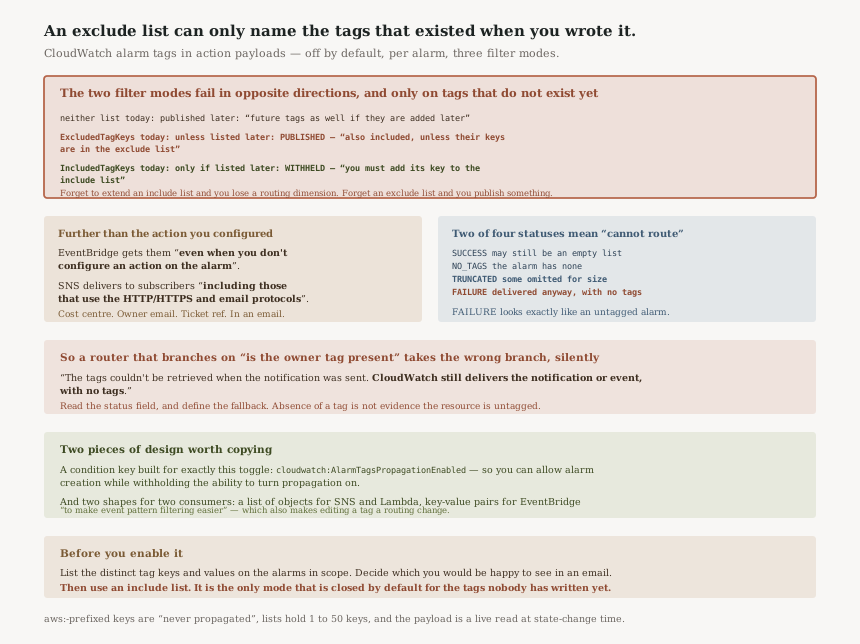
The two filter modes fail in opposite directions
The documentation puts them side by side, and the difference is only visible if you read both:
| Mode | A tag that exists today | A tag added next year |
|---|---|---|
| Neither list (default) | Published | “future tags as well if they are added later” |
ExcludedTagKeys | Published unless listed | Published — “also included, unless their keys are in the exclude list” |
IncludedTagKeys | Published only if listed | Withheld — “you must add its key to the include list” |
An exclude list can only name the keys that existed when somebody wrote it. If the reason you reached for one was to keep a particular class of value out of notifications, it does that job for today's tags and stops doing it the moment a new tag appears — which will happen, in an account where tagging is a convention rather than a schema.
The include list is the one that fails safe, at the cost of needing maintenance when you genuinely want a new tag to travel. That is the right cost to pay: forgetting to add a key loses you a routing dimension, while forgetting to extend an exclude list publishes something.
Where the tags go, which is further than "the action you configured"
“CloudWatch sends alarm state change events to EventBridge by default, so configured tags appear in those events even when you don't configure an action on the alarm. For Amazon SNS and Lambda, tags appear only when you configure that action for the alarm.”
So enabling propagation is not scoped by your actions. An alarm with no actions at all still emits state change events to EventBridge, and once propagation is on, those events carry the tags. Anything already consuming CloudWatch alarm events — a shared rule, a third-party integration, an archive — starts receiving them without being changed.
And on the SNS path, the subscribers are the audience: “CloudWatch includes the tags in the notification message that it delivers to the topic's subscribers, including those that use the HTTP/HTTPS and email protocols.”
Worth saying plainly: cost centre, owner email address and ticket reference are extremely common alarm tag values, and all three would now appear in an email to whoever is subscribed to that topic.
Two of the four status values mean "you cannot route this"
Every payload carries AlarmTagsStatus on SNS, alarmTagsStatus on Lambda and
EventBridge. Two values are benign and two are not.
“TRUNCATED – Some tags were omitted to keep the payload within its size limit.” Partial data, flagged.
“FAILURE – The tags couldn't be retrieved when the notification was sent. CloudWatch still delivers the notification or event, with no tags.”
That last one is the important one for anybody building on this. The notification arrives, on time, looking exactly like an alarm on an untagged resource — and the only thing in the payload distinguishing "this alarm has no owner tag" from "we could not read the owner tag" is the status field. A router that branches on the presence of a tag will silently take the wrong branch.
Note also that SUCCESS does not mean tags are present:
“The list can be empty if the filter excluded all tags.”
Business value
The lookup this removes is a real per-event cost. A shared SNS topic fanning hundreds of alarms into one Lambda meant a tag lookup per invocation to answer "whose is this", which is latency, API quota and code that exists only to re-join data that was already associated.
The EventBridge representation choice shows the routing case was designed for, not just accommodated: “Amazon SNS and Lambda include the tags as a list of key-value objects, and EventBridge includes them as key-value pairs to make event pattern filtering easier.” A list of objects is awkward to match in an event pattern; key-value pairs are not. Two shapes for two consumption models.
The consequence worth holding onto is that an EventBridge rule can now match on a tag value, which makes adding a tag to an alarm a routing change. That is the feature working, and it is also a new way for a tagging edit to alter behaviour.
Security considerations
Tags stop being metadata and become message content. That is the whole security story, and it is worth one pass over the tags actually in use on your alarms before enabling anything. Tags are written for humans and for cost allocation, by people who were not thinking about an outbound notification.
The permission design is good and specific.
“A principal that creates or updates an alarm to enable this configuration must have the
cloudwatch:ListTagsForResource permission for that alarm” — which is coherent,
since enabling propagation is effectively asking CloudWatch to read tags on your behalf forever.
And then a dedicated lever:
“CloudWatch also provides the cloudwatch:AlarmTagsPropagationEnabled condition key to
control whether principals can enable tag propagation.” A condition key created for exactly this
toggle means an organisation can allow teams to create alarms while withholding the ability to turn
propagation on — a separation most features do not offer.
One useful exclusion by default.
“Tag keys that begin with aws: are reserved for AWS and are never
propagated.” So AWS-generated tags, including the ones CloudFormation and Auto Scaling
add, stay out of payloads without you listing them.
Cost considerations
No price is attached to the feature. The second-order cost is payload size, and the service tells you when
you hit it rather than letting you find out: TRUNCATED exists precisely because tags compete
with the rest of the message for a size limit. The documented remedy is to narrow the set with the include
or exclude options.
For SNS, message size affects what you pay per publish on large payloads, so an alarm with many long tags on a high-churn metric is the case to watch — and that is also the case most likely to truncate.
Operational considerations
The payload is a live read, not a snapshot. “Each notification or event reflects the alarm's tags at the time of the state change, including tag changes that you make after you create the alarm.” So a retag takes effect on the next transition, with no republish needed — and equally, a mistaken retag is live immediately.
Several action types do not carry tags at all. “CloudWatch doesn't support alarm tags for other actions, such as Systems Manager OpsItems, Systems Manager Incident Manager incidents, Amazon EC2 actions, Amazon EC2 Auto Scaling and Application Auto Scaling actions, or CloudWatch investigations.” If your routing story runs through OpsItems or Incident Manager, this feature does not reach it.
The API shape is worth knowing because it is nested. Set
“the AlarmTagsPropagation configuration within the ActionConfiguration
parameter” on PutMetricAlarm, PutCompositeAlarm or
PutLogAlarm, and DescribeAlarms reads it back — so this is auditable across
an account without a new API.
Tradeoffs
| What you gain | What it costs |
|---|---|
| No per-event tag lookup | Tags become content in email and webhook deliveries |
| EventBridge patterns can match on tags | Editing a tag becomes a routing change |
| An exclude list, if you have a few tags to hold back | It cannot know about tags created later |
| An include list that fails safe | Maintenance whenever a new tag should travel |
| A status field rather than silent partial data | Consumers must read it, or mis-route on FAILURE |
Implementation guidance
- Read the tags before enabling. List the distinct tag keys and values on the alarms in scope and decide which of them you would be comfortable seeing in an email.
- Choose
IncludedTagKeys, notExcludedTagKeys, unless you have a specific reason. Only the include list is closed by default for tags that do not exist yet. - Use the condition key.
cloudwatch:AlarmTagsPropagationEnabledlets you decide centrally who can turn this on. - Make consumers read the status field and define the fallback for
FAILUREandTRUNCATEDexplicitly, rather than treating an absent tag as an untagged alarm. - Check what already consumes alarm events in EventBridge, because those events get the tags whether or not the alarm has an action configured.
- Audit with
DescribeAlarmsonce enabled, so the setting is visible across the account rather than per alarm in a console.
Best practices
- Treat alarm tags as published data from the moment you enable this. That changes what belongs in them.
- Keep the include list short and deliberate — usually the two or three keys your router actually reads.
- Do not rely on an exclude list to protect anything, since the keys it does not know about are exactly the ones nobody reviewed.
- Remember
SUCCESScan mean zero tags, so the status alone does not tell a consumer there is something to route on. - Check the Region list if you run in the Middle East, where the feature is not available.
Who should adopt this and when
Soon, if you fan many alarms through a shared pipeline and currently call
ListTagsForResource per event. That is the case the feature was built for and the saving is
straightforward.
With a review first, if your alarm tags carry anything you would not email. The review is quick, it is a list of tag keys, and it is much easier before enabling than after.
With an include list, if you enable it at all. The exclude option reads as the convenient choice and is the one that quietly stops protecting you.
Not applicable if your routing runs through OpsItems, Incident Manager or EC2 actions, which do not carry tags.
Key takeaways
- Exclude lists are open by default for new tags — “Any tags that you add later are also included” — while include lists are closed: “you must add its key to the include list”.
- Tags reach SNS subscribers “including those that use the HTTP/HTTPS and email protocols”, so they become message content.
- EventBridge gets the tags “even when you don't configure an action on the alarm”, because those events are sent by default.
FAILUREstill delivers: “CloudWatch still delivers the notification or event, with no tags” — indistinguishable from an untagged alarm except via the status field.SUCCESSdoes not imply tags are present, since “The list can be empty if the filter excluded all tags”.- A dedicated condition key,
cloudwatch:AlarmTagsPropagationEnabled, governs who may enable it — a separation worth using. aws:-prefixed keys are “never propagated”, and the lists allow “from 1 to 50 tag keys” of up to 128 characters each.
Official AWS references
- Amazon CloudWatch Alarms now supports tags in alarm actions payload — the destinations, the off-by-default per-alarm setting, the three filter modes, the supported alarm types, and the Region exclusions
- Alarm tags in action payloads — the destinations and the EventBridge-by-default behaviour, delivery to SNS subscribers including email and HTTP/HTTPS, the unsupported action types, the aws: prefix exclusion, all four status values and what FAILURE and TRUNCATED mean, the per-destination representations, the live read at state change time, the opposite future-tag behaviour of the include and exclude lists, the required ListTagsForResource permission and the AlarmTagsPropagationEnabled condition key, and the API shape with its list limits
- Tagging CloudWatch alarms — further reading on alarm tags generally; no claims in this post are drawn from it
- Using Amazon CloudWatch alarms — further reading on alarms and actions; no claims in this post are drawn from it
Comments