EBS snapshots can now carry additional KMS keys. The announcement sells it as skipping a re-encryption step; the documentation describes something more precise, and more useful, than that.
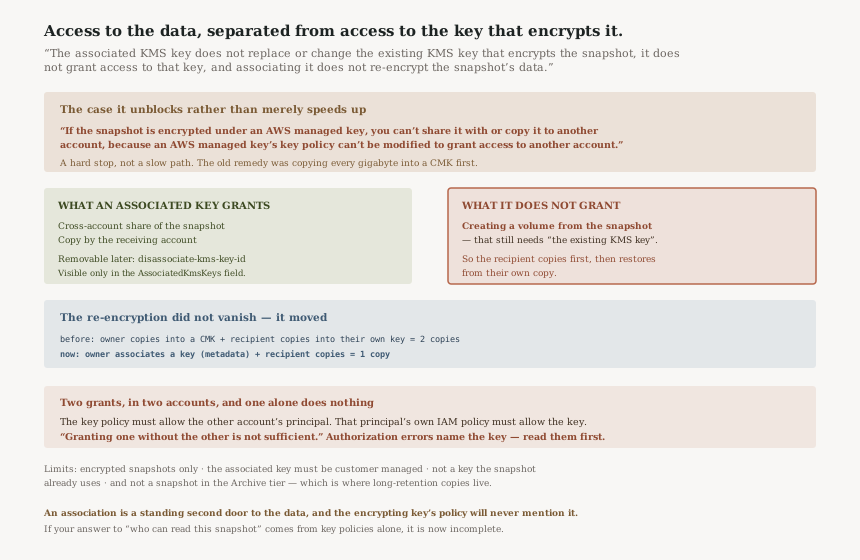
“The associated KMS key does not replace or change the existing KMS key that encrypts the snapshot, it does not grant access to that key, and associating it does not re-encrypt the snapshot’s data.”
Executive summary
“Amazon Elastic Block Store (EBS) now supports associating additional AWS Key Management Service (KMS) keys with EBS snapshots”, which “enables you to share and copy encrypted snapshots across accounts without first re-encrypting them”. It is available “in all AWS commercial, China, AWS GovCloud (US), and AWS European Sovereign Cloud (Germany) Regions, plus AWS Local Zones and AWS Outposts”.
The definition is the part worth memorising: “An associated KMS key is an additional customer managed KMS key that you associate with an encrypted snapshot”, and “A principal with access to the associated KMS key can access the snapshot's data for cross-account sharing and copying, without being granted access to the existing KMS key that encrypts the snapshot.”
Read that twice. It separates two things that have always been welded together in EBS: access to the data and access to the key that encrypts the data. You can now hand someone the first without the second.
What changed
The old constraint, still stated in the encryption documentation: “You cannot change the KMS key that is associated with an existing snapshot or volume. However, you can associate a different KMS key during a snapshot copy operation so that the resulting copied snapshot is encrypted by the new KMS key.” That has not changed, and this feature does not contradict it. You still cannot change the key. You can now add one.
The case that was genuinely blocked, rather than merely inconvenient, is the AWS managed key: “If the snapshot is encrypted under an AWS managed key, you can't share it with or copy it to another account, because an AWS managed key's key policy can't be modified to grant access to another account.”
That is a hard stop, not a slow path. Any snapshot that took the default encryption path was unshareable, and the only remedy was to copy it into a customer managed key first — a full copy of every gigabyte, with the duplicate storage and the time that implies, before the share could even begin. Associating a key removes that copy: “This also enables you to share snapshots encrypted with an AWS managed key, which otherwise can't be shared across accounts.”
Architecture
What an associated key does and does not grant
| The encrypting key | An associated key | |
|---|---|---|
| Encrypts the snapshot data | Yes | No — association “does not re-encrypt the snapshot's data” |
| Can be an AWS managed key | Yes | No — “must be a customer managed key” |
| Lets another account copy the snapshot | Yes, if its policy allows | Yes |
| Lets you create a volume from the snapshot | Yes | No — that needs “the existing KMS key” |
| Can be removed later | No | Yes — disassociate-kms-key-id |
The fourth row is the one that shapes the workflow, and it is in the considerations rather than the headline: “To create a volume from an encrypted snapshot, you must have access to the existing KMS key that encrypts the snapshot.” So the recipient account does not restore directly from the shared snapshot. It copies — “the other account can then copy the snapshot using the associated KMS key” — and restores from its own copy, which is encrypted under a key it controls.
That is still a large improvement, and it is worth being exact about why. The re-encryption has not disappeared; it has moved. Before, the owner copied the snapshot to make it shareable and the recipient usually copied it again to own their keys — two copies. Now the owner associates a key in a metadata operation and the recipient makes the only copy. One copy instead of two, and the owner's side becomes instant.
Two grants, and one is not enough
“The associated KMS key's key policy must allow the other account's principal to use the key” and “That principal's IAM policy in their own account must allow them to use the associated KMS key”, with the sentence that saves an afternoon: “Granting one without the other is not sufficient.”
This is standard KMS cross-account evaluation rather than anything new, but it is where this feature will actually fail in practice, because the two halves live in two accounts owned by two teams. The troubleshooting guidance is unusually concrete: “If an associate, disassociate, or copy request fails with an authorization error, the error identifies the KMS key or keys that you're not authorized to use.” The error names the key. Read it before theorising.
The limits, in the order you will hit them
| Limit | Consequence |
|---|---|
| “You can associate a KMS key only with an encrypted snapshot” | Unencrypted snapshots are out of scope entirely |
| “The associated KMS key must be a customer managed key” | You cannot solve an AMK problem with another AMK |
| “You can't associate a KMS key that the snapshot already uses” | No duplicate associations, and not the encrypting key itself |
| “You can't associate a KMS key with a snapshot in the Archive tier” | Archived snapshots must be restored to the standard tier first |
| “To create a volume … you must have access to the existing KMS key” | The recipient copies before restoring |
The Archive tier exclusion deserves a moment. Archive is where long-term snapshots go precisely because they are rarely touched, and long-term retention is exactly the population a disaster-recovery or compliance share would reach for. If your recovery plan involves handing an archived snapshot to another account, the association has to happen before archiving or after restoring, not at the moment you need it.
The operations
Three commands and two IAM actions. associate-kms-key-id and
disassociate-kms-key-id take a snapshot ID and a key ARN; viewing is the
describe-snapshots command with the AssociatedKmsKeys field. Permissions are
“the ec2:AssociateKmsKeyId and ec2:DisassociateKmsKeyId IAM permissions, plus the AWS KMS
permissions that Amazon EBS requires to use a KMS key”.
That AssociatedKmsKeys field is the one to wire into tooling. It is the only place the
association is visible, and an association is a standing grant of data access that no amount of reading
the encrypting key's policy will reveal.
Business value
The clearest win is the estate that encrypted everything with the default key years ago and has been living with the consequence. Those snapshots could not be shared at all, and the workaround — copy every one into a customer managed key — costs a full data copy per snapshot plus the storage for the duplicate. For a backup estate measured in terabytes that is a project. Associating a key is a metadata operation.
The second win is organisational rather than technical. A central backup account can now grant a recovery team access to specific snapshots through a key made for that purpose, without that team ever holding access to the key that protects the production estate. Revocation is a key policy change or a disassociation, not a re-encryption.
And the recovery-time improvement is real: the owner's side of a cross-account restore drops from a full snapshot copy to an API call.
Security considerations
An associated key is a second door to the same data. The snapshot is still encrypted
by its original key, and anyone with the associated key can copy the data out. Any review that asks who can read a given snapshot must now read AssociatedKmsKeys as well as the
encrypting key's policy, because the two answers can differ completely.
The separation is the point, and it cuts both ways. “without being granted access to the existing KMS key that encrypts the snapshot” is a least-privilege improvement when used deliberately, and a blind spot when nobody is looking for it. A key policy review that covers production KMS keys and not the association list will miss the grant entirely.
Nothing here weakens encryption at rest. “You cannot remove encryption from an encrypted volume or snapshot, which means that a volume restored from an encrypted snapshot, or a copy of an encrypted snapshot, is always encrypted”, and “Public snapshots of encrypted volumes are not supported”. The sharing this enables is still account-to-account.
Two policies, two accounts, two owners. Because “Granting one without the other is not sufficient”, the working configuration needs a change in the key's account and a change in the consumer's account. Treat it as one change with two halves, or the first failed restore drill will be spent discovering which half is missing.
Cost considerations
The announcement names no charge for the capability, and the saving is structural: a copy you no longer make. A cross-account share of an AMK-encrypted snapshot previously required a full copy, which means paying to store a second complete snapshot for as long as the share was needed. Association replaces that with metadata.
What remains is ordinary KMS usage. Every copy operation that uses the associated key is KMS API activity in the key's account, and a customer managed key has a monthly cost that an AWS managed key does not. If the pattern is one key per recipient team, that is a per-key line item to plan rather than discover.
And the recipient still makes one copy, so their side carries the storage it always did.
Operational considerations
Decide the association before archiving. The Archive tier exclusion means a snapshot cannot gain an associated key while archived, and archived snapshots are precisely the long-retention population most likely to be wanted by another account later.
The recipient's runbook changes shape. They copy using the associated key, then restore from their copy. A runbook written around restoring the shared snapshot directly will fail at the restore step with a key error, and the error will name the original key — which is correct and will still read as surprising.
Disassociation is available and is the revocation path. Unlike the encrypting key,
which is fixed for the life of the snapshot, an association can be removed with
disassociate-kms-key-id.
Local Zones and Outposts are included — “You can associate a KMS key with Local snapshots and regional snapshots in Local Zones, and with Amazon EBS Local snapshots on Outposts” — which is a wider launch surface than most EBS features arrive with.
Tradeoffs
| Choice | What you gain | What it costs |
|---|---|---|
| Associate a key for sharing | No owner-side copy; works for AMK-encrypted snapshots | A second standing grant of data access, visible only in AssociatedKmsKeys |
| Copy and re-encrypt as before | The recipient's copy is self-contained from the start | A full data copy and duplicate storage per snapshot |
| One associated key per recipient | Revocation is per-recipient and precise | A customer managed key per recipient to pay for and rotate |
| One shared association key | Fewer keys to manage | Revoking one recipient means revoking all of them |
Implementation guidance
Find the AMK-encrypted snapshots first. They are the population that could not be shared at all, and therefore the population where this changes something rather than saving a step.
Make both grants in one change. The key policy in the owning account and the IAM policy in the consuming account — the documentation is explicit that either alone does nothing.
Rehearse the recipient's path end to end, including the copy. The restore works from their copy, not from the shared snapshot, and that is the step a drill will discover.
Add AssociatedKmsKeys to whatever inventories your snapshots. If your
answer to who can read a snapshot comes from key policies alone, it is now incomplete.
Check the Archive tier before planning around it, because association is unavailable there.
Best practices
Keep association keys separate from encryption keys, by purpose and by name. A key whose only job is granting cross-account read makes the grant obvious in an audit, and makes disassociation a safe operation rather than one somebody has to reason about.
Treat an association as a grant with a lifetime. It persists until disassociated, and nothing expires it. If the share was for a migration or a drill, remove it when the work is finished.
Keep CloudTrail in the loop for association and copy events. The documentation points at it for identifying which key a request used, and that is also the record of when a second door was opened.
Who should adopt this and when
Adopt now if you have snapshots encrypted under AWS managed keys that anyone has ever asked to share. This is the only feature that makes that possible without copying the data.
Adopt now if cross-account disaster recovery is part of your design. Removing a full snapshot copy from the owner's side of a recovery shortens the part of an RTO that scales with data size.
Review before adopting if your snapshot access reviews are key-policy based. The control works; your evidence of who can read what needs a new field in it first.
Nothing to do if your estate already uses customer managed keys with cross-account policies and you are content with the copy step. The old path still works and is unchanged.
Key takeaways
An associated key separates access to the snapshot's data from access to the key that encrypts it: “A principal with access to the associated KMS key can access the snapshot's data for cross-account sharing and copying, without being granted access to the existing KMS key that encrypts the snapshot.” Nothing is re-encrypted and the original key is unchanged.
The case it unblocks rather than merely accelerates is the AWS managed key, whose policy cannot be modified and whose snapshots therefore could not be shared at all.
Two limits to design around: the recipient needs the original key to create a volume, so their path is a copy under the associated key; and a snapshot in the Archive tier cannot be given one.
Official AWS references
- Amazon EBS now supports associating additional KMS keys with snapshots — the announcement: cross-account sharing and copying without first re-encrypting, the AWS managed key example, and availability across commercial, China, GovCloud (US) and European Sovereign Cloud Regions plus Local Zones and Outposts
- Associated KMS keys — the definition of an associated key and what it grants, that it neither replaces the encrypting key nor re-encrypts the data, why AWS managed key snapshots cannot otherwise be shared, the two grants required for cross-account use, the
associate-kms-key-idanddisassociate-kms-key-idcommands and theAssociatedKmsKeysfield, theec2:AssociateKmsKeyIdandec2:DisassociateKmsKeyIdpermissions, every consideration including the Archive tier exclusion and the volume-creation requirement, and the troubleshooting guidance - Amazon EBS encryption — that the KMS key of an existing snapshot cannot be changed and that a copy can use a different key, that encryption cannot be removed from a snapshot or its copies, and that public snapshots of encrypted volumes are not supported
- Share an Amazon EBS snapshot with other AWS accounts — further reading on the sharing mechanism an associated key makes available; no claims in this post are drawn from it
- How AWS KMS evaluates access to a KMS key — further reading on why both the key policy and the caller's IAM policy are required; no claims in this post are drawn from it
Comments