Executive summary
Amazon ECS now provides “real-time service deployment observability in the Amazon ECS Console for native Linear, Canary, and Blue/Green deployment strategies.”
The substance is a correlation that previously had to be done by hand: “a live deployment timeline that narrates each service deployment as it happens”, carrying “circuit breaker status with live task failure and threshold tracking, deployment alarm state, container and load-balancer health checks, and lifecycle hook status.”
Those four signals all existed. What did not exist was one view that put them on the same clock, which is exactly what you need when a deployment is stuck and the question is whether it is stuck on a health check, an alarm or a hook. Available in all commercial Regions and GovCloud (US), at no additional charge.
What changed
A timeline, not a new mechanism. Nothing about how deployments behave has changed. The circuit breaker, the alarms, the health checks and the lifecycle hooks all worked yesterday. What arrived is a narration of them, in order, as they happen.
Scoped to the native strategies. Linear, Canary and Blue/Green — the deployment types ECS runs itself.
Nothing to enable. “Navigate to any Amazon ECS service in the Amazon ECS Console and select the Deployments tab.”
It is worth being precise about what that leaves unchanged: this is a console view. It shortens diagnosis. It does not give a pipeline anything it did not already have, and AWS's own guidance for automation points elsewhere — to an EventBridge rule, which the documentation still recommends.
Architecture
Each signal on the new timeline maps to a specific mechanism, and the circuit breaker is the one doing most of the work.
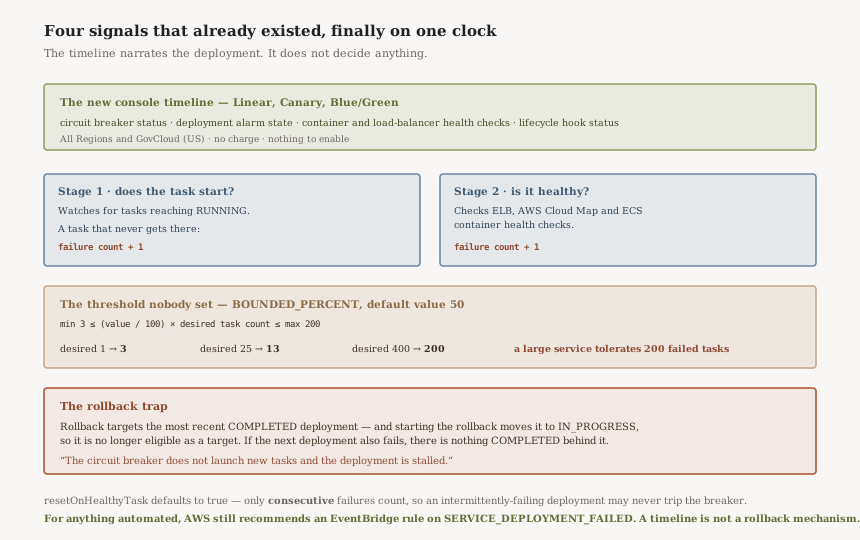
The circuit breaker counts failures in two stages. Stage 1 watches whether tasks reach RUNNING; a task that does not increases the failure count. Stage 2 begins once at least one task is running, and checks health against three sources: “Elastic Load Balancing load balancers, AWS Cloud Map service” and “Amazon ECS container health checks.” A failed health check also increases the count.
When the count reaches the threshold the deployment is marked FAILED, and “a deployment in a FAILED state doesn't launch any new tasks.”
One scope limit worth knowing before planning around it: “The deployment circuit breaker is only supported for Amazon ECS services that use the rolling update (ECS) deployment controller.”
Business value
The value is minutes off a live incident, and it is real.
A stuck ECS deployment has historically meant three browser tabs: service events, target group health, and the CloudWatch alarm — each with its own clock, none of them agreeing on ordering. The question “did the alarm fire because tasks were failing, or did tasks fail because the alarm rolled us back?” took longer to answer than it should.
Putting circuit breaker state, alarm state, health checks and hook status on one narrated timeline answers that by construction. For a team that deploys often, that is a recurring saving rather than a one-off.
Security considerations
No change. No new permissions are described, no new data path, and nothing about who can deploy or roll back has moved.
The one adjacent point is access: this is console-only, so the people who benefit are the people with console access to the ECS service. A team whose on-call engineers operate through a pipeline and a dashboard rather than the AWS console gets nothing from it until someone opens that tab.
Cost considerations
“These capabilities are available at no additional charge.” Nothing to model.
The indirect saving is the alternative most teams built instead: a Lambda subscribed to ECS events writing a deployment narrative into a log group or a chat channel. That is now partly redundant for the interactive case, though not for the automated one.
Operational considerations
The threshold is probably not what you assume. The default type is BOUNDED_PERCENT with a value of 50, and ECS “multiplies value by the latest service desired count… clamped to a minimum of 3 and a maximum of 200.” AWS's own examples: a desired count of 1 still tolerates 3 failures; a desired count of 25 gives 13; and 400 or 800 both give 200, because the cap binds. A large service will therefore accept two hundred failed tasks before the breaker trips.
Consecutive or cumulative is a one-word setting. resetOnHealthyTask defaults to true, meaning “the failure count resets to 0 each time a task reaches a healthy state” — only consecutive failures count. Set it to false and failures accumulate. A deployment that fails half its tasks but intermittently succeeds will never trip the default, and will trip the cumulative setting quickly.
The automation path is still an event. AWS's recommendation is unchanged by this release: “create and monitor an EventBridge rule with an eventName of SERVICE_DEPLOYMENT_FAILED.” For programmatic checks, DescribeServices still carries rolloutState and rolloutStateReason. A timeline a human reads is not a rollback mechanism.
Tradeoffs
Better diagnosis can delay better automation. A view that makes a failure legible is genuinely useful and also reduces the pressure to wire up the event that would have handled it without anyone watching. Worth noticing which of those a team is buying.
Console-only means unavailable where incidents are often handled. Chat-ops, a pipeline dashboard, a mobile phone at 3am — none of those are the ECS console.
Surfacing the threshold invites tuning it, which is the point and the risk. Live threshold tracking makes a number visible that most teams have never set. Lowering it means faster rollbacks and more false trips on an application with slow or flaky startup; that is exactly the trade resetOnHealthyTask exists to express.
Implementation guidance
Read your actual threshold before changing anything. Multiply your desired count by 50% and clamp it between 3 and 200. For most services that number will be higher than the number of failures anybody would want to tolerate.
Decide consecutive versus cumulative deliberately. The default suits an application with intermittent startup failures that stabilises. It is wrong for one where any pattern of failures means the build is bad.
Keep the EventBridge rule regardless. SERVICE_DEPLOYMENT_FAILED is what pages someone. The timeline is what they look at once paged.
Check you have a rollback target. This is the one below, and it is worth testing rather than assuming.
Best practices
Treat the timeline as a diagnosis tool, not a control. It narrates; it does not decide.
Set the threshold from your task count, not from the default. The default is a percentage, so it scales with the service and reaches the 200 cap on anything large.
Verify rollback works from a failed state. Most teams have tested that a rollback happens. Far fewer have tested what happens when two deployments fail in a row.
Who should adopt this
It is on already, everywhere ECS runs, for anyone using the native Linear, Canary or Blue/Green strategies. There is nothing to adopt.
The people who should act are those who have never looked at their circuit breaker configuration — which the new timeline now makes visible during every deployment. If the threshold and the counting mode were left at defaults, this release is the prompt to check whether those defaults match what you would actually want during a bad deploy.
Key takeaways
- A live deployment timeline in the ECS console, narrating Linear, Canary and Blue/Green deployments as they happen.
- It correlates four existing signals on one clock: circuit breaker state, alarm state, health checks, lifecycle hooks.
- All commercial Regions and GovCloud (US), no charge, nothing to enable.
- The default failure threshold is 50% of desired count, clamped between 3 and 200 — so a 400-task service tolerates 200 failures.
resetOnHealthyTaskdefaults to counting only consecutive failures, so an intermittently-failing deployment may never trip it.- Rollback needs a
COMPLETEDdeployment to target, and starting a rollback removes that status from it. - With no
COMPLETEDdeployment, the circuit breaker launches no new tasks and the deployment stalls. - For automation, AWS still recommends an EventBridge rule on
SERVICE_DEPLOYMENT_FAILED.
Official AWS references
- Amazon ECS now provides real-time deployment observability in the AWS Management Console
- How the Amazon ECS deployment circuit breaker detects failures — the two stages, threshold calculation, counting modes and the rollback condition
- Amazon ECS service deployment state change events — further reading on the EventBridge path
Comments