In This Post
Executive summary
On 6 August 2026, AWS announced general availability of fractional GPU scheduling in Amazon ECS with EC2 G6f instances. A task definition can request GPU=0.125, GPU=0.25, or GPU=0.5, and ECS places the task on a G6f instance that provides that fraction of an NVIDIA L4 Tensor Core GPU. It works with both ECS on EC2 and ECS Managed Instances, and adds GPU metrics and automatic detection of failed hardware.
The smallest unit is one-eighth of an L4 with 3 GB of GPU memory. Available in all Regions where G6f instances are available.
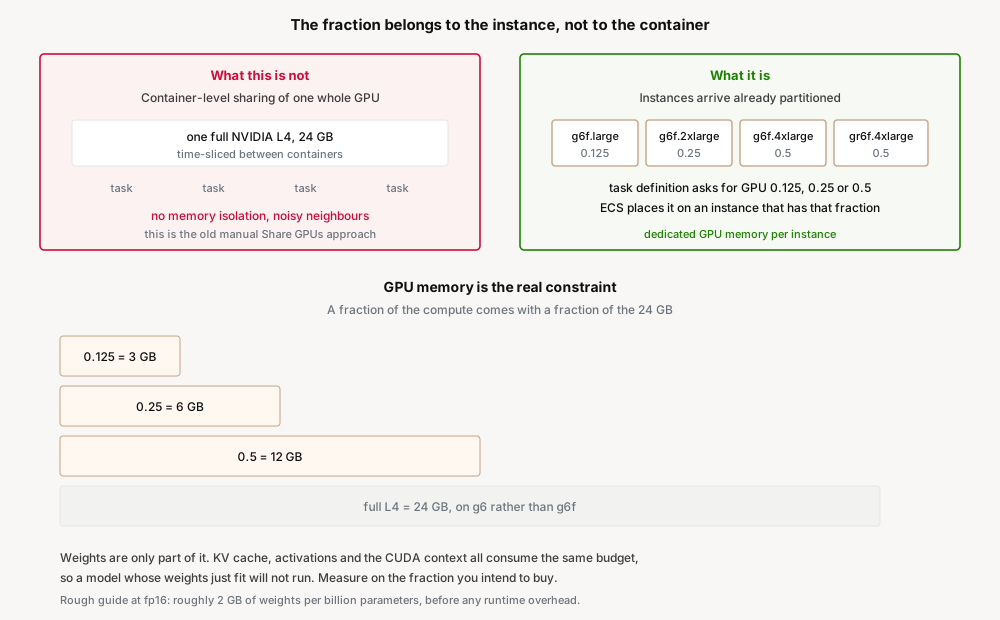
The important thing to understand before designing on this: the fraction is a property of the EC2 instance, not a share of a GPU handed out to containers. G6f instances are provisioned with a hardware partition of an L4 — a g6f.large is one-eighth of a GPU, with its own dedicated 3 GB. ECS has not started time-slicing one GPU between tasks; it has learned to place tasks onto instances that are already partitioned.
That distinction decides how you reason about isolation, and it means the binding constraint is GPU memory rather than compute. Three gigabytes disqualifies more models than people expect.
What changed
ECS could already schedule whole GPUs: a container definition declared how many it needed, and ECS pinned physical GPUs to containers. The unit was one GPU. If your model needed a tenth of an L4, you paid for an L4.
The change is that ECS now understands fractional values and places tasks accordingly on G6f instances.
The G6f family
These are the instances that make the fractions real. The GPU column is the partition each instance size receives:
| Instance type | GPU | GPU memory (GiB) | vCPUs | Memory (GiB) |
|---|---|---|---|---|
g6f.large | 1/8 (0.125) | 3 | 2 | 8 |
g6f.xlarge | 1/8 (0.125) | 3 | 4 | 16 |
g6f.2xlarge | 1/4 (0.25) | 6 | 8 | 32 |
g6f.4xlarge | 1/2 (0.5) | 12 | 16 | 64 |
gr6f.4xlarge | 1/2 (0.5) | 12 | 16 | 128 |
Note what the table tells you. The two 1/8 sizes differ only in vCPU and system memory — the GPU slice is identical. And gr6f.4xlarge is the memory-heavy variant of the same half-GPU: same 12 GB of GPU memory, double the system RAM.
What ECS added
- Fractional values in the task definition's GPU resource requirement —
0.125,0.25,0.5. - Placement onto G6f instances that satisfy the requested fraction.
- Support across ECS on EC2 and ECS Managed Instances.
- GPU metrics and automatic health detection for failed GPU hardware.
Why AWS built this
Because the smallest GPU you could rent was far larger than the smallest GPU most inference workloads need, and every workaround was bad.
A small embedding model, a re-ranker, a moderation classifier, a speech model — these are real production workloads that use a fraction of an L4 and sit idle between requests. Before this, the options were:
- Pay for a whole GPU per service. Simple, isolated, and mostly wasted. The usual choice, and the usual source of a surprising GPU bill.
- Pack several models onto one GPU by hand. ECS documents this: strip the GPU resource requirement so ECS reserves nothing, make
nvidiathe default Docker runtime through user data, and setNVIDIA_VISIBLE_DEVICESyourself. It works, and it gives you no memory isolation, no scheduling guarantees, and no protection from one container exhausting the GPU for the others. - Batch everything behind one service. Consolidate models into a single process to amortise the GPU. This couples unrelated services into one deployment unit and one failure domain for a hardware reason.
- Use a serverless inference endpoint instead. Reasonable, but a different operational model — and it takes the workload out of the cluster where the rest of your platform lives.
Fractional scheduling makes the granularity of the purchase match the granularity of the workload, while keeping each task in its own instance-level partition.
Architecture
The model to hold: AWS partitions the GPU at the instance level; ECS schedules against those partitions. Two different layers, and conflating them is where the misconceptions start.
Why the distinction matters
If this were container-level GPU sharing, the questions would be about noisy neighbours: can another container starve mine of SM time, can it exhaust GPU memory, what happens when it leaks. Those are the questions that make people nervous about GPU sharing, and they are the reason the manual approach documented by ECS has never been popular for production.
Because the partition belongs to the instance, a g6f.large arrives with 3 GB of GPU memory that is yours. You are not sharing a 24 GB pool and hoping. The isolation story is the same one you already trust for CPU and RAM on EC2.
The flip side is that the fraction is fixed by the instance you launch. You cannot decide at runtime to give a task a bit more GPU. Resizing means a different instance type, which means a capacity provider or Auto Scaling group that offers it.
Placement becomes a capacity design problem
Asking for 0.125 only helps if instances offering 0.125 exist in your cluster. A cluster of g6f.4xlarge will not usefully serve a fleet of one-eighth tasks, and a cluster of g6f.large cannot run a 0.5 task at all.
So the design work moves into the capacity provider: which G6f sizes back the cluster, in what proportion, and how they scale. A mixed fleet gives flexibility and complicates scaling; a uniform fleet is simple to reason about and strands capacity when task shapes vary. This is the same shape of problem as instance right-sizing, now with a GPU dimension.
Business value
The purchase granularity finally matches the workload. A moderation classifier that needs a sliver of an L4 can be bought as a sliver. For teams running several small models, this is the difference between one GPU instance per service and several services per GPU's worth of spend.
Isolation without the hand-rolled sharing. The manual NVIDIA_VISIBLE_DEVICES approach was the only prior way to pack models, and its lack of memory isolation kept it out of production for most teams. This gives packing density with instance-level separation.
GPU workloads stop being a special case in the cluster. Same task definitions, same capacity providers, same deployment pipeline, plus GPU metrics and automatic detection of failed hardware. Inference becomes another workload rather than a separate platform.
Smaller blast radius per model. One model per task on its own partition means an OOM or a driver fault takes down one service, not every model that happened to share a GPU.
Security considerations
Instance-level partitioning is a stronger boundary than container-level sharing. This is the security argument for the feature. Under the manual sharing approach, containers on a host address the same physical GPU, and separation depends on the NVIDIA runtime and on every container behaving. A hardware partition tied to the instance is a boundary of the kind you already reason about.
It is still not a tenancy boundary. If you are running untrusted or differently-classified workloads, the questions you would ask about any shared-hardware EC2 instance still apply. Fractional GPU is a packing and cost mechanism, not an isolation control you should lean on for a compliance claim without reading how the partitioning is implemented.
Model weights are data, and they are now spread across more tasks. Packing more models into a cluster means more places where weights are pulled, cached, and held in memory. If any model is proprietary or licence-restricted, the image and its registry permissions are the control surface, and there are now more copies to account for.
The GPU-optimized AMI is a patching obligation. GPU tasks need the ECS GPU-optimized AMI with its NVIDIA driver and container runtime. Driver updates are a distinct patch stream from your normal AMI cadence, and ECS explicitly warns that in-place NVIDIA and CUDA driver updates can cause GPU workload failures. Roll instances rather than patching drivers in place.
GPUs are not supported on Windows containers. Worth stating plainly, because it removes a whole platform from consideration rather than degrading it.
Cost considerations
AWS did not publish fractional pricing in the announcement, and I have deliberately not put a rate here that I could not verify. Confirm G6f pricing for your Region before modelling anything.
The saving comes from buying a smaller instance, not from a discount. There is no new billing dimension — you run g6f.large instead of a full-GPU instance. The question to model is how many of your GPU workloads actually fit in 3, 6 or 12 GB, because that determines how much of your GPU fleet can move down.
Density is bounded by the fleet, not the fraction. Requesting 0.125 saves nothing if your capacity provider only launches g6f.4xlarge. The saving is realised by the instance mix, which makes capacity provider design the actual cost lever.
Watch the system-memory dimension. A g6f.large has 2 vCPUs and 8 GiB of RAM. Inference containers often need meaningful host memory for tokenisers, request buffering and the model loading path. Being forced up to g6f.xlarge for CPU and RAM while using the same 3 GB GPU slice is a real and easy-to-miss outcome — and gr6f.4xlarge exists precisely because that pressure shows up at the half-GPU tier too.
Idle fractions still cost money. This is EC2. A one-eighth GPU running at 3% utilisation is cheaper than a wasted whole GPU but is not free, and consolidating four idle small models onto four small instances is still four instances. If a workload is genuinely intermittent, a serverless inference endpoint may beat any fraction.
Operational considerations
Prerequisites are easy to miss. GPU tasks need the ECS GPU-optimized AMI, and the container agent needs ECS_ENABLE_GPU_SUPPORT set to true. ECS sets NVIDIA_VISIBLE_DEVICES for containers with a GPU requirement, but the other NVIDIA runtime variables are not set for you — if your image is not built from an NVIDIA or CUDA base, you must set NVIDIA_DRIVER_CAPABILITIES to utility,compute or all yourself.
Do not mix the two sharing models. The manual approach requires removing the GPU resource requirement so ECS reserves nothing. Fractional scheduling requires declaring one. A cluster where some instances have been configured for manual sharing and others for fractional scheduling will behave inconsistently and be unpleasant to debug. Pick one per cluster.
Use the new health detection. Automatic detection of failed GPU hardware ships with this. GPU faults have historically presented as a task that runs but produces garbage or hangs, which is far worse than a clean crash. Make sure the resulting signal actually reaches your alerting.
Test on the fraction you will buy. A model benchmarked on a full L4 tells you almost nothing about its behaviour on 3 GB. Latency, batch size and concurrency all change. Benchmark on the target instance size before committing the fleet.
Mixed clusters are supported and worth using. ECS clusters can contain both GPU and non-GPU container instances, so the sidecars and support services around an inference task do not need to occupy GPU capacity.
Tradeoffs
Against a full GPU. A whole L4 gives 24 GB and all the compute, with no fitting exercise. If your model needs more than 12 GB, the fractions are irrelevant. If it needs 2 GB, a whole GPU is mostly waste. The decision is a memory measurement, not a preference.
Against EKS with time-slicing or MIG. EKS has supported GPU sharing through NVIDIA time-slicing for some time, and MIG on GPUs that offer it. Time-slicing gives density without memory isolation; MIG gives hardware isolation but only on MIG-capable hardware, which the L4 is not. ECS fractional scheduling lands between them: hardware-partitioned isolation with no device plugin to operate. If you are already on EKS, this is not a reason to move.
Against serverless inference. An endpoint that scales to zero beats any always-on fraction for spiky or low-volume workloads. Fractions win when the workload is steady enough that per-request pricing costs more than a small instance, or when the model must live inside your cluster's network and deployment model.
Against consolidating models into one service. Packing several models into one process on one GPU is still the densest option and still the most operationally coupled. Fractional instances trade a little density for independent deployment and independent failure.
Flexibility is what you give up. Three fixed fractions across five instance sizes is a coarse menu. A workload needing 0.2 of a GPU buys 0.25 and wastes the remainder, or squeezes into 0.125 and risks the memory ceiling.
Implementation guidance
Prerequisites
- ECS GPU-optimized AMI on the container instances. Retrieve the ID from Systems Manager rather than hardcoding it.
ECS_ENABLE_GPU_SUPPORT=truein the container agent configuration.- A capacity provider or Auto Scaling group that launches the G6f sizes matching the fractions your tasks request.
- Linux containers. GPUs are not supported on Windows containers.
- If your image is not NVIDIA or CUDA based,
NVIDIA_DRIVER_CAPABILITIESset toutility,computeorall. - A measured figure for your model's actual GPU memory use, including runtime overhead.
Get the GPU-optimized AMI
aws ssm get-parameters \
    --names /aws/service/ecs/optimized-ami/amazon-linux-2/gpu/recommended \
    --region us-east-1
Size the fraction from measured memory, not from the model card
Work out what actually has to live in GPU memory:
| Consumer | Rough scale | Notes |
|---|---|---|
| Model weights | ~2 GB per billion parameters at fp16 | Quantisation reduces this substantially |
| KV cache | Grows with context length and concurrency | Often the reason a fitting model stops fitting |
| Activations | Grows with batch size | Scales with the concurrency you allow |
| CUDA context and runtime | Hundreds of MB | Fixed overhead per process |
At 3 GB, a model whose weights alone are 2.5 GB will load and then fail under real concurrency. Measure at your intended batch size and context length, on the fraction you plan to buy.
Constrain placement while you validate
Pin tasks to a specific instance type during testing so you are measuring what you think you are measuring:
aws ecs run-task --cluster inference \
    --task-definition small-model-inference \
    --placement-constraints type=memberOf,expression="attribute:ecs.instance-type == g6f.large" \
    --region us-east-1
Do not enable the manual GPU-sharing configuration on the same instances. That approach deliberately removes the GPU resource requirement so ECS reserves nothing, and makes nvidia the default runtime for every container. Combined with fractional scheduling on the same cluster you get two schedulers' worth of assumptions about the same hardware, and failures that are extremely hard to attribute.
Best practices
- Measure GPU memory under real concurrency before choosing a fraction. Weights alone will mislead you.
- Design the capacity provider first. The instance mix, not the task definition, determines whether the saving is real.
- Benchmark on the target fraction, never on a full GPU.
- Pick one sharing model per cluster. Fractional scheduling or the manual approach, never both.
- Roll instances to update NVIDIA drivers. In-place driver updates are documented as a cause of GPU workload failures.
- Wire up the GPU health detection so hardware faults page someone instead of producing quiet nonsense.
- Check the vCPU and RAM columns, not just the GPU column. System memory often forces the size up.
- Retrieve the GPU AMI from Systems Manager rather than pinning an ID that goes stale.
Who should adopt, who should wait
Adopt
- Teams running several small models on ECS, each on its own full GPU. This is the case the feature exists for.
- Workloads doing embeddings, re-ranking, classification, moderation or speech — models that comfortably fit in 3 to 12 GB.
- Anyone currently using the manual GPU-sharing configuration in production and uncomfortable about the lack of memory isolation.
- Platform teams who want GPU workloads to behave like everything else in the cluster.
Wait
- Models needing more than 12 GB of GPU memory. No fraction helps; use a full GPU.
- Training or fine-tuning workloads. These want whole GPUs, often several.
- Spiky or low-volume inference where a scale-to-zero endpoint beats an always-on fraction.
- Teams without a memory measurement. Choosing a fraction from a model card is guessing.
- Windows container workloads, which cannot use GPUs on ECS at all.
- Teams on EKS with working time-slicing or MIG. Not a reason to migrate.
The constraint that decides everything
Everything about adopting this comes down to one number, and it is not the fraction of compute.
One-eighth of an L4 comes with 3 GB of GPU memory. A quarter gives 6 GB, a half gives 12 GB. Compute scales with the fraction, but it is memory that determines whether a model runs at all.
A GPU either holds the model or it does not. There is no graceful degradation — the process fails to allocate and the task dies. So the adoption question is never "is one-eighth of an L4 fast enough?" It is "does everything that must be resident fit in 3 GB, at the concurrency I intend to serve?"
The trap is that weights are the smallest and most predictable part of the answer. At fp16, weights run to roughly 2 GB per billion parameters, so a 1B model looks like a comfortable fit in 3 GB. Then the KV cache grows with context length and with every concurrent request, activations grow with batch size, and the CUDA context takes its fixed few hundred megabytes off the top. A model that loads cleanly in testing can fail in production purely because production has more concurrent users.
This is why the practical advice is narrow and unglamorous: measure resident GPU memory on the target fraction, at your real batch size and context length, with concurrency turned up to what you intend to allow. Then leave headroom. A model sized to exactly fill 3 GB is a model that will fail on a busy afternoon.
Get that measurement right and the rest of this feature is straightforward. Get it wrong and you will have moved a fleet onto instances that cannot run your workload, discovered under load.
Key takeaways
- ECS task definitions can request
0.125,0.25or0.5of a GPU, and ECS places tasks on G6f instances providing that fraction. - The fraction belongs to the instance, not the container. G6f instances arrive hardware-partitioned; this is not time-slicing one GPU between tasks.
- GPU memory per fraction: 3 GB at 1/8, 6 GB at 1/4, 12 GB at 1/2. Memory, not compute, is the binding constraint.
- Five instance sizes.
g6f.largeandg6f.xlargeshare the same 1/8 GPU and differ only in vCPU and RAM. - The fraction is fixed by the instance type, so capacity provider design determines whether the saving is real.
- Do not combine this with the manual GPU-sharing configuration on the same cluster.
- Requires the ECS GPU-optimized AMI and
ECS_ENABLE_GPU_SUPPORT=true. In-place NVIDIA driver updates are a documented cause of failures. - GPUs are not supported on Windows containers.
- Pricing was not published in the announcement. Verify G6f rates for your Region before modelling.
Official AWS references
- Amazon ECS now supports fractional GPU scheduling with Amazon EC2 G6f instances
- Amazon ECS task definitions for GPU workloads
- Announcing general availability of Amazon EC2 G6f instances with fractional GPUs
- Amazon ECS-optimized Linux AMIs
- Amazon ECS container agent configuration
- How Amazon ECS places tasks on container instances
- Linux Accelerated Computing Instances
- Use multi-instance GPUs (MIG) with NVIDIA GPUs on Amazon EKS
- GPU sharing on Amazon EKS with NVIDIA time-slicing
Comments