Executive summary
Amazon EKS now lets you set Kubernetes control plane parameters directly on a cluster — something a managed control plane has never exposed. Four parameters are supported at launch, across kube-scheduler, kube-controller-manager and kube-apiserver, on Kubernetes 1.31 or later, in every commercial, GovCloud (US) and China Region, at no additional charge.
Three of them are ordinary tuning knobs: pack pods densely instead of spreading them, expire Kubernetes events sooner to relieve etcd, and move the NodePort range to fit your firewall policy. Each has consequences worth understanding, and none of them are traps.
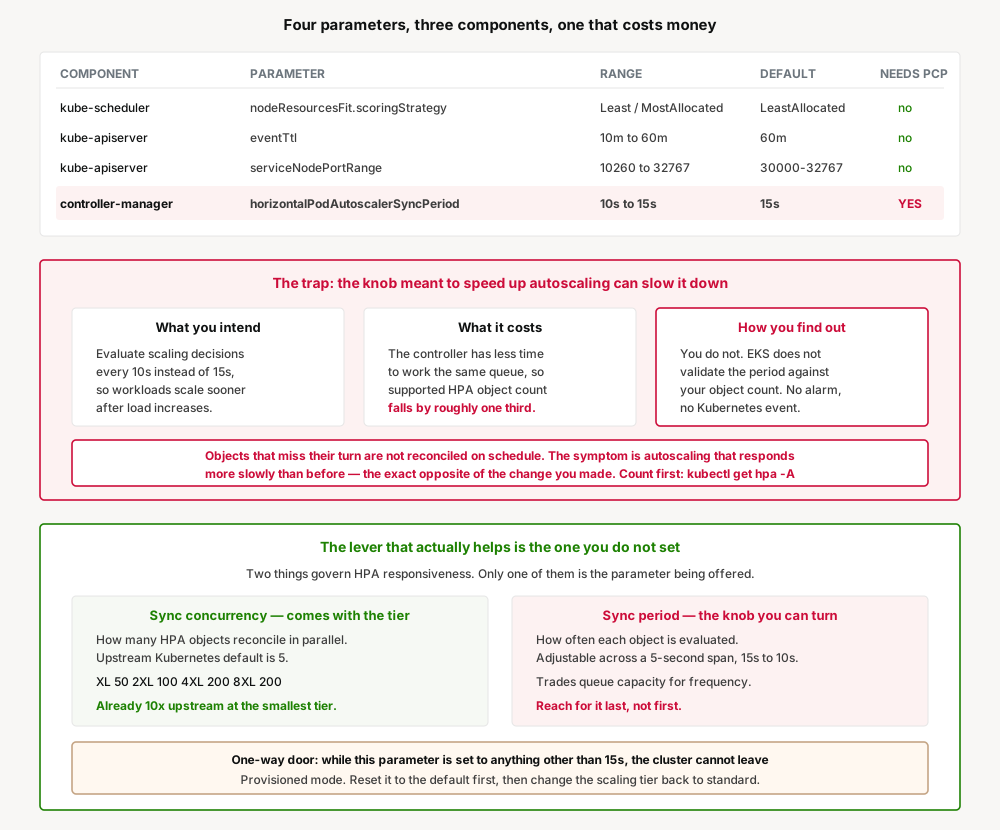
The fourth is different. horizontalPodAutoscalerSyncPeriod lets you evaluate autoscaling decisions every 10 seconds instead of 15. It requires the paid Provisioned Control Plane mode, and shortening it reduces the number of HorizontalPodAutoscaler objects your control plane can reconcile on schedule by roughly one third. EKS does not check that figure against the objects you already have. If you exceed it, some objects are not reconciled on time, no alarm and no Kubernetes event is raised, and the symptom is autoscaling that responds more slowly than before — the opposite of what you changed it for.
There is also a one-way door: while that parameter is non-default, the cluster cannot return from Provisioned mode to Standard mode.
What changed
EKS runs the Kubernetes control plane with default upstream settings, and until now that was the whole story — the API server, scheduler and controller manager were AWS's to configure and yours to live with. Advanced control plane configuration changes that for a specific, bounded set of parameters.
| Component | Parameter | Supported values | Default | Provisioned Control Plane? |
|---|---|---|---|---|
kube-scheduler | nodeResourcesFit.scoringStrategy | LeastAllocated, MostAllocated | LeastAllocated, cpu: 1, memory: 1 | No |
kube-controller-manager | horizontalPodAutoscalerSyncPeriod | 10s to 15s | 15s | Yes |
kube-apiserver | eventTtl | 10m to 60m | 60m | No |
kube-apiserver | serviceNodePortRange | 10260 to 32767 | 30000–32767 | No |
It uses the existing CreateCluster and UpdateClusterConfig operations with new fields, so it works from the console, CLI, SDKs, CloudFormation, CDK and eksctl at launch. ACK and Terraform support is described as coming soon.
Nothing changes for existing clusters. All clusters continue running default values until a parameter is explicitly set.
Why AWS built this
The default settings are correct for most clusters, which is precisely why they were never exposed. The pressure comes from the minority of workloads where a default is actively expensive.
The clearest case is bin-packing. Kubernetes spreads pods across nodes by default, leaving headroom everywhere. If you are running a large fleet and paying for that headroom on every node, packing pods onto fewer nodes is a direct reduction in compute spend — and it was simply not available on a managed control plane.
The migration case is just as concrete. Applications moving to EKS often expect services on fixed ports that fall outside the default 30000–32767 NodePort range. The previous options were to modify the application or put a proxy in front of it. Neither is work anyone wants to do to move a workload that already runs.
Architecture
Parameters are grouped by the component they belong to — kubeSchedulerConfig, kubeControllerManagerConfig, kubeApiServerConfig — and every one is cluster-wide. You cannot scope any of them to a namespace or a workload.
Two mechanics matter more than they first appear:
Updates merge; they do not replace. Only the fields you specify change, and omitted fields keep their current values. This holds both across components and within one. An update that sets only the scheduler config leaves the controller manager and API server untouched.
There is no reset operation. Because omitting a field leaves it in place, you cannot clear a parameter by leaving it out. Returning to a default means setting it explicitly to that default — and the defaults can change between Kubernetes versions, so the authoritative source is DescribeClusterVersions for your version, not documentation you read once.
Changes are not instant. A configuration change is not in effect when UpdateClusterConfig returns; EKS applies it through a rolling update of the control plane, taking several minutes, with the cluster returning to ACTIVE when complete. Track it with DescribeUpdate or block on aws eks wait cluster-active. Every change is validated before it is applied and recorded in CloudTrail.
The trap: the knob that backfires
The HPA sync period looks like the most attractive parameter on the list. Autoscaling that reacts in 10 seconds instead of 15 is an easy thing to want. It is also the only one that can leave you worse off than when you started, and the reasoning is worth following carefully.
Two different things govern how quickly HPA responds, and only one of them is this parameter.
Sync concurrency is how many HorizontalPodAutoscaler objects the controller manager processes in parallel. Upstream Kubernetes defaults to 5. Provisioned Control Plane clusters are already tuned well above that:
| Scaling tier | HPA sync concurrency |
|---|---|
| XL | 50 |
| 2XL | 100 |
| 4XL | 200 |
| 8XL | 200 |
Even the smallest tier runs ten times the upstream concurrency. If your autoscaling is sluggish because a backlog of HPA objects is being worked serially, moving to Provisioned Control Plane has already fixed it, before you touch any parameter.
Sync period is how often each object is evaluated, and it is the knob on offer. Shortening it does make each object's turn come round sooner — but the controller now has less time to work through the same queue within each cycle. AWS states the consequence plainly: reducing the period from 15s to 10s lowers the supported object count by roughly one third.
Then three facts compound:
- EKS does not validate this. The configuration change succeeds even if the cluster already holds more HPA objects than the shorter period can support. There is no error and no warning.
- Exceeding it fails silently. If the controller cannot work through every object within the period, some are not reconciled on schedule. No alarm, no Kubernetes event.
- The symptom points away from the cause. What you observe is autoscaling responding more slowly than expected. The natural reading of "my scaling got slower" is that the sync period needs to be shorter still — which makes it worse.
The check takes one command and must be run before the change, because afterwards nothing will tell you:
kubectl get hpa --all-namespaces --no-headers | wc -lAnd the door locks behind you. While horizontalPodAutoscalerSyncPeriod is set to anything other than 15s, the cluster cannot move from Provisioned mode back to Standard. To leave, you set the parameter back to the default first, then change the scaling tier. That is recoverable — but it is a sequence you have to know, discovered at the moment you are trying to cut cost.
Worth stating fairly: AWS documents every one of these behaviours openly, in the same page that offers the parameter. This is not hidden. It is simply a knob whose failure mode runs opposite to its purpose, which is the kind that gets turned anyway.
Business value
The value is concentrated in two of the four parameters, and it is real.
| Parameter | What it is worth | Who it is worth it to |
|---|---|---|
MostAllocated scoring | Pods occupy less total capacity, so fewer nodes are needed and consolidation can remove lightly used ones | Large fleets paying for spread-out headroom |
serviceNodePortRange | Removes application rewrites and proxies during migration; raises the number of services one cluster supports | Anyone moving fixed-port applications onto EKS |
eventTtl | Relieves etcd storage pressure and speeds up event-heavy API queries | High-churn batch, CI/CD, AI and CronJob clusters |
horizontalPodAutoscalerSyncPeriod | Up to 5 seconds earlier scaling response | Few clusters, and only after the concurrency question is settled |
The bin-packing case is the one with a number attached to it. The rest are unblockers — they remove work rather than reduce spend.
Security considerations
The parameter with a security dimension is serviceNodePortRange, and it cuts both ways. Narrowing the range to match your firewall policy is a genuine tightening. Widening it means node ports can now be allocated across a broader span than your security groups and network ACLs may have been written for. AWS's own guidance is to confirm those allow traffic on the new range before changing it.
The bounds themselves encode reasoning worth keeping. The lower bound of 10260 keeps allocation clear of ports Kubernetes system components already use on your nodes, including the kubelet health port (10248) and the kube-proxy health check port (10256). The upper bound of 32767 keeps the range clear of the Linux ephemeral port range, which typically starts at 32768 — if a NodePort fell inside it, the kernel could pick that port for an outbound connection from the node and collide with the service.
eventTtl has a forensic dimension. Shortening retention narrows what kubectl get events and kubectl describe can show you, and reduces what event-scraping monitoring tools have to work with. Deleted events cannot be recovered. If Kubernetes events form any part of your incident investigation path, capture them outside the cluster before shortening this.
MostAllocated concentrates blast radius. Packing pods onto fewer nodes means more pods are affected at once when a node goes unhealthy, an instance is retired, or an Availability Zone is disrupted. Under high pod churn, densely packed nodes also fill faster, which can leave pods Pending while new capacity is provisioned. The compute saving is real and so is this — treat it as a resilience decision, not only a cost one.
Cost considerations
There is no additional charge for configuring control plane parameters. Three of the four are free to use on any supported cluster.
The HPA sync period is not. It requires Provisioned Control Plane, which is billed at the hourly rate for the scaling tier your cluster runs on, in addition to the standard or extended support EKS hourly charges. That is an ongoing cost attached to a 5-second change in evaluation frequency, and it is worth naming plainly before the parameter is evaluated on its technical merits.
If you are already on Provisioned Control Plane for other reasons — predictable performance, the 99.99% SLA measured in 1-minute intervals rather than Standard's 99.95% over 5 minutes, or the control plane capacity itself — then the parameter is free at the margin and this consideration falls away.
In the other direction, MostAllocated is the only parameter here that reduces a bill, by reducing the number of nodes you run. If cost is what brought you to this feature, that is the parameter to look at, and it costs nothing to use.
Operational considerations
Scheduler changes are forward-only. The Kubernetes scheduler never relocates a running pod. Changing the scoring strategy affects future scheduling decisions only; existing placement is permanent until you evict or restart those pods. Expect the effect to appear gradually, as workloads turn over.
Filtering is unchanged. The scoring strategy affects only how candidate nodes are ranked. A pod that does not fit on a node still will not be scheduled there under either strategy.
Event TTL changes apply to new events only. An event's expiry is set when it is created, so existing events keep the retention they were created under. Storage relief arrives gradually as they age out, not at the moment you make the change. Events can also persist slightly beyond the configured period, because of etcd lease renewal during control plane leader election.
NodePort changes do not disturb existing services. If you narrow the range, services already holding a port outside it keep working and kube-proxy keeps routing to them. But a service holding an out-of-range port that is deleted and recreated cannot get that port back — which matters if your deployment process recreates services rather than updating them. New allocations outside the range are rejected, and explicitly specified nodePort values are validated the same way.
Resource weights: omitting is not the same as de-prioritising. When you specify a resources array on the scoring strategy, only the resources you list are scored at all. Setting cpu: 100 with no memory entry scores nodes on CPU alone and removes memory from the calculation entirely. To keep a resource in play with less influence, list it with a low weight.
Tradeoffs
| Gain | Cost |
|---|---|
| Control plane tuning on a managed control plane, for the first time | Every parameter is cluster-wide; no per-namespace or per-workload scoping |
| Dense packing cuts node count and compute spend | Concentrated blast radius, and Pending pods under churn |
| NodePort range fits existing firewall policy and migrating apps | Recreated services cannot reclaim out-of-range ports |
| Shorter event retention relieves etcd | Shorter debugging window; deleted events are unrecoverable |
| Faster HPA evaluation | Paid tier, one third less object capacity, silent failure, and an exit restriction |
| Validated ranges stop you setting something dangerous | Defaults and ranges shift between Kubernetes versions, so documentation ages |
The pattern: AWS has constrained each parameter to a range it is willing to support, which removes most of the ways this could go wrong. The one remaining sharp edge is the parameter whose safe value depends on something about your cluster that EKS does not check.
Implementation guidance
1. Read the current configuration before changing anything. describe-cluster returns the complete configuration running on your control plane, including parameters you have never customised and their defaults.
aws eks describe-cluster --name <cluster>2. Get the authoritative defaults for your Kubernetes version. Documented values apply to versions available at publication and change later. DescribeClusterVersions reports the current default and supported values per parameter and version — treat it as the source of truth, especially if you automate across several versions.
3. Count your HPA objects before touching the sync period. Nothing will tell you afterwards.
kubectl get hpa --all-namespaces --no-headers | wc -l4. If autoscaling is the goal, check concurrency before frequency. Watch the controller manager workqueue depth for the HPA controller. A depth sitting at or near zero means the control plane is keeping up and a shorter period is not what you need:
workqueue_depth{name="horizontalpodautoscaler"}If the queue is backed up, the answer is concurrency — which comes with the Provisioned Control Plane tier — not a shorter period, which reduces capacity further.
5. Test in a non-production cluster. AWS says this explicitly for every parameter, and it is not boilerplate here: these settings change how a core control plane component behaves for every workload on the cluster, and the right value depends on your workload.
6. Record the default before you deviate. There is no reset operation, and omitting a field on update leaves it in place. Returning to a default means knowing what it was and setting it explicitly.
7. Expect several minutes, and wait for it. The change is applied by a rolling control plane update, not on API return:
aws eks wait cluster-active --name <cluster>Best practices
- Change one parameter at a time. Updates merge rather than replace, so it is easy to accumulate several deviations and lose track of which one caused a behaviour change.
- Treat
MostAllocatedas a resilience decision. Model what a node loss costs at your target density before adopting it for the compute saving. - Pair a shorter
eventTtlwith durable event capture. Ship events somewhere outside the cluster first, then shorten retention — not the other way round. - Check security groups and NACLs before widening the NodePort range, and confirm nothing else on your nodes uses the ports you are opening up.
- Alarm on the HPA workqueue depth if you shorten the sync period. EKS will not warn you, so this metric is the only signal that the queue is not draining.
- Reset the sync period to
15sbefore planning any exit from Provisioned mode, and put that step in the runbook rather than discovering it during a cost exercise. - Re-read the supported ranges at each Kubernetes upgrade. Defaults and bounds are version-dependent, and an automated pipeline pinning a value can drift out of the supported range.
Who should adopt, who should wait
Adopt now: large fleets where scheduler spread is costing real money — MostAllocated is free, reversible for future scheduling, and the clearest win here. Teams migrating fixed-port applications, where the NodePort range removes rewrites and proxies outright. High-churn clusters watching etcd grow, where a shorter eventTtl addresses the cause rather than the symptom.
Wait: anyone considering the HPA sync period who has not yet counted their HPA objects or looked at workqueue depth — the diagnosis almost certainly points at concurrency, not frequency. Clusters below Kubernetes 1.31, which are not supported. Teams without a non-production cluster that resembles production closely enough to test a cluster-wide change, since there is no way to trial one of these on a subset of workloads.
Do not reach for Provisioned Control Plane just to get this parameter. It is an ongoing hourly charge on top of your existing EKS charges, in exchange for evaluating autoscaling decisions up to 5 seconds sooner. If Provisioned mode is right for you, it will be right for its own reasons — capacity, predictable performance, the higher SLA — and the parameter comes along free.
Key takeaways
- Four control plane parameters are now configurable on EKS, across the scheduler, controller manager and API server, on Kubernetes 1.31 or later, in all commercial, GovCloud (US) and China Regions, at no additional charge.
- Set through
CreateClusterandUpdateClusterConfig; available via console, CLI, SDKs, CloudFormation, CDK and eksctl at launch, with ACK and Terraform to follow. - Every parameter is cluster-wide. There is no per-namespace or per-workload scoping.
MostAllocatedpacks pods onto fewer nodes and is the only parameter here that reduces a bill — at the price of a concentrated blast radius. Running pods are never moved, so the effect appears only as workloads turn over.eventTtlapplies to new events only; existing events keep the retention in force when they were created, and deleted events cannot be recovered.serviceNodePortRangeis bounded at10260to stay clear of kubelet and kube-proxy health ports, and at32767to stay clear of the Linux ephemeral range. Existing services keep out-of-range ports, but cannot reclaim them if recreated.horizontalPodAutoscalerSyncPeriodrequires Provisioned Control Plane, an hourly charge on top of standard EKS charges.- Shortening it from
15sto10scuts supported HPA object capacity by roughly a third. EKS does not validate this, exceeding it degrades autoscaling with no alarm or event, and the symptom is slower scaling — the opposite of the intent. - Sync concurrency, not period, is what fixes a backlog. Provisioned tiers run 50 to 200 against an upstream default of 5.
- While the sync period is non-default, the cluster cannot leave Provisioned mode. Reset it to
15sfirst. - There is no reset operation and omitted fields keep their values, so returning to a default means setting it explicitly. Use
DescribeClusterVersionsfor the authoritative default for your Kubernetes version.
Official AWS references
- Amazon EKS now supports advanced Kubernetes control plane configuration parameters — launch announcement
- Advanced Kubernetes control plane configuration — EKS User Guide: every parameter, range, default and consideration
- Amazon EKS Provisioned Control Plane — EKS User Guide: scaling tiers, HPA sync concurrency, billing and exit restrictions
- Introducing advanced Kubernetes control plane configuration in Amazon EKS — AWS Containers Blog
- DescribeClusterVersions — EKS API Reference: authoritative defaults and supported values per version
- DescribeUpdate — EKS API Reference: tracking a configuration change to completion
- Amazon EKS pricing — Provisioned Control Plane hourly rates by scaling tier
Comments