Executive summary
AWS IAM now offers role manager, which creates the IAM roles a service needs from AWS managed role templates instead of asking you to author one. An administrator enables it once in the IAM console under Account settings; from then on, supported service consoles provision a role for you through the AcquireRole API.
Where the required permissions are knowable — an EventBridge rule with defined targets, for instance — the template encodes exactly those, and this is a straightforward improvement on a blank role form filled in under time pressure.
Where they are not knowable, which means Lambda, the template attaches the AWS managed policy PowerUserAccess. That policy is a NotAction allow, not a list of permitted services: it excludes iam:*, organizations:* and account:*, and permits everything else account-wide — including services AWS has not launched yet. Excluding iam:* is what prevents privilege escalation, and that boundary is deliberate and holds. The blast radius inside it is still the entire account.
Two consequences to plan for. Disabling role manager is not remediation — it stops new roles being created and narrows no existing one. And the free IAM Access Analyzer unused access analysis that AWS provides for scoping these roles down runs for 90 days from the point you disable, not from the point you enable.
What changed
AWS has introduced IAM role manager, a feature that creates the IAM roles a service needs instead of asking you to author them. An administrator turns it on once, in the IAM console under Account settings. From that point, when someone sets up a supported service, the console provisions a suitable role rather than presenting an empty role-creation form.
Six service consoles are supported at launch, with AWS Lambda and Amazon EventBridge named explicitly in the announcement. The feature is available in all AWS Regions except the AWS GovCloud (US) Regions and the China Regions. The announcement states no separate charge.
The roles are not improvised. Each one is created from an AWS managed role template — a definition AWS builds and maintains for a specific task, with the trust policy and permissions already worked out. The role that lands in your account is an ordinary IAM role you fully control, visible in the IAM console alongside every other role.
The detail that matters is not in the announcement. It is in AWS's own security blog published the same day, and it concerns what the Lambda template actually grants.
Why AWS built this
The first IAM role a person writes is usually the worst one they will ever write. The console asks for a trust policy and a permissions policy before the person knows what the workload will call, and the path of least resistance is to attach something broad and move on. That role then outlives the reason it was created.
AWS's framing is that the starting point itself is the problem. If the initial role comes from a maintained template rather than from a blank form filled in under time pressure, the common case improves: EventBridge rules with defined targets have knowable permissions, so the template encodes exactly those, and nobody has to guess.
That reasoning is sound where the permissions are knowable. The interesting case is where they are not.
Architecture
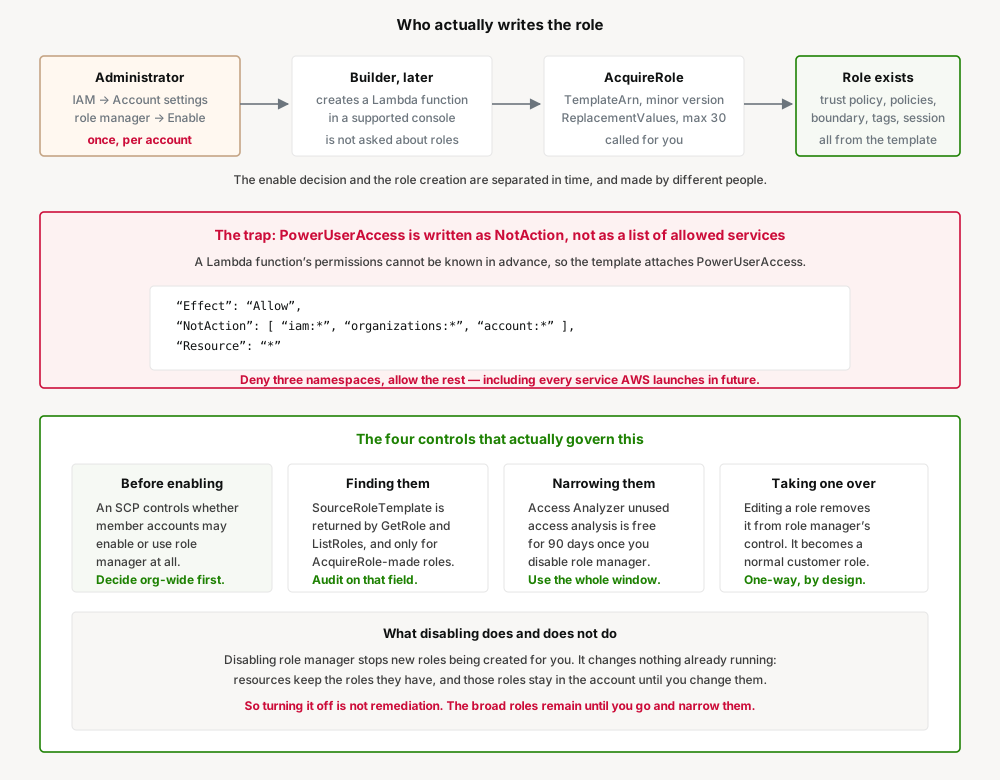
The mechanism is a public API. AcquireRole creates an IAM role from a specified role template, and the new role takes its configuration — name, path, trust policy, inline and managed policies, permissions boundary, tags, and maximum session duration — from the template version you specify.
Its parameters are worth reading, because they tell you how much of the role is fixed by AWS and how much is yours:
| Parameter | Required | Meaning |
|---|---|---|
TemplateArn | Yes | The role template to create from, e.g. arn:aws:iam::aws:role-template/awsserviceprincipal/Example:1 |
TemplateMinorVersion | No | Minor version to use; defaults to the template's default minor version |
ReplacementValues | No | Values substituted into template parameters. Maximum 30 entries |
Almost everything about the role is determined by the template version; your input is limited to substituting declared parameters. That is the trade being made. You gain a definition AWS maintains, and you give up authorship of the starting state.
The provenance is recorded. The Role object gains a SourceRoleTemplate member containing information about the role template the role was created from, and the documentation is explicit that this member is present only for roles created with AcquireRole. Because GetRole and ListRoles both return the Role structure, that field is the reliable way to enumerate what role manager has produced. AWS CloudTrail also records each role's creation.
Templates are themselves governable objects. AcquireRole can fail with RoleTemplateDisabled, described as a rejection because the specified role template is disabled, with the guidance to contact your administrator to enable it. A disabled template cannot be used to create new roles.
The trap: PowerUserAccess is a NotAction allow
For Lambda, the permissions a function will need cannot be determined in advance — the code has not been written yet, or it changes. AWS resolves this by attaching the AWS managed policy PowerUserAccess, described in the security blog as granting access to AWS services so the function can call what it needs, while deliberately excluding IAM, Organizations, and account settings.
That description is accurate. It is also easy to read as narrower than it is. Here is the policy as currently published, version v12:
{
  "Version" : "2012-10-17",
  "Statement" : [
    {
      "Effect" : "Allow",
      "NotAction" : [ "iam:*", "organizations:*", "account:*" ],
      "Resource" : "*"
    },
    {
      "Effect" : "Allow",
      "Action" : [
        "account:GetAccountInformation",
        "account:GetGovCloudAccountInformation",
        "account:GetPrimaryEmail",
        "account:ListRegions",
        "iam:CreateServiceLinkedRole",
        "iam:DeleteServiceLinkedRole",
        "iam:ListRoles",
        "organizations:DescribeEffectivePolicy",
        "organizations:DescribeOrganization"
      ],
      "Resource" : "*"
    }
  ]
}
The first statement is NotAction, not Action. It does not enumerate what the role may do; it enumerates the three namespaces it may not, and allows everything else on "Resource": "*". The practical consequences:
- Every service is included by default, including ones that do not exist yet. When AWS launches a new service next year, a role holding this policy can call it on the day it ships. Nothing has to be updated for that to happen, and nothing will notify you.
- The scope is the whole account. Not the function's own resources — every DynamoDB table, every S3 bucket, every Secrets Manager secret, every EC2 API in the account.
- The exclusions are narrower than "no IAM". The second statement adds back
iam:CreateServiceLinkedRole,iam:DeleteServiceLinkedRoleandiam:ListRoles. Reading the account's role inventory is permitted, and so is creating service-linked roles.
To be fair to the design: excluding iam:* from the first statement is what stops this becoming privilege escalation. A role that cannot attach policies or create arbitrary roles cannot promote itself to administrator, which is the boundary that actually matters. This is a considered choice, not an oversight.
But "can do anything except escalate privileges" is a large blast radius for a function that was meant to resize thumbnails. The gap between what the console implies you are getting and what the policy grants is the thing to internalise before enabling this.
Business value
The value is real and should not be dismissed. Role creation is a recognised point of friction and a recognised source of bad configuration, and both problems get worse the less IAM expertise the person has.
| Situation | Before | With role manager |
|---|---|---|
| EventBridge rule with defined targets | Author a trust policy and permissions by hand, or accept a console default | Template with the trust policy and permissions already worked out |
| New Lambda function, permissions unknown | Broad policy attached under time pressure, rarely revisited | PowerUserAccess, explicit and attributable, with a documented path to narrow it |
| Auditing what was granted and why | Reconstruct intent from the policy document | SourceRoleTemplate names the template the role came from |
| Keeping role definitions current | Your problem, indefinitely | AWS maintains the template; existing roles are unaffected by template changes |
The honest reading of the Lambda case is that it does not reduce permissions relative to a rushed manual role — it may well grant more. What it changes is that the grant is now consistent, labelled and enumerable. A fleet of roles all created from one known template with a recorded provenance is a materially easier remediation problem than a fleet of hand-written roles that each drifted differently.
Security considerations
Four things deserve attention before this reaches a production account.
The decision and its consequences are separated. An administrator enables role manager once. The roles appear later, created by different people who are not being asked to make a permissions decision and may not realise one is being made. Whoever enables it is accountable for every role it subsequently creates.
Disabling is not remediation. AWS is clear that disabling role manager does not disrupt anything already running: resources keep the roles they have, those roles stay in the account until you change them, and from that point you author new roles yourself. Turning it off stops the flow; it does not narrow a single existing role. If you enable it, run it for a month and then disable it, you are left with a month of PowerUserAccess roles and a new manual task.
Editing a role is a one-way door. Editing a role removes it from role manager's control and it becomes a standard customer-managed role. That is the correct behaviour — AWS should not overwrite your changes — but it means the population splits into managed and adopted roles, and you need to know which is which. SourceRoleTemplate is how you tell.
Multi-account governance exists and should be used first. In an organization, administrators can use a service control policy to control whether member accounts can enable or use role manager. This is the control to reach for before individual account owners start making the decision independently.
Do not treat PowerUserAccess as a temporary state that resolves itself. Nothing expires it, nothing reviews it, and the role keeps working perfectly whether or not anyone ever narrows it. Working correctly is exactly why nobody will revisit it. If you enable role manager for Lambda, the scope-down has to be scheduled work with an owner, not an intention.
Cost considerations
The announcement states no charge for role manager, and IAM itself has never been a metered service. There is no per-role or per-template cost to model.
One cost item is worth planning around, because it is time-bounded. AWS offers IAM Access Analyzer unused access analysis at no additional cost for 90 days when you disable role manager. Unused access analysis is otherwise a paid feature, so this is a real allowance and it is the intended mechanism for narrowing the roles role manager created.
The sequencing implication: the free window starts when you disable, not when you enable. Do the scope-down work inside those 90 days or pay for the analysis afterwards.
Operational considerations
Roles created this way are ordinary IAM roles. They appear in the IAM console, they work with existing tooling, and they are subject to the usual account limits — AcquireRole returns LimitExceeded when creation would exceed account limits, the same as any other role creation.
Naming comes from the template, which introduces a collision surface. AcquireRole can fail with NameConflict when the resulting role name conflicts with an existing role, and with EntityAlreadyExists. Accounts with an established naming convention, or an existing role that happens to match a template's output name, will hit this.
Templates are versioned, with major versions in the template ARN and a separate TemplateMinorVersion that defaults to the template's default minor version when unspecified. Existing roles are not retroactively changed when a template changes — the role took its configuration from the version used at creation time. That means two roles from the same template, created months apart, can legitimately differ, and SourceRoleTemplate is what tells you which version each came from.
Two transient errors are worth handling in any automation: ConcurrentModification and RoleModified, the latter raised when someone modified the role template while the service was creating the role. Both are documented as retryable after a short wait.
Tradeoffs
| Gain | Cost |
|---|---|
| No blank role form at the moment of least knowledge | The permissions decision is made once, centrally, by someone not present when it lands |
| Consistent, labelled roles with recorded provenance | Consistently broad, where permissions cannot be predetermined |
| AWS maintains template definitions | Template changes do not reach existing roles, so the population fragments by version over time |
| Faster path from idea to working service | The scope-down becomes deferred work that nothing forces |
| SCP-level control for organizations | Only if applied before account owners enable it themselves |
The pattern across that table: role manager converts an authoring problem into a governance problem. For organisations with functioning IAM governance, that is a good trade. For those without, it replaces many small bad decisions with one large one, and the large one is at least visible and reversible in a way the small ones were not.
Implementation guidance
1. Decide at the organization level before anyone decides locally. Use an SCP to control whether member accounts can enable or use role manager. Choosing deliberately to allow it is fine; discovering later that eleven accounts enabled it independently is not.
2. Enable it in one non-production account first and create the workloads you actually run. Read the roles that result, and confirm which templates attach PowerUserAccess versus a narrowly scoped template, rather than assuming from this post or from the announcement.
3. Build the inventory query before you need it. SourceRoleTemplate is present only on AcquireRole-created roles, which makes it a precise filter:
aws iam list-roles \
  --query 'Roles[?SourceRoleTemplate!=`null`].[RoleName,SourceRoleTemplate]' \
  --output table
Run it on a schedule, not once. The population grows every time somebody uses a supported console.
4. Cross-reference against attached policies. The role's provenance does not tell you its blast radius. Enumerate which of those roles carry arn:aws:iam::aws:policy/PowerUserAccess:
aws iam list-attached-role-policies --role-name <role> \
  --query "AttachedPolicies[?PolicyArn=='arn:aws:iam::aws:policy/PowerUserAccess']"
5. Schedule the scope-down against the 90-day window. The free unused access analysis starts at disable time. Put a date on it with an owner, before enabling.
6. Use CloudTrail for the timeline. Each role's creation is recorded, which gives you who triggered it and when — the missing half of the picture, since the console user is often not the person who enabled the feature.
Best practices
- Treat enabling as a change with a blast radius, not a console preference. It changes what every future console-created workload receives.
- Separate the two cases in your own policy. Templates for services with knowable permissions, such as EventBridge rules with defined targets, are a straightforward improvement. The Lambda case is a different decision and deserves to be made on its own.
- Apply a permissions boundary where you can. The template supplies one if it defines one; for roles you have taken over by editing, a boundary is the durable control that survives future policy edits.
- Audit on
SourceRoleTemplate, not on naming conventions. Names come from templates and can collide with yours; the field is authoritative and the names are not. - Do not let "we can narrow it later" be the whole plan. Later has no owner and no date unless you give it one.
- Re-audit after AWS launches new services. A
NotActionallow silently widens as the service catalogue grows. That is not drift in your configuration — your policy is unchanged — but it is drift in what it permits.
Who should adopt, who should wait
Adopt now: teams with an established IAM review process and Access Analyzer already in use, where a broad starting role is genuinely a starting point. Development and sandbox accounts, where the alternative is people attaching AdministratorAccess to get unblocked — PowerUserAccess from a labelled template is strictly better than that. Organisations standardising on EventBridge and similar services where the templates encode knowable permissions.
Wait: regulated environments with least-privilege attestation requirements, where a PowerUserAccess role is a finding regardless of how it was created. Accounts with sensitive data where any function reaching every bucket and table is unacceptable. Organisations without a role inventory today — build that first, or you will not be able to tell what role manager added. Anywhere the scope-down cannot be staffed, because deferred remediation here is indistinguishable from no remediation.
Decide centrally either way. The SCP exists so this is one deliberate decision rather than a per-account accident.
Key takeaways
- IAM role manager creates roles from AWS managed role templates via the
AcquireRoleAPI. An administrator enables it once in IAM account settings; it then acts inside supported service consoles. - Six service consoles at launch, including Lambda and EventBridge. All Regions except GovCloud (US) and China. No separate charge.
- Where permissions are knowable, the template encodes them. Where they are not — Lambda — the template attaches
PowerUserAccess. PowerUserAccessis aNotActionallow excluding onlyiam:*,organizations:*andaccount:*. It permits everything else account-wide, including services AWS has not launched yet, and adds backiam:ListRolesand the service-linked-role actions.- Excluding
iam:*is what prevents privilege escalation. That boundary is deliberate and it holds. The blast radius inside it is still the whole account. SourceRoleTemplateon theRoleobject is present only forAcquireRole-created roles, making it the precise way to inventory what role manager produced. CloudTrail supplies the timeline.- Disabling role manager stops new roles but changes nothing existing. Editing a role removes it from role manager's control permanently.
- Access Analyzer unused access analysis is free for 90 days from the point you disable. Schedule the scope-down against that window, with an owner.
- In an organization, an SCP controls whether member accounts can enable or use role manager. Make that decision before account owners make it for you.
Official AWS references
- AWS IAM now provides role manager to set up IAM roles automatically — launch announcement, supported services and Region availability
- How AWS IAM role manager rethinks the starting point for IAM roles — AWS Security Blog: role templates, the PowerUserAccess decision, SCP control, disable behaviour
- AcquireRole — IAM API Reference: parameters, template versioning, error conditions
- Role — IAM API Reference: the
SourceRoleTemplatemember - PowerUserAccess — AWS Managed Policy Reference: full policy document, version v12
- Permissions boundaries for IAM identities — IAM User Guide
- IAM roles — IAM User Guide
Comments