Image Builder can now build on an instance that is already running in an Auto Scaling group instead of launching a fresh one. The announcement sells it as speed. The documentation lists what gets ignored when you turn it on, and the list includes your recipe's base image.
“Image Builder doesn't use the following settings from your infrastructure configuration and recipe… Image recipe: the base image, block device mappings, and user data.”
Executive summary
“By default, Image Builder launches a new Amazon EC2 instance for every build. With a parent instance, Image Builder takes an instance that's already running in an Amazon EC2 Auto Scaling group instead, so the build doesn't wait for an instance to launch.”
That is a real saving, and the feature is carefully bounded: “This applies only to the build phase”, and “This feature is fully opt-in and does not affect existing pipelines”, in “all AWS Regions at no additional cost”.
What changes when you opt in is where your image comes from. “Image Builder creates the output AMI from the instance's own volumes.” Not from the base image in your recipe — from the volumes of a machine that the Auto Scaling group launched, from the group's launch template, and that has been serving traffic since.
What changed
| Aspect | What AWS says |
|---|---|
| Where the instance comes from | “an instance that's already running in an Amazon EC2 Auto Scaling group” |
| Which instance | “at random… You can't choose which instance Image Builder takes” |
| Instance state required | “in the InService state”, SSM Agent online, matching platform and architecture |
| What the AMI is made from | “the instance's own volumes” |
| Scope | “only to the build phase”; test instances “launch as usual” |
| If no instance is available | Waits up to “at most one hour”, then “the build fails” |
| Fallback | “Image Builder doesn't fall back to launching a new instance” |
| Permissions | A pipeline execution role is mandatory; the service-linked role is not enough |
| Cost | “no additional cost” |
Architecture
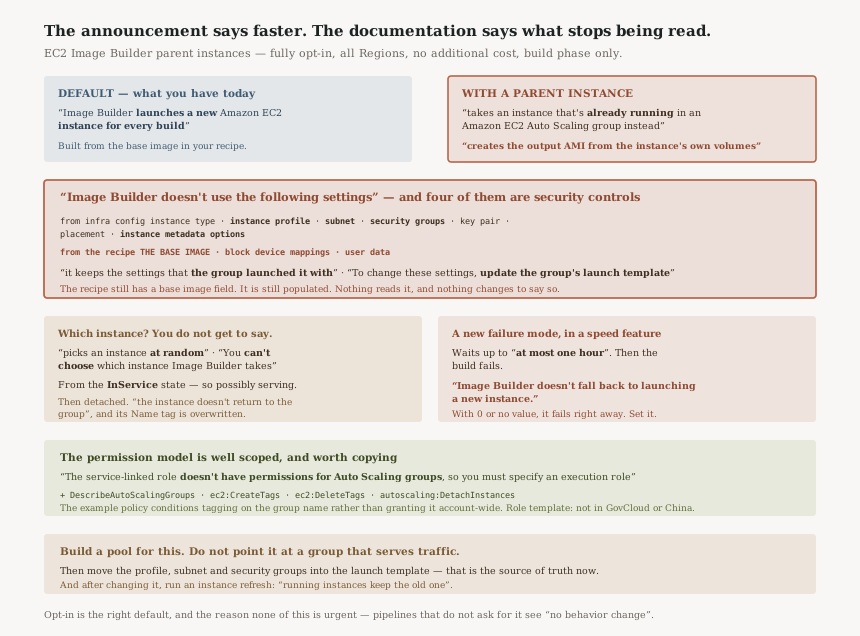
The ignored list is the announcement's missing paragraph
AWS is thorough about this, in two lists. From the infrastructure configuration, Image Builder ignores “the instance type, instance profile, subnet, security groups, key pair, placement, and instance metadata options”. From the image recipe, it ignores “the base image, block device mappings, and user data”.
Those are not minor fields. Four of them are security controls: the instance profile the build runs under, the subnet it sits in, the security groups around it, and the IMDS configuration. All four now come from somewhere else: “The build instance is already running, so it keeps the settings that the group launched it with”, and “To change these settings, update the group's launch template.”
AWS says it again specifically for the one most likely to be assumed: “The instance keeps the instance profile that the group launched it with, so the instance profile in your infrastructure configuration doesn't apply.”
So opting in moves the source of truth from the image recipe and infrastructure configuration to the Auto Scaling group's launch template. The recipe does not change. It still has a base image field, still populated, and now read by nothing.
An InService instance is one that may be serving
The selection rule is specific: “The instance is in the InService state”, chosen “at random”, and “You can't choose which instance Image Builder takes.”
InService is the state an instance is in when the group considers it healthy and in use — which, if the group is attached to a target group, means it is receiving requests. Then: “Before the build starts, Image Builder adds the following tags to the instance and then detaches it from the group”, and “The group's desired capacity doesn't change, so the group launches a replacement, and the instance doesn't return to the group.”
Which is correct behaviour for a build pool and the wrong behaviour for a serving fleet. The tag detail makes the intended shape obvious: the Name tag Image Builder applies “replaces the instance's current Name tag”. Nothing about that is designed for an instance you were using for something else.
A new failure mode, in a feature sold as speed
“Image Builder waits up to capacityWaitTimeoutSeconds, at most one
hour, for an instance that meets the conditions… If none becomes available, the build
fails.”
And explicitly: “Image Builder doesn't fall back to launching a new instance.” With “0 or no value, the build fails right away.”
So a pipeline that previously launched its own instance now depends on the group having spare qualifying
capacity at the moment it runs. The polling detail is worth knowing for anyone setting the timeout:
“Image Builder checks the group about every 15 seconds for the first 5 minutes,
then about every 45 seconds, so the actual wait can differ from
capacityWaitTimeoutSeconds by up to one check.” That first window is roughly
5 × 60 / 15 = twenty checks before the interval triples.
Business value
The saving is real and it is the boring kind that compounds. Launching and bootstrapping an instance is dead time on every pipeline run, and for a team rebuilding images daily across several recipes that is the bulk of the wall clock. Keeping a warm pool and taking from it removes that, and “The ASG continuously replenishes the pool as instances are used for builds” means the pool refills itself.
The opt-in design is the right default, and AWS states it plainly: “Pipelines without an ASG configured continue to use the default launch path with no behavior change.” Nothing about this reaches an existing pipeline that does not ask for it.
Security considerations
Two things to work through before enabling this, and neither is a flaw — both are consequences of building on a machine you did not launch for the purpose.
The build's identity and network position move to the launch template. Instance profile, subnet, security groups and instance metadata options all come from the group now. If your infrastructure configuration deliberately gave builds a minimal profile and an isolated subnet, none of that applies, and the build instead runs with whatever the serving fleet runs with. The documentation is direct about the required direction of travel: set an instance profile in the launch template “that has the permissions that Image Builder and your components need”.
The image's provenance changes. The output AMI is made from “the instance's own volumes”, so it inherits whatever accumulated on that instance between launch and selection. For a pool whose instances exist only to be built on, that is nothing much. For a group doing other work, it is everything that work left behind.
The permission model is well scoped, and worth copying. The service-linked role deliberately does not reach
Auto Scaling: “The Image Builder service-linked role doesn't have permissions for Auto Scaling
groups, so you must specify an execution role.” The four additional permissions
are named individually — DescribeAutoScalingGroups, ec2:CreateTags and
ec2:DeleteTags, and autoscaling:DetachInstances — and the example policy
conditions tagging on the group name rather than granting it account-wide.
Cost considerations
The feature is free; the pool is not. “no additional cost” covers the integration, and what you pay for is an Auto Scaling group holding instances warm so that a build does not wait. For a pipeline that runs a few times a day, a standing pool costs more than the launch time it saves. For one that runs continuously, the arithmetic reverses.
There is also a second-order cost in the replacement behaviour: every build consumes an instance permanently, since “the instance doesn't return to the group” and the group launches a replacement. The pool is a conveyor rather than a reservoir, so its cost scales with build frequency rather than sitting flat.
Operational considerations
SSM Agent is a hard prerequisite, not a nicety. “Image Builder runs your components through Systems Manager, so it takes only an instance whose agent is online”, and “A new instance isn't online until its agent registers with Systems Manager.” A freshly replenished pool therefore has a window in which its instances exist and do not qualify.
Changing the instance profile does not affect running instances. The documentation spells out the full procedure — new launch template version, update the group, then “Replace the instances that are already running” via an instance refresh, because “New instances get the new instance profile, but running instances keep the old one.” That is an easy thing to miss and it produces builds running under the previous profile.
The role template has Region gaps. “The role template isn't available in the AWS GovCloud (US) Regions or the China Regions” — so in those Regions the policy is yours to write, and the example in the documentation is the thing to copy.
Tradeoffs
| What you gain | What it costs |
|---|---|
| No launch and bootstrap time per build | A standing pool, charged whether or not you build |
| A pool that replenishes itself | Every build consumes an instance permanently |
| Builds start on a warmed machine | The output AMI comes from that machine's volumes, not your base image |
| One place to configure the build host | That place is the launch template, and the recipe still looks authoritative |
| Fully opt-in, no change to existing pipelines | Once opted in, no fallback — no qualifying instance means the build fails |
Implementation guidance
- Create a dedicated build-pool Auto Scaling group. Do not point this at a group serving
production traffic — selection is random, the instance is taken from
InService, and it does not come back. - Put the build's identity in the launch template: instance profile with the permissions Image Builder and your components need, the subnet you want builds in, and the security groups.
- Confirm SSM Agent is installed and registering on the pool's instances, since an instance whose agent is offline will never be selected.
- Add an execution role to the pipeline with
EC2ImageBuilderExecutionPolicyplus the four named permissions, or use the role template where it is available. - Set
capacityWaitTimeoutSecondsdeliberately. Leaving it unset means the build fails immediately when the pool is momentarily empty. - Write down what the image is actually built from, because the recipe will keep naming a base image that is no longer used.
Best practices
- Treat the launch template as part of your image definition. It now supplies the base, the block devices and the build host's identity.
- Keep the pool single-purpose. Everything about the selection and detach behaviour assumes instances that exist to be consumed.
- Remember test instances are unaffected — they “launch as usual, with the settings from your infrastructure configuration and recipe”, so your recipe is still authoritative for the test phase and not for the build phase.
- Use an instance refresh after changing the launch template, or running instances keep the old profile.
- Do not rely on this in a pipeline that must not fail without a deliberate timeout, given there is no fallback to launching.
Who should adopt this and when
Soon, if image build time is on a critical path — a frequent pipeline, or a release process that waits on an AMI. This removes the launch and bootstrap wait, which is usually the largest fixed cost in a build.
With care, if your infrastructure configuration encodes security decisions. Those settings stop applying, and the equivalent decisions have to be re-made in the launch template before you enable it, not after.
Not yet, if you build infrequently. A warm pool to save a few minutes a day is the wrong trade, and the no-fallback failure mode is a real cost against a small saving.
Not at all with a shared or serving group. Random selection from InService,
the Name tag overwrite, and permanent detachment all point one way.
Key takeaways
- Opting in means “Image Builder creates the output AMI from the instance's own volumes” — not from your recipe's base image, which it “doesn't use”.
- Instance type, instance profile, subnet, security groups, key pair, placement and IMDS options all stop coming from the infrastructure configuration and start coming from the group's launch template.
- Selection is “at random” from
InServiceinstances, you “can't choose”, and the instance “doesn't return to the group”. - There is no fallback: “Image Builder doesn't fall back to launching a new instance”, and the wait is capped at “at most one hour”.
- A pipeline execution role is mandatory, because “The Image Builder service-linked role doesn't have permissions for Auto Scaling groups”.
- It is “fully opt-in” with “no behavior change” for pipelines that do not configure it — the right default, and the reason none of the above is urgent.
- Test instances are unaffected; this “applies only to the build phase”.
Official AWS references
- EC2 Image Builder now integrates with ASG for faster image builds — the selection of an already-running instance, the self-replenishing pool, the opt-in guarantee for existing pipelines, and Region and cost availability
- Build on an instance from an Auto Scaling group — the default launch behaviour it replaces, the build-phase-only scope, random selection and the InService and SSM Agent conditions, the tagging and detach sequence including the Name tag overwrite, the full list of infrastructure configuration and recipe settings that stop applying, the output AMI coming from the instance's own volumes, the instance profile rule and the instance refresh requirement, the capacity wait timeout and polling cadence, the absence of any fallback, the mandatory execution role and its four extra permissions, and the role template's Region gaps
- Create an infrastructure configuration — further reading on where the parent instance is configured; no claims in this post are drawn from it
- Infrastructure configuration details — further reading on the settings that no longer apply; no claims in this post are drawn from it
Comments