Security Hub can now export findings straight to S3, as CSV or as JSON in OCSF format, from any findings page. AWS names the use case precisely: “compliance reporting and audit evidence”.
Which makes one detail worth more than the feature. An export's contents are decided by the filters on the page you started it from — and the default CSV has nine columns, none of which records what those filters were.
Executive summary
On-demand export of Security Hub findings to a bucket you own, in CSV or JSON (OCSF), from “every findings page… including Threats, Exposure, Vulnerabilities, Posture Management, Sensitive Data, and All Findings”, in every Region where Security Hub runs.
The design is sensible and the documentation is clear. The thing to build a habit around is provenance: “An export captures the findings that match the filters on the page you start it from”, so two exports taken minutes apart from differently filtered pages are both correct, both named by default after the page and the clock, and indistinguishable once they are files in a bucket.
What changed
| Aspect | What AWS says |
|---|---|
| Formats | CSV, or “JSON in the Open Cybersecurity Schema Framework (OCSF) format” |
| Scope | “The export uses the page as its scope and carries over the filters you applied on that page” |
| Trigger | “Exports are on demand” — you start it, Security Hub runs it in the background |
| Concurrency | “Only one export can run at a time in an account” |
| Destination | A bucket and prefix you choose, every object encrypted with “the AWS Key Management Service (AWS KMS) key you choose” |
| Completeness | CSV is a column selection. “JSON (OCSF) exports always contain the complete finding” |
The announcement frames this as removing work: exporting is now possible “without building and maintaining their own extraction pipelines”. True for ad-hoc evidence. Read it against “Exports are on demand” and the scope is clear — there is no schedule here, so a nightly feed into a data lake is still a pipeline.
Architecture
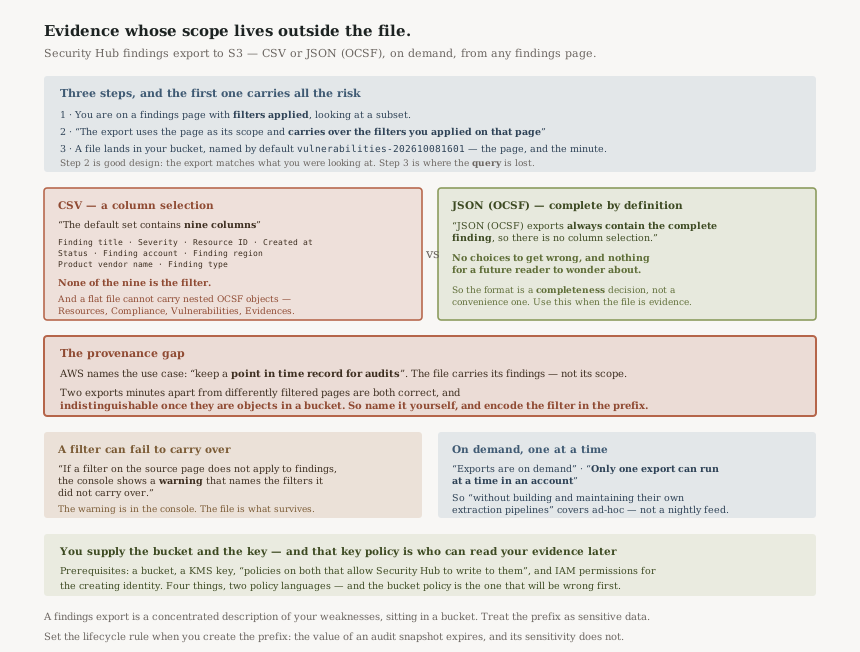
The flow is three steps and the first one carries all the risk.
- You are on a findings page, with filters applied, looking at a subset.
- You choose Export. The scope is inherited: the console shows it as “All findings, using the filters carried over from the Vulnerabilities page”, and to change it you “return to the findings page and adjust them there”.
- A file lands in your bucket, named by default something like
vulnerabilities-202610081601— the page, and the minute.
Step 2 is good design: the export matches what you were looking at, which is almost always what you meant. Step 3 is where the information is lost, because the filename records the page and not the filter, and the nine default CSV columns describe findings rather than the query that selected them.
The nine columns, and what is not among them
“The default set contains nine columns: Finding title, Severity, Resource ID, Created at, Status, Finding account, Finding region, Product vendor name, and Finding type.”
That is a reasonable default for a spreadsheet. It is a thin basis for evidence, and the alternative is right there: “JSON (OCSF) exports always contain the complete finding, so there is no column selection.”
So the format choice is a completeness choice, not a convenience one. CSV is whatever you ticked; JSON is
everything, by definition. The column picker makes the mapping explicit — each option
“shows the column name and the OCSF field path it comes from, for example Finding account
(cloud.account.uid)”, grouped by OCSF object including
“Finding info, Cloud, Resources, Compliance, Vulnerabilities, and Evidences” —
which is genuinely well done and also tells you how much structure a flat file is declining to carry.
Business value
Real, and specific: getting findings to people who do not have console access. An auditor, a risk function, a customer's security questionnaire. Until now that meant someone with Security Hub access running an API extraction and someone maintaining it.
The data-warehouse use case AWS names — “load findings into a data warehouse or business intelligence tool” — is where the on-demand limit bites. One export, started by a human, one at a time per account, is a fine way to seed a dataset and not a way to keep one current.
The strongest use is the third one AWS lists: “keep a point in time record for audits”. A snapshot of what the posture looked like on a date is exactly the artefact an audit wants, and it is the one where the provenance gap matters most.
Security considerations
A findings export is a concentrated description of your weaknesses in a bucket. AWS requires a KMS key rather than offering one — “encrypts every object with the AWS Key Management Service (AWS KMS) key you choose” — and that key policy is the real access control on the evidence.
Which connects to #76 from this week, where a KMS key policy silently determined what Macie could classify. Here it determines who can read the findings file in two years, when the people who created it have gone. A key policy is part of the retention design, not part of the setup.
The prerequisites are worth reading as a checklist rather than a sentence: “an Amazon S3 bucket, an AWS KMS key, policies on both that allow Security Hub to write to them, and IAM permissions for the identity that creates the export”. Four things, in two policy languages, and the bucket policy is the one that will be wrong first.
One more: whoever can start an export can put findings wherever the bucket policy allows. That is a reasonable capability and it is also a new path for finding data to leave the console, so it belongs in the same conversation as who can read Security Hub.
Cost considerations
The announcement states no charge for the feature. What it does create is S3 storage, KMS requests on every object, and whatever the downstream tool costs — all small, and all permanent if nobody sets a lifecycle policy.
A point-in-time audit record is precisely the kind of object that should expire on a schedule somebody chose, because its value drops to near zero once the audit closes while its sensitivity does not. Put a lifecycle rule on the prefix when you create it, not when the bucket gets large.
Operational considerations
“Only one export can run at a time in an account.” With the remedy spelled out: “wait for the running export to finish or cancel it from the Exports page”.
Fine for humans, awkward for automation, and an interesting coordination problem in a delegated administrator account where several people might reasonably export at once. There is at least an audit trail of attempts: “You can track every export from the Exports page”.
The failure mode to know about is in the filters: “Filters are applied to OCSF fields. If a filter on the source page does not apply to findings, the console shows a warning that names the filters it did not carry over.”
AWS warns, which is the right behaviour. But the warning is in the console at creation time and the file is what survives. An export taken past a dismissed warning is wider than the operator intended and looks identical to one that is not.
Tradeoffs
| Choice | Gains | Costs |
|---|---|---|
| CSV | Opens in a spreadsheet; readable by anyone | Nine columns by default, and a flat file cannot carry nested OCSF objects like Resources or Evidences |
| JSON (OCSF) | “always contain the complete finding” — complete by definition, no choices to get wrong | Not readable by the audience most likely to be asking for it |
| Export from a filtered page | Exactly the findings you were looking at | The filter is not recorded in the artefact |
| Export from All findings, unfiltered | Scope is self-evident and needs no provenance note | A much larger file, and the reader does the filtering instead |
Implementation guidance
- Use JSON (OCSF) when the file is evidence. It is complete by definition, so no future reader has to wonder what was omitted.
- Use CSV only for reporting to people, and treat it as a view rather than a record.
- Overwrite the suggested name.
vulnerabilities-202610081601records the page and the minute; put the filter in the name — severity, status, account scope — because that is the part nothing else preserves. - Encode scope in the S3 prefix too, so a bucket listing is self-describing without opening files.
- Write the KMS key policy for the reader you will have in two years, not the operator you have today.
- Put a lifecycle rule on the prefix at creation. The value expires; the sensitivity does not.
- If a carried-over filter warning appears, stop and go back. The scope is wider than you think and the file will not say so.
- Do not design a recurring feed on this. On demand, one at a time per account.
Best practices
- An artefact should describe its own scope. If the tool will not do it, the filename and prefix must.
- Prefer the complete format for anything retained. Column selection is a decision made once and inherited by every future reader.
- Treat the findings bucket as sensitive data, because a list of your unremediated weaknesses is exactly that.
- Export unfiltered when you can. Scope you do not have to document is scope that cannot be misread.
- Check the Exports page after a run, since the work happens in the background and success is not otherwise announced.
Who should adopt this and when
Immediately, if you currently maintain a findings extraction script. This replaces the ad-hoc half of it, and the OCSF output is a better interchange format than most hand-rolled extractions produce.
Before your next audit, if you produce evidence by screenshot. A complete OCSF export with a deliberate name is a considerably stronger artefact than a console capture, and it takes less time.
Not as a replacement for streaming, if you already send findings to EventBridge or a SIEM. Different mechanism, different purpose; this is snapshots, that is flow.
Key takeaways
- On-demand export of findings to S3 as CSV or JSON (OCSF), from any findings page, in all Security Hub Regions.
- “The export uses the page as its scope and carries over the filters you applied on that page” — so the query decides the contents.
- The default CSV is nine columns; “JSON (OCSF) exports always contain the complete finding”. Format is a completeness decision.
- Nothing in the file records which filters produced it, and the suggested name is only the page plus a timestamp — so name it yourself.
- A filter that does not apply is warned about in the console, not in the artefact.
- “Only one export can run at a time in an account”, and exports are on demand, so this is not a scheduled feed.
- You supply the bucket and the KMS key; that key policy is who can read your evidence later.
Official AWS references
- AWS Security Hub now exports findings to S3 in CSV or JSON format — the formats, the findings pages covered, the on-demand delivery to a bucket in your account, and Regional availability
- Exporting findings from Security Hub to Amazon S3 — the filter-carried-over scoping rule and its worked example, the on-demand and one-at-a-time behaviour, the nine default CSV columns and their OCSF field paths, the completeness of JSON (OCSF), the filter warning, the suggested export name, and the bucket, KMS and IAM prerequisites
- What is AWS Security Hub — further reading on the findings pages this export draws from; no claims in this post are drawn from it
Comments