Business Challenge
Post #18 established the mechanics: three elements, additive permissions, no subtraction. This post is about the part everyone actually touches — the role picker — and the three entries in it that absorb most real assignments.
The pattern is consistent enough to predict. Reader for the people who should look but not touch. Owner for the two or three who set the place up. Contributor for everyone else, because it reads as the sensible middle: more than read-only, less than owner. That reading is wrong in a specific and consequential way.
Microsoft organises roles into two documented categories: job function roles, which allow management of specific Azure resources, and privileged administrator roles, which grant the ability to manage Azure resources or assign roles to other users. Contributor is in the second category. It grants full access to manage all resources; the only thing it withholds is the ability to assign roles. It is not a step down from Owner in capability — it is Owner without the delegation, which is a distinction about governance rather than about blast radius.
Three consequences follow, and each is the subject of a section below:
- The Reader/Contributor/Owner ladder is not a gradient. Reader is
*/read. Contributor is*minus theMicrosoft.Authorizationwrites. Owner is*. There is nothing between "can read everything" and "can do everything". - Granting the right to assign roles is granting Owner. Both User Access Administrator and Role Based Access Control Administrator can, in Microsoft's own words, assign themselves or others the Owner role. That is documented behaviour, not a loophole.
- None of the three reach the data. Key Vault Contributor explicitly does not allow access to secrets, keys or certificates. Storage Account Contributor manages storage accounts but not the data in them. Data access is a separate family of roles that has to be granted on purpose.
Nobody decides "this team should be able to delete every resource in the subscription". They decide "this team needs to deploy", the picker offers Contributor, and the two sentences seem equivalent. They are not, and the gap grows over time: a wildcard in Actions includes actions defined in the future, as Azure adds new resource types. A Contributor assignment made in 2024 covers services that did not exist when it was made.
Architecture
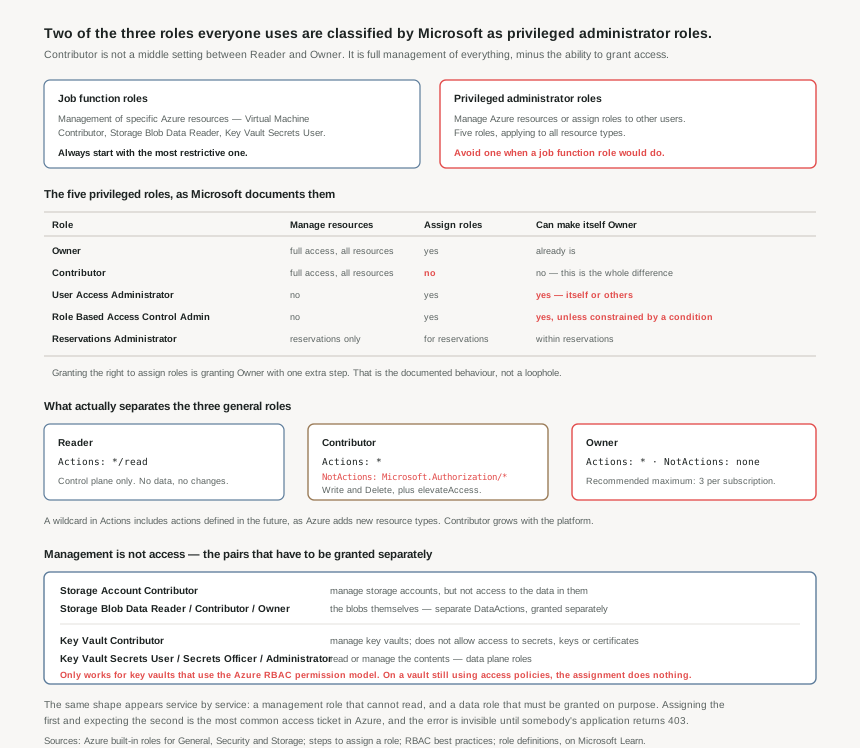
The five privileged roles, and the one permission that separates them
Microsoft publishes the privileged set explicitly. These five apply to all resource types:
| Role | What it grants | The part that matters |
|---|---|---|
| Owner | Full access to manage all resources, and assign roles in Azure RBAC. | Actions: * with no NotActions. The recommended maximum is 3 per subscription. |
| Contributor | Full access to manage all resources. Cannot assign roles, cannot manage Blueprints assignments or share image galleries. | Actions: * with NotActions removing Microsoft.Authorization/*/Write, Microsoft.Authorization/*/Delete and elevateAccess/Action. |
| User Access Administrator | Manage user access to Azure resources, assign roles. | Can assign themselves or others the Owner role. Cannot manage resources directly — which takes one assignment to fix. |
| Role Based Access Control Administrator | Manage user access, assign roles. Cannot manage access by other means, such as Azure Policy. | Same Owner-granting reach as UAA unless a condition constrains which roles it may assign and to whom. |
| Reservations Administrator | Manage all reservations in a tenant, and assign roles for reservations. | Tenant-wide by nature, which is easy to miss because reservations feel like a billing detail. |
Read the middle two rows together and a common design collapses. The usual reasoning is that User Access Administrator is a safe delegation — "they can manage access but not resources". Microsoft's own table says the holder can assign themselves the Owner role, so what they can manage is a decision they make, not a boundary you set. The same is true of Role Based Access Control Administrator by default.
The difference between them is what makes RBAC Administrator worth knowing: it is the role designed to be constrained. The documented best practice is that if you are assigning a role with permission to create role assignments, you should consider adding a condition to constrain the role assignment. A condition can limit which roles the holder may assign and which principals they may assign them to — up to 8 KB of it, as post #18 covered. Delegating access management without such a condition is delegating Owner with an extra click.
Reader, Contributor, Owner — the actual definitions
Reader is a single action: */read, described as "view all resources, but does not allow you to make any changes". Its role ID, worth putting in scripts rather than the name, is acdd72a7-3385-48ef-bd42-f606fba81ae7. The documentation attaches a note that people skip: this covers the control plane, so a Reader can read control plane information for all Azure resources. Reader at management group scope means reading everything in every subscription underneath it — configuration, topology, resource names, tags. That is a lot of estate reconnaissance for a role that gets handed out as a courtesy.
Contributor (b24988ac-6180-42a0-ab88-20f7382dd24c) is a wildcard minus a short exclusion list. Post #18 made the point that NotActions is not a deny rule; here is where that matters most. Contributor's inability to grant access holds only for a principal whose other assignments do not grant it. Contributor at a resource group plus User Access Administrator elsewhere in the hierarchy is, in effect, Owner — and neither assignment looks alarming on its own.
Owner is the wildcard with nothing removed. The recommendation of a maximum of three subscription owners is one of the few numeric targets Microsoft publishes for access management, and it is monitorable in Defender for Cloud. Three is not a technical limit; it is a statement about how many compromised accounts it takes to lose a subscription.
Management is not access: the pairs to learn
The most frequent real-world misuse is not over-privilege. It is assigning a control plane role and expecting data access — and the failure appears as an application returning a permission error against a resource whose owner can see it perfectly well in the portal.
| Manage the resource | Reach the data | What the management role explicitly excludes |
|---|---|---|
| Storage Account Contributor | Storage Blob Data Reader / Contributor / Owner | "not access to the data in them. Does not allow access to the storage account key which is needed for data access." |
| Key Vault Contributor | Key Vault Secrets User / Secrets Officer / Administrator | "does not allow you to assign roles in Azure RBAC, and does not allow you to access secrets, keys, or certificates." |
The storage trio is a clean least-privilege ladder and the guidance is to start at the bottom: if a principal needs to read blobs but not write them, choose Storage Blob Data Reader rather than Storage Blob Data Contributor, and definitely not the administrator-level Storage Blob Data Owner, which adds POSIX access control assignment and super-user actions.
The Key Vault set is more granular still, and the distinctions are real: Key Vault Reader reads metadata about certificates, keys and secrets but cannot read sensitive values such as secret contents or key material. Key Vault Secrets User reads secret contents and nothing else. Key Vault Secrets Officer performs any action on secrets except managing permissions. Key Vault Administrator performs all data plane operations on the vault and everything in it — and notably cannot manage the vault resource itself or manage role assignments.
"Only works for key vaults that use the 'Azure role-based access control' permission model." A vault still on the legacy vault access policy model ignores these assignments entirely. The assignment succeeds, appears in the portal, appears in an access review, and grants nothing. There is no error to notice — the application simply cannot read the secret, and the role assignment is the first place anyone looks and the last place the problem is.
Job function roles, and why the search is worth the ten minutes
The documented method for finding a job function role is unglamorous and works: start from the built-in roles index, navigate to the service category for the resource, search the page for a keyword such as "blob" or "virtual machine", and always start with the most restrictive role. Only create a custom role if nothing fits — which is post #20.
The reason this is worth doing rather than reaching for Contributor is that job function roles do not grow. Contributor's wildcard picks up every future action for every future service; Microsoft.Compute/virtualMachines/* picks up future actions on virtual machines only. Ten minutes at assignment time buys a permission set that still means what it meant when it was granted.
Why This Architecture Holds Up
Role choice is a statement about who can escalate
Since permissions add and nothing subtracts, the only structural questions worth asking about a role are: what does its wildcard cover, and does it let the holder grant themselves more. Those two produce a hierarchy that is different from the one in the picker:
- Can escalate — Owner, User Access Administrator, RBAC Administrator (unconstrained), and any custom role holding
Microsoft.Authorization/roleAssignments/write. Everything else these principals lack is one assignment away. - Cannot escalate but can do everything else — Contributor, plus any custom role with a broad wildcard. Bounded only by scope.
- Bounded by resource type — job function roles. The only category where the scope of harm is legible from the role name.
- Bounded to data, or to management, but never both — the data plane roles and their control plane counterparts.
An access review that groups assignments this way answers a question worth answering. One that lists them alphabetically by role name does not.
Time-bound beats narrow when the role has to be broad
Sometimes the answer genuinely is a privileged role — a migration, an incident, a subscription being built. The documented approach is Privileged Identity Management: just-in-time privileged access that is time bound, after which privileges are revoked automatically.
There is a practical detail that makes this cheaper than it looks. Eligible role assignments and assignments scheduled in the future do not count toward the 4,000-per-subscription limit. An estate that moves its standing privileged assignments to eligible ones reduces both its exposure and its consumption of a budget that only counts active grants. That is an unusual alignment: the safer option is also the one that scales further.
The budgets push the same way
A subscription allows 4,000 role assignments and a management group 4000 ÷ 500 = 8 times fewer. Combined with the guidance to assign roles to groups rather than users, and to keep privileged assignments at narrow scopes, the shape that survives is: few assignments, each to a group, most of them job function roles at resource group scope, with the privileged ones eligible rather than active.
One habit supports all of it. Assign by role ID, not by name. Role names change — a custom role can be renamed, and a preview role loses its "(Preview)" suffix at GA — while the ID never does. Automation that names roles as strings breaks silently on the day a role is renamed, which is the day nobody is looking.
Key Architecture Decisions
The shape that works
| Situation | Role | Why not the obvious one |
|---|---|---|
| A team deploying its own workloads | The job function roles for the services they use, at resource group scope | Contributor is a privileged administrator role whose wildcard silently covers every service Azure adds later. |
| An application reading blobs | Storage Blob Data Reader on the account or container |
Storage Account Contributor manages the account and explicitly does not reach the data. |
| An application reading one secret | Key Vault Secrets User, on a vault using the RBAC permission model |
Key Vault Contributor cannot read secrets, and any data role is inert on a vault still using access policies. |
| Delegating access management | Role Based Access Control Administrator with a condition |
Unconstrained, it — like User Access Administrator — can assign the Owner role to itself. |
| Someone who needs to look, broadly | Reader at the narrowest scope that answers their question | Reader at management group scope reads every resource in every subscription beneath it. Harmless is not the same as bounded. |
| Genuine administrative work | Owner or UAA, eligible via PIM, time-bound | Maximum three subscription owners is the published recommendation, and eligible assignments do not consume the 4,000 limit. |
| Anything assigned by automation | The role ID, never the display name | Role IDs are stable across renames and identical across clouds. |
| Nothing built-in fits | A custom role with explicit actions | Wildcards in a custom role inherit future actions, which is the same defect as Contributor in a role you now own. |
Closing Thought
The role picker is a list of names, and names are a bad interface for permissions. "Contributor" sounds like a participant. "User Access Administrator" sounds like a clerk. "Storage Account Contributor" sounds like it manages storage, which it does — while the thing most people mean by storage, the data, is somewhere else entirely.
The definitions do not have this problem. Contributor is a wildcard with three exclusions. User Access Administrator can make itself Owner. Storage Account Contributor says, in its own description, that it cannot reach the data. Every one of these is a sentence Microsoft publishes, and every one of them is more useful than the name above it.
So the habit worth building is small: before assigning a role, read its actual definition once. Not the summary in the picker — the Actions, the NotActions, and whether there are DataActions at all. It takes about a minute, it is the only way to know whether the role does what its name suggests, and it is how you discover that the three roles your estate runs on are two privileged administrator roles and a reconnaissance tool.
#20 covers custom roles: when a built-in genuinely does not fit, how AssignableScopes constrains where a custom role can be used, why wildcards in a custom role reproduce the exact defect this post described in Contributor, and the tenant-wide limits that make custom roles a resource to budget rather than a tool to reach for.
Comments