Business Challenge
Three posts have circled this choice. #14 listed the eleven effects and the fixed order they run in. #15 showed how each one lands in a compliance percentage. #16 explained why only two of them can repair anything, and what that costs in identities and remediation tasks. What has not been said is how to pick one.
In practice it usually is not picked. A team needs a control, finds a built-in that roughly matches, and inherits whatever effect Microsoft chose for it. Or someone writes a custom definition and uses audit, because audit feels safe. Both are defensible on the day and neither survives contact with a real requirement, because the effect determines four things that have nothing to do with each other:
- Whether anything is prevented.
denyfails the request with a403 (Forbidden)before the Resource Provider sees it.auditwrites a warning event to the activity log and does not stop the request. Same rule, same scope, opposite outcome for the person deploying. - Whether existing resources can be fixed. Only
modifyanddeployIfNotExistscan, and only through a remediation task somebody creates. Every other effect marks the resource and moves on. - Whether an identity is required.
deployIfNotExistsandmodifyneed one, with roles granted; the rest need nothing. - What the compliance number means. A
manualpolicy reportsUnknownby default, and unknown sits on the compliant side of the percentage — so an unattested control scores like a pass.
The failure this produces is quiet and it is always the same. A control is written as audit to be cautious, ships, reports non-compliance for eighteen months, and nothing changes — because nobody is on the hook for a number that has never blocked anything. Or a control is written as deny for strength, and turns out to apply to a property that half the estate legitimately sets, so it gets an exclusion, then another, and ends up enforcing nothing while looking strict.
It is tempting to read the list as a dial from lenient to strict — audit, then modify, then deny. It is not one. audit and auditIfNotExists answer different questions about different resources. append and modify both correct a request, but one of them rejects it outright when it disagrees with the caller. denyAction guards a completely different verb from every other effect on the list. Choosing well means answering three questions in order, not sliding a dial.
Architecture
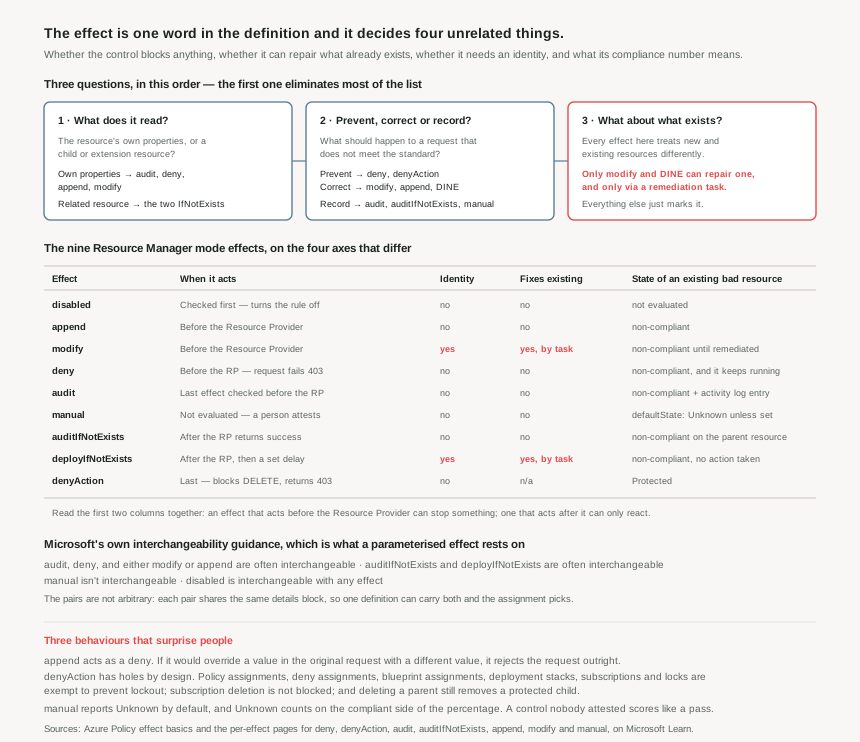
Question one: does the control read the resource, or something attached to it?
This is the question that decides which half of the list you are choosing from, and Microsoft states the distinction exactly: audit policies assess a resource's compliance based on its own properties, while auditIfNotExists policies assess a resource's compliance based on a child or extension resource's properties.
"Storage accounts must not allow public blob access" is a property of the storage account. It is knowable from the request itself, before anything is created, which is why it can be denied. "Virtual machines must have the antimalware extension" is not a property of the virtual machine — it is the presence of a separate resource that does not exist yet at request time. No amount of preference makes that deniable; the extension cannot be there before the VM is.
So the shape of the control dictates the family:
- Own properties →
audit,deny,append,modify. All evaluate before the Resource Provider, so all can act on the request in flight. - A related resource →
auditIfNotExists,deployIfNotExists. Both run after the Resource Provider returns success, because there is nothing to look at until then.
The IfNotExists pair shares a details block — type, name, existenceScope, existenceCondition, evaluationDelay — and that shared shape is why they are interchangeable with each other and with nothing else. One detail in that block deserves repeating from #16 because it applies to both: if existenceCondition is not specified, any related resource of that type satisfies the effect. A rule checking for diagnostic settings without an existence condition passes on a diagnostic setting that sends nothing anywhere.
There is a documented trap at the boundary. When the if condition's type and the details type are the same, name becomes required — and the documentation adds that an audit effect should be considered instead. If you find yourself writing an auditIfNotExists whose related resource is the resource, the answer to question one was "own properties" and the effect is wrong.
Question two: prevent, correct, or record?
Within the family, the choice is about what should happen to a request that does not meet the standard.
| Intent | Effect | What the caller experiences | What it cannot do |
|---|---|---|---|
| Prevent | deny |
The request fails with 403 (Forbidden) before reaching the Resource Provider. In the portal it appears as a deployment status prevented by the policy assignment. |
Touch anything that already exists. Existing matches are simply marked non-compliant — and keep running. |
denyAction |
A DELETE call fails with 403. The only supported action today is delete. |
Guard creation or update at all. It is a different verb from every other effect here. | |
| Correct | append |
Fields are added to the request. No identity needed. | Change existing resources, or disagree politely — see below. |
modify |
Properties or tags are added, updated or removed on the request; existing resources can be remediated later. | Work without a managed identity and granted roles. | |
deployIfNotExists |
Nothing at request time. A template deploys after the provider returns success, following the evaluation delay. | Block anything, ever. It reacts; it does not gate. | |
| Record | audit |
Nothing. A Microsoft.Authorization/policies/audit/action operation is added to the activity log and the resource is marked non-compliant. |
Prevent, correct, or attract attention on its own. |
auditIfNotExists |
Nothing. The resource that satisfied the if condition is the one marked non-compliant. |
Tell you which related resource was wrong — the parent carries the state. | |
manual |
Nothing. A person creates an attestation to set the state. | Be interchanged with any other effect, or report anything without human input. |
append is the one that behaves unlike its description. It adds fields to a request — and if it would override a value in the original request with a different value, it acts as a deny effect and rejects the request. So an append policy is a silent correction when the caller said nothing, and a hard block when the caller disagreed. That is two very different experiences from one definition, and it is why array aliases matter: with a non-[*] alias the effect appends the entire array, and if the array already exists a deny event occurs from the conflict, while the [*] form appends to a pre-existing array and creates one if absent.
Microsoft's guidance between the two correcting effects is unambiguous and worth quoting rather than paraphrasing: for tags, use modify rather than append, because modify provides more operation types and the ability to remediate existing resources — but append is recommended if you aren't able to create a managed identity, or modify doesn't yet support the alias for the resource property. That is the real decision boundary. append is the effect for a team that cannot get an identity, not the effect for a team that wants a lighter touch.
Question three: what happens to what already exists?
Every effect on this list treats new and existing resources differently, and the difference is not a footnote — it is most of the operational cost.
A deny policy assigned today does not remove yesterday's violations. Existing resources that match are marked non-compliant and continue running, indefinitely, with no mechanism in Azure Policy to do anything about them. An append policy makes no changes to resources that already exist; it marks them. A deployIfNotExists policy marks them non-compliant and explicitly takes no action.
This has a consequence that changes how a rollout should be sequenced. Choosing deny for a control does not reduce the backlog; it freezes it. The estate stops getting worse and stays exactly as wrong as it was. If the point of the control is to reach a compliant state rather than to stop the bleeding, deny is at best half the answer, and the other half is a modify or deployIfNotExists policy with an identity and a remediation task behind it.
The two effects with their own rules
denyAction protects deletion, and it has documented holes. It blocks DELETE calls, which makes it the tool for "this must not be deleted by accident" — and the exemptions are as important as the capability. Microsoft.Authorization/policyAssignments, denyAssignments, Microsoft.Blueprint/blueprintAssignments, Microsoft.Resources/deploymentStacks, Microsoft.Resources/subscriptions and Microsoft.Authorization/locks are all exempt, deliberately, to prevent lockout scenarios. Beyond that: policy does not block removal of resources during a subscription deletion, and it does not block removal of child and extension resources when the delete targets the parent. Protecting a diagnostic setting does not protect it from the deletion of the storage account it hangs off. For resource group deletion, only definitions whose cascadeBehaviors is set to deny block it — that is the default value, and it only applies in indexed mode.
manual is not a policy effect in the usual sense at all. It exists so a human can self-attest compliance for things Azure cannot see — a documented procedure, a signed agreement, a physical control. Its defaultState takes Unknown, Compliant or Non-compliant, defaulting to Unknown, and the state changes only when someone creates an attestation, which can carry metadata and links to evidence. It is what the regulatory compliance initiatives from #15 use for their customer-responsibility controls, and Microsoft's own best practice is to target the scope that defines the boundary of resources whose compliance needs attesting, rather than individual resources.
Its interaction with the compliance percentage is the thing to hold on to. Unknown is in the numerator, so a manual control that nobody has attested improves the score. Pair that with a defaultState of Non-compliant when the honest starting position is "not yet demonstrated", and the number starts telling the truth.
Why This Architecture Holds Up
Parameterise the effect — but only within a documented pair
Microsoft's own pattern is to expose the effect as a parameter with allowedValues, so one definition can be assigned in different postures at different scopes. That is the mechanism behind a staged rollout: assign as audit at the management group, watch the compliance report, reassign as deny once the noise is understood. It composes with the enforcementMode and resourceSelectors staging from #14, and it is the cheapest safety measure available.
The constraint is that the swap must stay inside a pair that shares a rule shape. The documented guidance: audit, deny, and either modify or append are often interchangeable; auditIfNotExists and deployIfNotExists are often interchangeable; manual is not interchangeable; disabled is interchangeable with anything. Offering audit and deployIfNotExists as alternatives in one parameter is not a stricter version of the same rule — the second needs a details block, a template, roleDefinitionIds and an identity that the first never required, and an assignment that picks it without them produces a policy that reports and cannot act.
Two habits follow. Always include disabled in the allowed values, because it is universally interchangeable and gives an operator a way to stop one member of an initiative without an override. And never parameterise across the two families, because the family was decided by question one and is a property of the control, not of the assignment.
The pairing that actually works: a gate and a repair
Most controls worth writing want two things — stop new violations and fix old ones — and no single effect does both. The durable pattern is a pair:
- A
deny(or anappend/modifythat corrects silently) to hold the line at request time. - A
modifyordeployIfNotExists, with an identity, to work through the existing estate by remediation task.
They belong in the same initiative, because they are one control, and they should share an enforcementMode journey: both in DoNotEnforce first, both enforcing once the remediation backlog is drained. Shipping only the first freezes the backlog. Shipping only the second means every new resource re-creates the work.
Effect choice decides who absorbs the cost
This is the part that rarely gets said in a design review. Each effect moves the work to a different team, at a different moment:
denyputs the cost on the deploying team, immediately, in the form of a failed deployment. That is the most effective placement — the person who can fix it is present and blocked — and it is whynonComplianceMessagesfrom #14 matters so much. A403with a GUID is the same control with the feedback removed.auditputs the cost on the platform team, later, as a list nobody asked for. It is the right choice when the standard is genuinely still being negotiated, and the wrong choice when it is not, because it converts a decision into a backlog.modifyanddeployIfNotExistsput the cost on the platform team once, up front, in identity and remediation design — and then on nobody. That is the most expensive to build and the cheapest to live with.manualputs the cost on a named person on a schedule, which is correct for controls Azure cannot observe and a fiction for anything it can.
Reading the effect list this way settles most arguments quickly. "Should this be audit or deny" is usually not a question about risk appetite; it is a question about whether the platform team is willing to be the ones who find out.
Key Architecture Decisions
The shape that works
| Situation | Effect | Why |
|---|---|---|
| A property of the resource, and the standard is settled | deny, with a nonComplianceMessage |
Fails the request at 403 before the Resource Provider, and puts the fix in front of the person who can make it. |
| A property with a safe default the caller rarely sets | modify |
Corrects silently at request time and can remediate the existing estate. Preferred over append for tags and wherever the alias is supported. |
| The same, but no managed identity is available | append |
Microsoft's stated fallback. Accept that it cannot remediate, and that it rejects any request that sets a different value. |
| A required companion resource — diagnostics, extensions, backup | deployIfNotExists |
The only effect that can create the missing thing. Needs an identity, roles and a remediation plan. |
| The same, but deploying it automatically is not acceptable yet | auditIfNotExists |
Same rule shape, same details block, no identity. The documented interchange, so the definition can carry both behind a parameter. |
| Critical resources that must survive an accident | denyAction with cascadeBehaviors considered |
The only effect that guards DELETE. Know its exemptions: subscription deletion, parent deletion and the six lockout-prevention types are not covered. |
| A control Azure cannot observe | manual, with defaultState set deliberately |
Leaving it at Unknown flatters the compliance percentage. Target the scope, not each resource, and attach evidence to the attestation. |
| Any control still being negotiated | Parameterised effect, assigned as audit |
Staging belongs in the assignment. Keep the swap inside a documented interchangeable pair, and include disabled in the allowed values. |
| Any control that must also fix the past | A pair: gate plus repair, in one initiative | No effect both blocks new violations and repairs old ones. A deny alone freezes the backlog at its current size. |
Closing Thought
The effects list reads like a menu of severities, and that reading is the source of most of the trouble. It is really three separate questions wearing one word: what does this rule look at, what should happen to a request that fails it, and who repairs the resources that failed it before the rule existed. Answer those in order and the choice is usually forced — there is rarely more than one effect left standing.
What the list will not do is let you avoid the decision. An audit chosen because the standard is unsettled is a reasonable engineering position. An audit chosen because deny felt confrontational is a decision to let the estate drift while producing a monthly report about it, and the report is the part that makes it feel handled.
A useful habit, borrowed from the way changes get reviewed elsewhere: for every policy definition, write down which team gets interrupted by it and when. If the answer is "nobody, ever", the effect is wrong regardless of how the rule is written.
#18 leaves policy for the other half of Azure governance: RBAC. Role definitions, role assignments and scope — a system that looks structurally similar to what these four posts described, inherits down the same hierarchy, and answers a completely different question about who may act rather than what may exist.
Official Azure Reference
- Azure Policy definitions effect basics
- Azure Policy definitions deny effect
- Azure Policy definitions denyAction effect
- Azure Policy definitions audit effect
- Azure Policy definitions auditIfNotExists effect
- Azure Policy definitions deployIfNotExists effect
- Azure Policy definitions append effect
- Azure Policy definitions modify effect
- Azure Policy definitions manual effect
- Azure Policy compliance states
Comments