Business Challenge
Posts #41a through #42 built up the Conditional Access machinery: how a policy is evaluated, what shapes the session, which signals narrow it. One grant control kept appearing in every table and never got examined — Require multifactor authentication. This post is about what that checkbox actually accepts, and about the control that replaced it for anyone who cares about the answer.
The problem it solves is a gap between a sentence and a mechanism. "We require MFA" is a sentence every organisation says. Underneath it, Entra will accept a password plus an SMS code, a password plus a push notification, a Temporary Access Pass, or a FIDO2 security key — and the distance between the first and the last of those is most of the modern phishing threat model.
Microsoft is blunt about the gap. Traditional MFA with SMS or authenticator apps significantly improves security over password-only systems, but these MFA options are prone to remote phishing attacks, in which attackers use social engineering and AI-driven tools to steal identity credentials — like passwords or one-time codes — without physical access to a user's device. An SMS code is a secret a user can be talked into reading aloud. A security key is not.
Authentication strength is the control that lets a policy say which it means. Its table also functions as an audit: if a combination is not in the column, your policy has never required it.
The three built-in strengths are not a security ladder bolted on top of MFA. The bottom rung is MFA: MFA strength: the same set of combinations that can be used to satisfy the Require multifactor authentication setting.
So the familiar checkbox was always an authentication strength. It just never showed you its contents.
Architecture
Where each method can be used at all
Before strengths, a more basic distinction: not every method can serve in every position. A method is available for primary authentication, secondary authentication, SSPR, or some combination — and the assignments are not intuitive.
| Method | Primary | Secondary (MFA) | SSPR / recovery |
|---|---|---|---|
| Password | Yes | No | No |
| Passkey (FIDO2), synced passkey, passkey in Authenticator | Yes | MFA | No |
| Windows Hello for Business | Yes | MFA1 | No |
| Certificate-based authentication | Yes | MFA | No |
| Temporary Access Pass | Yes | MFA | No |
| SMS sign-in | Yes | MFA | SSPR |
| QR code | Yes | No | No |
| Microsoft Authenticator push notifications | No | MFA | SSPR |
| Voice call | No | MFA | SSPR |
| Software and hardware OATH tokens | No | MFA | SSPR |
| Verified ID | No | No | Account recovery only |
1 Windows Hello for Business can serve as a step-up MFA credential if a user is enabled for passkey (FIDO2) and has a passkey registered — so its second-factor role is conditional on something else being in place.
Two rows are worth pausing on. Password is primary only; it cannot be a second factor, which is obvious once stated and quietly rules out a category of bad design. And Verified ID is not an authentication method at all: it can't be used to satisfy authentication requirements like sign-in, MFA, or SSPR, and exists for account recovery when all authentication methods are lost. It is worth knowing that exists — identity-verification partners covering 192 countries/regions, with Face Check matching a user's real-time selfie to the photo from their identity document and sharing only the match result — because the alternative to it is a help desk that can be socially engineered.
The three built-in strengths, and what each accepts
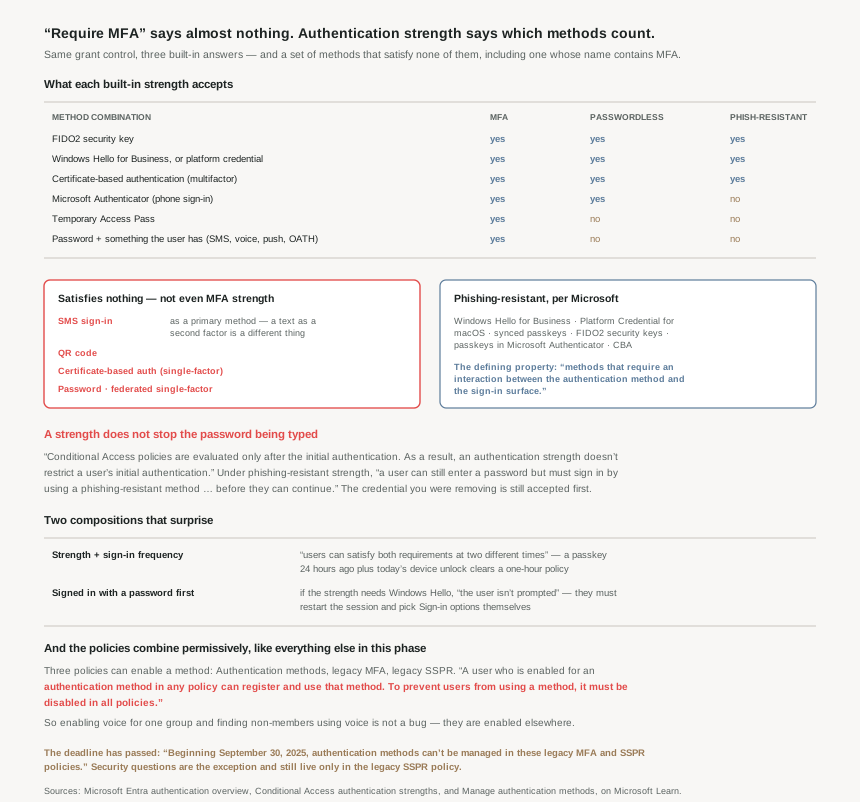
| Combination | MFA | Passwordless | Phishing-resistant |
|---|---|---|---|
| FIDO2 security key | ✓ | ✓ | ✓ |
| Windows Hello for Business or platform credential | ✓ | ✓ | ✓ |
| Certificate-based authentication (multifactor) | ✓ | ✓ | ✓ |
| Microsoft Authenticator (phone sign-in) | ✓ | ✓ | |
| Temporary Access Pass | ✓ | ||
| Password + something the user has | ✓ | ||
| Federated single-factor + something the user has | ✓ | ||
| Federated multifactor | ✓ | ||
| Certificate-based authentication (single-factor) | |||
| SMS sign-in | |||
| Password | |||
| Federated single-factor | |||
| QR code |
Something the user has is defined precisely, and the definition is where SMS actually lives: text message, voice, push notification, software OATH token, or hardware OATH token. So a password plus a text message satisfies MFA strength. SMS sign-in does not — that is SMS as the primary method, replacing the password rather than supplementing it, and it satisfies nothing.
The defining property of the top tier is stated in one clause and it is the useful definition of phishing resistance: methods that require an interaction between the authentication method and the sign-in surface. A code can be read out over the phone to an attacker. A credential cryptographically bound to the origin it is signing into cannot be relayed, because the relay is a different origin.
Why This Architecture Holds Up
Because a strength does not stop the password being typed
This is the limitation to internalise before designing anything around phishing resistance, and it is the same structural fact #41a opened with:
Conditional Access policies are evaluated only after the initial authentication. As a result, an authentication strength doesn't restrict a user's initial authentication.
The worked consequence is spelled out: under the built-in Phishing-resistant MFA strength, a user can still enter a password but must sign in by using a phishing-resistant method, such as a FIDO2 security key, before they can continue.
So a phishing-resistant policy does not remove the phishable credential from the flow. The password is still accepted, still typed into whatever page the user is looking at, and still harvestable. What the strength guarantees is that harvesting it is not sufficient — which is a real and large improvement, and is not the same as the credential being gone. Removing the password from the flow is the Authentication methods policy's job, not Conditional Access's, and it is why the two features exist side by side.
Because the two controls cannot be combined, and one is a subset of the other
You can't use the Require multifactor authentication and Require authentication strength grant controls together in the same Conditional Access policy. The reason given is the clean one: the built-in Multifactor authentication authentication strength is equivalent to the Require multifactor authentication grant control.
That makes migration simple to reason about. Swapping a policy from Require MFA to MFA strength changes nothing at all — identical combinations. The change of behaviour comes only when you move up a tier. A tenant can therefore convert every MFA policy to strengths as a no-op, and then tighten individual ones on their own schedule, which is a much safer sequence than editing behaviour and mechanism at once.
Built-in strengths also move under you, deliberately: they are always available and can't be modified, and Microsoft updates built-in authentication strengths when new methods become available. A policy set to Phishing-resistant MFA strength picks up new phishing-resistant methods without an edit. A custom strength does not — that is the trade for pinning an exact list.
Because two compositions produce access you did not intend
The first is documented as a known issue and deserves reading twice, because it combines this post's control with #41b's:
When a resource requires an authentication strength and a sign-in frequency, users can satisfy both requirements at two different times.
The example: a resource requires a passkey and a one-hour sign-in frequency. The user signed in with a passkey 24 hours ago. Today they unlock their Windows device with Windows Hello, and get in — yesterday's sign-in satisfies the authentication strength requirement, and today's device unlock satisfies the sign-in frequency requirement.
Each control is doing exactly what it says. Composed, they certify something neither one asserts: that the user authenticated with a passkey within the last hour. Nobody did. This is the same shape as #41b's finding that resilience defaults extend sessions past sign-in frequency — two independently reasonable controls whose conjunction is weaker than either reading suggests.
The second is a user-experience dead end with no error message. If a user signs in with a password as primary and the strength requires Windows Hello for Business, the user isn't prompted to sign in with Windows Hello for Business. The user needs to restart the session, select Sign-in options, and select a method that the authentication strength requires. The platform knows what is required, knows it was not supplied, and cannot ask for it — the user has to know to start again. That is a help-desk call unless it is anticipated in the rollout comms.
Because the method policies combine permissively, and that is now the third time
Three policies can enable a method: the Authentication methods policy, the legacy MFA policy, and the legacy SSPR policy. They do not synchronise, and the combining rule is stated plainly:
Microsoft Entra ID respects the settings in all of the policies so a user who is enabled for an authentication method in any policy can register and use that method. To prevent users from using a method, it must be disabled in all policies.
The documented symptom is worth memorising because it looks exactly like a bug: enable Voice calls for one group, and you find that even users who aren't group members can sign-in with a voice call. They are enabled elsewhere — via Mobile phone in legacy SSPR, which enables both options, or Call to phone in legacy MFA.
That is default-allow again, for the third time in this phase: #41a's access tokens issued when no control triggers, #42's device filter that does not apply to an unregistered device, and now a method that stays enabled unless it is turned off in three places. Whatever the underlying reason, the operational lesson is consistent — in Entra, verifying that something is switched on is easy and verifying that it is switched off requires enumerating every surface that could switch it on.
Because the migration has a deadline that has already passed
In March 2023, we announced the deprecation of managing authentication methods in the legacy multifactor authentication and self-service password reset (SSPR) policies. Beginning September 30, 2025, authentication methods can't be managed in these legacy MFA and SSPR policies.
That date is a year behind us. The migration has three states — Pre-migration (methods policy for authentication only, legacy respected), Migration in Progress (methods policy for both, legacy still respected), and Migration Complete (only the Authentication methods policy is used … legacy policy settings are ignored). Only the last one actually collapses the three-policy problem above into one.
The transition is deliberately one-way at the front: a tenant that started in Migration in Progress won't be allowed to move to Pre-migration. And one method does not come along — security questions can only be enabled today by using the legacy SSPR policy, so a tenant using them keeps a legacy policy alive on purpose. Two other legacy controls also survive completion: the Number of methods required to reset setting and the SSPR administrator policy.
So "Migration Complete" does not mean the legacy policies are gone. It means they are ignored for method enablement, while still holding two settings that matter. Worth checking rather than assuming, in any tenant old enough to have both.
Key Architecture Decisions
| Situation | Decision | Why |
|---|---|---|
| A policy says "Require MFA" | Read the MFA strength table to see what it accepts | The two are equivalent; the table is the only place the contents are visible. |
| Converting MFA policies to strengths | Swap to MFA strength first as a no-op, tighten later | Identical combinations, so behaviour cannot change on the swap. |
| Combining both grant controls | Not possible — pick one | They are unsupported together for the same reason. |
| Claiming a resource is phishing-resistant | Say the strength is enforced, not that the password is gone | A strength doesn't restrict a user's initial authentication. |
| Relying on SMS sign-in as an MFA method | Don't — it satisfies nothing | Only password + something the user has counts; SMS sign-in is a primary method. |
| Wanting new phishing-resistant methods to apply automatically | Use the built-in strength, not a custom one | Microsoft updates built-in authentication strengths when new methods become available. |
| Requiring a strength plus sign-in frequency | Know they can be satisfied at different times | A 24-hour-old passkey plus today's unlock clears a one-hour policy. |
| Rolling out a Windows Hello strength | Tell users to restart and use Sign-in options | Signing in with a password first produces no prompt and no error. |
| Turning a method off | Disable it in all three policies | Enabled in any policy means usable. |
| Non-members using a method you scoped to a group | Check legacy SSPR Mobile phone and legacy MFA | Documented behaviour, not a defect. |
| Still on a legacy policy for methods | Migrate — the date passed on 30 September 2025 | Methods can't be managed there any more. |
| Using security questions | Keep the legacy SSPR policy enabled | They can only be enabled today by using the legacy SSPR policy. |
| Authentication methods policy won't save | Consolidate targeted groups | It fails past a policy size of 20 KB. |
| Users not seeing methods to register | Check they are on converged registration | Only it is aware of the Authentication methods policy. |
Closing Thought
The useful thing about authentication strength is not that it adds security. It is that it makes an existing claim legible. Every tenant with a Require MFA policy has been enforcing a specific list of combinations all along; the list was simply never shown. Opening the strength table is less like configuring a feature and more like reading a contract you had already signed.
What it reveals is usually a spread. The same policy that a compliance document describes in one phrase is accepting a hardware key from one user and a text message from another, and those two sign-ins are not close to equivalent against an attacker who is on a phone call with the second user right now.
The honest limit is worth carrying too. A phishing-resistant strength does not remove the password from the sign-in; it removes the password's sufficiency. The credential is still typed, still harvestable, still worth something to somebody assembling a list. Getting rid of it is a different project, in a different blade, and this series reaches it next.
And the pattern that has now appeared three posts running: in this platform, on is easy to verify and off is not. A method is disabled only when it is disabled everywhere. A policy restricts only when something explicitly blocks. A filter applies only when the object it queries exists. None of those is a bug, and all of them reward checking rather than assuming.
#44 takes the passwordless methods on their own terms: FIDO2 and passkeys, Windows Hello for Business, and Microsoft Authenticator — what each one actually binds to, and what it takes to remove the password rather than merely outrank it.
Comments