Business Challenge
Post #43 ended on a limitation worth repeating: a phishing-resistant authentication strength does not remove the password from the sign-in. It removes the password's sufficiency. The credential is still typed, still harvestable, still worth something to whoever is assembling a list. Getting rid of it is a different project, and this is that project.
The threat being designed against is stated plainly, and it is not a hypothetical: remote phishing attacks are on the rise. These attacks aim to steal or relay identity proofs — such as passwords, SMS codes, or email one-time passcodes — without physical access to the user's device. And the reason it is getting worse rather than better: with AI-driven attack toolkits, these threats are becoming more sophisticated and scalable.
Every method in this post answers that with the same mechanism. Instead of a shared secret that both sides know — which means both sides can leak it — there is an asymmetric key pair where a private key is stored on your device and public key is stored with the app or the website that you sign into. Nothing the server holds is worth stealing. Nothing the user can be talked into saying out loud is worth hearing.
That much is standard. The architecture question is which package to deploy, and the honest answer depends on a trade Microsoft states in one sentence and most summaries skip entirely.
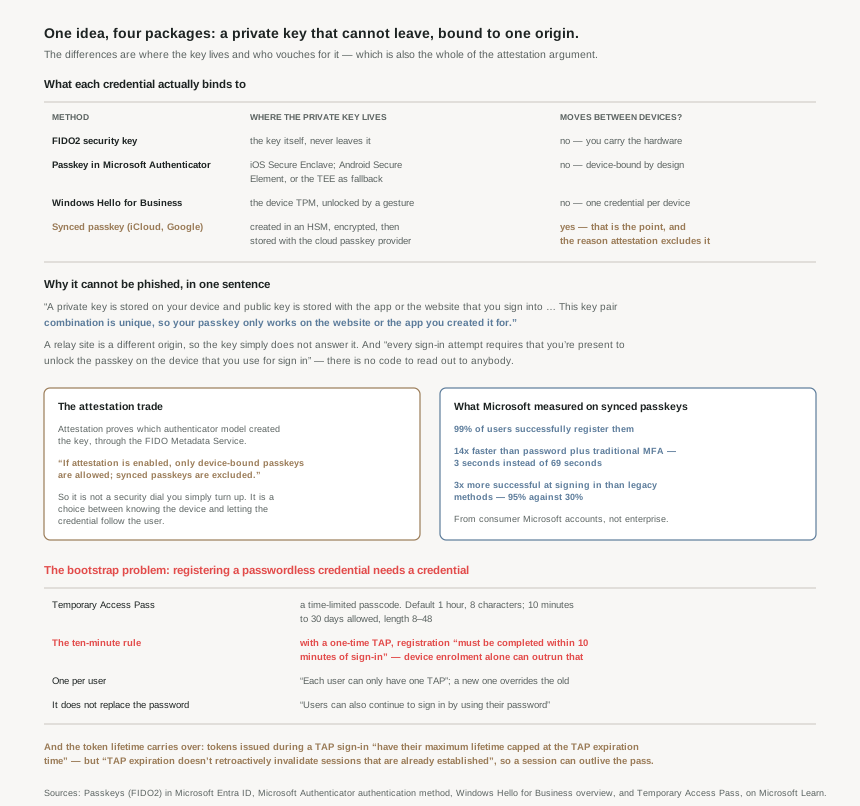
If attestation is enabled, only device-bound passkeys are allowed; synced passkeys are excluded.
Attestation proves which authenticator model created a key. Syncing means the key exists in more than one place by design. You cannot have both, and choosing between them is choosing between knowing the device and letting the credential follow the user.
Architecture
Why this cannot be phished
Two properties do the work, and they are worth separating because they defeat different attacks.
Origin binding. This key pair combination is unique, so your passkey only works on the website or the app you created it for. An attacker's relay site is a different origin, so the authenticator does not recognise it and does not respond. The documentation gives this its formal name: verifier impersonation resistance, which ensures an authenticator only releases secrets to the Relying Party (RP) the passkey was registered with and not an attacker pretending to be that RP.
Local user presence. Every sign-in attempt requires that you're present to unlock the passkey on the device that you use for sign in. Someone can't trick you to sign in on another device that they control. There is no code to read out, no notification to approve while distracted.
Mechanically, the exchange is short: Entra sends a challenge (nonce) to the authenticator, the authenticator locates the key pair using the hashed RP ID and credential ID, the user supplies a gesture to unlock the private key, the authenticator signs, and Entra verifies the signature using the public key and issues a token. Standards throughout: WebAuthn for browsers and CTAP for authenticator communication.
Where the key actually lives, per method
| Method | Key storage | Leaves the device? |
|---|---|---|
| FIDO2 security key | The key itself | No — you carry the hardware |
| Passkey in Microsoft Authenticator | The Secure Enclave on iOS; on Android the Secure Element on devices that support it, or fall back to the Trusted Execution Environment | No — device-bound to ensure that they never leave the device they were created on |
| Windows Hello for Business | The device TPM, unlocked by gesture | No — one credential per device |
| Synced passkey | Created by the hardware security module (HSM) and encrypted on the local device, then synced and stored in the cloud passkey provider | Yes — that is the feature |
Windows Hello for Business is two factors in one gesture
The thing people get wrong about Windows Hello is treating the PIN as a weaker password. It is not the same kind of object. Windows Hello for Business incorporates two of these factors: something you have (the user's private key protected by the device's security module) and something you know (your PIN).
The PIN's safety comes from being local rather than from being complex: the use of a PIN doesn't compromise security, since Windows Hello has built-in brute force protection, and the PIN never leaves the device. A four-digit PIN that cannot be tried remotely and locks out after a few attempts is a harder target than a twelve-character password that can be sprayed from anywhere — which is exactly what #42's password spray detection was about.
And the server side has nothing to lose: there's no symmetric secret (password) which can be stolen from a server or phished from a user and used remotely, so it prevents server breaches and replay attacks because the credentials are asymmetric and generated within isolated environments of TPMs. Biometrics stay local too — the biometric data doesn't roam and is never sent to external devices or servers, so there's no single collection point an attacker can compromise to steal biometric data.
Why This Architecture Holds Up
Because attestation and syncing are mutually exclusive, and both are defensible
Attestation verifies the authenticity of the passkey provider or device during registration and provides cryptographically verifiable device identity through FIDO Metadata Service (MDS). Turn it on and you know the model of hardware holding every credential in your tenant. Turn it on and, necessarily, synced passkeys are excluded — because a key that exists in Apple's or Google's cloud cannot attest to a single device.
The documentation is careful not to call the synced option inferior. It states the gap precisely — unattested passkeys, including synced passkeys and unattested device-bound passkeys, don't provide device provenance — and then makes a case for them anyway, with numbers from consumer scale:
- 99% of users successfully register synced passkeys
- 14x faster compared to password and a traditional MFA combination: 3 seconds instead of 69 seconds — though the two times quoted divide to 23, not 14, so one of the three figures is doing something the page does not explain
- 3x more successful signing-in with synced passkey than legacy authentication methods (95% vs 30%)
That 30% figure deserves a second look. It says legacy MFA sign-ins succeed less than a third of the time at consumer scale. A control that fails seven attempts in ten is not producing the security its name implies — it is producing abandonment, support calls, and pressure to add exceptions. The strongest argument for passwordless in that list is not the security property. It is that the thing actually works.
The recommendation splits on population: FIDO2 security keys are recommended for highly regulated industries or users with elevated privileges, while for most users — those outside highly regulated environments or without access to sensitive systems — synced passkeys offer a convenient, low-cost alternative to traditional MFA. And the cost of the strict option is named honestly: keys can increase costs for equipment, training, and helpdesk support — especially when users lose their physical keys and need account recovery.
Because the bootstrap problem is the hard part, not the cryptography
To register a passwordless credential you must already be authenticated. If the whole point is that the user has no password — a new joiner, a lost phone, a replaced laptop — something has to break the circle. That something is the Temporary Access Pass: a time-limited passcode that can be configured for single use or multiple sign-ins.
| Setting | Default | Allowed |
|---|---|---|
| Minimum lifetime | 1 hour | 10 – 43,200 minutes (30 days) |
| Maximum lifetime | 8 hours | 10 – 43,200 minutes (30 days) |
| Default lifetime | 1 hour | 10 – 43,200 minutes (30 days) |
| One-time use | False | True / False |
| Length | 8 | 8 – 48 characters |
And here is the operational trap, which is a timer nobody expects: when using a one-time TAP to register a passwordless method such as a FIDO2 security key or phone sign-in, the user must complete the registration within 10 minutes of sign-in.
Ten minutes is not long for a new laptop. The documentation spells out the collision: if the overall device enrolment process takes longer than 10 minutes, users need to enter a second single-use TAP. So a one-time-use policy — which sounds like the obviously safer setting — means issuing two passes for a single onboarding, or a user stranded partway through setup with an expired code and nobody at the desk yet. A multi-use pass avoids it, and the trade is stated rather than hidden: monitor TAP usage to ensure it's not used more times than expected during its validity period.
One more circularity that catches people: on a device that is already joined, users must first authenticate with another method such as a password, smartcard, or FIDO2 key, before using TAP to set up Windows Hello for Business. The pass unblocks first-time setup, not every later recovery.
Users can also continue to sign in by using their password; a TAP doesn't replace a user's password.
Issuing a Temporary Access Pass does not disable anything. It adds a second way in for its lifetime. Which means the phishable credential this whole post is about removing is still there throughout the rollout — and removing it is a separate act in the Authentication methods policy from #43.
Because these credentials have dependencies outside your tenant
Passwordless is usually pitched as removing dependencies. It moves several of them instead, and the new ones are worth knowing because they fail in ways a password never did.
Attestation depends on Apple and Google being up. Registering a passkey in Authenticator verifies that the legitimate Microsoft Authenticator app created the passkey by using Apple and Google services. So: if Apple and Google services are down, Authenticator attestation blocks registration that requires attestation until services are restored, and even short of an outage, heavy service usage can make passkey registration fail. This is the same shape as #42's finding that GPS-based location policies deny access when the Play Integrity API is unavailable — a third party's availability becomes your onboarding's availability.
Push notifications depend on the network you are in. In China, the Notification through mobile app method on Android devices doesn't work because as Google play services (including push notifications) are blocked in the region. However, iOS notifications do work. That is a per-country, per-platform hole in a method most tenants treat as universal.
And a few flat incompatibilities. Windows Hello for Business doesn't work with Microsoft Entra Domain Services. A TAP can't be used with the Network Policy Server (NPS) extension and Active Directory Federation Services (AD FS) adapter, and cannot be added to an external guest at all — Temporary Access Pass cannot be added to an external guest user. OATH codes from Authenticator aren't supported for certificate-based authentication.
Because a TAP session can outlive the TAP
This one belongs beside #40 and #41b, because it is the same token-lifetime shape in a new place. Tokens issued during a TAP sign-in have their maximum lifetime capped at the TAP expiration time at the moment of issuance — sensible. Then: however, TAP expiration doesn't retroactively invalidate sessions that are already established.
So a one-hour pass can produce a session that persists well past the hour, governed by Conditional Access session controls rather than by the pass. The documented remedy is the one #41b already established: configure sign-in frequency. A temporary credential does not automatically produce a temporary session, and the word "temporary" in the feature name is about the passcode, not about the access it grants.
One useful side effect worth knowing: for federated domains, a TAP is preferred over federation, so a user with a TAP completes the authentication in Microsoft Entra ID and isn't redirected to the federated Identity Provider. In a hybrid tenant that is how you onboard someone whose federated identity provider is unavailable.
Key Architecture Decisions
| Situation | Decision | Why |
|---|---|---|
| Privileged users, regulated industry | FIDO2 security keys or Authenticator passkeys | Recommended for users with elevated privileges; both are device-bound. |
| General population | Synced passkeys | A convenient, low-cost alternative to traditional MFA, with 99% registration success. |
| Wanting attestation and synced passkeys | Not possible — pick per population | Enabling attestation excludes synced passkeys entirely. |
| Enforcing one-time TAPs | Plan for two passes per onboarding | Registration must complete within 10 minutes of sign-in; enrolment often takes longer. |
| Onboarding a new joiner | Consider a multi-use TAP | One pass covers enrolment and credential registration; monitor usage. |
| Assuming a TAP removes the password | It doesn't | Users can also continue to sign in by using their password. |
| Recovering on an already-joined device | Expect another method first | Password, smartcard or FIDO2 key is required before TAP sets up Windows Hello. |
| Limiting access after a TAP sign-in | Set sign-in frequency | Pass expiry doesn't retroactively invalidate sessions that are already established. |
| Onboarding external guests | TAP is unavailable | It can be added to an internal guest only. |
| Android users in China | Provide an alternative method | Push notifications are blocked; iOS still works. |
| Attestation-required rollout | Expect registration failures under load | It depends on Apple and Google services being available. |
| Running Entra Domain Services | Windows Hello for Business is out | Explicitly unsupported. |
| Users worried a PIN is weaker | Explain it is local and rate-limited | Brute force protection, and the PIN never leaves the device. |
| Registering many authenticators | Five is the ceiling | Up to five OATH hardware tokens or authenticator applications at any time. |
Closing Thought
The cryptography here is settled and mostly uninteresting — a signed challenge, an origin check, a key that does not move. What remains genuinely hard is everything around it, and all of it is about bootstrapping and recovery.
A password has one property no key ceremony can match: it can be conveyed over a phone call to somebody who has lost everything. Passwordless has to replace that, and the Temporary Access Pass is the replacement — a passcode that is deliberately temporary, deliberately scoped, and carries a ten-minute timer that turns out to be shorter than setting up a laptop.
Which is why the interesting number in this post is not a key length. It is 30%: the share of legacy MFA sign-ins that succeed at consumer scale. A method people cannot complete is not a strong control, it is an unreliable one, and the security benefit of passwordless arrives partly through that door. Users who can sign in do not ask for exceptions.
The pattern from #43 holds here too, in a new form. Adding a passwordless credential does not take the password away — not the TAP, not the passkey, not Windows Hello. Every one of them is an additional way in until somebody goes to the Authentication methods policy and disables the old one in all three places. The cryptography is the easy half.
#45 leaves authentication for authorisation timing: Privileged Identity Management, and the difference between holding a role and being eligible for one.
Comments