Business Challenge
This series has spent eleven posts on authentication — who you are, how strongly you proved it, which methods count. This post moves to a different axis: not whether someone holds a privileged role, but when, and for how long.
The problem is stated without euphemism. Organisations want to minimize the number of people who have access to secure information or resources, because that reduces the chance of a malicious actor getting access or an authorized user inadvertently impacting a sensitive resource. Two risks, one of which is an accident. Both scale with the number of people holding the role at any given moment.
Last week's Weekly Intelligence made the first risk concrete: Storm-3168 deleted a hundred storage accounts in seven minutes using permissions that had been granted long before and were sitting unused. Nothing was escalated. The standing assignment was the vulnerability.
PIM's answer is to make the assignment conditional on an act. And the first thing to understand is what that act does not change.
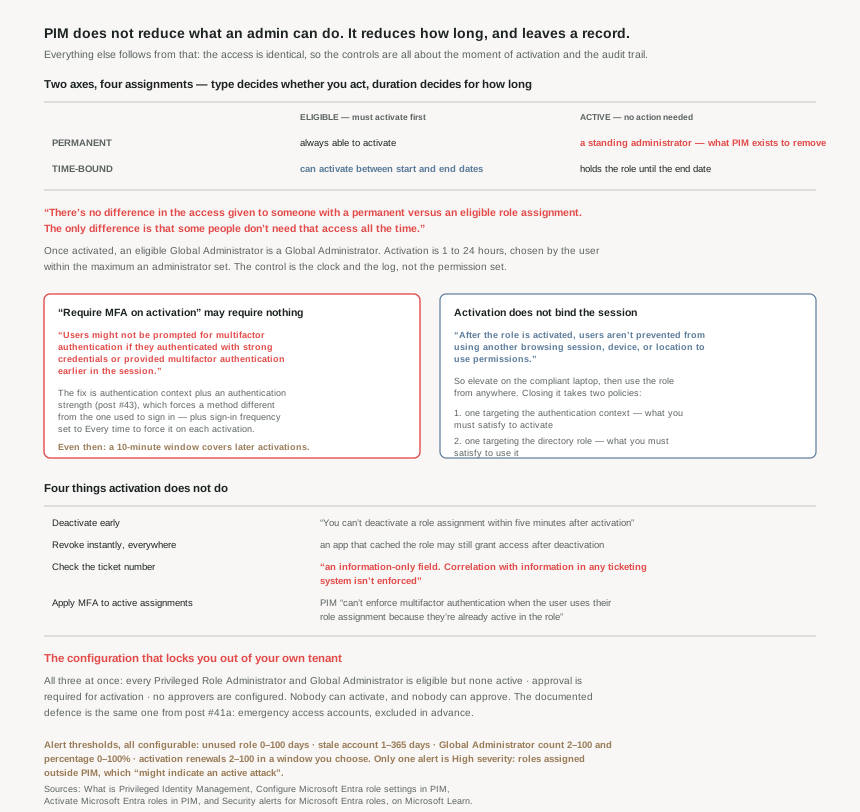
There's no difference in the access given to someone with a permanent versus an eligible role assignment. The only difference is that some people don't need that access all the time.
An activated Global Administrator is a Global Administrator. PIM is not least privilege — that is a different control, covered in #19 and #20. PIM is least duration, plus a record of who asked and why.
Architecture
Two axes, not one
People conflate "eligible" with "temporary". They are separate axes. Type decides whether you must act; duration decides how long the assignment itself lasts.
| Eligible — must activate | Active — no action needed | |
|---|---|---|
| Permanent | A user is always eligible to activate the role | A user can always use the role without performing any actions — the standing administrator |
| Time-bound | Eligible to activate the role only within start and end dates | Can use the role only within start and end dates |
Permanent eligible is the workhorse and the one most tenants should default to: the person can always elevate, but never holds the role while idle. Time-bound active is the right shape for a contractor or a migration — they need it continuously for six weeks, and then the assignment simply stops existing. Permanent active is what PIM exists to eliminate, and should survive only on emergency access accounts.
Activation is the process of performing one or more actions to use a role that a user is eligible for, where those actions might include performing a multifactor authentication (MFA) check, providing a business justification, or requesting approval from designated approvers. The user picks a duration within a ceiling the administrator sets, and that ceiling can be from one to 24 hours.
Worth noting what can hold an assignment: roles are assigned to users, groups, service principals, or managed identities. So the workload identities from #35 to #37 are in scope for just-in-time elevation too — which, after Storm-3168, is a thought worth having.
Expiry is not deletion — it is a request queue
Time-bound assignments do not simply lapse into a support ticket. When a role assignment nears expiration, the user can use Privileged Identity Management to request an extension, and when a role assignment expires, the user can use Privileged Identity Management to request a renewal. Both require an approval from a Global Administrator or Privileged Role Administrator.
That is a better design than it looks. It means an administrator setting an end date is not committing to remembering it — the system produces the review at the right moment, initiated by the person who actually knows whether they still need it.
Why This Architecture Holds Up
Because "require MFA on activation" frequently requires nothing
This is the most important sentence in the settings documentation, and it undoes the assumption most people make when they tick the box:
Users might not be prompted for multifactor authentication if they authenticated with strong credentials or provided multifactor authentication earlier in the session.
So a user who signed in with MFA at 09:00 can elevate to Global Administrator at 16:00 with no challenge at all. The setting is satisfied by a claim already in the token — exactly the behaviour #43 documented for report-only's Success result, where an MFA requirement is satisfied by an MFA claim already present in the token. It is not a fresh proof of presence. It is a check that one happened at some point.
The documentation is explicit about the remedy, and it composes three features from the last three posts: if your goal is to ensure that users must provide authentication during activation, you can use On activation, require Microsoft Entra Conditional Access authentication context together with Authentication Strengths. Those require users to authenticate during activation by using methods different from the one they used to sign in to the machine — the worked example being a user who signs in with Windows Hello and must then use passwordless Authenticator to elevate.
And to make it happen every time rather than once: configure the Conditional Access policy targeting your authentication context with sign-in frequency set to Every time under Session controls. Which is #41b's control, with the caveat #41b established — "every time" is floored at five minutes of clock skew.
Even then there is a documented gap: when a user reauthenticates for one role activation, a 10-minute window applies. If the user activates another eligible role within this window, they aren't prompted to reauthenticate again. And that window is not scoped to one kind of role — it applies across Microsoft Entra roles, Azure resource roles, and PIM for Groups. One strong authentication, ten minutes, every eligible role you hold.
Because the backup protection has a hole shaped like report-only
Microsoft anticipated the obvious misconfiguration — pointing PIM at an authentication context before creating the policy behind it — and built a fallback: if there are no Conditional Access policies in the tenant that target authentication context configured in PIM settings, during PIM role activation, the multifactor authentication feature in Microsoft Entra ID is required. Sensible. Fail closed to at least MFA.
Then the next sentence: this backup protection mechanism isn't triggered if the Conditional Access policy is turned off, is in report-only mode, or has an eligible user excluded from the policy.
Read those two together. No policy at all gives you MFA. A policy that is disabled, in report-only, or excludes the user gives you nothing. The safety net catches the case where somebody forgot, and not the case where somebody turned it off — and a policy sitting in report-only looks, from the PIM settings blade, exactly like a policy that is working. That is #41b's finding about report-only being indistinguishable from "not applied", arriving in a place where the consequence is unchallenged elevation to Global Administrator.
Because activation does not bind the session it was performed in
The On activation, require Microsoft Entra Conditional Access authentication context setting defines the authentication context requirements that users must satisfy when they activate the role. After the role is activated, users aren't prevented from using another browsing session, device, or location to use permissions.
The worked example is the one to carry into a design review: users might use an Intune-compliant device to activate the role. Then after the role is activated, they might sign in to the same user account from another device that isn't Intune compliant and use the previously activated role from there.
Elevate on the managed laptop, then use Global Administrator from the personal one. Closing that needs two Conditional Access policies, not one: the first targets authentication context and specifies the requirements that users must meet to activate the role; the second targets directory roles and specifies the requirements that users must meet to sign in with the directory role activated. Most tenants build the first and assume it covers the second.
Because the people who can edit Conditional Access can edit your elevation requirements
A consequence of putting PIM's activation requirements inside Conditional Access, stated plainly and easy to miss:
Security principals with permissions to manage Conditional Access policies, such as Conditional Access Administrators or Security Administrators, can change requirements, remove them, or block eligible users from activating the role. Security principals that can manage the Conditional Access policies should be considered highly privileged and protected accordingly.
A Conditional Access Administrator does not hold Global Administrator. They can, however, weaken the gate that stands in front of it — or close it entirely and deny every activation in the tenant. That role belongs in the same tier as the roles it guards, which is not where most role inventories put it.
Because there is a configuration that locks everyone out, and it is a reasonable-looking one
Three settings, each individually recommended, that together end the tenant. You are locked out if:
- All Privileged Role Administrators/Global Administrators have eligible assignments, but none are active — the pure just-in-time ideal.
- Approval is required for activation — the recommended control.
- No approvers are configured.
Nobody holds the role, nobody can activate without approval, and nobody exists to approve. The documented defences are two: configuring emergency access accounts — the same break-glass accounts #41a insisted on excluding from every Conditional Access policy — and configuring specific approvers. On that second point the guidance is quantified: we recommend that you select at least two approvers, and usefully, the approver doesn't have to have any roles, so approval can sit with someone who holds no privilege at all.
There is one structural guard already in place: PIM prevents removal of the last active Global Administrator and Privileged Role Administrator role assignments. It will not let you delete your way into the hole. It will let you configure your way into it.
Because deactivation is not revocation
PIM's own timing is fast: on activation it creates active assignment (assigns user to a role) within seconds, and on deactivation it removes the active assignment within seconds as well. The directory is current almost immediately.
What consumes the directory may not be. If application previously cached the fact that user has a role — when role is deactivated, user may still get access, and the remedy offered is the weak one: for some applications, signing out and signing back in may help.
This is #40's lesson in a new costume. The role assignment is a fact in the directory; the access is a claim in a token that an application already holds. Deactivating the role does not reach into that token. So the real end of an elevation is the same lever as everywhere else in this series — token revocation — and the PIM timer is an upper bound on the assignment, not on the access.
Two smaller mechanics worth knowing before designing a runbook around it: you can't deactivate a role assignment within five minutes after activation, so there is a floor on how quickly a mistaken elevation can be undone from the portal. And requiring ticket information on activation is decorative — this option is an information-only field. Correlation with information in any ticketing system isn't enforced. It captures a string. It does not check it.
Because the alerts are the part that actually finds the problem
PIM's security alerts get less attention than its activation flow and are arguably more useful, because they describe the drift a tenant experiences over a year. Severity is defined precisely: High requires immediate action because of a policy violation; Medium signals a potential policy violation; Low suggests a preferable policy change.
Exactly one is High — Roles are being assigned outside of Privileged Identity Management, because such assignments aren't properly monitored and might indicate an active attack. That is the alert that tells you PIM is being bypassed, which matters more than any individual setting inside it.
| Alert | Severity | Configurable threshold |
|---|---|---|
| Roles assigned outside PIM | High | — |
| Potential stale accounts in a privileged role | Medium | Not signed in for 1 and 365 days |
| Administrators aren't using their privileged roles | Low | No activation for 0 to 100 days |
| Too many Global Administrators | Low | Count 2 to 100 and share 0% to 100% |
| Roles activated too frequently | Low | 2 to 100 activations in a chosen window |
| Roles don't require MFA for activation | Low | — |
The Global Administrator alert has a design worth copying: it is triggered if two different criteria are met — an absolute count and a percentage — and if you only meet one of these measurements, the alert doesn't appear. Five Global Administrators is fine in a tenant of four hundred admins and alarming in a tenant of six. Requiring both conditions is how you get an alert that stays meaningful as an organisation grows, rather than one people switch off in month three.
One operational footnote: the maximum number of notifications sent per one event is 1000. Past that, recipients are silently dropped. For a tenant doing bulk assignment that is a real ceiling.
Key Architecture Decisions
| Situation | Decision | Why |
|---|---|---|
| Default assignment shape | Permanent eligible | Always able to elevate, never holding the role idle. |
| Contractor or time-boxed project | Time-bound active | Continuous need, and the assignment ends by itself. |
| Emergency access accounts | Permanent active, excluded from CA | The one legitimate standing assignment; the lockout scenario depends on it. |
| Ticking "require MFA on activation" | Don't stop there | Users might not be prompted if MFA happened earlier in the session. |
| Wanting genuine proof at elevation | Authentication context + authentication strength + sign-in frequency Every time | Forces methods different from the one they used to sign in to the machine. |
| Using authentication context | Create and enable the CA policy first | The MFA fallback isn't triggered if the policy is off or report-only. |
| Requiring a compliant device to elevate | Write two CA policies | One for activation, one for using the activated role. |
| Reviewing your privileged role inventory | Put Conditional Access Administrator in the top tier | They can change requirements, remove them, or block eligible users from activating. |
| Requiring approval | Name at least two approvers explicitly | No approvers plus all-eligible admins locks the tenant. |
| Choosing approvers | They need no role at all | The approver doesn't have to have any roles. |
| Ending a mistaken elevation | Revoke tokens, don't just deactivate | A cached role in an app survives deactivation; and there is a five-minute floor. |
| Relying on the ticket number field | Treat it as a note, not a control | Correlation with information in any ticketing system isn't enforced. |
| Tuning the too-many-admins alert | Set both count and percentage | Meeting only one measurement raises nothing. |
| Seeing "roles assigned outside PIM" | Treat as an incident | The only High alert; might indicate an active attack. |
Closing Thought
The honest framing of PIM is narrower than its marketing and more useful for it. It does not make an administrator less powerful. For the hours the role is active, the blast radius is exactly what it always was. What it changes is the fraction of the year that radius exists, and whether anyone can reconstruct afterwards who asked for it.
Last week's Storm-3168 report is the argument in one incident. Permissions granted long before, unexercised, and entirely sufficient once a credential leaked. Nothing about that attack required escalation. Under a just-in-time model the same leak reaches a principal that is eligible for something and currently holds nothing — which is not immunity, but it is the difference between a key in the lock and a key in a drawer.
The part I would not have predicted is how much of PIM's strength turns out to live outside PIM. "Require MFA on activation" is satisfied by a token claim from this morning. Real proof of presence comes from authentication context, which is Conditional Access, which is governed by an authentication strength, which is a different blade again. Bind the elevated session to a managed device and you need a second policy in yet another place. The settings page is the smaller half of the control.
Which produces the same closing note as the last three posts: the default is permissive, and the thing you must verify is not that the control is switched on but that nothing quietly satisfies it. A report-only policy, a morning's MFA claim, a ten-minute window, a cached role in an application — each of them is a way for a gate to open without anybody opening it.
#46 stays with PIM and takes the governance half: approval workflows, and access reviews — the mechanism that asks, periodically, whether any of this is still needed.
Comments