Business Challenge
A platform team runs a release pipeline that has worked for a year. One Thursday it starts failing halfway through, with HTTP 429, too many requests. Nothing in the pipeline changed that week. The obvious suspects — the compute provider, the network provider, the storage account being written to — are all healthy.
What changed is somewhere else entirely. A new monitoring dashboard went live on Monday, polling metrics for a few hundred resources on a short interval, using the same service principal the pipeline uses. The dashboard is not failing. The pipeline is, because the two of them are drawing from one bucket of request tokens, and the pipeline arrives second.
The team's mental model is that a rate limit belongs to the service you are calling. In Azure the limit that bites first usually belongs to Azure Resource Manager — the single front door every management request passes through, regardless of which service it is ultimately for.
The same misunderstanding has a mirror image that shows up during outages. When the control plane has a bad day, teams report "Azure is down" while their applications keep serving traffic perfectly. Both statements are true at once, and knowing why is the difference between an incident call that ends in five minutes and one that does not.
The clearest illustration of the two planes: a management lock that prevents users from deleting a database does not prevent users from deleting the data in it through queries. The lock is a control plane feature and the query is a data plane operation. Everything you configure to govern Azure — RBAC on management operations, Azure Policy, locks, the activity log — lives on one side of that line.
Architecture
Azure operations divide into two categories. You use the control plane to manage resources — create a virtual machine, resize a disk, delete a resource group. You use the data plane to use what a resource does — RDP into that virtual machine, read a blob, run a query.
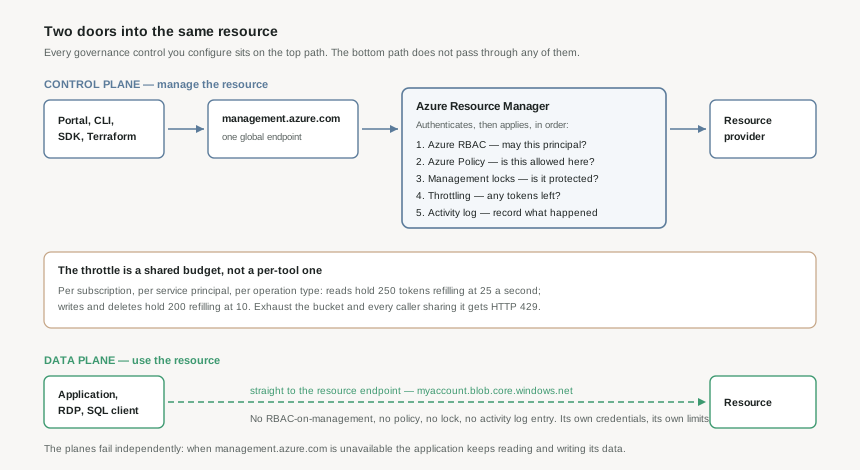
One endpoint, and what it does before your request lands
Every control plane request goes to the Resource Manager URL — https://management.azure.com for Azure global, with separate URLs for Government, Azure Germany and the 21Vianet-operated cloud. The portal, the CLI, PowerShell, the SDKs and Terraform are all clients of that one API, which is why they behave consistently: they are not four implementations of Azure management, they are four callers of it.
Resource Manager authenticates the request and then applies, on your behalf, the features you configured to manage resources: Azure RBAC, Azure Policy, management locks, and activity logging. Only then does it forward the request to the resource provider that actually performs the work.
That ordering is the whole reason those governance features are trustworthy. A policy that denies public IP addresses is not implemented by the network provider being polite about it; the request never reaches the network provider. It also explains why the same policy is silent about what happens inside a resource — Resource Manager never sees a data plane call.
The two planes fail independently
Microsoft states this directly: even during periods of control plane unavailability, you can still access the data plane of your resources. A storage account remains readable at myaccount.blob.core.windows.net while management.azure.com is unavailable.
For an architect this is a design input, not trivia. It means a management-plane incident stops you changing things — no scaling, no deployments, no failover that requires an API call — while leaving the running system serving. It also means any recovery procedure that depends on calling Azure APIs has a dependency your application does not have.
Resource Manager's own resilience
Resource Manager runs a separate instance in each region, distributes across availability zones where they exist, does not depend on a single logical datacentre, and is not taken down for maintenance. The global endpoint is recommended precisely because it does DNS-based distribution and automatic failover across those instances.
The caveat is in the same paragraph and matters more than the reassurance: while the initial handling of a request is resilient, the request may still be susceptible to a regional outage once it is forwarded to a regional service. The front door is highly available; what is behind a given door may not be.
Why This Architecture Holds Up
Since 2024, Resource Manager throttling is applied per region rather than per instance, using a token bucket. A bucket holds a maximum number of tokens; each request spends one; tokens return at a fixed refill rate. Per region rather than per instance is the meaningful change — the old model gave inconsistent behaviour because regions have different numbers of Resource Manager instances.
| Scope | Operation | Bucket size | Refill per second | Empty to full |
|---|---|---|---|---|
| Subscription | reads | 250 | 25 | 10 seconds |
| Subscription | writes | 200 | 10 | 20 seconds |
| Subscription | deletes | 200 | 10 | 20 seconds |
| Tenant | reads | 250 | 25 | 10 seconds |
| Tenant | writes / deletes | 200 | 10 | 20 seconds |
The sentence that explains the opening story is this one: the limits apply per subscription, per service principal, and per operation type. Two workloads authenticating as the same service principal share a bucket. Two workloads with their own service principals do not — though there is also a global subscription limit equivalent to 15 times an individual service principal's limit, so a large enough fleet of identities eventually meets a ceiling anyway.
There is a specific, named offender worth checking before anything else: reading metrics through the providers/microsoft.insights/metrics API contributes significantly to Resource Manager traffic and is called out as a common cause of subscription throttling. The recommended fix is the getBatch API, which queries many resources in one request.
Resource providers throttle separately
Passing the Resource Manager throttle does not mean the request is safe. Providers apply their own limits, per subscription per region:
- Storage — 800 management reads per 5 minutes, 10 writes per second or 1,200 per hour, 100 list operations per 5 minutes.
- Network — 1,000 writes or deletes per 5 minutes, 10,000 reads per 5 minutes.
Note the shape of the storage write limit: 10 per second or 1,200 per hour. Sustained use hits the hourly figure long before the per-second one, which is 36,000 an hour if you could actually sustain it. A burst-tolerant limit and a sustained limit are two different constraints and both are enforced.
x-ms-ratelimit-remaining-subscription-reads and x-ms-ratelimit-remaining-subscription-writes come back on ordinary responses and tell you how much budget is left. Logging them turns throttling from an unexplained failure into a trend you can see approaching. When you do get a 429, the response carries Retry-After in seconds — and sending a request before it elapses does not get processed, it just returns a fresh value.
Concurrency, and the other status code
429 has a quieter sibling. When two operations try to update the same resource at the same time, Resource Manager lets one complete, blocks the others, and returns 409. If request A finishes before request B, A succeeds and B fails with 409. This is a correctness guarantee rather than a fault: it is what stops two concurrent updates leaving a resource in a state neither of them intended. Pipelines that run in parallel against shared infrastructure meet it regularly, and the right response is to re-read the resource state and decide, not to blindly retry.
Key Architecture Decisions
| Decision | Choose this | Because |
|---|---|---|
| Identity for automation | A separate service principal per pipeline or workload | The throttle is per service principal. Sharing one identity across a pipeline, a dashboard and an agent makes them compete for a single bucket, and the loser is whichever arrives second. |
| Handling 429 | Honour Retry-After; log the remaining-quota headers continuously | Retrying before the value elapses is not processed and returns a new value. The headers arrive on successful responses too, so the trend is visible before the failure. |
| Handling 409 | Re-read state and re-decide, do not blind-retry | 409 means somebody else changed the resource. A blind retry re-applies a decision made against state that no longer exists. |
| Metrics collection at scale | The getBatch API, not per-resource metrics calls | It is the named common cause of subscription throttling, and the fix is documented rather than clever. |
| Protecting data, not just resources | Do not rely on locks or policy for data-level protection | They are control plane features. Deleting rows, dropping a container or emptying a blob are data plane operations that pass none of them. Data protection needs backup, soft delete and data plane permissions. |
| DR runbooks | Assume the control plane may be unavailable when you need it | Any step that scales, fails over or redeploys is an API call. The application keeps running without the control plane; your recovery procedure does not. |
| Endpoint choice | The global endpoint, management.azure.com | It provides DNS-based distribution, automatic failover and routing to the healthiest region. Pinning a regional endpoint trades that away for nothing. |
Closing Thought
Resource Manager is the least visible component in an Azure estate and the one most consistently underestimated. It is not a routing layer that forwards requests to services; it is where authorisation, governance and rate limiting actually happen, and it is the reason a policy assignment is worth trusting at all.
The practical takeaway is a habit rather than a configuration: when something in Azure fails to change, ask which plane the failure is on before asking which service is at fault. A 429 and a 409 are both Resource Manager telling you about contention — one for capacity, one for state — and neither is a problem with the resource you were trying to touch.
#4 stays on the control plane and looks at resource providers: what registration actually does, why a deployment fails with a provider that is not registered, and what the provider boundary means for regional availability.
Comments