Business Challenge
Every estate eventually needs to move something. A resource was created in the wrong group during a rush. A team splits and takes its workloads with it. A subscription hits a limit. A proof of concept becomes production and needs to sit where production sits.
The portal presents this as a Move button with three options, which sets an expectation the operation does not meet. The move is not a reorganisation of a folder. Azure Resource Manager allows it four hours to finish, and locks the source and destination resource groups for the duration — no creating, no deleting, no property changes, in either group, including on resources that have nothing to do with the move.
Three consequences follow, and each one has caught estates that treated the move as clerical:
- Every resource ID changes. Subscription and resource group are both segments of the ID, so anything holding that string — dashboards, alert rules, automation, templates, links in documentation — now points at a resource that does not exist.
- Role assignments do not come along. An assignment on a moved resource becomes orphaned. It must be created again afterwards, and the documented recommendation is to remove it deliberately before the move rather than let the system clean it up later.
- The operation can finish halfway. If a resource has not moved within four hours, Resource Manager unlocks both groups: what moved is in the destination, what failed is still in the source. There is no rollback.
What does not happen is downtime. Existing resources remain fully operational throughout — a virtual machine keeps serving traffic while its own resource group is locked. That combination is what makes the operation deceptive. Nothing appears to be wrong while it runs, and the damage is to the things that refer to the resource rather than the resource itself.
Moving a resource only changes its associated resource group and does not alter the physical region. So the operation is purely a change to where the resource sits in the management hierarchy — which is another way of saying that everything it costs is paid in references, permissions and governance, and nothing is gained in latency, resilience or placement.
Architecture
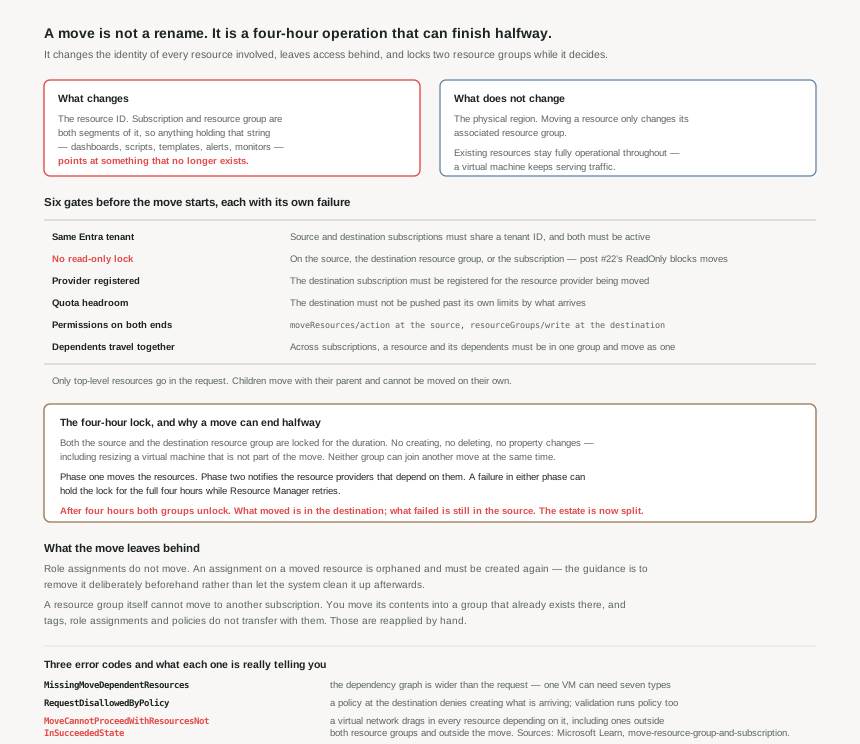
The six gates
Most move failures are pre-flight failures, and the checklist is worth running as a checklist rather than discovering item by item:
| Gate | Requirement | Where it comes from in this series |
|---|---|---|
| Tenant | Source and destination subscriptions must be in the same Microsoft Entra tenant, and both must be active. | Post #18: a directory transfer permanently deletes all role assignments, so crossing tenants is a different operation entirely. |
| Locks | Resources cannot be moved if a read-only lock exists on the source, the destination resource group, or the subscription. | Post #22. ReadOnly blocks the move; CanNotDelete is not named here. |
| Provider registration | The destination subscription must be registered for the resource provider being moved. | Common when moving a resource type into a subscription that has never used it. |
| Quota | The destination must have headroom for what is arriving. | Post #11. The limits are per subscription, and a move is a bulk arrival. |
| Permissions | moveResources/action at the source resource group and resourceGroups/write at the destination. | Post #18. Two scopes, so a mover needs rights on both ends — frequently two different owners. |
| Dependents | Across subscriptions, a resource and its dependent resources must be in the same resource group and move together. | The one that turns a small move into a project. |
Only top-level resources go in the request. Child resources move automatically with their parent and cannot be moved on their own — a virtual machine's extensions travel with the virtual machine, and cannot be sent separately.
The cross-subscription rule is the one that reshapes plans. Because a resource and its dependents must sit in one resource group before they can cross a subscription boundary, the documented shape is three steps rather than one: consolidate the dependents into a single group, move that group's contents across, then redistribute into the target structure if you want them apart again. Two moves and a reorganisation to achieve what sounds like one operation.
The four-hour lock, and partial completion
A move request has two phases. Resources move in the first. In the second, the resource providers that depend on the moved resources are notified. Resource Manager allows the whole thing four hours precisely because of those cross-provider dependencies — the window exists so transient failures can be retried rather than failing the move outright.
During that window both resource groups are locked. The lock prevents deleting either group, creating anything in them, deleting anything in them, or updating any resource's properties — the documented example is that you cannot change a virtual machine's size. Neither group can participate in another move at the same time, so a migration that queues several moves through a shared staging group serialises whether you intended it to or not.
A move that consumes the full window costs 4 × 60 = 240 minutes in which two resource groups are frozen. That is the number to put in a change request, not the "usually a few minutes" that most moves actually take.
If a resource has not moved within four hours, Resource Manager unlocks both groups and stops. Resources that moved successfully are in the destination; resources that failed remain in the source. Nothing is reverted, and nothing tells you the set is now split except a comparison you have to do yourself. Validate first, and move in batches small enough that a partial result is comprehensible.
Three error codes, three different lessons
MissingMoveDependentResources means the dependency graph is wider than the request. Microsoft's own example is worth memorising because it calibrates expectations: moving a virtual machine could require moving seven resource types across three resource providers — virtualMachines and disks from Compute; networkInterfaces, publicIPAddresses, networkSecurityGroups and virtualNetworks from Network; and storageAccounts from Storage. A virtual network gateway must be in the same resource group as its virtual network, because the two cannot move separately.
RequestDisallowedByPolicy means the destination's governance rejected the arrival. Validation includes checking the policies that apply to the resources involved, so a move is subject to the same Azure Policy assignments as a fresh deployment — the whole of posts #14 to #17 applies at the destination. A key vault cannot move into a group where policy denies creating key vaults, which is correct behaviour and rarely anticipated.
MoveCannotProceedWithResourcesNotInSucceededState is the one with the widest blast radius. If either resource group contains a virtual network, Azure checks the state of all resources that depend on that network, directly and indirectly. The move is blocked if any of them is not in a succeeded state — and the documentation is explicit that this holds even when the offending virtual machine is not one of the resources being moved, and even when it is not in the source or destination resource group at all. An unrelated failed deployment somewhere else in the subscription can block your move.
Validation is free, and almost nobody runs it
There is a validateMoveResources action that tests a move scenario without performing it, available through REST, CLI, PowerShell and Python. It returns 204 when validation succeeds and an explanatory error when it does not. Validation runs automatically as part of a real move request, but running it separately is the difference between learning about a missing dependent in a planning session and learning about it with two resource groups locked.
Why This Architecture Holds Up
The resource group you choose at creation is the one you keep
Everything above adds up to a single design conclusion: resource group placement is expensive to change, so it is worth getting right when the resource is created and cheap to get wrong at that moment. The cost of a bad placement is not paid on the day; it is paid whenever somebody tries to correct it.
That argues for grouping by lifecycle rather than by team or by convenience. Resources that are created, updated and deleted together belong together — which is exactly the criterion the cross-subscription dependency rule enforces anyway, and the same criterion deployment stacks use in post #21. A group assembled by who owned the work in a given quarter will eventually need to be split, and that split is a four-hour lock and a list of broken references.
A move is a governance event, not a resource event
Six posts of this series are quietly present in every move. The role assignments from #18 are orphaned. The custom roles from #20 whose AssignableScopes named the old group no longer reach the resource. The locks from #22 block the operation. The policies from #14 to #17 are evaluated at the destination. Tags — post #13 — survive on resources but not on a resource group, since a group cannot move at all.
That last point deserves its own statement, because it is asked constantly: a resource group cannot be moved to another subscription. You move all of its resources into a group that already exists in the target subscription, and tags, role assignments and policies do not transfer with them. The group is not a container that relocates; it is a name that stays behind.
Batch size is a real decision
Resource Manager returns an immediate error above 800 resources in one operation, and the guidance notes that moves well under that limit can still fail by timing out. Two numbers matter here, and only one of them is the limit. The other is the batch size at which a partial completion is still something a person can reason about at the end of a four-hour window.
For a real migration, the shape that works is: validate the whole set, move in batches grouped by dependency, verify each batch landed before starting the next, and keep a written record of which resource IDs changed so the references can be chased afterwards. That last artefact is the one nobody produces and everybody needs.
Key Architecture Decisions
The shape that works
| Decision | What to do | Why |
|---|---|---|
| Grouping at creation | Group by shared lifecycle, not by team or project phase | A move is the only correction available, and it costs a four-hour lock plus every reference to the old resource ID. |
| Before any move | Run validateMoveResources and read the failure |
It is free, it runs the same checks, and 204 means the real attempt will not discover a missing dependent with two groups locked. |
| Role assignments | Record them, remove them before the move, recreate after | They do not move and become orphaned. Removing them first is the documented recommendation and leaves a record of what to restore. |
| Locks | Remove ReadOnly locks on both ends first, and put them back after |
A read-only lock on the source, destination group or subscription blocks the move outright. |
| Cross-subscription moves | Consolidate dependents into one resource group first, then move, then redistribute | The resource and its dependents must be in one group and move together. This is three operations, planned as three. |
| Batch size | Well under 800, grouped by dependency, verified between batches | 800 is an immediate error and smaller sets can still time out. Partial completion is the real risk, not rejection. |
| Change window | Book four hours, not "a few minutes" | Both resource groups are frozen for the duration, including resources not in the move. |
| After the move | Chase the resource IDs: dashboards, alerts, automation, templates, documentation | The ID changes, and nothing in Azure updates the things that referenced it. |
| Moving a resource group | Do not plan for it — plan to move contents and rebuild the group's settings | Groups cannot move between subscriptions, and tags, role assignments and policies do not transfer. |
Closing Thought
The interesting thing about resource moves is how much of the rest of the platform they touch. Nothing in the operation is conceptually hard — a resource ends up in a different group — and yet doing it safely requires knowing where the locks are, which policies apply at the destination, who holds rights on both ends, what the dependency graph actually contains, and what refers to the resource by ID.
That is a reasonable definition of a governance system working as intended. Every control this series has covered is doing its job during a move: the lock refuses, the policy validates, the role assignment stays attached to a scope rather than following a resource around. The friction is the controls being real.
Which leaves one practical conclusion, and it is not about moves at all. The cheapest move is the one you never make, and the way to avoid making them is to decide resource group membership on lifecycle at creation time — when it costs nothing but a moment's thought, rather than four hours and a list of things that now point nowhere.
#24 steps up a level to deployment scopes: tenant, management group, subscription and resource group — what can be deployed at each, why a template's scope is not the same as where its resources land, and how the four levels compose in a single deployment.
Comments