Business Challenge
#41a ended where most treatments of Conditional Access end: the grant controls are satisfied, the token is issued, the user is in. Two things happen after that which decide rather a lot, and neither gets the attention the grant controls do.
The first is the session. Once access is granted, session controls decide how long it lasts, whether it survives closing the browser, whether it survives a Microsoft outage, and whether the resource gets told anything about the device. These are configured in the same policy blade as everything else and read like afterthoughts. They are not.
The second is the question of how you know. Conditional Access is the one part of an identity platform where a mistake locks people out of everything at once, and it has no staging environment. Report-only mode is the answer, and it is a good one — but it is important to know precisely what it does and does not exercise, because the most common report-only result is the one that means nothing was tested.
Three claims from the documentation to set the tone, all of which invert a common assumption:
- The default sign-in frequency is a rolling window of 90 days, and Microsoft argues against shortening it.
- Every time does not mean every time. The policy factors in five minutes of clock skew.
- Turning off resilience defaults for one group's policy can deny access, during an outage, to users who don't belong to the group or role in the policy assignment.
Post #40 covered configurable token lifetimes and noted that refresh and session token lifetimes stopped being configurable on 30 January 2021. This is what replaced them — the same page says so directly: Microsoft retired the configurable token lifetime feature for refresh and session token lifetimes on January 30, 2021, and replaced it with the Conditional Access authentication session management feature.
So session controls are not an extra. For session lifetime they are now the only surface, and a tenant still carrying the old policy object is configuring nothing.
Architecture
The seven session controls
| Control | What it actually does |
|---|---|
| Application enforced restrictions | Passes device information to the app, which decides: limited if the device isn't managed or compliant, and full if the device is managed and compliant. The app implements the restriction, not Entra. |
| Conditional Access App Control | A reverse proxy architecture via Defender for Cloud Apps, monitoring and controlling sessions in real time. |
| Sign-in frequency | How long a user can stay signed in before being prompted to sign in again. Hours, days, or every time. |
| Persistent browser session | Whether users stay signed in after closing and reopening their browser window. |
| Customize continuous access evaluation | CAE is auto enabled; this is where you turn it off — and only under narrow conditions. |
| Disable resilience defaults | Whether a session survives a Microsoft Entra outage. |
| Require token protection | Token binding — ensuring a token is usable only from the intended device. |
Two of those carry a constraint worth knowing before you plan around them. Disabling CAE works only when All resources are selected, no conditions are selected — so a targeted "turn CAE off for this one app" policy is not a thing that exists. And in an External ID external tenant the list collapses to two: sign-in frequency and persistent browser session.
Token protection deserves its own sentence, because it is the direct answer to the risk #40 described. Without it, if an attacker steals a token through hijacking or replay, they can impersonate the victim until the token expires or is revoked — and #40's numbers said that window is 60 to 90 minutes, or up to 28 hours under CAE. Microsoft's own framing is measured: token theft is rare, but its impact can be significant.
Sign-in frequency, and the argument for leaving it alone
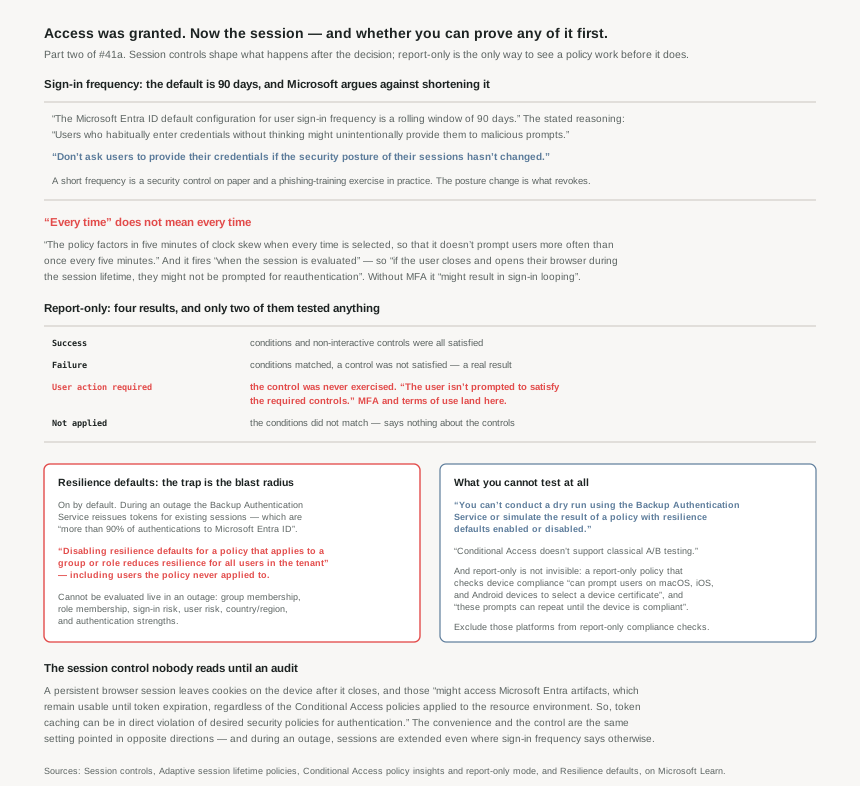
The default is a rolling window of 90 days. That number surprises people, and the documentation anticipates the reaction with an argument rather than a shrug:
It might seem sensible to ask users for credentials often, but this approach can backfire. Users who habitually enter credentials without thinking might unintentionally provide them to malicious prompts.
That is a real security argument, not a usability concession: frequent prompts train exactly the reflex phishing depends on. The stated principle is don't ask users to provide their credentials if the security posture of their sessions hasn't changed, and the safety net is revocation rather than expiry — any IT policy violation revokes the session, with a password change, a noncompliant device, or an account being disabled given as examples.
One behaviour changed and is worth catching if you learned this earlier: sign-in frequency previously applied only to first-factor authentication, and based on customer feedback, sign-in frequency now applies to multifactor authentication (MFA) as well.
The four-hour cycle that makes sign-in frequency non-obvious
On joined devices the prompt is not timed from the user's sign-in. On Microsoft Entra joined and hybrid joined devices, unlocking the device or signing in interactively refreshes the Primary Refresh Token (PRT) every four hours, and sign-in frequency is measured against the PRT refresh. The documentation's own worked example, with a one-hour policy:
- At 00:00, a user signs into their Windows 11 Microsoft Entra joined device and starts work.
- At 00:30, the user locks their device.
- At 04:45, the user unlocks the device.
- At 05:45, the user is prompted to sign in again — one hour after the PRT was refreshed at 04:45, and over four hours since the initial sign-in at 00:00.
A one-hour policy produced a prompt five hours and forty-five minutes after sign-in, and nothing is broken. There is a matching deferral on the other side: if the client app is a browser, the system defers sign-in frequency enforcement of events and policies on background services until the next user interaction, and on confidential clients enforcement of non-interactive sign-ins waits until the next interactive sign-in.
So sign-in frequency is an upper bound on inattention, not a timer. If a control description says "users reauthenticate hourly", that is not what this setting produces — which is the same conclusion #40 reached about sign-in frequency and token lifetime variation, from the other end.
When you select Every time, the policy requires full reauthentication when the session is evaluated — so if the user closes and opens their browser during the session lifetime, they might not be prompted for reauthentication. There is also a floor: the policy factors in five minutes of clock skew when every time is selected, so that it doesn't prompt users more often than once every five minutes.
The advice attached is a warning about the control defeating itself: triggering reauthentication too frequently can increase security friction to a point that it causes users to experience MFA fatigue and open the door to phishing. And a sharp operational one — using it without multifactor authentication might result in sign-in looping for your users.
Why This Architecture Holds Up
Because the most common report-only result means nothing was tested
Report-only lets administrators test most Conditional Access policies before enabling them: the system evaluates policies in report-only mode but doesn't enforce them. Four results, and they do not carry equal weight.
| Result | What it tells you |
|---|---|
| Success | All configured policy conditions, required non-interactive grant controls, and session controls were satisfied — e.g. an MFA requirement met by an MFA claim already present in the token. |
| Failure | All configured policy conditions were satisfied but not all the required non-interactive grant controls or session controls were satisfied. A genuine negative result. |
| User action required | User action would be required to satisfy the required grant controls, and with report-only mode, the user isn't prompted. The control was never exercised. |
| Not applied | Not all configured policy conditions were satisfied — the assignment did not match. Says nothing about the controls. |
The third row is the one to sit with. A policy whose whole purpose is to require MFA, run in report-only against real traffic, will report User action required for every user who did not already have an MFA claim — because users aren't prompted for multifactor authentication challenges or terms of use. That result confirms the assignment matched. It confirms nothing about whether those users can complete the control: whether they are registered, whether their method works, whether the prompt reaches them.
Which is precisely the population that generates the help-desk queue on enforcement day. Report-only is excellent at answering "who does this policy catch" and structurally incapable of answering "can they get through it". Those are different questions and only the first one gets tested.
A second limitation is narrower but absolute: policies can be evaluated in report-only except for items included in the "User Actions" scope. And report-only is not invisible to users, which is the trap most likely to cause an unexpected support ticket: policies in report-only mode that require a compliant device can prompt users on macOS, iOS, and Android devices to select a device certificate during policy evaluation, even though device compliance isn't enforced. These prompts can repeat until the device is compliant. The remedy is explicit — exclude the Mac, iOS, and Android device platforms from report-only policies that perform device compliance checks.
Worth knowing what the tooling cannot do either. Conditional Access doesn't support classical A/B testing, which splits live traffic between two enforced variants of a policy. The documented substitute for changing an existing policy is a discipline rather than a feature: create a copy in report-only mode with your proposed changes. Compare the report-only copy's results against the original enforced policy, then update the enforced policy and remove the copy.
Because resilience defaults have a blast radius larger than the policy
This is the sharpest thing in the material and the least likely to be discovered before it matters.
The mechanism first. If the primary authentication service is unavailable, the Microsoft Entra Backup Authentication Service automatically issues access tokens to applications for existing sessions — and the reason that is worth so much is a number: reauthentications for existing sessions account for more than 90% of authentications to Microsoft Entra ID. Keeping those alive is most of keeping the tenant alive. Two exclusions: it doesn't support new sessions or authentications by guest users.
During an outage the backup service re-evaluates policies but cannot see everything live. The conditions it can't reevaluate in real time are named: group membership, role membership, sign-in risk, user risk, country/region location and authentication strengths. Resilience defaults decide what happens in that blind spot — enabled, it uses data collected at the start of the session; disabled, access is denied.
Now the consequence, quoted in full because paraphrase weakens it:
Disabling resilience defaults for a policy that applies to a group or role reduces resilience for all users in the tenant. Because group and role membership can't be evaluated in real time during an outage, even users who don't belong to the group or role in the policy assignment are denied access to the application within the scope of the policy.
Read that as an operator. You harden one policy — say, admins accessing the Azure portal — by turning off resilience defaults, which sounds like exactly the right instinct for a privileged path. During an outage, the backup service cannot tell who is an admin, so it cannot tell who the policy applies to, so it denies everyone in scope of the targeted application. A control scoped to a handful of people becomes an outage for the whole tenant, at the worst possible moment. Microsoft's mitigation is a structural one: apply the policy to individual users instead of groups or roles.
Two more consequences of the same blind spot. When active, the Backup Authentication Service doesn't evaluate authentication methods required by authentication strengths — so if you used a non-phishing-resistant authentication method before an outage, during an outage you aren't prompted for multifactor authentication even if accessing a resource protected by a Conditional Access policy with a phishing-resistant authentication strength. And sign-in frequency stops applying: sessions that expire during an outage are extended even if the policy is configured with a session control to enforce a sign-in frequency.
There is one thing that does still hold, and it is the same lever #40 and #41a both landed on: the Backup Authentication Service subscribes to the same revocation events as CAE, so if a user's token is revoked as part of CAE, the user can't sign in during an outage. Revocation is the control that works when nothing else does.
Because none of this can be rehearsed
You can't conduct a dry run using the Backup Authentication Service or simulate the result of a policy with resilience defaults enabled or disabled. There is no test mode, no What If for outages, no report-only equivalent. Microsoft Entra runs monthly tests using the Backup Authentication Service, but the scope of these tests varies and we do not test every tenant every month.
What you get instead is evidence after the fact. In the sign-in logs, add the filter "Token issuer type == Microsoft Entra Backup Auth" to display the logs processed by Microsoft Entra Backup Authentication Service. That is worth knowing before an incident rather than during one — it is how you find out, retrospectively, that a quiet period was actually an outage your tenant rode out.
So resilience defaults sit in an unusual category: a setting whose behaviour you cannot observe until the day it matters, attached to a warning about tenant-wide denial. The correct response to an untestable control with an asymmetric downside is to leave the default alone, which is also what Microsoft says: Microsoft recommends keeping the resilience defaults enabled.
Because persistent browser sessions are a security control pointed both ways
The setting sounds like pure convenience and the documentation is blunt that it is not:
In persistent browsers, cookies remain stored on the user's device even after the browser is closed. These cookies might access Microsoft Entra artifacts, which remain usable until token expiration, regardless of the Conditional Access policies applied to the resource environment. So, token caching can be in direct violation of desired security policies for authentication.
Regardless of the Conditional Access policies applied is the phrase that matters. A cached artefact outlives the policy that governed its issue, which is the same property that made #41a's propagation delays bite — the policy binds at issuance, and afterwards you are relying on expiry or revocation. The default hands the choice to the user, via the Stay signed in? prompt, on personal devices.
One interaction to check before enabling sign-in frequency at all: if "Remember MFA on trusted devices" is enabled, disable it before using sign-in frequency, as using these two settings together might prompt users unexpectedly. Two reauthentication mechanisms configured in different places, and the documented outcome of running both is unpredictable prompting.
Key Architecture Decisions
| Situation | Decision | Why |
|---|---|---|
| Tempted to shorten sign-in frequency tenant-wide | Leave the 90-day default unless a specific case earns otherwise | Frequent prompts mean users who habitually enter credentials without thinking might unintentionally provide them to malicious prompts. |
| Writing "users reauthenticate hourly" in a control description | Don't — state the bound, not a period | The PRT four-hour cycle turned a one-hour policy into a prompt at 05:45 after a 00:00 sign-in. |
| Using "require reauthentication every time" | Scope it narrowly, and pair it with MFA | Five minutes of clock skew is the floor; without MFA it might result in sign-in looping. |
| Before enabling sign-in frequency | Turn off "Remember MFA on trusted devices" | Together they might prompt users unexpectedly. |
| Reading a report-only result of "User action required" | Treat it as untested, not as passing | With report-only mode, the user isn't prompted to satisfy the required controls. |
| Report-only policy that checks device compliance | Exclude macOS, iOS and Android platforms | Users get repeating certificate prompts even though device compliance isn't enforced. |
| Changing an existing enforced policy | Clone to report-only, compare, then update and delete the clone | There is no A/B testing; this is the documented substitute. |
| Hardening a privileged path by disabling resilience defaults | Assign that policy to individual users, never a group or role | Otherwise even users who don't belong to the group or role … are denied access during an outage. |
| Relying on an authentication strength during an outage | Don't — it is not evaluated | You aren't prompted for multifactor authentication even if accessing a resource protected by a phishing-resistant strength. |
| Wanting to rehearse outage behaviour | Accept that you cannot; check the logs after | No dry run exists; filter on Token issuer type == Microsoft Entra Backup Auth. |
| Turning CAE off for one application | Not possible — rethink | Disable works only when All resources are selected, no conditions are selected. |
| Worried about token theft on a session | Require token protection | Ensuring a token is usable only from the intended device — the direct answer to #40's stolen-token window. |
| Enabling persistent browser sessions | Treat it as a security decision | Cached artefacts remain usable regardless of the Conditional Access policies applied to the resource environment. |
Closing Thought
There is a pattern across this pair of posts that I did not expect to find, and it is about honesty in documentation. Conditional Access is the kind of product that invites confident marketing — Zero Trust policy engine, real-time enforcement, adaptive session control. What the pages actually say, repeatedly, is where the thing stops working.
It runs after first-factor authentication. The default is allow. Policy changes take up to a day. Report-only does not exercise interactive controls. Resilience defaults cannot be dry-run, and turning them off for one group can deny the tenant. None of that is buried in a footnote; it is in warning boxes, in the main flow, stated plainly.
That is worth more than it looks. A control whose boundaries are documented is one you can design around; a control that claims to be total is one you find the edges of during an incident. The uncomfortable half of that bargain is that reading the boundaries is now your job, and the default reading — the feature list — produces a mental model that is wrong in specific, expensive ways.
If I had to reduce both posts to one operational sentence: Conditional Access decides at issuance, shapes the session afterwards, and the only thing in the whole system that acts immediately is revoking refresh tokens. Everything else is a policy waiting for a token, a session waiting to expire, or a control that the outage path cannot see.
#42 goes one level into the assignments: named locations, filters for devices, and how risk from ID Protection arrives as a condition — the three signals that make a policy specific rather than tenant-wide.
Comments