Business Challenge
The Azure resource model taught one reflex above all others: a container passes things down. A policy assigned at a management group applies to every subscription beneath it. A role assignment at a resource group reaches every resource inside it. Posts #14 to #21 were largely about the consequences of that single property — where to attach a rule so that the right set of things inherits it, and how to reason about blast radius when they do.
Microsoft Entra ID has containers too. Groups hold users. Groups hold groups. Administrative units hold users, groups and devices. The vocabulary is so familiar that the reflex transfers automatically, and this is the post arguing that it should not.
Because in Entra, containment and inheritance are separate questions, answered separately for each container. Two of the four cannot nest at all. One nests but does not pass access down. One brings a group into scope without bringing the group's members. None of this is hidden — every rule below is a sentence in Microsoft's own documentation — but none of it is where you would look, and the failure mode is uniformly silent. Nothing errors. The delegation simply covers a different set of people than the person who built it believes.
A policy that fails to apply is visible in a compliance report; post #15 was largely about reading one. An administrative unit that fails to constrain an administrator produces no report at all — the administrator does their job, successfully, over a larger population than intended. The signal only arrives if someone audits the scope, or if something goes wrong in a part of the directory that person was never supposed to touch.
Architecture
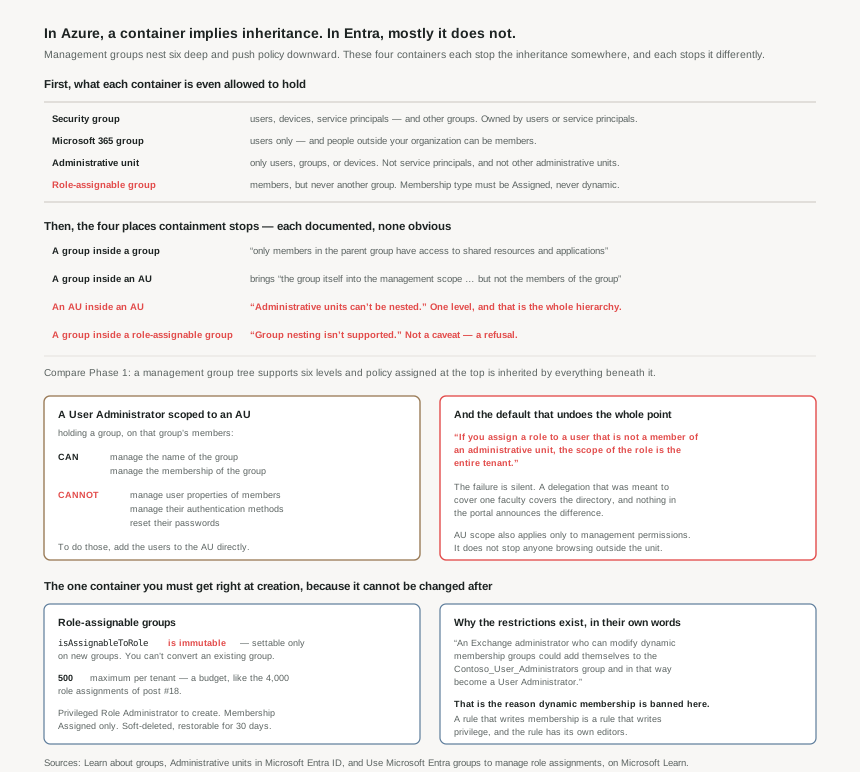
What each container is allowed to hold
Start here, because half the design errors are ruled out by the membership rules alone.
| Container | Can contain | Notable |
|---|---|---|
| Security group | Users, devices, service principals — and other groups, sometimes known as nested groups. | The only one of the four that can hold a service principal, which matters from #34 onward. |
| Microsoft 365 group | Only users. | People outside of your organization can be members — the collaboration container, not the access-control one. |
| Administrative unit | Only users, groups, or devices. | No service principals, and no other administrative units. |
| Role-assignable group | Members, but a group can't be added as a member. | Membership type must be Assigned and can't be a Microsoft Entra dynamic group. |
Both group types can be owned by users and service principals, which is worth registering now: group ownership is a delegation path that does not appear in any role assignment list, and a service principal can hold it.
The four places containment stops
This is the section worth keeping. Each of these is a direct quotation, and each contradicts the reflex Phase 1 installed.
| The nesting | What actually happens |
|---|---|
| A group inside a group | When nesting an existing security group to another security group, only members in the parent group have access to shared resources and applications. Nesting is permitted; it is not a general mechanism for cascading access, and the documentation flags this as a caveat rather than a feature. |
| A group inside an administrative unit | It brings the group itself into the management scope of the administrative unit, but not the members of the group. The delegated admin can manage the group; they cannot touch the people in it. |
| An administrative unit inside an administrative unit | Administrative units can't be nested. One level, and that is the entire hierarchy available to you. |
| A group inside a role-assignable group | Group nesting isn't supported. A group can't be added as a member of a role-assignable group. Not a caveat — a refusal. |
Set that against the Azure side, where a management group tree supports six levels of depth and a policy assigned at the top is evaluated against everything beneath it. Same word, different physics. An architect who reasons about Entra delegation using the management group model will design a hierarchy that Entra will not build, and will then approximate it with a flat set of units that do not relate to each other at all.
The administrative unit, and the sentence that decides whether it works
An administrative unit restricts permissions in a role to any portion of your organization that you define — the university example in the docs is the canonical one, where each autonomous school gets IT staff who can manage their own students and no one else's. Users can be members of multiple administrative units, so the same person can sit in both "Seattle" and "Marketing".
Then comes the line that governs everything: if you assign a role to a user that is not a member of an administrative unit, the scope of the role is the entire tenant.
Read that as a default rather than a footnote. The absence of a scope is not a narrow scope or an error — it is the widest scope the directory has. Every delegation built on administrative units depends on a positive act of scoping having actually happened, and the consequence of forgetting is not a failure but a silent promotion to tenant-wide.
Administrative units apply scope only to management permissions. They don't prevent members or administrators from using their default user permissions to browse other users, groups, or resources outside the administrative unit. In the Microsoft 365 admin center outside users are filtered from view, but you can browse other users in the Microsoft Entra admin center, PowerShell, and other Microsoft services. An administrative unit is a boundary on what you may change, never on what you may see. If the requirement was confidentiality between divisions, this is the wrong control.
The one container that must be right at creation
Role-assignable groups are how you assign an Entra role to a group rather than to people one at a time. They carry more hard constraints than anything else in this post, and the constraints are the interesting part.
To create one you set isAssignableToRole to true at creation. The property is immutable. Once a group is created with this property set, it can't be changed. And you can't make an existing group a role-assignable group.
That should sound familiar. Post #20 established that a custom role's AssignableScopes is fixed at creation and caps its reach forever. This is the same class of decision in a different directory: a boolean chosen on day one that cannot be revisited, where the cost of getting it wrong is rebuilding the group and re-establishing its membership, not editing a field.
Three more constraints worth holding:
- A maximum of 500 per tenant. Another budget, alongside the 4,000 role assignments per scope from post #18. Large enough that nobody plans for it and small enough that a naive "one group per role per department" scheme will eventually meet it.
- Privileged Role Administrator to create one, and for Graph, the RoleManagement.ReadWrite.Directory permission is required to manage membership — the Group.ReadWrite.All permission won't work. An automation that manages ordinary groups will fail against these, by design.
- Soft delete with a 30-day window. When a role-assignable group is deleted, it's soft-deleted and can be restored within 30 days, and group owners can restore a deleted role-assignable group — which is itself a privilege worth noticing.
Why This Architecture Holds Up
Because the restrictions are documented threat models, not friction
Microsoft rarely explains why a restriction exists. Here it does, and the explanation is worth more than the rule:
If a group is assigned a role, any IT administrator who can manage dynamic membership groups could also indirectly manage the membership of that role. The worked example: an Exchange administrator who can modify dynamic membership groups could add themselves to the Contoso_User_Administrators group and in that way become a User Administrator.
That is the entire reason role-assignable groups cannot use dynamic membership. It generalises into a principle this series will use again: a rule that writes membership is a rule that writes privilege, and the rule has its own set of editors. Whoever can edit the rule holds, transitively, every permission the rule can grant — and that person does not appear in any list of people who hold the role.
The same reasoning produces the other protections. To prevent elevation of privilege, you must be assigned at least the Privileged Authentication Administrator role to change the credentials, reset MFA, or modify sensitive attributes for members and owners of a role-assignable group. Otherwise the path is simpler still: do not join the group, just reset the password of someone already in it.
Because the AU containment rule quietly decides your delegation model
Return to the rule that a group in an administrative unit brings the group but not its members, and follow it through to a design.
A regional helpdesk needs to reset passwords for staff in their region. The instinct is to put the region's group into the region's administrative unit and scope Helpdesk Administrator there. It will not work, and it will not say so: the documented table is explicit that a User Administrator scoped to an AU containing a group cannot manage the user properties of members, cannot manage their authentication methods, and cannot reset their passwords. To get those, the group members (users) must be added directly as members of the administrative unit.
So the administrative unit must be populated with users, not with the group that happens to describe them. Which raises the maintenance question immediately — and the answer shapes the whole design:
- Users and devices can be added to an AU by rules for dynamic membership, in Graph, PowerShell and the Entra admin center.
- Groups cannot. Add or remove groups dynamically based on rules is unsupported in every interface the documentation lists.
- And dynamic AU membership has a licence consequence from post #31: it moves every member of that unit from Free to P1.
Three facts that together settle the design. Populate administrative units with users; automate that population with dynamic rules; and price it as P1 per member rather than Free, because choosing the automation is what changes the bill.
Because some of these objects are not yours to manage at all
A structural constraint that predates any design you might draw: groups synced from on-premises Active Directory can only be managed on-premises, and distribution lists and mail-enabled security groups can only be managed in the Exchange admin center or the Microsoft 365 admin center. Relatedly, assigning Entra roles to on-premises groups is listed among the scenarios that aren't supported.
In a hybrid estate this is the first question to ask of any group, not the last: where does this object's authority live? A delegation design that routes through a synced group is a design whose control plane is somewhere else, and whose changes arrive on someone else's schedule.
Because standing membership is a choice, and PIM is the alternative
One line keeps the door open to the better pattern: if you don't want members of the group to have standing access to a role, you can use Privileged Identity Management to make a group eligible for a role assignment, and then each member of the group is then eligible to activate the role assignment for a fixed time duration.
Worth pricing honestly, given post #31. Role-assignable groups need P1; PIM for just-in-time activation needs P2. So "the group exists but holds nothing until activated" is a P2 design, and an estate on P1 has role-assignable groups whose members simply hold the role. That is a licensing decision presenting as a security one — and knowing which it is stops the conversation going in circles.
Key Architecture Decisions
| Decision | What to do | Why |
|---|---|---|
| Delegating admin rights to a division | Put users in the administrative unit, not the group that describes them | A group in an AU brings the group, not the members of the group. Password reset and user properties need direct membership. |
| Keeping that population current | Dynamic rules for users and devices; accept that groups cannot be added dynamically | Group-based dynamic AU membership is unsupported in every interface. Budget P1 per member for the dynamic option (#31). |
| Modelling a hierarchy of divisions | Flatten it. Use multiple AU memberships per user instead | Administrative units can't be nested, but users can be members of multiple administrative units. |
| Any role assignment to a group | Create it role-assignable on day one, even if you are unsure | isAssignableToRole is immutable and cannot be set on an existing group. The remedy for guessing wrong is a rebuild. |
| Sizing that approach | Count against 500 before adopting one group per role per team | A maximum of 500 role-assignable groups per tenant — a budget, like the 4,000 role assignments of #18. |
| Automating group membership | Never dynamic for role-assignable groups; audit who can edit rules for the rest | Whoever edits the rule holds the privilege it grants, and appears in no list of role holders. |
| Confidentiality between divisions | Do not reach for administrative units | They scope management permissions only and do not stop browsing via Graph, PowerShell or the Entra admin center. |
| Groups arriving from on-premises | Establish where each group's authority lives before designing around it | Synced groups can only be managed on-premises, and Entra roles cannot be assigned to on-premises groups at all. |
| Standing privilege | Make the group PIM-eligible rather than permanently assigned — if you hold P2 | Eligibility gives activation for a fixed time duration. Role-assignable groups are P1; PIM activation is P2. |
| Group ownership | Audit it alongside role assignments, including service principal owners | Owners can manage membership — and for role-assignable groups, restore a deleted one within 30 days. |
Closing Thought
The through-line of this post is a single word doing two different jobs. In Azure Resource Manager, "container" means inheritance: put a thing inside another thing and the rules flow down. In Entra ID, "container" means membership, and whether anything flows is a separate question answered case by case — sometimes yes, often partially, twice not at all.
What makes that expensive is not the complexity; it is that the two models share their vocabulary and their portal. Nothing in the experience of creating an administrative unit signals that it will never nest, or that the group you just added brought its name and not its people. You find out when a helpdesk ticket cannot be completed, or, worse, when one is completed by someone whose scope was wider than the design said.
So the practical discipline for this phase is narrower than "understand the objects". It is: for every container you place something into, find the sentence that says what does and does not come with it. All four sentences in this post exist, all four are short, and not one of them is where you would have gone looking.
#33 takes the mechanism this post kept deferring to: rules for dynamic membership — the syntax, what attributes can be referenced, how re-evaluation actually behaves, and why a rule that writes membership deserves the same review as a role assignment.
Comments