Business Challenge
Managed identities solve credential handling for things running inside Azure. Posts #35 and #36 were about that. The obvious question is what happens to everything else — a GitHub Actions workflow that deploys to App Service, a job in AWS that reads from Blob Storage, a cluster that is not AKS — and the honest historical answer was: a client secret in a variable somewhere, with a calendar reminder and a rotation runbook.
The documentation is unusually direct about why that is bad: these credentials pose a security risk and have to be stored securely and rotated regularly, and you also run the risk of service downtime if the credentials expire. Two failure modes from one design, and most estates have met both.
Workload identity federation removes the secret entirely. You configure a user-assigned managed identity or app registration in Microsoft Entra ID to trust tokens from an external identity provider (IdP), such as GitHub or Google. After that, your external software workload exchanges trusted tokens from the external IdP for access tokens from Microsoft identity platform.
Nothing is stored. Nothing expires. Nothing rotates. Which is the pitch, and is also the thing to think carefully about — because a credential with no expiry date is a credential nobody is ever prompted to review.
Not a key. A rule: this issuer, presenting this subject, for this audience, may act as this identity. The trust moves from something you hold to something someone else asserts — and the security of the arrangement becomes the security of their issuer plus the precision of your rule.
Architecture
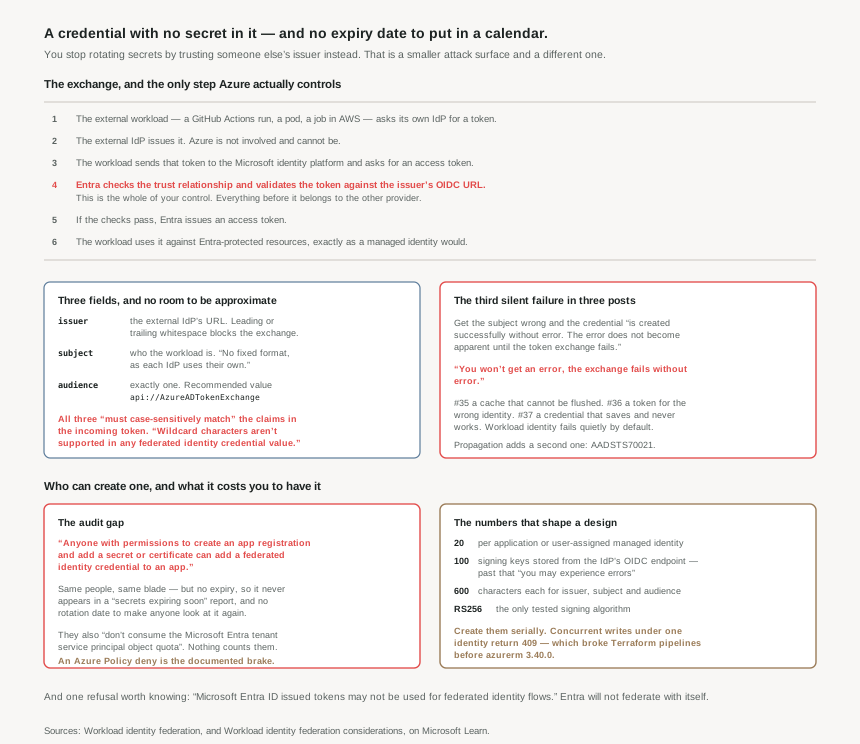
The exchange
The flow is the same for every scenario, which is the feature's great simplification. The external workload asks its own IdP for a token. The IdP issues one. The workload presents it to the Microsoft identity platform, which checks the trust relationship on the user-assigned managed identity or app registration and validates the external token against the OpenID Connect (OIDC) issuer URL on the external IdP. If that passes, Entra issues an access token, and the workload uses it exactly as a managed identity would.
Notice where the boundary falls. Steps 1 and 2 happen entirely inside the other provider. Azure's involvement begins when a token it did not issue arrives at its door, and the only question it can answer is whether that token matches a rule you wrote. Everything upstream — who may run the workflow, who may edit the pipeline, how the IdP decides what to put in the subject claim — is governed somewhere else.
The supported list is broad and worth knowing, because it is the reason this matters beyond CI: any Kubernetes cluster (AKS, Amazon EKS, Google GKE, or on-premises), GitHub Actions, Google Cloud, Amazon Web Services, SPIFFE and SPIRE, and Azure Pipelines service connections.
One refusal is worth committing to memory: Microsoft Entra ID issued tokens may not be used for federated identity flows. The federated identity credentials flow does not support tokens issued by Microsoft Entra ID. Entra will not federate with itself, so this is not a route for one Entra app to impersonate another.
Three fields, and no room to be approximate
A federated identity credential is three values and a name.
issuer— the URL of the external identity provider, which must match the issuer claim of the external token. Beware whitespace: if the issuer claim has leading or trailing whitespace in the value, the token exchange is blocked.subject— the identifier of the external software workload, matched against thesubclaim. It has no fixed format, as each IdP uses their own — sometimes a GUID, sometimes a colon delimited identifier, sometimes arbitrary strings.audience— exactly one value; federated identity credentials must have exactly one audience, and the recommended value is "api://AzureADTokenExchange".
And the matching is strict in both the ways that catch people. All three must case-sensitively match the corresponding issuer, subject and audience values contained in the token. And wildcard characters aren't supported in any federated identity credential property value — so a rule cannot say "any branch of this repo". It names one subject, and a second subject needs a second credential out of the twenty you are allowed.
The name has its own constraints, and one of them is permanent: 3-120 characters, URL friendly, alphanumeric, dash, or underscore, first character alphanumeric, and it's immutable once created. Another entry in this phase's growing list of fields you get one chance at — alongside AssignableScopes in #20 and isAssignableToRole in #32.
On a wrong subject: the federated identity credential is created successfully without error. The error does not become apparent until the token exchange fails. And on the exchange itself, stated even more starkly: You won't get an error, the exchange fails without error.
Put that beside the other two. Post #35: a permission change that takes effect in up to 24 hours and cannot be hurried. Post #36: a token issued for the wrong identity because you omitted a parameter. Post #37: a credential that saves cleanly and never works. Workload identity in Entra fails quietly by default, and every one of these is documented rather than surprising — which makes reading the considerations page part of the design work, not part of the troubleshooting.
And a second, temporary silence
Even a correct credential does not work immediately. It takes time for the federated identity credential to be propagated throughout a region after being initially configured, and during that window a request fails with AADSTS70021: No matching federated identity record found for presented assertion.
That error message is worth recognising on sight, because it is identical to what a genuinely wrong subject produces. The same symptom means "wait a minute" and "you will be here all day", and only time distinguishes them. The guidance is to wait a short time after adding the federated identity credential before requesting a token, and to add retry logic — with a caveat that reveals how eventual the consistency is: retries should be done for every request even after a token was successfully obtained.
Why This Architecture Holds Up
Because it is a credential that no credential report will show you
This is the argument I would most want a security team to hear.
Anyone with permissions to create an app registration and add a secret or certificate can add a federated identity credential to an app. The same people, the same blade, the same level of privilege. But a client secret has an expiry date, which means it appears in every "secrets expiring in 30 days" report and forces a human to look at it at least once a year. A federated identity credential has no expiry, so it appears in no such report and nothing ever prompts a review.
It is also invisible to the crudest form of counting: federated identity credentials don't consume the Microsoft Entra tenant service principal object quota. They do not show up in an object count either.
So the very property that makes them good — no expiry, no rotation, no downtime — removes the mechanism that made secrets get reviewed. The design consequence is that federated credentials need a deliberate audit, because nothing will produce one for you. Enumerate them per app and per managed identity, and check each subject against the repository, branch or workload it names. Microsoft even documents the brake: a deny Azure Policy on Microsoft.ManagedIdentity/userAssignedIdentities/federatedIdentityCredentials, which is the right control for an estate that wants federation to be a platform-team decision rather than an app-team one.
Because the subject is your entire authorisation boundary
With no wildcards, no expiry and no secret, one string decides who may act as this identity. If a GitHub subject names a repository and a branch, then anyone who can push to that branch can obtain your Azure token. If it names an environment, then whoever can approve that environment holds it. The Azure side of this arrangement is exactly as strong as the weakest path to satisfying that subject claim in the other system.
This is the same shape as post #33's dynamic membership rules, where the real access-control list was whoever could write the attributes the rule read. Here it is whoever can cause the external IdP to mint a token with that subject. In both cases the people who hold the access do not appear in any Azure role assignment, and in both cases the review question is the same: who can satisfy this condition, in the system that owns it?
The absence of wildcards is a genuine kindness here, even though it costs you credentials out of the twenty. A rule that cannot say "any branch" is a rule that cannot accidentally mean it.
Because the limits shape multi-cluster and multi-repo designs early
A maximum of 20 federated identity credentials can be added to an application or user-assigned managed identity. That is not many once a subject names a specific branch, environment or cluster: twenty repositories, or twenty clusters, or twenty environments — and the combination arrives sooner than any of them alone.
Combined with the uniqueness rule — the combination of issuer and subject must be unique on the app — the design that scales is one identity per role rather than one per consumer. Post #35 made the same argument from the other direction: a user-assigned managed identity used as the unit of authorisation, with resources attached to it. Federation reaches the same conclusion because the alternative runs out of credentials.
Two more that decide whether automation works:
- Create them serially under one identity. Creating multiple federated identity credentials under the same user-assigned managed identity concurrently triggers concurrency detection logic, which causes requests to fail with 409-conflict HTTP status code. The AzureRM Terraform provider fixed this in version 3.40.0; earlier versions can cause failures in pipelines. Under different managed identities they parallelise fine.
- Check the issuer's key count. The Microsoft identity platform stores only the first 100 signing keys from the IdP's OIDC endpoint, and beyond that you may experience errors. Rare, but a large multi-tenant IdP is exactly where it would bite, and the failure would look intermittent.
Because it changes who your trust depends on
A client secret is a bad credential with one clear virtue: it is yours. Its security is your storage, your rotation, your discipline. Federation trades that for a dependency on an external provider's ability to issue honest tokens — its signing keys, its OIDC endpoint, its correctness about what belongs in a subject claim.
That is a good trade almost every time, because the alternative is a secret in a CI variable and the historical record on those is not kind. But it should be made knowingly, and it has a scope: only issuers that provide tokens signed using the RS256 algorithm are supported, and anything else may work, but haven't been tested. If you federate with an IdP you do not run, you have taken a dependency on an organisation's key management that no Azure control can compensate for.
Key Architecture Decisions
| Decision | What to do | Why |
|---|---|---|
| Any workload outside Azure needing Azure access | Federate. Do not issue a client secret | Secrets have to be stored securely and rotated regularly, with downtime if the credentials expire. |
| Auditing app credentials | Enumerate federated credentials explicitly; they will not appear in an expiry report | No expiry, and they don't consume the service principal object quota. Nothing counts them. |
| Who may create them | Consider a deny Azure Policy on the FIC resource type | Anyone with permissions to ... add a secret or certificate can add a federated identity credential. |
| Reviewing a federated credential | Ask who can make the external IdP mint that subject | The subject is the whole boundary, and the people who satisfy it hold no Azure role assignment. |
| Scoping the subject | Name the narrowest thing the IdP will assert — branch or environment, not repository | No wildcards, so the rule means exactly what it says — use that. |
| Multi-repo or multi-cluster | One identity per role, not per consumer | A maximum of 20 federated identity credentials per app or managed identity. |
| Creating them in IaC | Serially under one identity; AzureRM 3.40.0 or later | Concurrent writes under one parent fail with 409-conflict. |
| Right after creating one | Wait, then retry — and keep retry logic permanently | Propagation produces AADSTS70021, and retries should be done for every request even after a token was successfully obtained. |
| Debugging a failed exchange | Diff issuer, subject and audience character by character, including case | They must case-sensitively match, whitespace in the issuer blocks the exchange, and you won't get an error. |
| Naming the credential | Encode the workload in the name at creation | The name is immutable once created, so a bad one is permanent. Use the optional description field, which is not validated, for anything that may need to change. |
Closing Thought
Federation is the best answer this phase has produced to a real problem. Secrets in pipelines are the most reliably leaked credential in the industry, and this removes them completely rather than managing them better. I would use it everywhere it is supported.
But it is worth being precise about what changed. You have not removed the credential; you have replaced a string you store with a rule you write, and moved the enforcement from your secret store to someone else's token issuer. The rule is exact, which is good, and permanent, which is neutral, and invisible to every tool that was built to find credentials, which is the part to plan for.
That is the thread running through all three of these posts. A managed identity's permissions cannot be revoked quickly. A managed identity token can be issued for the wrong principal without complaint. A federated credential can be wrong and silent, or right and temporarily silent, and the error text is the same either way. None of it is hidden — every sentence quoted here is in Microsoft's own documentation — but none of it surfaces during the five minutes it takes to configure, and all of it surfaces later.
#38 moves from proving who a workload is to deciding what it may do: app roles, scopes and consent — the difference between delegated and application permissions, and why the consent screen is an authorisation decision made by whoever happens to click it.
Comments