Business Challenge
#32 introduced custom roles and their maintenance burden. This is the mechanical layer underneath: what you are actually allowed to put in one, and what the launch stage field does.
Check what survived the clone. Some predefined roles contain deprecated permissions or permissions that are otherwise not permitted in custom roles — and in that case the custom role will omit the deprecated and restricted permissions. No error, just a shorter role than the one you copied.
Correct approachDiff the created role against the source role rather than assuming the copy is faithful. The omission is by design and it is silent.
Listed is not the same as supported. A permission marked TESTING means Google is testing the permission to check its compatibility with custom roles — you can include the permission in custom roles, but you might see unexpected behavior, and it is not recommended for production use.
Correct approachRead the support level, not just the name. TESTING is the level that accepts your input and may not behave, which makes it more dangerous than the one that refuses.
The field records your intent and does not enforce it. Most launch stages are informational, and help you keep track of whether each role is ready for widespread use. Exactly one does something: the DISABLED launch stage lets you disable a custom role.
Correct approachTreat the stage as documentation for humans, with DISABLED as the single operational lever — a way to switch a role off without deleting it and losing the definition.
You cannot. Deny policies, principal access boundaries, organization policy and Privileged Access Manager settings are all unsupported in custom roles. This is the single clearest pattern in the exclusion list, and it is deliberate.
Correct approachUse predefined roles for guardrail administration. The exclusion exists to stop a custom role becoming the tool that dismantles the controls above it.
Architecture
Three support levels, six launch stages, and one number that reframes the whole topic.
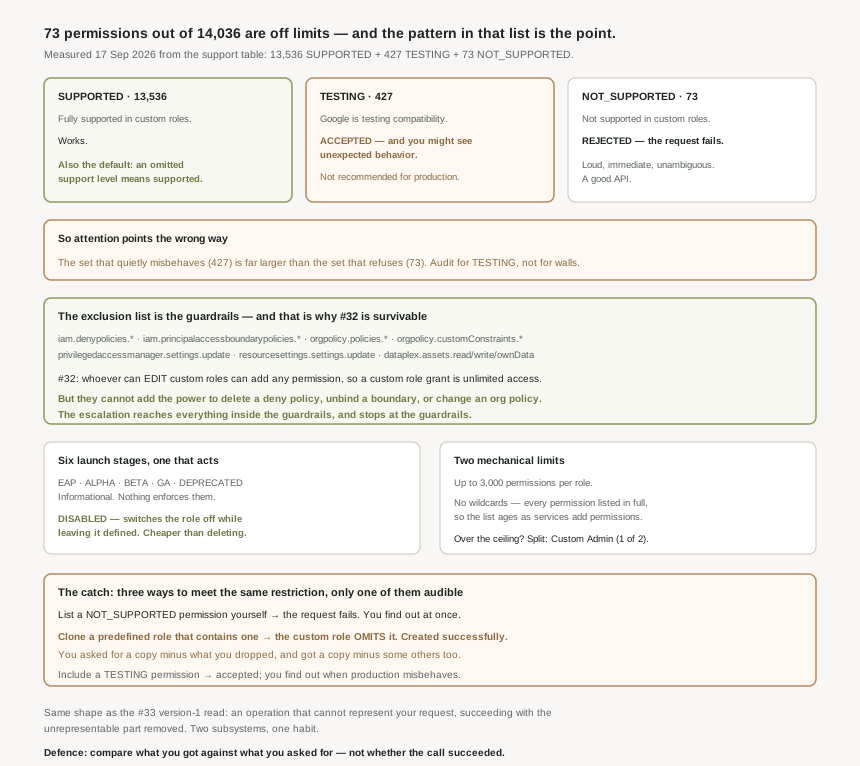
The three support levels
| Level | What Google says | What happens when you use it |
|---|---|---|
| SUPPORTED | Fully supported in custom roles. | Works. Also the default reading: if the response omits the level of support for a permission, then that permission is supported. |
| TESTING | Google is testing the permission to check its compatibility with custom roles. | Accepted. You might see unexpected behavior, and it is not recommended for production use. |
| NOT_SUPPORTED | The permission is not supported in custom roles. | Rejected — a custom role can contain only permissions that are supported, and if it contains other permissions, the request fails. |
Note the asymmetry in how those three fail. SUPPORTED works, NOT_SUPPORTED refuses loudly, and TESTING is the middle case that accepts the permission and may then misbehave — which inverts where most people direct their attention, because the level that quietly misbehaves covers far more permissions than the level that refuses.
Google publishes the support level per permission but no totals, so the figures here are my own tally, not a documented number, and they are stated that way deliberately. Method: fetch the support-levels page, strip the markup, and count the permission name / support level pairs in the table. Counted on 17 September 2026 that gives 14,036 permissions — 13,536 SUPPORTED, 427 TESTING, 73 NOT_SUPPORTED. The table is rendered from a live catalogue, so expect these to drift; the ratio between the last two is the part that matters, and it is roughly six to one.
Those proportions are the argument. The set you may use but should not is several times the size of the set you cannot use at all, so an audit that looks only for hard failures is looking in the smaller place.
What is actually on the unsupported list
The unsupported list is short enough to read in full, and reading it is worth more than any summary. The clusters:
iam.denypolicies.*— create, delete, replace, update. The subject of #36.iam.principalaccessboundarypolicies.*— bind, create, delete, unbind, update.orgpolicy.policies.*andorgpolicy.customConstraints.*— the organization policy service from #22.privilegedaccessmanager.settings.updateandresourcesettings.settings.update.dataplex.assets.readData,writeData,ownData— data-plane access rather than control-plane.- A tail of service-specific cases —
domains.registrations.*, fleet management, storage transfer reporting,appengine.runtimes.actAsAdmin.
#32 established the custom role escalation path: anyone who can edit custom roles in a container can add any permission to any custom role there, so granting them a custom role hands them unlimited access. Now look at what they cannot add. They cannot grant themselves the ability to delete a deny policy, unbind a principal access boundary, change an organization policy, or edit a custom constraint. The escalation still reaches everything inside the guardrails — and stops at the guardrails themselves. That is not a documentation gap or a backlog item; it is the boundary that makes the #32 warning survivable.
The six launch stages
The stage field on a custom role can contain one of the following values: EAP, ALPHA, BETA, GA, DEPRECATED, or DISABLED. Five of the six are labels. The exception is DISABLED, which switches the role off while leaving it defined — the only one with behaviour attached.
That makes the stage field genuinely useful for the problem #32 identified, which is that a custom role is code you have adopted maintenance of. A role marked DEPRECATED tells the next person not to grant it; a role marked DISABLED stops working without anyone losing the permission list. Both are cheaper than deletion, and deletion is the operation people reach for instead.
Custom roles can contain up to 3,000 permissions, and the maximum total size of the title, description, and permission names for a custom role is 64 KB — two ceilings, and the second is the one you meet first if your permission names are long. There is also a count limit: you can create up to 300 organization-level custom roles in your organization, and up to 300 project-level custom roles in each project in your organization. Wildcards are not accepted in permission names — every permission is listed in full, so a role covering a broad surface is a long explicit list that ages as services add permissions. When one role is not enough, Google's suggestion is to split the permissions across several and choose role titles that show the relationship between the custom roles, such as Custom Admin (1 of 2). That naming convention is a hint about how often the 3,000 ceiling is actually reached.
Why This Architecture Holds Up
The interesting engineering detail is that hitting an unsupported permission produces completely different experiences depending on how you arrive at it.
| How you arrive | What happens | Do you find out? |
|---|---|---|
| You list a NOT_SUPPORTED permission explicitly | The request fails. | Immediately, and unambiguously. |
| You create the role from a predefined role containing one | The custom role omits it. | No. The role is created successfully. |
| You include a TESTING permission | Accepted, and may behave unexpectedly. | Only when something misbehaves in production. |
The first row is a good API. The second is the trap: cloning a predefined role is the natural way to build a custom one — start from something that works, remove what you do not need — and it is exactly the path where the restriction applies silently. You asked for a copy minus some permissions and got a copy minus some permissions minus some others, and the difference is not in the response you read.
It is the same shape as the #33 version-1 read: an operation that cannot represent what you asked for, completing successfully with the unrepresentable part removed. Two different subsystems, one habit — and the same defence, which is to compare what you got against what you asked for rather than checking whether the call succeeded.
What to do with this
- Diff every cloned role against its source. If the permission counts differ, the difference is the restricted set, and you need to know whether you depended on any of it.
- Query support levels rather than guessing.
queryTestablePermissions()reports the level per permission, and remember that an omitted level means supported. - Treat TESTING as unusable in production and audit existing custom roles for it — 427 permissions carry that level, so the odds of one being present are not negligible.
- Do not design guardrail administration around custom roles. Deny policies, principal access boundaries, org policy and PAM are unavailable by design.
- Use DISABLED instead of deleting when retiring a role, and DEPRECATED to warn before you do.
- Expect the explicit list to age. No wildcards means a custom role never picks up permissions added to a service later — the #32 drift problem, stated mechanically.
Key Architecture Decisions
| Decision | Choose this | Because |
|---|---|---|
| Building a custom role from a predefined one | Diff the result | The custom role will omit the deprecated and restricted permissions. |
| A permission marked TESTING | Keep it out of production | You might see unexpected behavior; not recommended for production use. |
| Checking whether a permission is allowed | queryTestablePermissions() |
An omitted support level means the permission is supported. |
| Administering deny policies or org policy | Predefined roles only | Those permissions are not supported in custom roles. |
| Retiring a custom role | DISABLED, then delete later | It is the one launch stage with behaviour attached. |
| Signalling readiness | Use the stage, expect nothing to enforce it | Most launch stages are informational. |
| A role that needs more than 3,000 permissions | Split, with related titles | Choose role titles that show the relationship between the custom roles. |
| Covering a broad service surface | Accept the explicit list, or use predefined | Wildcards are not accepted in permission names. |
Closing Thought
"The permissions you cannot grant" sounds like it should be a long list of arbitrary gaps, the sort of thing you work around. It is 73 entries out of 14,036, and once you read them the arbitrariness disappears. Deny policies. Principal access boundaries. Organization policy and custom constraints. Privileged Access Manager. These are the mechanisms that limit what IAM can do, and they are the ones IAM will not let you assemble a custom role out of.
Which answers a question #32 left slightly open. If whoever can edit custom roles effectively has unlimited access, what stops that from being total? This list does. The escalation reaches everything governed by allow policies and stops at the layer that governs allow policies. Whether that boundary is in the right place is a fair question — 0.52% of the catalogue is a narrow moat — but it is a boundary someone chose, and it is the reason the guardrails in #22 mean anything at all.
#36 takes the first item on that exclusion list and gives it the post it deserves: deny policies — syntax, evaluation order, and denial conditions. The mechanism that finally lets you subtract access, which is why #33 could only ever add.
Comments