Business Challenge
#49 established that an IAM binding names an identity, and that the account behind it is resolved in Cloud Identity. This post is about how accounts get into Cloud Identity at scale, which for most organisations means Google Cloud Directory Sync reading an on-premises directory. The tool is free, well documented, and does what it says. The thing worth a careful read is what it does when it finds less than it expected.
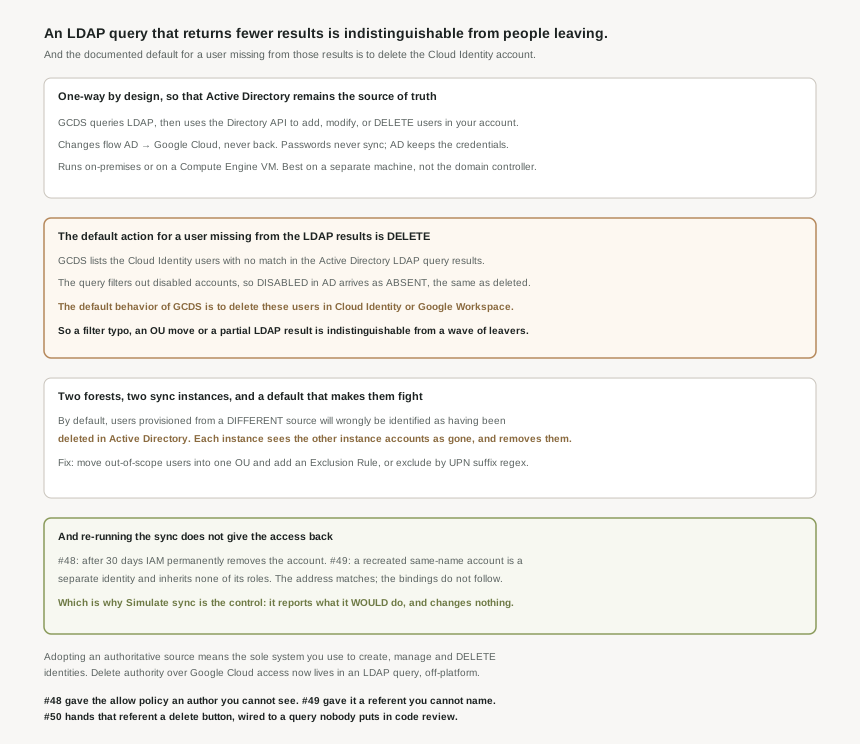
It is read-only against the directory, not against Google. Acting as a go-between, GCDS queries the LDAP directory and uses the Directory API to add, modify, or delete users in your Cloud Identity or Google Workspace account. One-way means Active Directory is never written to. It does not mean nothing gets written.
Correct approachTreat the sync as a privileged writer against Cloud Identity, and review its configuration with the same care as an IAM change.
Removal is driven by absence from a query result, not by a deletion event. GCDS lists the Cloud Identity users with no corresponding match in the LDAP results, and because the query carries (!(userAccountControl:1.2.840.113556.1.4.803:=2)), any users that have been disabled or deleted in Active Directory since the last provisioning was performed will be included in that list. Disabled and deleted are the same input.
Know that the signal is "not in the result set". Anything that shrinks the result set — a filter change, an OU move, a partially answered query — produces the same list.
It is not. The default behavior of GCDS is to delete these users in Cloud Identity or Google Workspace, and it is a setting you change rather than one you opt into — under Google Domain Users Deletion/Suspension Policy in Configuration Manager.
Correct approachChange the policy for non-administrator users to suspend, and confirm the option not to suspend or delete Google domain admins not found in LDAP is checked, so a bad run cannot take the super admin with it.
The accounts come back. The access does not. From #49: a recreated account with the same name is a separate identity and inherits none of the roles granted to the deleted one. From #48: after 30 days IAM permanently removes the account, so even undelete has a deadline.
Correct approachTreat an erroneous sync deletion as an access-loss incident with a 30-day clock, not a provisioning hiccup. Undelete the original accounts; do not recreate them.
Architecture
The premise is a governance one before it is a technical one. A reference architecture starts from the idea of an authoritative source for identities — the sole system that you use to create, manage, and delete identities for your employees — and the Active Directory pattern is to use Active Directory as IdP and authoritative source. Synchronization is one-way so that Active Directory remains the source of truth.
What actually moves, and what does not
| Thing | Direction | Note |
|---|---|---|
| Users and groups | Active Directory → Cloud Identity | Via the Directory API — add, modify, or delete. |
| Any change made in Cloud Identity | Nowhere | Changes in Active Directory are replicated to Google Cloud but not the other way around. |
| Passwords | Never | Provisioning does not include passwords; Active Directory remains the only system that manages these credentials. |
| Authentication | Delegated by SAML | A separate mechanism from provisioning — that is #51. |
The reason provisioning exists at all, separately from sign-on, is the sequencing constraint from #49. Provisioning ensures that when you create a new user in Active Directory, it can be referenced in Google Cloud even before the associated user has logged in for the first time — which is exactly what a binding written in advance needs, and exactly what federation alone cannot provide.
Where it runs, and why on-premises is usually right
You can run GCDS either on-premises or on a Compute Engine virtual machine in Google Cloud, and the guidance leans on-premises for a reason that is easy to skip: by default, Active Directory uses unencrypted LDAP. Reaching it from inside Google Cloud means either LDAPS or Cloud VPN, whereas the GCDS-to-Google leg is HTTPS and needs little firewall work. It is also best to run GCDS on a separate machine rather than on the domain controller.
Two smaller planning notes worth catching before they cost a weekend. If you intend to provision more than 50 users on the free edition, you request an increase of the total number of free Cloud Identity users through your support contact. And the documentation says to consider using an Active Directory test environment before connecting production — which, given the deletion behaviour below, reads less like boilerplate than it first appears.
Why This Architecture Holds Up
This is the part that deserves to be understood precisely, because the mechanism is simpler than people assume and that simplicity is the hazard.
GCDS does not consume a change feed. On each run it builds the list of Cloud Identity users that have no corresponding match in the Active Directory LDAP query results, and acts on that list. So the input is not "who was deleted" but "who is missing from what the query returned this time".
A person leaves and their account is deleted. A person is disabled pending an investigation — and because the query carries (!(userAccountControl:1.2.840.113556.1.4.803:=2)), disabled accounts are filtered out, so they arrive as absent. Or nobody left at all and the query itself changed: a base DN edited, an OU restructured, a filter tightened, a search returning partial results. All three produce a list of Cloud Identity users with no match, and the default behavior of GCDS is to delete these users in Cloud Identity or Google Workspace. The tool cannot distinguish between them, because from where it stands there is nothing to distinguish — the query returned what it returned.
The two-instance default, which is the one I did not expect
Organisations with more than one forest or domain commonly run more than one GCDS instance against a single Cloud Identity account. The documentation is direct about what happens if you do that without extra configuration: by default, users in Cloud Identity or Google Workspace that have been provisioned from a different source will wrongly be identified in Active Directory as having been deleted.
Read that with the deletion default alongside it. Instance A queries forest A, finds the accounts provisioned by instance B absent from its results, and concludes they were deleted. Instance B does the same in reverse. Two correctly-installed, individually-correct syncs will remove each other’s users, on a schedule, because neither has been told the other exists.
The remedy is scoping, done explicitly: move all users beyond the scope of the forest you are provisioning into a single organizational unit and add an exclusion rule for it, or exclude by user email address with a regular expression on the UPN suffix. Either way the point is the same — each instance has to be told which accounts are none of its business, and the default is that everything is.
The control that matters is the one that changes nothing
GCDS has a simulation mode, and in a system whose destructive action is triggered by absence it is the single most valuable feature. During simulation GCDS performs no changes to your account, but will instead report which changes it would perform during a regular provision run. The instruction that goes with it is explicit about what you are looking for: review the proposed changes and verify that there are no unwanted changes such as deleting or suspending any users or groups.
A simulation before the first run is in the setup guide. The argument of this post is that it belongs before every configuration change, because the configuration is a query and a query is exactly as reviewable — and as easy to get subtly wrong — as any other code. A base DN edit has no visible blast radius until the run. The proposed-changes list is the blast radius, printed, for free, before anything happens. In practice that means treating a deletion count above your expected leaver rate as a stop condition, not a surprise to work through afterwards.
And one piece of sequencing that connects straight back to #49
The setup guide carries a prerequisite that is really a reference to the previous post: if you suspect that any of the domains you plan to use for Cloud Identity could have been used by employees to register consumer accounts, consider migrating these user accounts first. Those are #49’s unmanaged accounts, and the ordering matters because sync is the thing that will collide with them. Provisioning a managed account at an address an unmanaged account already holds is the conflict case, and it is better met deliberately before a scheduled task meets it at 02:00.
Key Architecture Decisions
| Decision | Choose this | Because |
|---|---|---|
| Deletion policy for non-admins | Suspend rather than delete | The default is delete, and deletion loses the role bindings. |
| Protecting the super admin | Keep the admins-not-in-LDAP exclusion checked | Otherwise a bad run can remove the account you administer with. |
| Any change to the LDAP query | Simulate first, every time | Simulation reports what it would do without changing anything. |
| A simulation proposing mass deletions | Stop and investigate the query | Absence from the results is indistinguishable from departure. |
| More than one forest or domain | Exclusion rules on every instance | By default each instance treats the others accounts as deleted. |
| Where to run GCDS | On-premises, on a separate machine | Active Directory uses unencrypted LDAP by default. |
| Before connecting production | A test Active Directory environment | The destructive default is easier to discover there. |
| Domains that may hold consumer accounts | Migrate those accounts before syncing | Provisioning into an occupied address is the conflict case. |
| Recovering from an erroneous deletion | Undelete, never recreate | A same-named new account is a separate identity with no roles. |
The one to look at today
Open your sync configuration and read two things: the deletion policy, and whether exclusion rules exist for every account your instance does not own. If the policy says delete and there are no exclusions, you have a scheduled task whose failure mode is the permanent removal of IAM access for everyone it cannot see — and whose trigger is an LDAP query that no review process is currently looking at. Then run a simulation and read the proposed-changes count. If it is not approximately your leaver rate, the query is telling you something.
Closing Thought
None of this is a flaw in the tool. A sync that refused to delete would leave departed employees holding accounts, which is the failure #49 spent its length on. Propagating deletions is the point, and GCDS does it with a free tool, a documented default, a protected-admins option, a configurable policy and a simulation mode that will show you the whole run before it happens. Everything needed to operate it safely is in the box and in the documentation.
What the series has accumulated is a chain rather than three separate facts. #48 found the allow policy has an author you cannot see. #49 found it has a referent you cannot name, joined to the policy by a mapping an administrator can move. #50 is where that referent acquires a delete capability, and the trigger is not an intention recorded anywhere but the shape of a query result on a machine in another building. The policy document stays unchanged throughout. Which is the uncomfortable part: by this point in the series, the allow policy has become one of the less informative places to look for who can do what.
#51 takes the other half of the Active Directory pattern: single sign-on with a third-party identity provider — what SAML actually asserts, what it does not, and why provisioning had to come first.
Comments