Business Challenge
A platform team is asked to design a landing zone. They open the console expecting to create an organization and discover one already exists. Nobody on the team made it. It carries a domain name that IT registered years earlier for email, and it appeared on its own the first time somebody logged in.
Three consequences follow, and the team meets them in this order.
The organization is bound to one domain, and there is exactly one of each. A proposal to split the platform across two organizations turns out to be a proposal to run two identity domains — a conversation with the people who own email, not a cloud design decision.
Correct approachEstablish which domain the organization is bound to before drawing any diagrams. If that answer constrains the design, it constrains it from day one rather than from the first review.
They were created before the organization existed, they sit under “No organization”, and no policy the team writes reaches them — not because a rule failed, but because those projects were never underneath the place the rules attach to.
Correct approachInventory what sits outside the organization first, then move it in deliberately. Nothing reports these as ungoverned, because governance is scoped to the organization they are not in.
Not administrator mistakes: accounts people created themselves, which the organization does not own and cannot switch off. IAM accepts them, so the binding looks entirely ordinary in a policy listing.
Correct approachTurn on domain-restricted sharing before bindings exist. It defines the set of trusted accounts whose principals may appear in allow policies, and rejects the rest at the point of granting.
Folders, projects, IAM, organization policy, VPC Service Controls — every control in the rest of this series lives in the resource plane and is anchored to the organization. The account that owns that organization sits outside all of it. Designing the resource plane without knowing who holds the identity plane is designing the inside of a building whose doors somebody else controls.
Architecture
Google Cloud has two planes, and the confusion that produces most identity incidents is treating them as one. The identity plane decides who exists. The resource plane decides what exists and who may touch it. They are bound together one-to-one, and they are administered by different people using different tools.
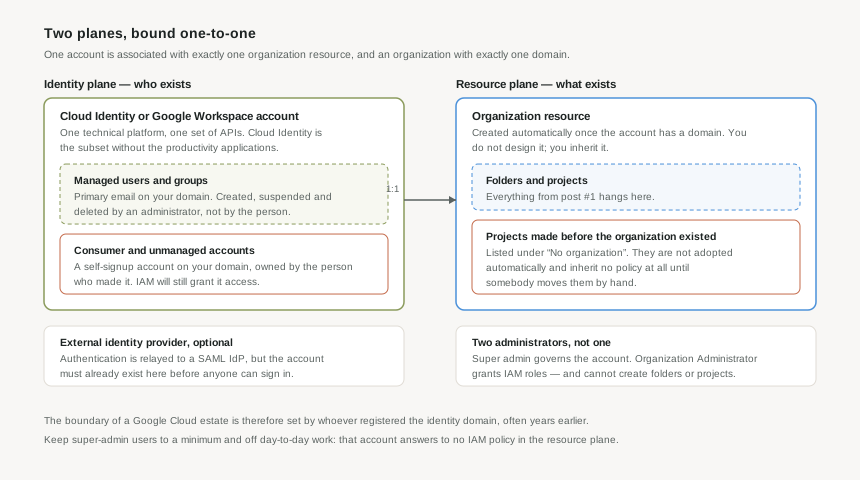
Cloud Identity and Google Workspace are the same product wearing different licences
Both share a common technical platform, use the same APIs and the same administrative tools, and share the notion of an account as a container for users and groups identified by a domain name. Cloud Identity is the subset: it manages users, groups and authentication without the collaboration and productivity applications.
For an architect this matters mainly because it removes a false choice. If your company already runs Google Workspace, you already have the identity plane and there is nothing to procure. If it does not, Cloud Identity gives you the same container without buying an office suite you will not use.
The organization appears on its own
Once the account exists and is associated with a domain, the organization resource is created for you automatically. There is no design step, and this is the single most surprising thing about starting on Google Cloud with an enterprise background: the root of your resource hierarchy is a consequence of a DNS domain, not a decision recorded anywhere.
The binding is strict in both directions. Each account is associated with exactly one organization resource, and an organization resource is associated with exactly one domain. So "should we have one organization or two?" is really "do we operate one identity domain or two?" — and the answer usually already exists.
The projects that predate it are stranded, permanently, until moved
Projects created before the organization existed are listed under No organization, and this is documented as normal rather than as an error. They must be moved into the organization resource manually.
This is worth dwelling on, because it is the one failure in this post that is completely silent. A project outside the organization has nothing above it. It inherits no IAM grants, no organization policy constraints, no deny policies — not because those controls were misconfigured but because inheritance flows down from a root this project does not have. A compliance dashboard scoped to the organization reports on the organization, and reports clean.
Managed accounts, and the ones you do not own
A managed user account has a primary email on your domain and is created, suspended and deleted by an administrator. That is the account type the rest of this series assumes.
The other kind is a consumer account: self-signup, where the person who created it has full control of the account and any data created by using it. When a consumer account's primary email corresponds to your primary or secondary domain, it becomes an unmanaged user account — an account wearing your company's domain that your company does not control.
The reason this is an architecture concern rather than an administrative one is that IAM does not distinguish. Allow policies can reference consumer accounts, including gmail.com users and consumer accounts using a corporate email address. A binding to such an account looks entirely ordinary in a policy listing.
Why This Architecture Holds Up
There are two kinds of administrator here and they are not a hierarchy. Confusing them is how organizations end up with either a bottleneck or an unaudited superuser.
The super administrator belongs to the identity plane, from Google Workspace or Cloud Identity. It has a great deal of control over the organization resource, and Google explicitly recommends against using it for day-to-day management. The crucial property for a cloud architect: it is not an IAM role. Nothing you write in the resource plane — no deny policy, no organization policy constraint, no perimeter — is what governs it.
The Organization Administrator is an IAM role, granted separately, and it is narrower than its name suggests. It can assign IAM roles to other users and define allow and deny policies. It cannot create folders or projects.
That last restriction reads like an oversight and is not. It separates deciding who may do things from doing them, so the person who grants access cannot quietly grant themselves somewhere to work unobserved. If you want a platform team that can both govern access and build structure, you grant two roles deliberately, rather than assuming one implies the other.
Who holds super admin on the identity domain, and how many of them are there? Google's guidance is to retain only a minimal number and discourage everyday usage. If the answer is "we don't know" or "the person who set up email", that is the first item of platform work — ahead of landing zones, ahead of networking, ahead of everything in the next forty posts.
Federation moves authentication, not the accounts
Most enterprises federate to an existing identity provider, and the mechanism is more limited than people expect. Cloud Identity or Google Workspace relays authentication decisions to a SAML IdP — but the user account must already exist on the Google side before any sign-on attempt. Federating does not create accounts; it only decides who may sign in to accounts that are already there.
So a federated design is always two mechanisms, not one: authentication relayed to the IdP, and provisioning that keeps the account list in step. Teams that build the first and postpone the second get a working login for exactly the users somebody created by hand, and a joiner-mover-leaver process that silently does nothing.
Domain-restricted sharing is the control that closes the consumer-account gap
Because IAM will accept consumer accounts, the fix is not vigilance in code review — it is an organization policy constraint. Domain-restricted sharing defines the set of trusted Cloud Identity or Google Workspace accounts whose principals may appear in allow policies, and rejects the rest at the point somebody tries to grant.
It belongs in the first hour of a new organization rather than the first audit, because it is one of the few controls here that is genuinely harder to introduce later: turning it on once bindings exist means breaking whatever access those bindings were providing.
Key Architecture Decisions
| Decision | Choose this | Because |
|---|---|---|
| Cloud Identity or Google Workspace | Whichever the company already runs; Cloud Identity if neither | They are one platform with the same APIs and admin tools. The difference is productivity applications, which is a licensing question, not an architecture one. |
| Number of organizations | One, unless you genuinely operate two identity domains | An account maps to exactly one organization and an organization to exactly one domain. A second organization is a second identity domain with everything that implies. |
| Projects under "No organization" | Inventory them first, then move them in deliberately | They inherit nothing — no IAM, no organization policy, no deny policies — and nothing reports them as ungoverned, because governance is scoped to the organization they are not in. |
| Super admin accounts | A minimal number, dedicated, never used for daily work | Google's own guidance, and the account is outside IAM entirely. No control described anywhere later in this series applies to it. |
| Organization Administrator | Grant it for governance, and grant project creation separately | It deliberately excludes creating folders and projects. Treat the gap as the separation of duties it is rather than patching it with a broader role. |
| Consumer accounts on your domain | Domain-restricted sharing, from day one | IAM will otherwise accept them, and a binding to an unmanaged account is indistinguishable from any other in a policy listing. |
| External identity provider | Federate authentication and automate provisioning together | Federation only relays sign-in decisions; accounts must already exist. Doing one without the other produces a leaver process that quietly does nothing. |
Almost everything else in this series is something you decide. The identity plane is something you find. Before the first folder is drawn, establish which domain the organization is bound to, who holds super admin on it, how many of them there are, and whether any projects are sitting outside the organization entirely. All four are questions with existing answers, and all four constrain the design.
Closing Thought
Post #1 described a hierarchy that propagates: grant at a folder and every project beneath it inherits. This post is about the ceiling of that mechanism. The organization is the root, it exists because a domain exists, and the account that administers the domain is not governed by anything inside the hierarchy it created.
That is not a flaw. Every cloud has to bottom out in an authority that its own policy engine does not constrain, and it is better that it is visible than buried. But it does mean an honest platform design names that authority, keeps it small, and treats it as a thing to be protected rather than a thing to be used.
The next posts go back inside the hierarchy — but everything they describe assumes the account described here is sound.
#3 covers the Resource Manager API: the control plane every request passes through, why an operation on a project is really an operation on a resource-hierarchy node, and what that means for automation that has to wait for the hierarchy to catch up with itself.
Comments