Business Challenge
#33 established that effective access is a union over the ancestry. This post is the operational consequence: given a principal and a resource, find the binding responsible. Every failure below comes from an inspection that silently narrowed the question.
You checked one term of the union. An allow policy does not show any roles gained through policy inheritance — the output is what was set at that resource, and nothing about it indicates that more applies.
Correct approach
Read a get-iam-policy result as "bindings set here", never as "access here". The absence of a principal is not evidence.
Closer, but the search finds bindings as written. Google's own worked example is explicit: this request only returns principals who have been granted the Owner role on the project, and does not include those who inherit it.
Correct approachUse the search to enumerate bindings at every level of the ancestry, then compute the union yourself. It is an inventory tool, not an evaluation engine.
Two ways that conclusion fails. The principal may never be named — a group is, and they are in it. And your own permissions can truncate the answer: the caller must have the iam.roles.get permission for permissions to be listed in a searchAllIamPolicies response.
Search for the groups the principal belongs to as well as the principal, and confirm you hold iam.roles.get before trusting an empty or permission-less result.
The binding you found may not be the one granting the access. If an inherited role already gives a principal all of the permissions that they need, a grant on the resource itself is redundant — granting another role that contains the same or fewer permissions is redundant, and has no effect.
Correct approachBefore deleting, establish whether the binding is the source or a duplicate of something inherited. Removing a redundant binding changes nothing and looks like a completed remediation.
Architecture
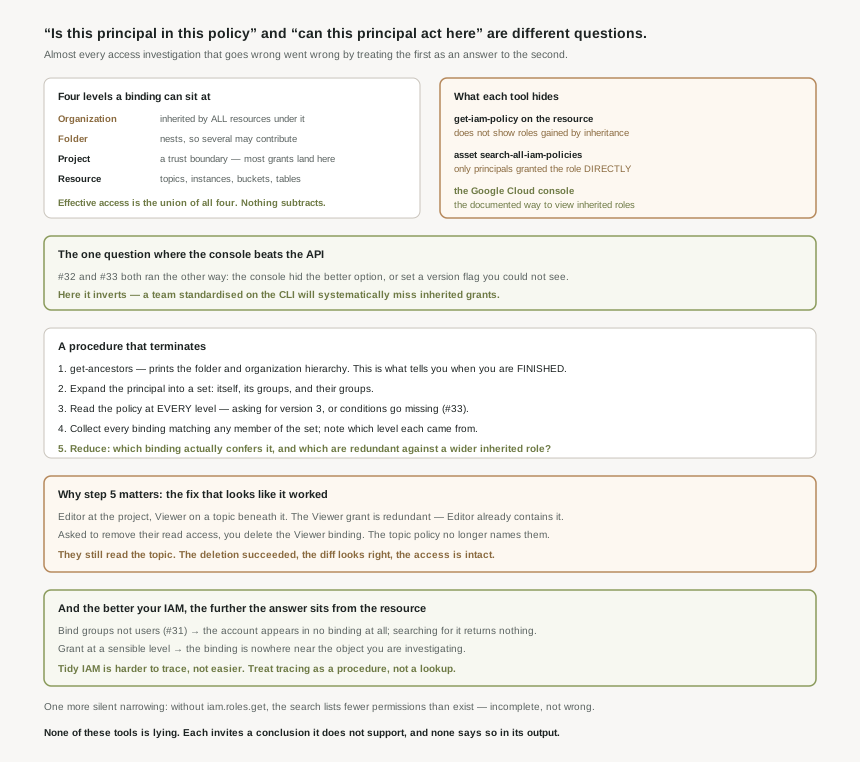
Allow policies are hierarchical and propagate down the structure. A binding can sit at any of four levels, and tracing means enumerating all four.
The four levels
| Level | What a binding here reaches |
|---|---|
| Organization | IAM roles granted at this level are inherited by all resources under the organization. The widest blast radius and the least frequently reviewed. |
| Folder | Roles granted at the highest folder level will be inherited by projects or other folders that are contained in that parent folder — so folder nesting means more than one folder may contribute. |
| Project | Everything in the project. Projects represent a trust boundary within your company, which is why this is where most grants land. |
| Resource | One object. Additional resources such as Pub/Sub topics and Compute Engine instances support lower-level roles, alongside the Cloud Storage and BigQuery systems. |
What each tool actually tells you
| Method | Answers | Hides |
|---|---|---|
get-iam-policy on the resource |
Bindings set at this exact level. | Everything inherited. No indication any exists. |
asset search-all-iam-policies |
Bindings as written, anywhere in scope. | Inheritance; group membership; permissions you cannot read. |
| The Google Cloud console | Inherited roles — to view them, use the console. | Less than the others, which is the surprise. |
#32 and #33 both ran the other way: the console made the weaker choice easy, or hid a version flag that the API exposed. Here it inverts. The documented route to seeing inherited roles is the console; the CLI returns the local policy only. So the habit those posts encourage — prefer the API, it tells you more — is wrong for this one question, and a team that has standardised on the CLI will systematically miss inherited grants.
A procedure that terminates
- Establish the ancestry.
gcloud projects get-ancestorswill get the ancestors for a project and print the folder and organization hierarchy for the given project. This is the list of levels you must check; without it you are guessing at depth. - Expand the principal into a set. The principal itself, plus every group it belongs to, plus any group those groups belong to. Bindings name groups far more often than people, by #31's design argument.
- Read the policy at every level — resource, project, each folder, organization — asking for version 3, or conditions will be missing from what you read, per #33.
- Collect every binding matching any member of the set, and note which level each came from.
- Reduce. Of the bindings found, determine which actually confer the permission in question, and which are redundant against a wider inherited role.
The search API helps with steps 3 and 4 at scale — it takes a memberTypes filter that contains one of the following IAM principal types, so you can restrict a sweep to service accounts or groups — but the union in step 5 is yours to compute.
Why This Architecture Holds Up
Two structural facts make the naive search fail, and they pull in opposite directions.
| Fact | Effect on a search for a principal |
|---|---|
| Good practice binds groups, not users (#31). | The principal is not in any binding. Searching for them returns nothing, correctly and uselessly. |
| Policies inherit downward, and grants concentrate at project and above. | The binding is not near the resource. Searching the resource returns nothing, correctly and uselessly. |
So the better an organisation follows the guidance in #31 and #32 — few durable groups, bound at a sensible level, no per-user grants on individual objects — the further the answer sits from the thing you are investigating. Tidy IAM is harder to trace, not easier. That is not an argument against tidiness; it is an argument for treating tracing as a procedure rather than a lookup.
Google's example uses the concentric basic roles: grant Kalani Editor at the project, and a Viewer grant on a topic beneath it is redundant, because Editor already contains everything Viewer has. Now invert it into an incident. You are asked to remove someone's read access to that topic. You find the Viewer binding on the topic, delete it, and verify the topic policy no longer mentions them. Nothing has changed — they still read the topic through Editor at the project. The deletion succeeded, the policy diff looks right, and the access is intact. The only defence is step 5: ask which binding is the source before removing any of them.
What to do with this
- Never conclude from one level. A principal absent from a resource policy tells you nothing about their access to it.
- Get the ancestry first. It defines when the search is finished, which is the difference between a procedure and a hunt.
- Search for groups, not just the account. In a well-run estate the account will not appear anywhere.
- Confirm your own read permissions. Missing
iam.roles.getmakes results quietly incomplete rather than erroneous. - Prove the revocation, do not assume it. Re-check effective access after the change, at the resource, not at the level you edited.
- Reach for the purpose-built tools when the manual walk gets long — Policy Troubleshooter and Policy Analyzer exist precisely to compute this, and they are #38.
Key Architecture Decisions
| Decision | Choose this | Because |
|---|---|---|
| Interpreting a resource policy | Read it as "set here", not "access here" | An allow policy does not show roles gained through policy inheritance. |
| Seeing inherited roles | The Google Cloud console | It is the documented route to view inherited roles. |
| Using the asset search for access questions | As an inventory of bindings | It returns only principals granted the role directly on the resource. |
| Scoping the investigation | get-ancestors first |
It prints the folder and organization hierarchy for the project. |
| Identifying the principal | Expand to groups, recursively | Well-designed policies bind groups, so the account may appear nowhere. |
| Reading policies during a trace | Request version 3 | Otherwise conditions are absent from what you read (#33). |
| Trusting an empty search result | Only after checking your permissions | iam.roles.get is required for permissions to be listed. |
| Removing a binding you found | Establish it is the source first | A role redundant against a wider inherited role has no effect to remove. |
| Verifying a revocation | Re-check at the resource | The union may still grant it from a level you did not edit. |
Closing Thought
There is a particular kind of tool that is dangerous not because it is wrong but because it is narrower than its name suggests. get-iam-policy on a bucket returns a document called the bucket's allow policy, and it is complete and accurate about bindings set on the bucket. Search across an organization for a role and you get every binding granting it, accurately. Neither is lying. Both invite a conclusion they do not support, and neither says so in its output.
The defence is not a better tool — #38 covers those, and they are worth using. It is knowing what question you asked. "Is this principal in this policy" and "can this principal act on this resource" are different questions with different answers, and almost every access investigation that goes wrong went wrong by treating the first as an answer to the second. Get the ancestry, expand the groups, read every level, then decide.
#35 returns to roles and goes a level deeper on the one kind you own: custom roles — launch stages, and the permissions you cannot put in one no matter how much you want to.
Comments