Business Challenge
#34 traced access by hand: get the ancestry, expand the groups, read every level. These tools exist so that is not the only option. They are worth knowing precisely, because each is narrower than its name.
Policy Troubleshooter will not take one. Other types of principals, including groups, domains, workforce identities, and workload identities, are not supported — it evaluates a user, a service account or an agent identity, and nothing else.
Correct approachTroubleshoot a member of the group, and remember you are then testing that person rather than the grant. For a question about the group itself, Policy Analyzer is the tool that accepts one.
It said nobody else is allowed it. Only IAM allow policies attached to the resource used as the scope and to its descendants will be analyzed — deny policies and Principal Access Boundary policies are outside what the query reads.
Correct approachRead an Analyzer result as the grant surface, not as effective access. Something in it may be denied by a policy the query never looked at.
You reproduced it against today's identity graph. Policy Troubleshooter always uses the group membership status at the time of troubleshooting, and the additional context does not include group membership status.
Correct approachEstablish separately whether membership changed between the event and the investigation. If it did, the tool cannot reconstruct the moment you care about.
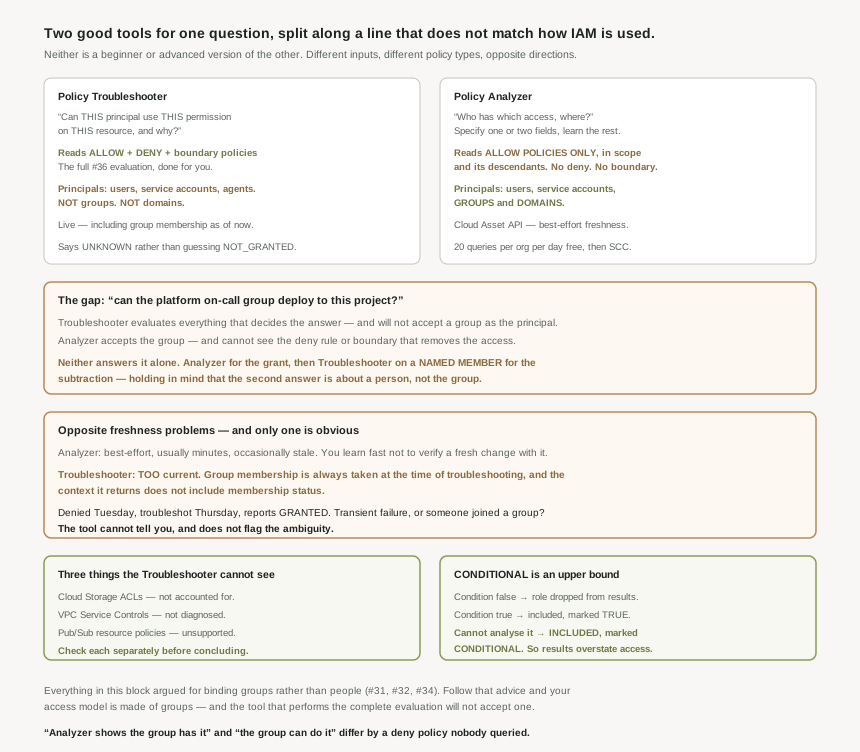
Three mechanisms are outside its scope. It does not account for access granted by Cloud Storage access control lists, it does not diagnose access issues related to VPC Service Controls, and it does not support evaluating allow policies set on Pub/Sub resources.
Correct approachFor a bucket, check ACLs separately. For Pub/Sub, troubleshoot the parent project and then read the topic or subscription policy by hand. For a network-shaped denial, the VPC Service Controls violation analyzer is the tool.
Architecture
The two tools are not a beginner and an advanced version of each other. They take different inputs, read different policy types, and answer questions that point in opposite directions.
The two questions
| Policy Troubleshooter | Policy Analyzer | |
|---|---|---|
| Question | Can this principal use this permission on this resource, and why? | Who has which access, where? |
| Input | A principal, a resource, and a permission — all three. | One or two of principals, access, resources, condition context. |
| Policies read | Allow, deny, and Principal Access Boundary. | Allow policies only, within the scope and its descendants. |
| Principal types | Users, service accounts, agent identities. Not groups or domains. | Users, service accounts, groups and domains. |
| Freshness | Evaluated live, including group membership as of now. | Cloud Asset API, best-effort. |
| Cost | — | 20 analysis queries per organization per day free. |
Take the most ordinary question in a well-run estate: can the platform on-call group deploy to this project? Policy Troubleshooter evaluates allow, deny and boundary policies together — and will not accept a group as the principal. Policy Analyzer accepts the group — and reads only allow policies, so a deny rule or a boundary that removes the access is invisible to it. Neither tool answers the question on its own. You run the Analyzer to find the grant, then the Troubleshooter against a named member to confirm nothing subtracts it, and you hold in your head that the second answer is about a person rather than the group.
What the Troubleshooter actually reads
The relevant policy set is the one #33 and #34 described: the resource's own allow and deny policies, plus the allow and deny policies of its parent project, folder and organization, because of inheritance. Principal Access Boundary policies are included when they are bound to a principal set containing the principal. That is the full evaluation from #36's ordering, performed for you.
It also reports an UNKNOWN rather than a false negative when it lacks information — for agent identities specifically, if an agent has no granting allow bindings, Policy Troubleshooter returns an access state of UNKNOWN_INFO rather than NOT_GRANTED. That distinction matters in an investigation: "I could not determine this" and "this is denied" are different findings, and a tool that collapsed them would be worse than one that admits the gap.
What the Analyzer does with conditions
Conditions from #37 do not vanish in an Analyzer query, but they are not always resolved. Where the condition evaluates false the role is dropped from the results; where it evaluates true the binding is included and marked TRUE; and where the condition cannot be analysed, it includes the role in the query results and marks the condition evaluation as CONDITIONAL.
CONDITIONAL is the value to read carefully. It means the binding is in your results and the tool could not decide whether it applies — so a result set containing them is an upper bound on access, not a list of it.
It runs on the Cloud Asset API, which offers best-effort data freshness — almost all policy updates appear within minutes, but the most recent change may not be there, so it is the wrong instrument for confirming a change you just made. And Cloud Asset Inventory limits group expansion within the group memberships as well as resource expansion within the hierarchy, which means a deeply nested group structure can be truncated rather than fully walked. Both argue for the Analyzer as a periodic review tool rather than a live one.
Why This Architecture Holds Up
The two tools have opposite freshness problems, and only one of them is obvious.
The Analyzer's is documented and easy to reason about: best-effort, usually minutes, occasionally stale. You learn quickly not to use it to verify a change you made thirty seconds ago.
The Troubleshooter's is the reverse and far easier to miss. It is too current. Group membership is always taken at the time of troubleshooting, and the additional context it returns does not include group membership status. So the reconstruction of a past event runs against the present identity graph.
Consider what that does to an ordinary investigation. Someone was denied access on Tuesday. On Thursday you troubleshoot it and the tool reports the access as granted. Two readings are available: the denial was transient, or somebody was added to a group in between. The tool cannot distinguish them, and it does not flag the ambiguity — it reports a clean GRANTED. The single most likely explanation for a denial that later resolves is precisely the input the tool silently replaces.
This is the same shape as the #35 clone and the #33 version-1 read: an operation that cannot represent what you asked for, succeeding anyway with the unrepresentable part quietly substituted. The defence is the same too — know what the instrument cannot see, and establish it separately.
What to do with this
- Pick the tool from the question, not the difficulty. "Why was this denied" is the Troubleshooter; "who can do this" is the Analyzer.
- Never treat an Analyzer result as effective access. It is the allow surface, before deny and boundary policies subtract from it.
- For a question about a group, use both — Analyzer for the grant, Troubleshooter on a member for the subtraction.
- Timestamp your membership assumption. When investigating a past denial, check whether the principal's groups changed since, because the tool will not tell you.
- Check the three exclusions before concluding — Cloud Storage ACLs, VPC Service Controls, Pub/Sub resource policies.
- Budget the Analyzer. 20 queries per organization per day free; beyond that needs Security Command Center Premium or Enterprise at the organization level.
Key Architecture Decisions
| Decision | Choose this | Because |
|---|---|---|
| Diagnosing one denial | Policy Troubleshooter | It evaluates allow, deny and Principal Access Boundary policies together. |
| Auditing who holds a permission | Policy Analyzer | It takes a resource or an access and returns the principals. |
| A question about a group | Analyzer, then Troubleshooter on a member | Troubleshooter does not accept groups; Analyzer does not read deny policies. |
| Verifying a change you just made | Not the Analyzer | It uses the Cloud Asset API with best-effort freshness. |
| Investigating a past denial | Confirm membership separately | Group membership is taken at the time of troubleshooting. |
Reading a CONDITIONAL result |
Treat it as an upper bound | The binding is included because the condition could not be analysed. |
| A bucket-level question | Check ACLs as well | Troubleshooter does not account for Cloud Storage ACLs. |
| A Pub/Sub topic or subscription | Troubleshoot the parent, then read by hand | Resource-level Pub/Sub allow policies are unsupported. |
| Planning analysis volume | Batch queries deliberately | 20 free analysis queries per organization per day. |
Closing Thought
The honest summary of this pair is that Google built two good tools for one question and split it along a line that does not match how IAM is actually used. Everything earlier in this block argued for binding groups rather than people — #31 on principals, #32 on roles, #34 on why a well-organised estate is harder to trace. Follow that advice and your access model is made of groups. Then the tool that performs the complete evaluation will not accept one as input.
That is not a reason to avoid the tools; both are far better than the manual walk in #34, and the Troubleshooter doing allow, deny and boundary evaluation in one answer is genuinely hard work you no longer have to do. It is a reason to know which half of the question each one answered, and to say so when you report a finding. "Policy Analyzer shows the group has it" and "the group can do it" are different statements, and the distance between them is a deny policy nobody queried.
#39 leaves policy evaluation for the identity that causes most of it: service accounts — what they are, what they are not, and why treating one as a user account is the root of several later posts.
Comments