Business Challenge
A data platform team gets approval to build on Google Cloud. They need somewhere to put things, so they create one project for production, one for development, and they start building. Nobody creates a folder, because nothing asks them to. The organization already exists, because someone in IT set up Cloud Identity a year earlier and it was provisioned automatically.
A year on, three things have gone wrong, and none of them announced itself.
Raising the quota takes days. A second team's pipeline is in the same project and consumed the headroom. Quota is counted per project, and use of a resource in one project does not affect available quota in another — so two workloads sharing a project share every ceiling between them.
Correct approachTreat the project as the unit of headroom rather than as a folder. If two workloads must not compete for quota, they belong in two projects; that is the only boundary the platform counts against.
The billing export splits cleanly by project. The recommendation engine is four services inside a project that also holds six other things. The project was drawn around a team, and the question is being asked about a product.
Correct approachDraw the project around the thing you will be asked to cost. Labels can describe a resource, but the project is the line the bill actually breaks on.
Deleting the development project would delete everything inside it, which is exactly what deletion means here — except that one of the things inside it is a bucket another team has been reading from for eight months.
Correct approachThe project is the blast radius. Anything with a different lifecycle, or a consumer outside the team, does not belong in a project somebody expects to throw away.
All three are the same mistake. The team chose their project boundaries in week one, for week-one reasons, and the project turned out to be the boundary for three unrelated things at once.
If you have worked in another cloud, the instinct is to map the project onto the nearest equivalent container and move on. Every version of that mapping is wrong somewhere, because the project is simultaneously the quota boundary, the billing attachment point, the IAM scope most grants land on, and the deletion boundary. No single container elsewhere carries all four. It is worth reading the rest of this on its own terms rather than as a translation.
Architecture
The hierarchy has an organization at the root, optional folders for grouping, and then projects, which contain the actual service resources — VM instances, buckets, datasets, clusters. Every resource except the one at the top has exactly one parent.
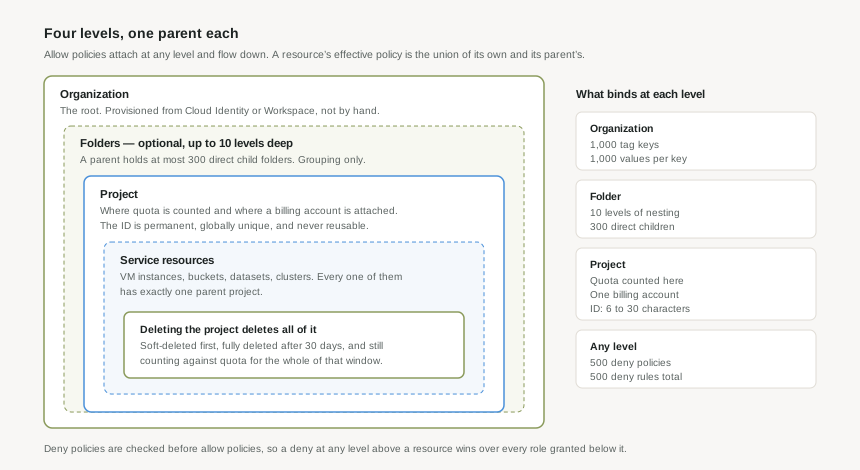
The organization arrives before you ask for it
The organization is not something you design and then create. When a user with a Google Workspace or Cloud Identity account creates a project, an organization resource is automatically provisioned for them. It is tied to the identity domain, and it is the root of everything below.
This has a practical consequence worth knowing on day one: the boundary of your Google Cloud estate was decided by whoever set up your identity domain, quite possibly years earlier and for reasons having nothing to do with cloud. That is the first thing to go and look at, before drawing any diagrams.
Folders are grouping, and grouping only
A folder exists to be a place to attach a policy so it reaches everything underneath. That is the whole job. The rules that shape a design:
Ten levels deep
Folders nest up to 10 levels. As with most depth limits, this is a ceiling and not a target — each level is another place a grant can be hiding when you are trying to work out why somebody has access.
Three hundred children
A parent folder cannot contain more than 300 direct child folders. Breadth is generous but finite, which matters for anyone planning a folder per team in a large organisation.
One parent, always
Every resource below the root has exactly one parent. A project sits in one folder, so the tree can encode exactly one dimension — and everything else has to be expressed some other way.
Optional, genuinely
Projects can sit directly under the organization. Folders are not required, and a small estate does not need them. They start earning their place when the same policy has to reach many projects.
The project is where the constraints live
Three separate things attach to the project, and the fact that they attach to the same object is the single most important structural fact in Google Cloud.
Quota is counted here. Quotas generally apply at the project level, and use of a resource in one project does not affect available quota in another. Two workloads in one project share every ceiling; the same two workloads in two projects do not.
Billing attaches here. A billing account is linked to projects, and a project without an active, valid billing account cannot use the services enabled in it. Notably, billing accounts are not parents of projects in an IAM sense — the payment relationship and the hierarchy are two different graphs over the same projects, which is why "who pays for this" and "who governs this" can diverge and often do.
Deletion happens here. Deleting a project takes everything in it. Google softens this with a soft-delete: the project is fully deleted after 30 days, and it counts against your quota for that entire window — a detail that surprises anyone who deletes projects to free up room and finds they have not.
The identifiers are permanent in a way that catches people
A project has a mutable display name and an immutable ID. The ID must be 6 to 30 characters, lowercase letters, numbers and hyphens only, starting with a letter and not ending with one. After creation, the project ID is permanent.
More consequentially: an ID cannot be one that is in use or has been previously used, and that includes deleted projects. The namespace is global and it is append-only. A team that burns data-platform on a proof of concept and deletes it cannot have that ID back — not in 30 days, not ever. This is the argument for a naming convention existing before the first project, rather than after the tenth.
Why This Architecture Holds Up
The hierarchy is not an org chart. It is a propagation mechanism, and access is what propagates.
The effective allow policy for a resource is the union of the allow policy set at that resource and the allow policy inherited from its parent. Two words there carry the weight. Union means grants accumulate: a role granted at the organization and a role granted at the project both apply, and nothing at the lower level can subtract from the higher one. Inherited means roles granted at the organization or a folder reach every child resource, including the ones that do not exist yet.
That last property is the entire argument for building a folder structure before you need it. A grant on the right folder covers the project nobody has created. A grant made project by project covers exactly the projects that existed on the day someone made it.
Deny policies are the only thing that subtracts
Because allow policies only ever add, Google Cloud provides a separate mechanism for taking away. IAM always checks relevant deny policies before checking relevant allow policies, and when a principal is denied a permission, they cannot do anything requiring it regardless of the roles they have been granted.
Deny policies inherit the same way: attached to a project, folder or organization, a deny policy is effective for all resources inside it. Each resource can carry up to 500 deny policies containing 500 deny rules in total.
The reason this belongs in post #1 rather than in the IAM post is that it changes how you read the hierarchy. Access is not "the sum of what was granted here". It is "the sum of what was granted anywhere above, minus anything denied anywhere above" — and at full folder depth, anywhere above means twelve places: the organization, ten folder levels, and the project itself.
Name the policy that would live at the new level and at no other level. If there isn't one, the level is a folder in the filing sense rather than the Google Cloud sense — and it is not free, because it is one more of the twelve places somebody will have to check when the question is "why can this account read that bucket".
What the tree cannot express
One parent per node means the tree encodes exactly one dimension. Everything genuinely multi-dimensional — cost centre, owning team, data classification, environment, application — has to live somewhere else, and that somewhere is tags.
The budget there is generous: 1,000 tag keys under an organization or project, 1,000 values per key, which is a million possible combinations, of which any single resource may carry 50. There is no shortage of room to describe a resource. The shortage is in the tree, and the mistake is trying to solve a tagging problem by adding folder levels.
Key Architecture Decisions
| Decision | Choose this | Because |
|---|---|---|
| What a project is drawn around | One application in one environment | The project is the quota ceiling, the billing line and the deletion boundary at once. Any coarser and all three become shared; any finer and you are managing projects for their own sake. |
| Folder depth | Two or three levels, not ten | Depth costs nothing to create and adds an inheriting level to every future access question. Ten is the ceiling; twelve inheriting levels is what a policy investigation has to walk at full depth. |
| What the folder tree is organised by | The one dimension whose policies must propagate — usually environment or governance posture | One parent per node. Production and sandbox need genuinely different policy; two teams' production projects usually do not. |
| Ownership, cost centre, classification | Tags, never folder levels | They are multi-dimensional and they change. A million key-value combinations are available; the tree has room for one dimension. |
| Where a broad grant goes | The highest folder whose entire subtree should have it | Grants inherit downward and cover projects that do not exist yet. Per-project grants cover only what existed the day they were made. |
| Project IDs | A convention agreed before the first project | The ID is permanent, globally unique across all of Google Cloud, and can never be reused — including after deletion. There is no renaming your way out of this later. |
| Removing access that inheritance granted | A deny policy, deliberately and rarely | Allow policies only add. Deny is the only subtraction, it is evaluated first, and it beats every role below it — which makes it both the right tool and an easy way to break something quietly. |
A soft-deleted project is fully deleted after 30 days and counts against quota for that whole window. Two things follow. Deleting projects to make room does not make room until next month. And a project you deleted is recoverable for a while — which is a genuine safety net, but not one to rely on, since the resources inside it may not survive the round trip in the state you left them.
Closing Thought
Google Cloud asks you to make one decision early and repeatedly: where does this project boundary go. It is an unusually loaded question, because the answer sets a quota ceiling, a billing line and a blast radius simultaneously, and those three concerns pull in different directions. A project per application per environment is the shape that satisfies all three most of the time, and the estates that struggle are almost always the ones with too few projects rather than too many.
The folder tree above it should stay shallow and boring. It exists so that a grant can reach projects that do not exist yet, and every level added past that purpose is a level somebody will have to check later.
Everything else in this series is built on these three nouns. Identity in #2, organization policy in #19 and the whole of IAM from #31 onward are all descriptions of things attached to the levels described here.
#2 looks at Cloud Identity and Google Workspace as the identity plane: where a principal comes from before it ever reaches Google Cloud, why identity is a separate product from the cloud it governs, and what that separation means for an organization resource that was provisioned automatically on somebody else's decision.
Comments