Business Challenge
#79 ended on the division of labour Google draws inside a host project: Network Admins have full control over all network resources except for firewall rules and SSL certificates, because Security Admins manage firewall rules and SSL certificates. This post is what operating that division costs, and the honest answer is that the role table is the easy part.
Preparing your organization, setting up Shared VPC host projects, and using Shared VPC networks involves a minimum of three different administrative Identity and Access Management (IAM) roles. "Minimum" and "three" are both doing work there. Three findings turned out to matter more than the table: the broadest power sits in the role that is not named after Shared VPC, the protection on the host project is removable by the person most likely to break it, and the list of principals needing grants is longer than the list of people.
It is half of the powerful one. An Organization Admin can grant one or more IAM principals the Shared VPC Admin and Project IAM Admin roles — a pair, not a choice. And the capability people actually worry about lives in the second: the Project IAM Admin role grants Shared VPC Admins permission to share all existing and future subnets, not just individual subnets.
Correct approach
Review the two grants separately. compute.xpnAdmin lets someone enable hosts and attach projects; resourcemanager.projectIamAdmin is what turns selective sharing into blanket sharing, because delegating subnet access is an IAM binding. If you want attachment without blanket sharing, that is the role to withhold. Both are bound high up — this grant creates a binding at the organization or folder level, not the project level, and consequently the IAM principals must be defined in the organization, not just a project therein.
Only from accident, and only until someone with project owner decides otherwise. The stakes first: the accidental deletion of a host project would lead to outages in all service projects attached to it. So enabling a host places a lock, called a lien, and as long as the lien is present, it prevents the project from being deleted accidentally. Then the gap, stated by Google rather than inferred: by default, a project owner can remove a lien from a project, including a Shared VPC host project, unless an organization-level policy is defined to limit lien removal. And explicitly: the project owner for the host project could remove the lien then delete the Shared VPC project.
Correct approachSet the constraint, once. A user with the orgpolicy.policyAdmin role can define an organization-level policy constraint (constraints/compute.restrictXpnProjectLienRemoval) that limits the removal of liens, and the cost is trivially low: because an organization policy applies to all projects in the organization, you only need to follow these steps once to restrict lien removal.
Not if they run GKE. Beyond the humans, each service project's GKE service agent must have a binding for the Host Service Agent User ( roles/container.hostServiceAgentUser ) role on the host project, which exists so that the agent can perform network management operations in the host project, as if it were the host project's GKE service agent. And that binding alone is not enough: however, you must add the Compute Network User IAM permission manually to the GKE service agent of the service project to access the host network.
Correct approach
Enumerate machine principals alongside human ones. Two service accounts per service project appear in Google's own summary table of subnet grants — the GKE agent at @container-engine-robot.iam.gserviceaccount.com and the Google APIs agent at @cloudservices.gserviceaccount.com — and both need Network User on the subnets the cluster uses.
Architecture
A two-role admin at the top, three similarly named roles in the middle, and a set of robot accounts underneath that the org chart does not contain.
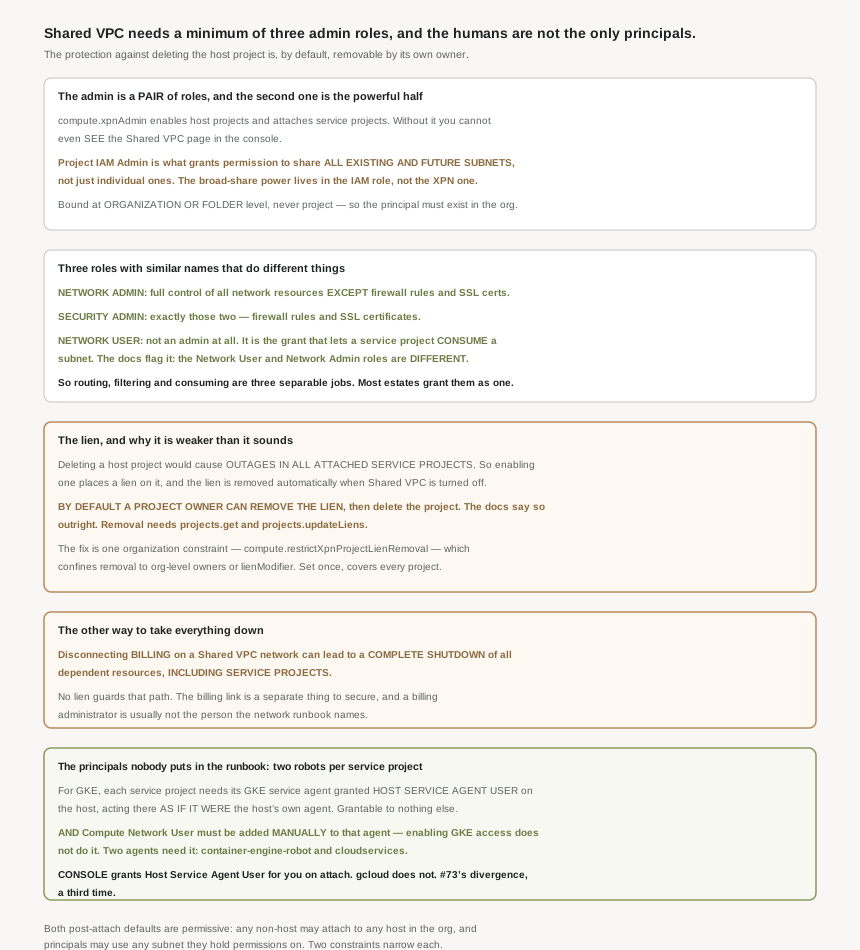
Three roles whose names are nearly the same
Google puts an explicit warning in the provisioning page, which is usually a sign that something has cost people time: the Network User and Network Admin roles are different. Setting them beside the Security Admin gives the real shape.
| Role | What it actually controls | Granted on |
|---|---|---|
Network Admin (compute.networkAdmin) |
Full control over all network resources except for firewall rules and SSL certificates | Host project, or the organization |
Security Admin (compute.securityAdmin) |
Firewall rules and SSL certificates — exactly the exception above | Host project, or the organization |
Network User (compute.networkUser) |
Not administration at all — the grant that lets a service project consume a subnet | Whole host project, or named subnets |
Shared VPC Admin (compute.xpnAdmin) |
Enabling hosts, attaching service projects | Organization or folder only |
Project IAM Admin (resourcemanager.projectIamAdmin) |
The half that permits sharing all existing and future subnets | Organization or folder only |
Read that as three separable jobs rather than five roles. Deciding where packets may go is Network Admin. Deciding which packets are allowed is Security Admin. Being allowed to put a workload on a subnet at all is Network User. Most estates I have seen collapse the first two into one platform team grant, which is understandable and throws away the only structural control Google offers over the nine posts of firewall material this block has covered: the person who writes a deny rule need not be the person who can route around it.
The Shared VPC Admin's scope has a practical consequence worth naming because it bites in the console. Without the role you cannot even look: if you don't yet have the Compute Shared VPC Admin role ( roles/compute.xpnAdmin ), then you cannot view this page in the Google Cloud console. And because the binding is organization- or folder-scoped, the console misbehaves if you pick the wrong scope — if you select a project, the Roles menu shows incorrect entries. An engineer who cannot find the role in the menu is usually looking at a project, not at the organization.
One more grant often travels with the pair without being discussed: Shared VPC Admins can also create and delete projects if they have the Project Creator role and Project Deleter role. Project Deleter on the organization, held by the same principal that administers Shared VPC, is worth a second look given the next section.
The lien, and the one constraint that makes it real
This is the finding I would act on today. The protection is automatic and well designed: a lien is placed when the project becomes a host, and the lien is automatically removed from the host project when it is no longer configured for Shared VPC. Nobody has to remember either step.
The weakness is in who may lift it. Lien removal requires an IAM principal with the resourcemanager.projects.get and resourcemanager.projects.updateLiens permissions on the project — and a project owner has those. So the default posture is that the host project's own owner can remove the safety catch and then delete the project, with the blast radius from the first sentence of this section: outages in every attached service project.
The remedy confines removal to the organization level: with compute.restrictXpnProjectLienRemoval enforced, only principals holding roles/owner or roles/resourcemanager.lienModifier at the organization level, or a custom role with those two permissions at that level, can lift a lien. A project owner who is not also an organization owner loses the ability entirely.
Three properties make it unusual. It is a single organization-wide switch, so the work is minutes. It is almost certainly not set, because nothing prompts you and the lien's existence reads as sufficient protection. And the failure it prevents is not gradual — it is every attached service project at once, caused by a legitimate action taken by someone with legitimate authority over their own project. There is no partial version of this outage.
The other way to take it all down
The lien guards deletion. Nothing equivalent guards payment. Disconnecting billing on a Shared VPC network can lead to a complete shutdown of all dependent resources including service projects.
That matters because it is a different person. Deleting a project is an action a project owner or network administrator takes; detaching a billing account is an action a billing administrator takes, usually during a cost exercise, usually without reading a network runbook. The host project in a hub-and-spoke estate is exactly the project that looks odd on a cost report — it owns the gateways and, per #79, carries VPN egress generated by service projects it cannot see. So it is both the project most likely to attract billing attention and the one whose billing must not be touched.
What the defaults are, after you finish setting up
Two post-setup defaults are permissive and both have a constraint available. On attachment: by default, a Shared VPC Admin can attach a non-host to any host project in the same organization. On consumption: by default, after you configure Shared VPC, IAM principals in service projects can use any subnet in the host project if they have the appropriate IAM permissions. Those are compute.restrictSharedVpcHostProjects and compute.restrictSharedVpcSubnetworks, both of which #79 established are prospective only.
It is worth being precise about what enabling a host project does and does not do, because the words suggest more than happens. When you enable a host project, the project's network resources are not automatically shared with service projects. Attaching does not grant either: in the console flow, Service Project Admins are added in a separate step, and these users will be granted the IAM role of compute.networkUser for the shared subnets. Until that binding exists nobody can build, since only Service Project Admins can create resources in the subnets of the Shared VPC host project. Enable, attach, grant — three steps, and the first two produce no capability at all.
Why This Architecture Holds Up
This is the part of Shared VPC IAM that breaks clusters, and it is documented in the GKE pages rather than the Shared VPC ones, which is part of why it gets missed.
Each service project's GKE service agent must have a binding for the Host Service Agent User ( roles/container.hostServiceAgentUser ) role on the host project. What it confers is unusually broad, and the documentation does not soften it: the binding lets the agent perform network management operations in the host project, as if it were the host project's GKE service agent. There is one safeguard — this role can only be granted to a service project's GKE service agent — so it cannot be handed to a human or to an arbitrary service account.
Then the trap. Attaching with GKE access enabled does part of the job: when attaching a service project, enabling GKE access grants the service project's GKE service agent the permissions to perform network management operations in the host project. But not all of it: however, you must add the Compute Network User IAM permission manually to the GKE service agent of the service project to access the host network. So the automatic step grants the host-service-agent half and leaves the subnet-consumption half to you.
And there are two agents, not one. Google's summary of roles granted on subnets lists, per service project, both the GKE agent at @container-engine-robot.iam.gserviceaccount.com and the Google APIs service agent at @cloudservices.gserviceaccount.com, each needing Compute Network User on the subnet that service project's cluster uses. A grant list built from the team roster is therefore missing two entries per project.
On the Host Service Agent User binding: if you have been using the Google Cloud console, you do not have to grant the Host Service Agent User role explicitly, because that was done automatically when you used the Google Cloud console to attach service projects to your host project. Via gcloud you grant it yourself. This is the same divergence #73 found in hierarchical firewall policy defaults and #77 found in flow log sampling rates — a guided path that configures more than the primitive, with the result that a console-built estate and a Terraform-built estate differ in ways neither artifact records. The practical rule by now: for anything in this product area, assume infrastructure-as-code produces the barer configuration, and write the difference down explicitly.
One related manual step belongs in the same mental bucket, because it has the same shape — something a managed service usually does for you, which here it does not. For internal Application Load Balancer traffic in a Shared VPC cluster, on the firewall rule permitting the proxy subnet: you must create this firewall rule manually. The Ingress controller does create rules for Google Cloud health checks, but not that one. After nine posts on firewall rules, a rule that a controller declines to create is worth knowing about before the first failed deployment rather than during it.
The vocabulary, and where to look things up
Two naming facts save real time. First, the API name: Shared VPC is also referred to as "XPN" in the API and command-line interface — which is why the role is compute.xpnAdmin, the constraint is compute.restrictXpnProjectLienRemoval, and the API methods are enableXpnHost and listXpnHosts. Searching the documentation for "shared" finds the concept pages; searching for "xpn" finds the reference material.
Second, the framing in the provisioning page is narrower and more accurate than the overview's: Shared VPC lets you export subnets from a Virtual Private Cloud (VPC) network in a host project to other service projects in the same organization. Export, not share — a subnet is offered outward and consumed by a grant, which is exactly how the IAM model works. And it is address-family agnostic: Shared VPC supports exporting subnets of any stack type.
The structural limits from #79 still bound everything here. The quota page fixes the fan-in at number of host projects to which a service project can attach 1 and the fan-out ceiling at number of Shared VPC host projects in a single organization 100; in the provisioning page's words, a service project can only attach to one host project, but a host project supports multiple service project attachments, and cross-folder work needs breadth of authority, since a Shared VPC Admin can link projects in two different folders only if the admin has the role for both folders.
Key Architecture Decisions
| Situation | Decision | Because |
|---|---|---|
| Any organization with a Shared VPC host project | Enforce compute.restrictXpnProjectLienRemoval today |
A project owner can otherwise remove the lien and delete the host, taking every service project down. |
| Securing the host project generally | Secure the billing link as a separate task | Disconnecting billing can shut down all dependent resources including service projects. |
| Wanting attachment without blanket sharing | Withhold Project IAM Admin, grant compute.xpnAdmin alone |
Project IAM Admin is what permits sharing all existing and future subnets. |
| Granting network duties to a platform team | Split Network Admin and Security Admin deliberately | Network Admin excludes firewall rules and SSL certificates by design. |
| Writing a Shared VPC grant list | Include two service agents per service project | The GKE agent and the Google APIs agent both need Network User on the subnets. |
| Attaching a service project with GKE | Add Compute Network User to the GKE agent by hand | Enabling GKE access grants Host Service Agent User, not Network User. |
| Provisioning with Terraform or gcloud | Grant Host Service Agent User explicitly | Only the console does it automatically on attach. |
| An engineer cannot find the Shared VPC Admin role | Check they selected the organization, not a project | Selecting a project makes the Roles menu show incorrect entries. |
| An engineer cannot open the Shared VPC page at all | They lack compute.xpnAdmin |
The page is not viewable without it. |
| Internal Application Load Balancer in a Shared VPC cluster | Create the proxy-subnet firewall rule yourself | The Ingress controller creates health-check rules only. |
| Expecting capability after enabling and attaching | Expect none until the Network User grant exists | Enabling shares nothing and only Service Project Admins can create resources. |
| Searching the documentation | Search for "xpn" for reference material | The API and CLI call Shared VPC XPN throughout. |
The one to look at today
Check whether compute.restrictXpnProjectLienRemoval is enforced on your organization. It is one command to read and one to set, it applies organization-wide so you only do it once, and until it is set the documented position is that a host project's owner can remove the lien and delete the project. Then list who holds roles/owner on each host project, because that is the set of people the default currently trusts with every attached service project's availability.
Closing Thought
The thing worth taking from this one is that Shared VPC's IAM model is better designed than it is defaulted. The separations are real and thoughtful: routing apart from filtering, administration apart from consumption, a lock placed and lifted automatically as the configuration changes, a service agent role that can be granted to nothing except the one agent it is for. Somebody thought carefully about each of those.
And then every default leans open. The lien can be lifted by the project's owner. Any non-host can attach to any host. Any principal with permissions can use any subnet. The console quietly grants a binding the CLI does not. Twenty posts in, that is the clearest statement of the pattern this whole block keeps producing: the mechanism is sound, the documentation is honest about its limits, and the shipped configuration is the permissive one. Reading the defaults is the work. Nothing warns you, because from the platform's point of view nothing is wrong.
#81 moves from sharing one network to joining two: VPC Network Peering, and its non-transitivity — why A peered to B and B peered to C never gives you A to C.
Comments