📋 In This Post
Why — The Problem This Solves
Azure gives you three nested scopes: management groups, subscriptions and resource groups. Almost every landing zone that goes wrong goes wrong because somebody picked one of them as the real boundary and treated the other two as packaging.
They are not three sizes of the same box. They answer three different questions, and the answers are not interchangeable.
What is allowed here?
Management group. Policy and RBAC inherit downward, to subscriptions that do not exist yet. Holds no resources — nothing deploys into one.
What is the ceiling?
Subscription. Quota is counted per subscription per region. Also the billing boundary and the resource-provider registration boundary.
And the third: a resource group answers what dies together. It is the only one of the three whose deletion is atomic and complete.
That last fact settles a question people argue about for weeks. If you want a disposable unit — one per experiment, one per week, one per feature branch — it has to be a resource group, because cancelling a subscription is not a teardown. Billing stops immediately and services are disabled, but the subscription itself persists: the portal's Delete subscription option does not appear until three days after cancellation, Azure deletes it automatically only at 90 days, and it can be reactivated throughout. A resource group deletes now.
The design falls out of the three answers. Disposable unit → resource group. Quota and blast-radius separation → subscription. Policy posture → management group. Nothing about that requires taste; it requires reading what each scope actually does.
What You Need to Know — Skills & Tools
- Azure Policy — definitions, initiatives, assignments, and the difference between an effect and an enforcement mode.
- Policy aliases — the property paths a rule can test, and
what the
[*]wildcard changes about the test. - Management group hierarchy — inheritance, and the fact that a subscription has exactly one parent.
- Microsoft Customer Agreement billing — billing account, billing profile, invoice section, and the Subscription Alias API that creates subscriptions programmatically against them.
- Entra workload identity federation — trading an OIDC token for an Azure access token, so CI never holds a client secret.
- Terraform with the AzureRM provider, version 5.x. It is
not a drop-in for 4.x:
subscription_idis now required on the provider block, andskip_provider_registrationhas been replaced byresource_provider_registrations.
Architecture — How It Fits Together
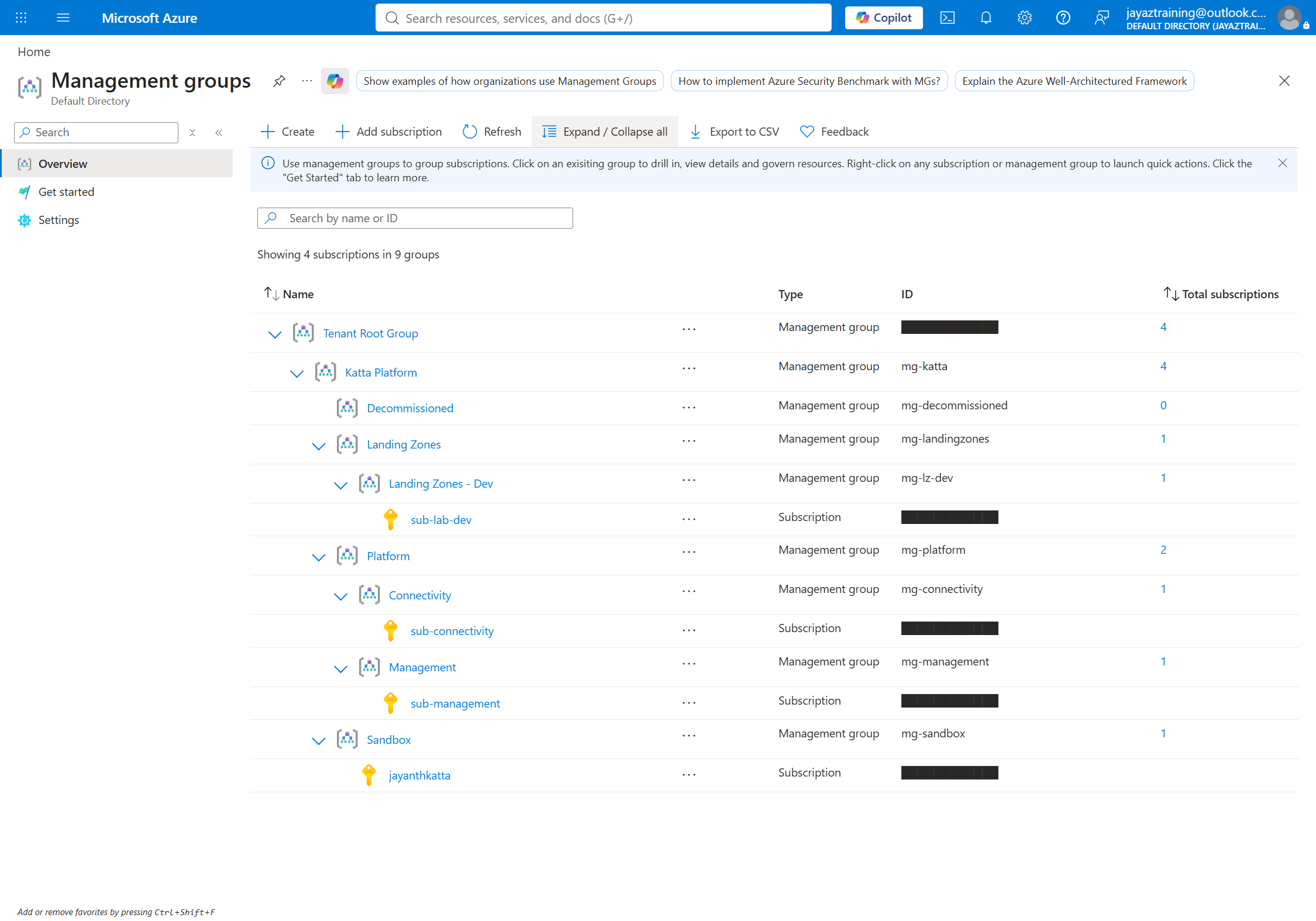
Three decisions in that tree are worth defending.
Nothing is assigned at Tenant Root Group. An assignment there reaches every subscription in the tenant, forever, including any created later by anyone for any reason — and undoing it needs elevated access. The intermediate root is what keeps a mistake survivable.
Connectivity and Management are separate. Whoever can rewrite the hub network's routing should not, by the same grant, be able to read every diagnostic log in the estate or rotate an encryption key. Splitting them costs nothing, because management groups are free.
Decommissioned exists because cancellation is not deletion. A retired subscription needs somewhere to sit under a deny-all assignment for its retention window. That node is not tidiness; it is a direct consequence of how Azure behaves.
How We Built It — Step by Step
0. How any of this gets deployed
Everything below is Terraform. There is no portal click anywhere in this week — the screenshots are the result of an apply, not a record of someone configuring things by hand.
State lives in HCP Terraform; the apply runs locally:
terraform {
  required_providers {
    azurerm = { source = "hashicorp/azurerm", version = "~> 5.2" }
  }

  cloud {
    organization = "Katta"
    workspaces {
      name    = "azure-week-01-dev"
      project = "Azure Platform Lab"
    }
  }
}
The workspace is set to local execution deliberately. HCP
defaults a new workspace to remote, which fails immediately here because
there are no Azure credentials stored in the workspace — the apply authenticates
with whatever az login session is on the machine. So HCP holds the
state file and its version history, and the plan and apply run locally. There are
no HCP run logs for this week, because there were no HCP runs.
Bootstrap creates the tree, the CI identity and the subscriptions. Everything after that is one workspace per week.
HCP Terraform holds the state, not the runs — yet. Both workspaces store state remotely, so nothing is checked in and nothing sits on a laptop. Execution mode is still local: every plan and apply behind this post ran on my own machine against my own credentials. That means no run history, no approval gate, and no audit trail beyond a terminal. Remote execution needs the federated credentials wired into each workspace as environment variables, which is a later week — until then, "it is in HCP" is a claim about state and nothing more.
The custom rule denies a public IP on a network interface. The alias is the part that has to be right:
Microsoft.Network/networkInterfaces/ipConfigurations[*].publicIpAddress.id
The [*] matters. A network interface can carry several IP
configurations. Without the wildcard the rule inspects only the first, and
happily admits an interface whose second configuration is public. With
it, the condition is true if any configuration has one.
The effect is a parameter, not a constant, which is what lets the same definition be assigned twice — reporting first, enforcing second — without editing it.
./scripts/deploy.sh report     # enforce = false → evaluates, blocks nothing
./scripts/validate.sh          # all three attempts succeed; two are non-compliant

./scripts/deploy.sh enforce    # enforce = true  → denies
./scripts/validate.sh          # two rejected, the compliant one still deploys
Introducing a deny to an environment nobody has measured is how a guardrail causes the outage it exists to prevent. Report-only mode tells you what would have been blocked before anything is.
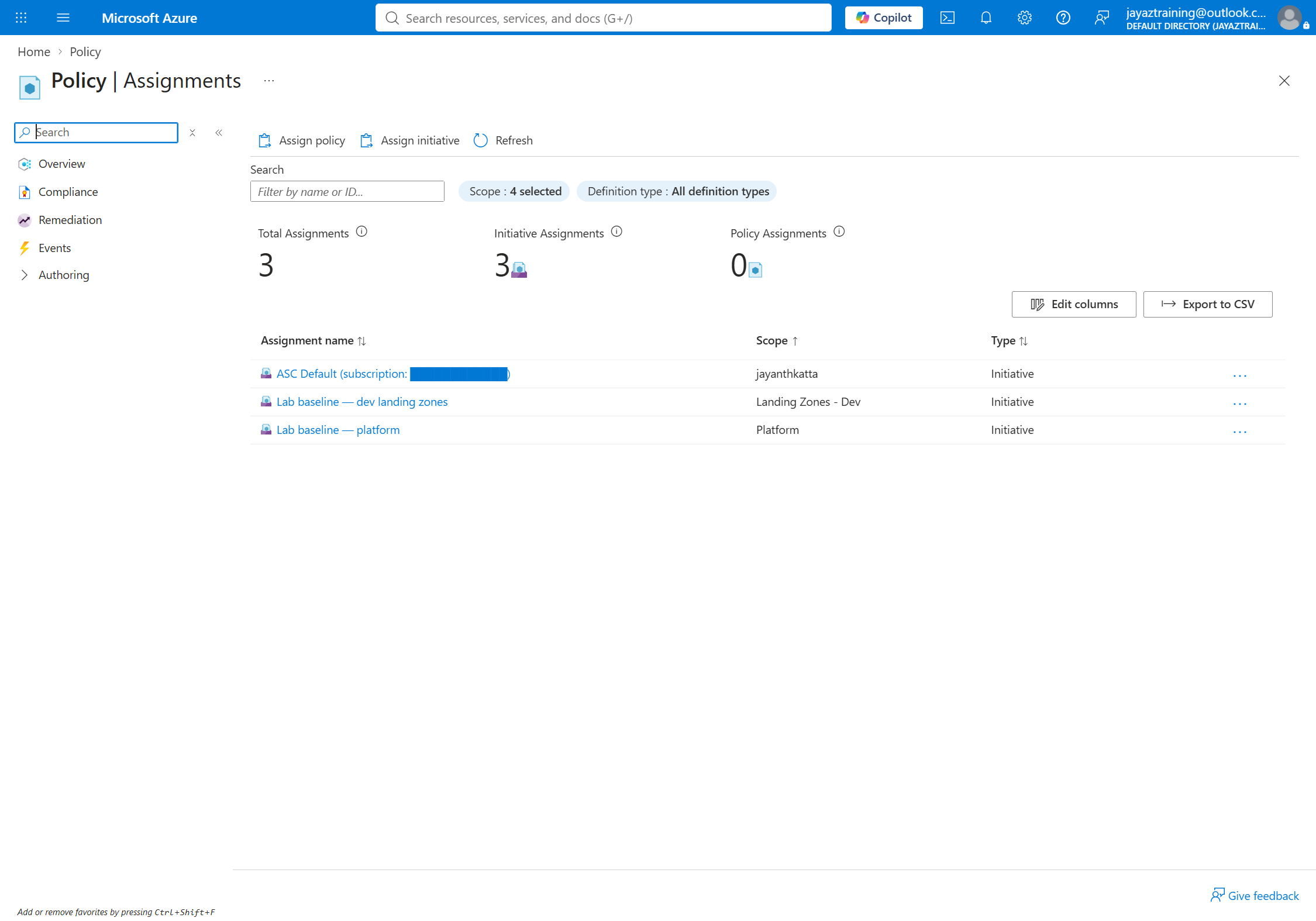
The third test is not padding. A rule that only ever blocks has been shown to be on, not to be correct. Proving the compliant path still deploys is what separates a guardrail from an outage.
Challenges — What Actually Went Wrong
The deny that did not deny
Enforcing mode was on. The assignment reported
enforcementMode: Default. The effect read Deny. The
allowed-locations list was right. A storage account in a banned region deployed
anyway.
Every property of the assignment was correct. The subscription simply was not underneath it — created but never placed, so it still sat at the Tenant Root Group, on a different branch entirely. Policy flows downward to whatever is beneath it, and nothing was beneath it.
Creating a subscription and placing it in the hierarchy are two separate operations. The Subscription Alias API creates it at the tenant root; moving it is a second call. An unplaced subscription inherits no policy and no role assignments, and looks completely healthy right up until something is supposed to stop you and does not.
The tell was in the portal all along: the management group list showed 0 subscriptions against Landing Zones - Dev. I was reading the assignment instead, because an assignment is easy to inspect and looks convincing. Check placement first — every field can be right while the policy governs an empty branch.
Thirty-four minutes for one subscription
Three subscriptions requested concurrently produced an apply that sat for an hour and committed nothing to state. Requested one at a time, the first completed in about ten minutes and the second failed outright:
performing AliasCreate: Failure sending request: StatusCode=0
-- Original Error: context deadline exceeded
StatusCode=0 means no HTTP response was ever received — the
client gave up, Azure refused nothing. Retried with an explicit 60-minute
timeout it succeeded, taking 33 minutes 59 seconds.
This is the worst failure mode available, because Azure often completes the creation anyway. You are left with a subscription that exists and is absent from state, and subscriptions cannot be deleted.
"100% (0 out of 0)" is not a pass
The compliance blade reported the assignment as Compliant, 100%. It had never evaluated anything.
Microsoft.PolicyInsights was not registered on the subscription.
Policy still evaluates and denies without it — enforcement runs in
Azure Resource Manager, not in that provider — so the guardrail was working
perfectly. What breaks is reading the results back: the scan API fails with
SubscriptionNotRegistered, and the portal renders the empty result
as a green tick.
A green tick against a scope that has never been examined looks identical to a green tick against a clean one. Only the denominator tells them apart.
The rejection that explained the wrong thing
A storage account in the wrong region was refused with this reason:
Denied by the lab baseline. Network interfaces may not carry a public IP...Correct rejection, nonsense explanation. A nonComplianceMessage
with no policyDefinitionReferenceId applies to every
policy in the initiative, so one generic string was emitted for all three
rules. Someone reading that goes and debugs their networking.
A wrong explanation is worse than no explanation. Messages are now set per policy reference.
What Compliance Actually Reported
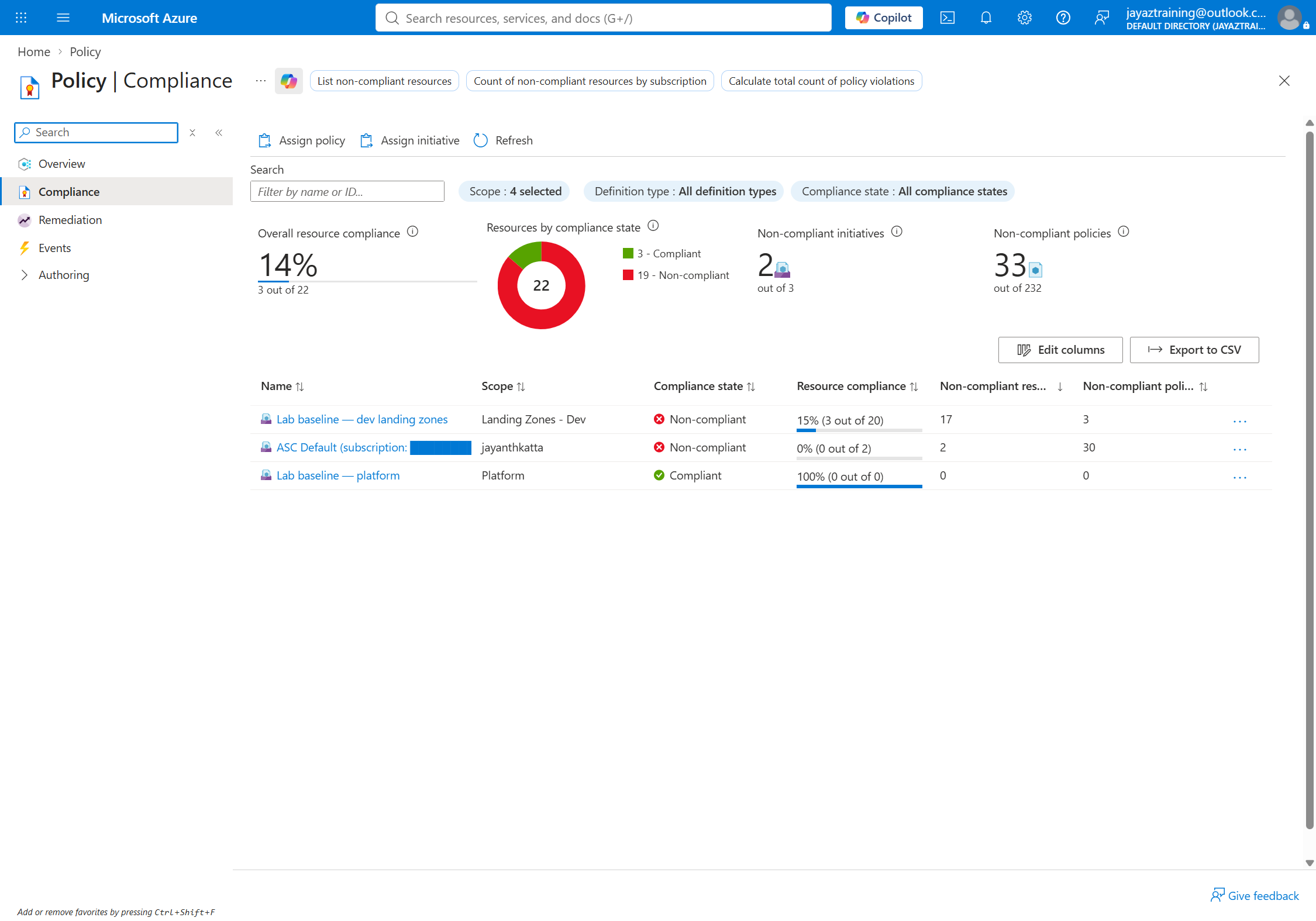
Both rows are worth reading carefully, because they say opposite things and look similar.
The dev row is real: 15% (3 of 20), seventeen violations. Every one of those resources was created while the assignment was in report-only mode, and switching to enforcing removed none of them.
The platform row is 100% (0 out of 0) — an empty scope, not a clean one. Same green tick, entirely different meaning.
Security — Controls at Every Layer
No client secrets. CI authenticates through federated
credentials on an Entra app registration — HCP Terraform presents an OIDC token,
Entra exchanges it because issuer, audience and subject match. There is no
azuread_application_password anywhere in the repository.
Not Owner. The CI identity holds Contributor, Role Based Access Control Administrator and Management Group Contributor, scoped to the intermediate root. Owner bundles "can deploy" and "can grant roles" with no way to separate them; split, the grant-roles half is a visible line in the audit trail.
Nine identities, seven revoked. Auditing access by listing app registrations found five. Auditing from the assignment side — every role assignment, resolved back to its principal — found nine, because registrations created by portal wizards and shell sessions have no owner and never appear in an owner-filtered list. Seven held standing Contributor or Owner on the subscription. All seven lost it.
Screenshots that refuse to leak. Captures run through Playwright against a signed-in profile. The tooling masks the tenant ID, subscription IDs, billing identifiers and object IDs across text nodes, attributes and form-control values, then asserts they are absent and exits non-zero rather than write the file. It also refuses to save a sign-in page — checked by URL first, then DOM, and re-checked immediately before the shutter.
Cost
$0. Management groups are free. Subscriptions created through the alias API are free — a subscription is a billing container, and an empty one bills nothing. App registrations, federated credentials, policy definitions, assignments and compliance evaluation are all free.
The test bed was a virtual network, a subnet, two network interfaces and a handful of storage accounts, all created and destroyed within the session — under a penny in total.
Budgets exist on all three subscriptions before anything with an hourly price lands in them, alerting at 50% actual and 90% forecast. Forecast, not actual: an actual-spend alert at 90% of a monthly budget arrives after the money is already committed.
Cleanup
This is the week where "delete the resource group" is not the whole answer, and that is the part worth carrying forward.
The definition, the initiative and both assignments live at management group scope — outside every resource group, in a part of the hierarchy that resource-group deletion cannot reach. Delete the group by hand and the guardrails remain, still evaluating, still denying, with nothing left in the subscription to explain where they came from.
An orphaned deny assignment whose source nobody can find is a genuinely nasty
thing to inherit. terraform destroy removes both because Terraform
tracks both, and the cleanup script verifies afterwards that the assignment is
actually gone rather than assuming it.
References
- Azure Policy effect basics
- Safe deployment of Azure Policy assignments
- Get compliance data — evaluation triggers and their intervals
- Cancel and delete an Azure subscription
- Policy rule structure and aliases
- Management groups overview
- Create MCA subscriptions programmatically
- Workload identity federation
Key Takeaways
- Verify placement before you verify configuration. An assignment is easy to read and looks convincing, and every field can be correct while it governs an empty branch. Ask what is underneath the scope first.
- The only proof a deny works is a deployment that got denied. Reading the assignment verifies the wrong object. That is why this week ships a test script rather than a screenshot of a portal blade.
- Enforcing does not clean up. Seventeen non-compliant resources created during report-only mode were still there afterwards. Policy evaluates on write; it blocks the next deployment and has no opinion about what already exists. Remediation is a different mechanism.
- A green tick with a zero denominator means nothing was
examined. Register
Microsoft.PolicyInsightsbefore you trust a compliance number, because enforcement works fine without it. - Targeted applies leave half-built objects. Creating a
subscription with
-targetcreated the subscription and skipped its management group placement and its budget, because those are separate resources rather than attributes. It looked finished for two days. - The error message is the product. A guardrail whose rejection sends someone to debug the wrong subsystem has made the platform worse, not safer. Per-policy messages cost one line each.
Next week: policy as code — initiatives, exemptions, and
deployIfNotExists with the remediation identity that everybody
forgets to grant.
Comments