📋 In This Post
Lab Overview
Weeks 1 through 4 built governance and a vending pipeline. Every one of them was destroyed at the end of the day, and nothing was lost, because nothing depended on them.
The hub network is different. Spokes peer into it. Private endpoints resolve through its DNS estate. Egress leaves through its firewall. Six later weeks assume it exists — so "tear it all down" stops being the responsible default and becomes the thing that breaks next week.
But a hub with an Azure Firewall in it bills by the hour, permanently. Standard is roughly $967/month if left running. That is a real number for a lab, and "just remember to delete it" is not a design.
The resolution is to stop treating the week as one thing. Almost everything a later week actually needs — the virtual networks, the peerings, the route table, the private DNS zones — costs nothing at all. One resource carries the entire hourly cost. Split those two apart and the week can be both permanent and cheap, which it cannot be as a single unit.
| Difficulty | Advanced — 22 resources across two subscriptions, and the firewall has requirements Basic does not advertise |
| Time to complete | About two hours. The firewall alone takes most of an hour to provision, and it bills the whole time |
| Deployment | Terraform (azurerm), two provider aliases, state in HCP Terraform, local execution |
| Measured cost | $0.72 — the firewall ran 1 h 47 m against a planned hour. Both causes were process, not Azure |
| Full lab guide | LAB.md — prerequisites, variables, commands, expected outputs, validation and cleanup |
Read the cost note before you deploy this one. It is the
only week in the lab with a meter that runs whether or not you are using it:
Azure Firewall Basic is $0.405/hour from the moment it
provisions. Both the firewall and the private DNS estate are gated behind
variables that default to false, so a plain apply builds the free
layer and nothing else.
Cloud Services and Concepts
Hub and spoke puts one shared virtual network in the middle — the hub — and each workload in its own VNet, a spoke, connected to it. The things every workload needs but nobody wants to build twice (egress control, DNS, inspection) live in the hub once. What makes it work:
- A peering connects two VNets, and it is two resources, one declared from each side. Both must exist before traffic flows, and peering is not transitive — two spokes peered to the same hub still cannot reach each other through it by default.
- Azure Firewall inspects and filters traffic leaving the network. Its SKUs are not simply price tiers: Basic is not a cheaper Standard, it carries a structural requirement Standard does not, and that requirement changes the VNet's design rather than just its bill.
- A firewall policy can inherit. A parent policy holds the rules a landing zone may not edit; a child policy holds the ones it may. The hierarchy is the control, not the rule list.
- Private DNS zones are what make a private endpoint resolve to its private address. Where they live matters: per-spoke zones fail silently, resolving to the public address while everything appears configured.
- A user-defined route is what forces traffic through the firewall. Without one the firewall exists and is simply not in the path — present, but not load-bearing.
Architecture and Workflow
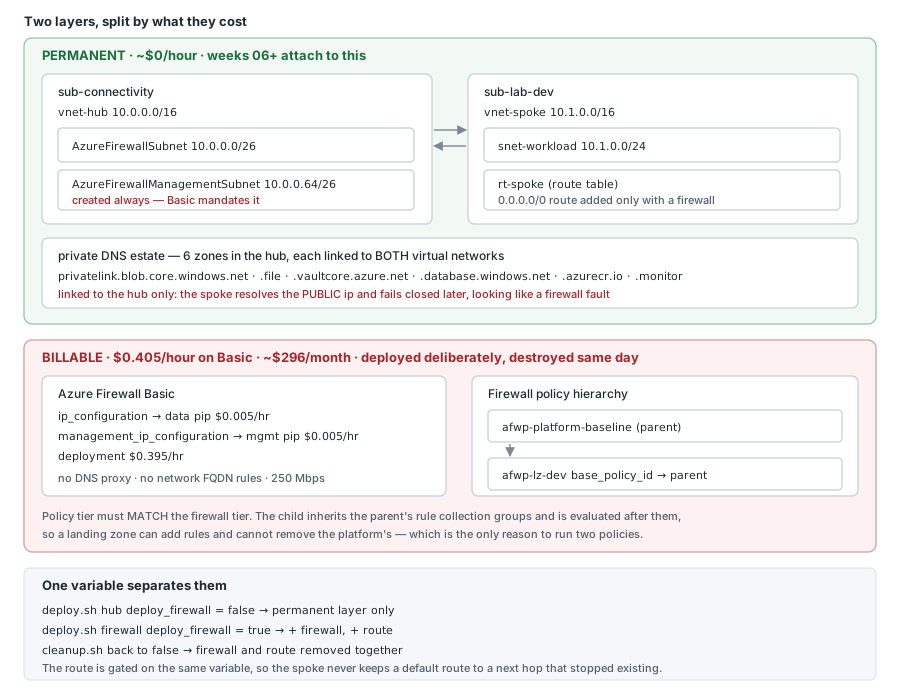
The hub lives in the connectivity subscription and the spoke in the landing zone subscription — two subscriptions, two provider aliases, one configuration. That is what the management group hierarchy built in the bootstrap is for, and this is the first week that proves the split earns its keep: the two halves can be owned by different teams, on different lifecycles.
Prerequisites
- Two Azure subscriptions — one for the hub
(
sub-connectivityhere) and one for the spoke (sub-lab-dev). That split is the point: hub and spoke can be owned by different teams on different lifecycles. One subscription works if you point both variables at it, and you lose the thing the week demonstrates. - Contributor on both. No role assignments are created, so User Access Administrator is not needed.
- A billing alert you trust. This is the one week that
bills while idle.
deploy_firewalldefaults tofalse; setting it true starts a $0.405/hour meter that does not stop because you walked away. - Terraform ≥ 1.10 with
azurerm5.x, and two provider aliases — 5.x requires an explicitsubscription_idon each. - Azure CLI 2.60+. Note that
az network firewalllives in an extension, which matters for scripting — see Troubleshooting. - One resource provider:
Microsoft.Network. - Non-overlapping address space. Hub
10.0.0.0/16and spoke10.1.0.0/16by default. Peering refuses to create if they overlap, and it refuses at apply time rather than at plan time.
Every variable, both subscription roles and the layered deploy commands are in the lab guide, which is the reproducible half of this write-up.
Implementation
0. How any of this gets deployed
Everything below is Terraform. There is no portal click anywhere in this week — the screenshots are the result of an apply, not a record of someone configuring things by hand.
State lives in HCP Terraform; the apply runs locally:
In versions.tf.
The workspace is set to local execution deliberately. HCP
defaults a new workspace to remote, which fails immediately here because
there are no Azure credentials stored in the workspace — the apply authenticates
with whatever az login session is on the machine. So HCP holds the
state file and its version history, and the plan and apply run locally. There are
no HCP run logs for this week, because there were no HCP runs.
The hub and the spoke are in different subscriptions, so the configuration declares two providers:
In versions.tf.
And the whole cost design reduces to one variable, defaulted off:
variable "deploy_firewall" {
  type    = bool
  default = false     # the only billable thing in the week
}
Which gives two commands — the free one, and the one that starts the meter:
./scripts/deploy.sh hub        # permanent layer. ~$0/hour. Safe to leave
./scripts/validate.sh
./scripts/deploy.sh firewall   # + firewall and route. $0.405/hour
./scripts/cleanup.sh           # removes the firewall, keeps the hub
The permanent layer applies as 29 resources. With that in mind, here is what each step actually creates.
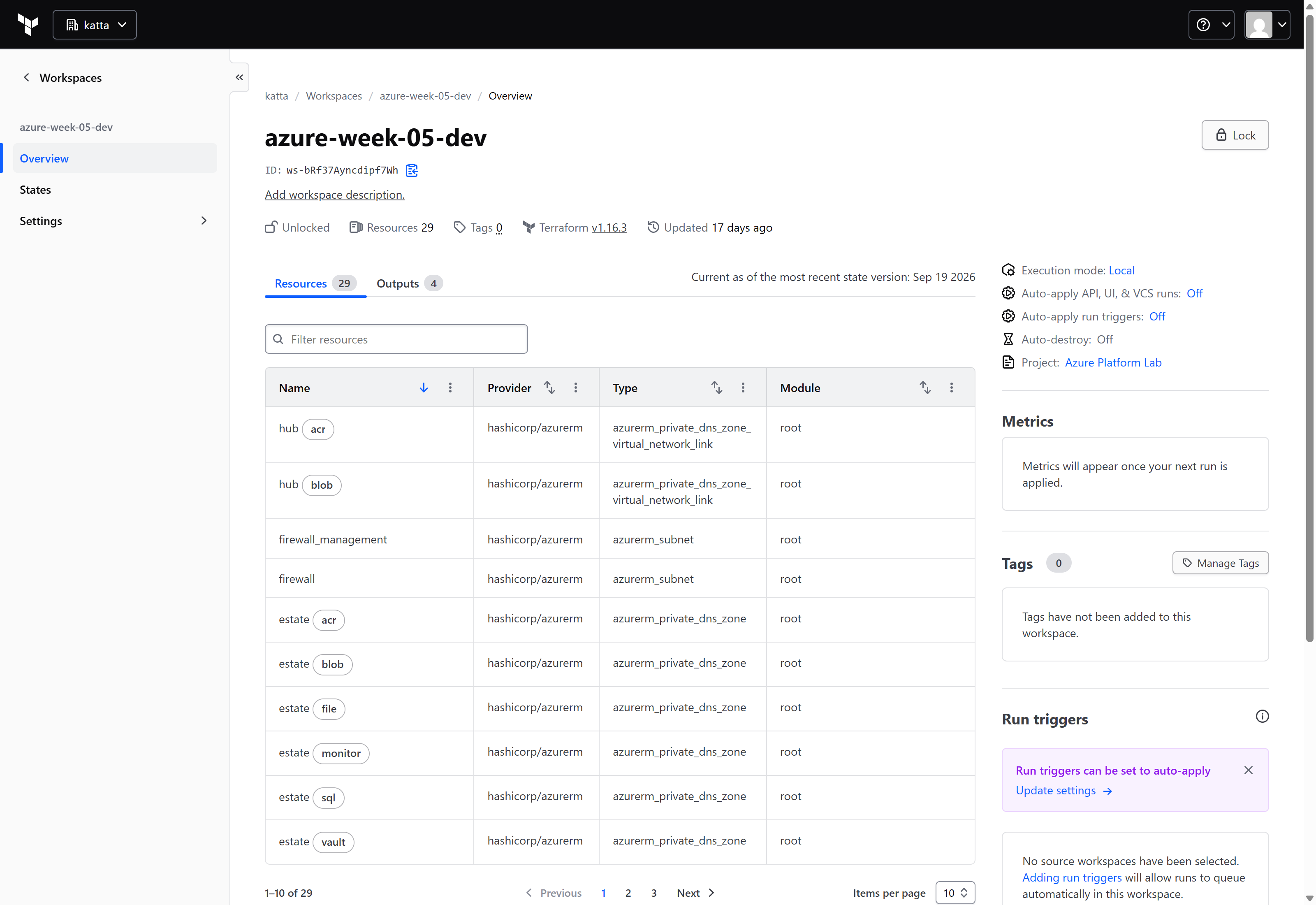
The workspace, read back from the HCP Terraform API:
GET /api/v2/organizations/Katta/workspaces/azure-week-05-dev

name=azure-week-05-dev  execution-mode=local  resource-count=29  terraform=1.16.3
execution-mode=local is the point: HCP holds the state, the
machine runs the apply. And 29 is the permanent layer — the number quoted below
is the one HCP itself reports.
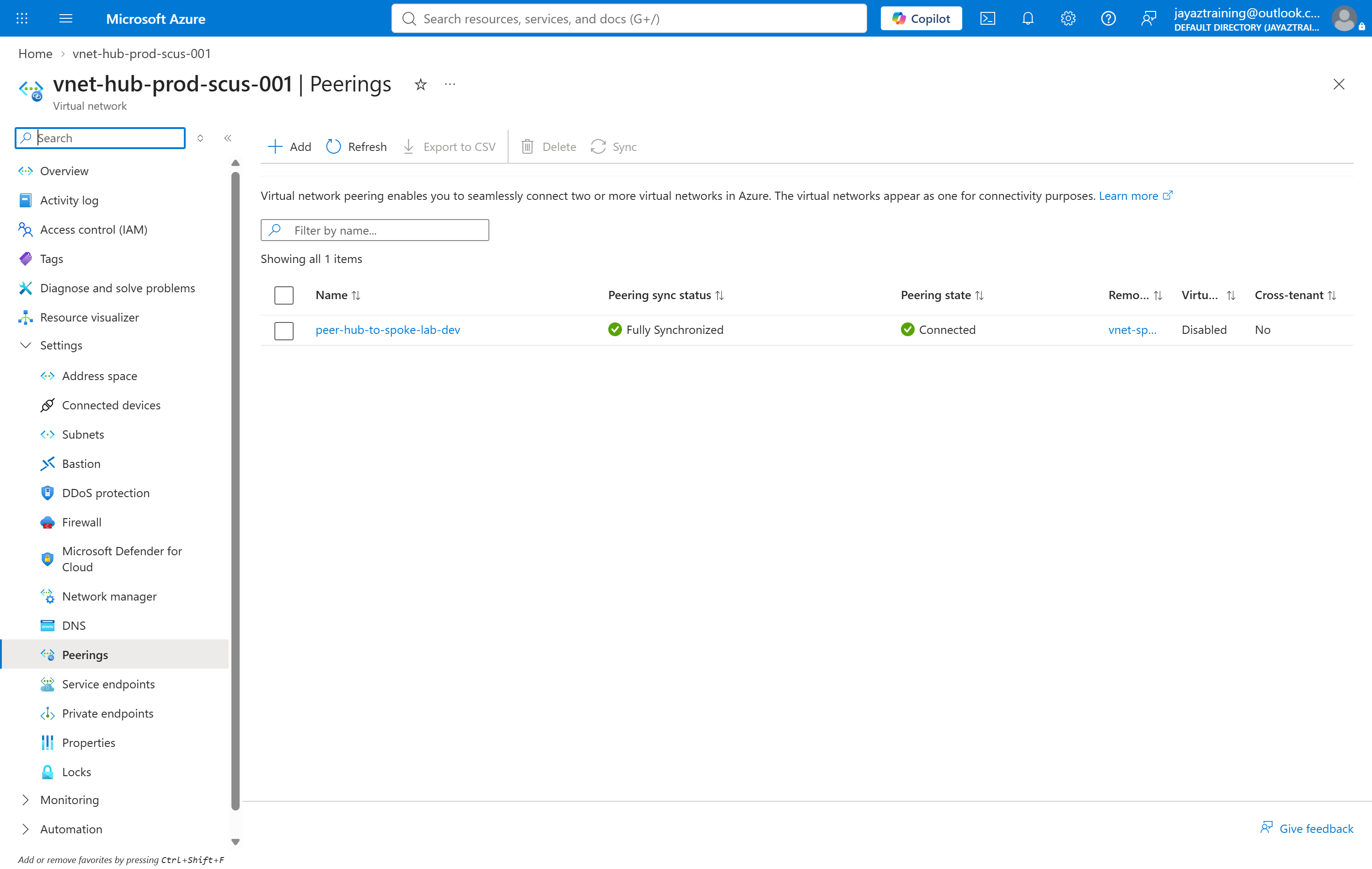
1. The hub, the spoke, and the peering between them
A peering is two resources, not one. Each side is declared
independently, and traffic only crosses when both exist. One side alone sits in
Initiated — a resource that exists, reports healthy in the portal,
and moves no packets.
In main.tf.
That is why the check reads the state rather than the existence:
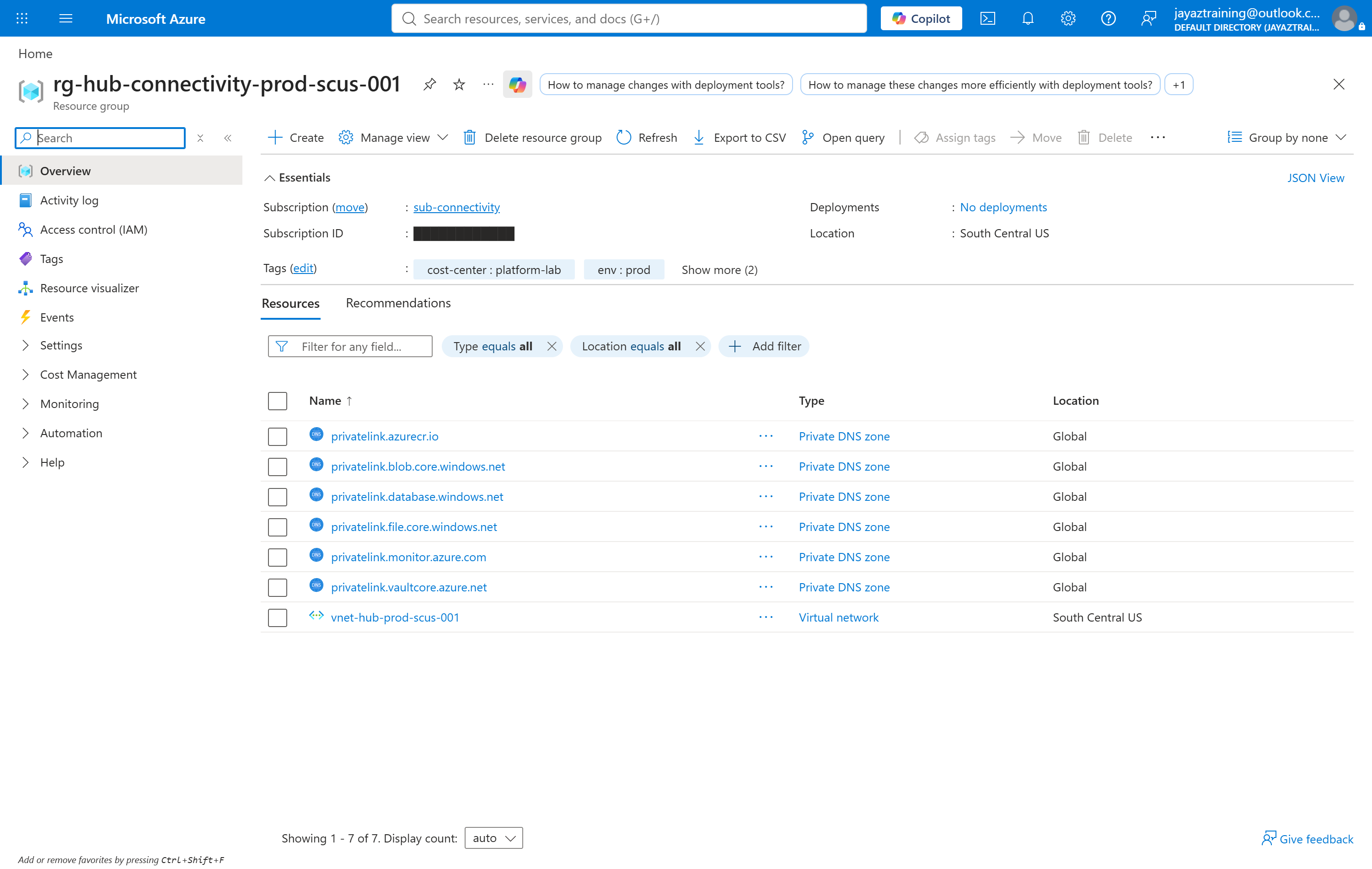
2. The private DNS estate
Six privatelink zones, created in the hub and linked to
both virtual networks. The names cannot be invented — each Azure
service publishes the exact zone its private endpoints register into, and a zone
one character off resolves nothing while looking entirely correct in the portal.
They live in the hub because a private endpoint must resolve to the same record everywhere. Per-spoke zones are the classic mistake: resolution works in the spoke that owns the endpoint, and silently returns the public IP everywhere else. That failure surfaces much later, in some unrelated week, and looks exactly like a firewall problem.
In main.tf.
Everything to this point costs approximately nothing and is designed to stay up. The next step is where the meter starts.
3. The firewall — and what Basic quietly requires
In main.tf.
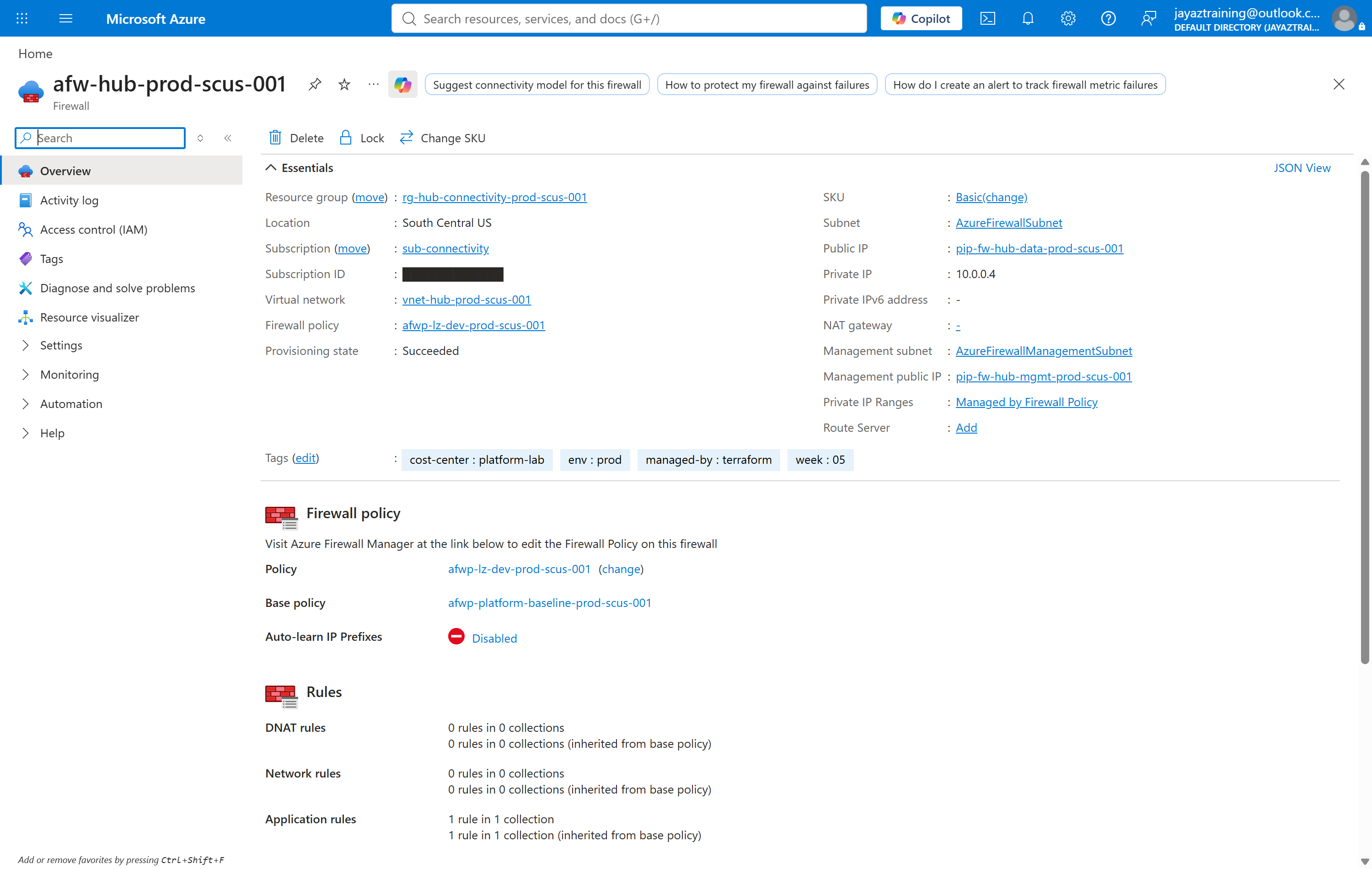
Read that blade carefully, because it contains the week's first real finding. There is a Management subnet and a Management public IP alongside the ordinary ones. Those are not optional:
Firewall Basic has a mandatory requirement to be configured with a management NIC.
Basic requires a second subnet named AzureFirewallManagementSubnet
and a second public IP, neither of which Standard needs. That is a
virtual network design decision, not a pricing toggle — so this hub
creates the management subnet unconditionally, at every tier.
Changing SKU later is then a variable change, rather than re-addressing a hub
that six weeks are already peered into. An empty /26 costs nothing.
Basic's other limits are worth knowing before choosing it: no DNS proxy ("uses Azure DNS only"), no network-level FQDN filtering, no web categories, threat intelligence in alert mode only, and a 250 Mbps ceiling. Private endpoint resolution still works — the zones above are linked per-VNet and resolve through Azure DNS — but the firewall cannot be the central resolver for spokes, which is the pattern most reference architectures show.
4. The policy hierarchy
A parent policy holds what every landing zone gets and cannot remove. A child inherits it and adds its own. Child rule collection groups are evaluated after the parent's, so the parent always wins — which is the entire reason to run two rather than one.
In main.tf.
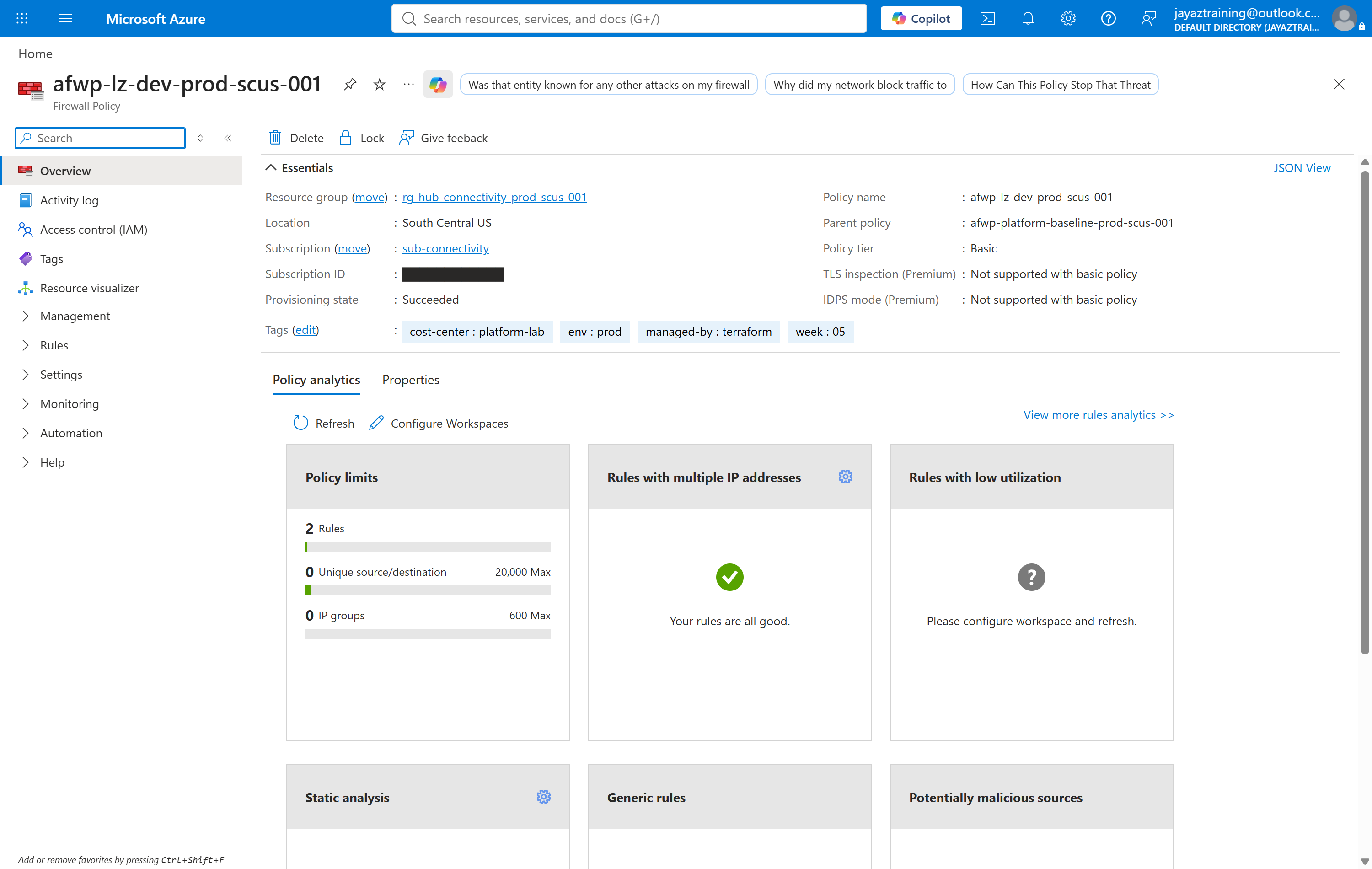
Two details here. The policy tier must match the firewall
tier — a Standard policy on a Basic firewall is refused. And the portal states
the trade-off plainly: TLS inspection (Premium): Not supported with basic
policy.
The inheritance is easiest to verify from the firewall blade in step 3, which
reports 1 rule in 1 collection and 1 rule in 1
collection (inherited from base policy). That second line is the hierarchy
working, read from the deployed firewall rather than from the template that
claimed it.
5. The route that makes it load-bearing
Without this step, the firewall exists, bills, and carries nothing. The spoke's default route has to point at it.
resource "azurerm_route" "spoke_default_via_firewall" {
  provider = azurerm.spoke
  count    = var.deploy_firewall ? 1 : 0    # same gate as the firewall

  address_prefix         = "0.0.0.0/0"
  next_hop_type          = "VirtualAppliance"
  next_hop_in_ip_address = azurerm_firewall.hub[0].ip_configuration[0].private_ip_address
}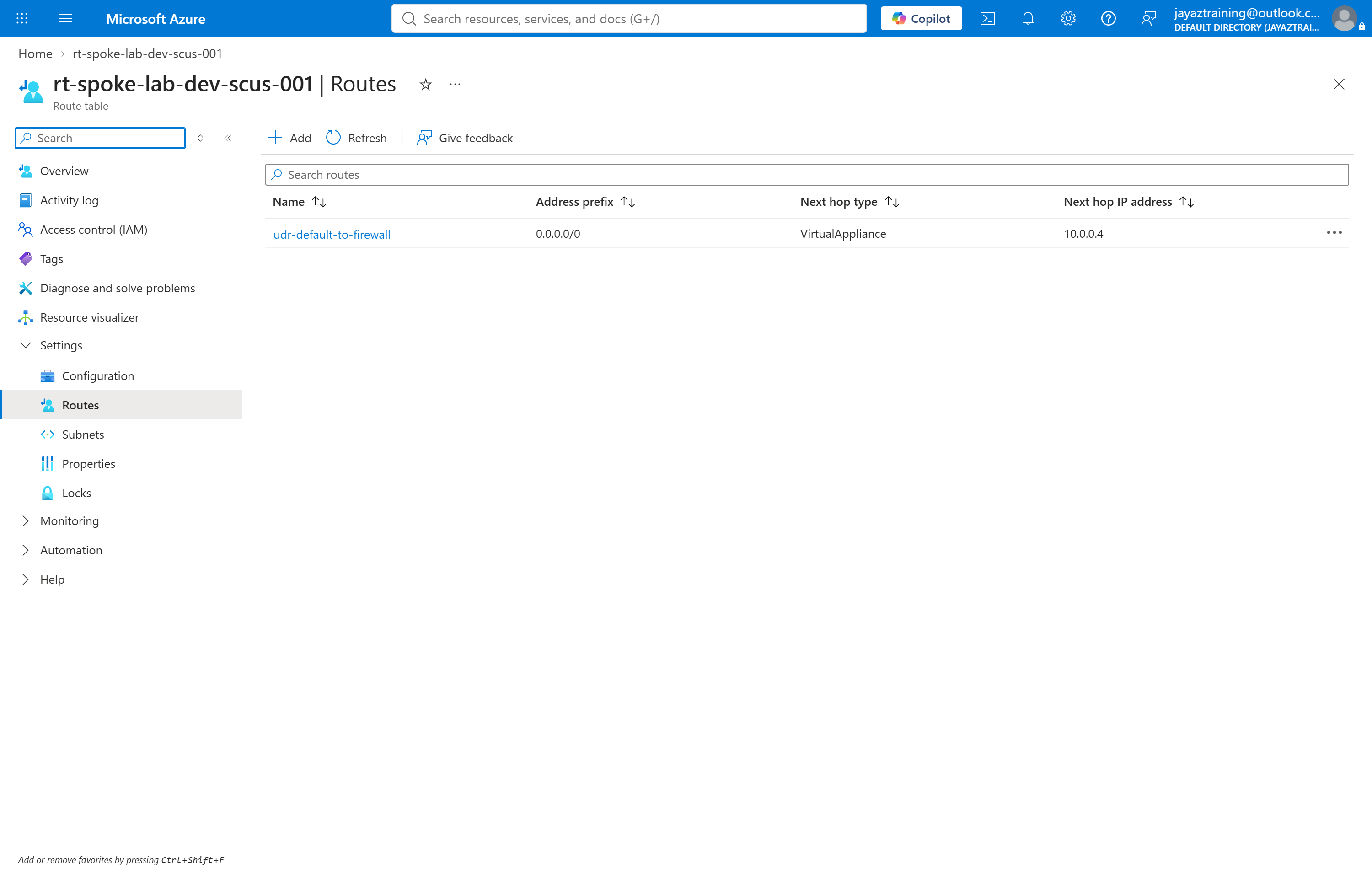
0.0.0.0/0 with next hop VirtualAppliance at the firewall's private IP. Without this the firewall exists, bills, and inspects nothing.0.0.0.0/0 → VirtualAppliance → 10.0.0.4. That address is the
firewall's private IP from step 3 — worth comparing the two screenshots, because
a route pointing at the wrong address is indistinguishable from a correct one
until traffic stops.
The route is gated on the same variable as the firewall, deliberately. A
0.0.0.0/0 route whose next hop no longer exists does not fail
loudly; it blackholes the subnet.
Validation with everything up: 5 passed, 0 failed. Without the firewall, the same script reports 4 passed and skips the route check — the absence of that route is the correct state, not a gap.
Validation and Evidence
A successful terraform apply proves 22 resources exist. It
does not prove that a peering carries traffic, that a route points anywhere
real, or that the firewall's subnets are sized the way Azure silently
requires. validate.sh checks those separately —
5 passed / 0 failed with the firewall deployed.
| Test | Expected | Actual | Status |
|---|---|---|---|
| Both peerings report Connected | both sides Connected, not Initiated | hub → spoke and spoke → hub, both Connected | PASS |
| Every private DNS zone links to both VNets | every zone linked twice | 6 zones, 12 links | PASS |
| Firewall subnets named and sized as Azure requires | exact names, /26 each | AzureFirewallSubnet 10.0.0.0/26, AzureFirewallManagementSubnet 10.0.0.64/26 | PASS |
| The spoke's default route points at the firewall | next hop equals the firewall's private IP | next hop 10.0.0.4 = firewall 10.0.0.4 | PASS |
| Deployed state matches configuration | no drift | none | PASS |
Without the firewall the same script reports 4 passed and skips
check 4. That is deliberate: with no firewall there should be no
0.0.0.0/0 route, so its absence is the correct state rather than
a gap. A check that failed here would be teaching you to ignore it.
Security and Cost
Security
- Egress is forced through the firewall by the spoke's default route, not left to per-resource configuration. A workload cannot opt out of it.
- The parent policy cannot be edited by the landing zone. Platform rules are inherited and evaluated first; a landing zone team can add rules and cannot remove the baseline.
- Private DNS zones live in the hub, so private endpoint resolution is consistent across every spoke rather than per-team and divergent.
- Auto-registration is off on every zone link. These zones exist for private endpoints, which create their own records; auto-registration would additionally register every VM NIC in the linked network into a privatelink zone.
- Basic's threat intelligence is alert-only — it cannot deny. Worth stating explicitly, because "threat intelligence is enabled" reads as protection and on this tier it is telemetry.
Cost — and what it really came to
Prices read from the Azure retail price API for South Central US on the day:
| Layer | Per hour | Per month if left up |
|---|---|---|
| Permanent — VNets, peerings, route table, 6 DNS zones | ~$0.000 | ~$0 |
| Firewall Basic + 2 public IPs | $0.405 | $296 |
| Firewall Standard + 1 public IP (for comparison) | $1.325 | $967 |
The plan was to run the firewall for about an hour — roughly $0.41. It actually ran 1 hour 47 minutes, about $0.72.
Nothing about Azure caused the overrun. The firewall finished deploying, the screenshots were taken, and then it sat there while attention was elsewhere. The hourly rate was never the risk. An absence of a deadline was — which is precisely the failure mode the two-layer split exists to contain, arriving in the one window where the split does not protect you.
Troubleshooting and Lessons
The teardown failed, and the script reported success. This is the one worth the whole post.
- Problem: cleanup died with
FirewallPolicyUpdateFailed — Failed with 1 faulted referenced
  firewalls
. The firewall stayed up and kept billing, and the script still exited 0, so nothing signalled a problem. - Root cause: two independent failures lined up.
Terraform tried to update the child policy while the firewall still
referenced it, so the destroy aborted. And the safety check that existed to
catch exactly that could not run: it used
az network firewall list, which needs theazure-firewallextension and, in a non-interactive shell, dies on the dynamic-install prompt withEOFError: EOF when reading a line. - Resolution: recovery was
az resource delete --ids <firewall>, which needs no extension, then a re-apply. Eight minutes, and part of the $0.72. The script now checks the apply's exit code explicitly and verifies withaz resource list. - Lesson learned: either failure alone would have been caught by the other. A verification step is itself a dependency, and one that cannot run is worse than none — it reports clean.
A query that returned null instead of failing.
- Problem: both firewall subnets reported as missing when they existed and were correctly sized.
- Root cause:
az network vnet subnet show --query addressPrefixnow returns null — the value moved toaddressPrefixes[]. The old field is still in the response, so the query succeeds and returns empty. - Resolution: query
addressPrefixes[0]. - Lesson learned: an empty result is indistinguishable from "does not exist". A renamed field that leaves its old name in place fails silently, which is worse than a hard error.
An azurerm 5.x schema change.
- Problem:
azurerm_private_dns_zone_virtual_network_linkfailed validation on two arguments at once. - Root cause: 5.x takes
private_dns_zone_idwhere 4.x tookresource_group_nameplusprivate_dns_zone_name. - Resolution: use the 5.x form.
- Lesson learned: when every argument fails at once, suspect a major version rather than a typo — almost any published example predates the change.
Cleanup and Key Takeaways
Cleanup
Cleanup removes the firewall, both public IPs and both policies by re-applying
with the flag off — not by destroy -target, which would leave the
route pointing at an address that no longer answers. Both are gated on the same
variable, so they go together in dependency order.
The public IPs matter more than they look. A standard static IP left behind is $0.005/hour: trivial per hour, permanent if nobody checks. The script now verifies that zero firewalls and zero public IPs remain before it reports clean.
The hub, the spoke, the peerings and the DNS estate stay up. That is the point.
References
- Azure Firewall features by SKU
- Deploy and configure Azure Firewall Basic
- Private endpoint DNS configuration
- Hub-spoke network topology in Azure
- Week 5 code in the lab repository
Key takeaways
- Split a week by what it costs, not by what it does. When one resource carries the entire hourly bill and everything else is free, those are two different lifecycles wearing one name.
- Basic is not a cheaper Standard. It mandates a management subnet and a second public IP, and it has no DNS proxy. Decide the tier before addressing the hub, not after.
- A peering is two resources. One side alone exists, reports healthy, and carries nothing — so check the state, not the existence.
- Put private DNS zones in the hub. Per-spoke zones resolve correctly where the endpoint lives and return the public IP everywhere else.
- A cleanup script that cannot fail loudly is not a cleanup script. Mine exited 0 while the firewall kept billing, and its safety check could not run in the shell it ran in. Check exit codes, and make sure the verification command actually works where it executes.
Comments