📋 In This Post
Lab Overview
Here is an uncomfortable thing about most Azure guardrails: the person they are designed to stop can usually remove them.
A resource lock is itself a resource. An Owner deletes the lock, then deletes the thing the lock was protecting. Two commands.
An Azure Policy with a deny effect is an
assignment. An Owner with rights at that scope unassigns it, does what they
wanted, and re-assigns it if they are tidy. Also two commands.
In both cases the control and the target live at the same scope, under the same identity. So the guardrail is exactly as strong as the discipline of the person standing next to it at 2am during an incident — which is to say, it is not a guardrail. It is a reminder.
A deployment stack is different in kind, not in degree. The
stack owns a set of resources and holds a deny assignment over
them. A deny assignment is not a role assignment and cannot be out-voted by
one. No amount of Owner gets around it — you have to go to where
the stack lives and remove the stack.
So the claim for the week, stated so that it can fail: an Owner with full rights over the subscription cannot delete a resource a deployment stack is protecting, and can delete an otherwise identical resource sitting beside it.
| Difficulty | Intermediate — two resources, but the control lives at management group scope and is created outside Terraform |
| Time to complete | Under an hour. The validation genuinely deletes a storage account, so allow for a redeploy if you re-run it |
| Deployment | Terraform (azurerm) for the control pair; az stack mg create for the protected half — deployment stacks are an ARM object with no Terraform resource |
| Measured cost | $0.00 — two empty storage accounts, deleted the same day |
| Full lab guide | LAB.md — prerequisites, variables, commands, expected outputs, validation and cleanup |
Cloud Services and Concepts
| Service | Purpose here | What it is |
|---|---|---|
| Deployment stack | Owns the resources it deployed | An Azure resource that tracks what it created and can place a deny assignment over it. |
| denySettingsMode | What the stack refuses | denyWriteAndDelete blocks both, and it is enforced by Azure rather than by RBAC on the caller. |
| Deny assignment | Why holding Owner is not enough | A deny assignment outranks a role assignment. The refusal reads DenyAssignmentAuthorizationFailed and states that the caller has permission to perform the action — and still cannot. |
| Management group scope | Why the stack lives above the subscription | A Contributor inside the subscription cannot reach a stack at the management group, so it cannot lift its own restriction. |
| action-on-unmanage | What teardown does, and its default | The default is detach: omit the flag and every resource keeps running, untracked and unowned, while the command reports success. |
Architecture and Workflow
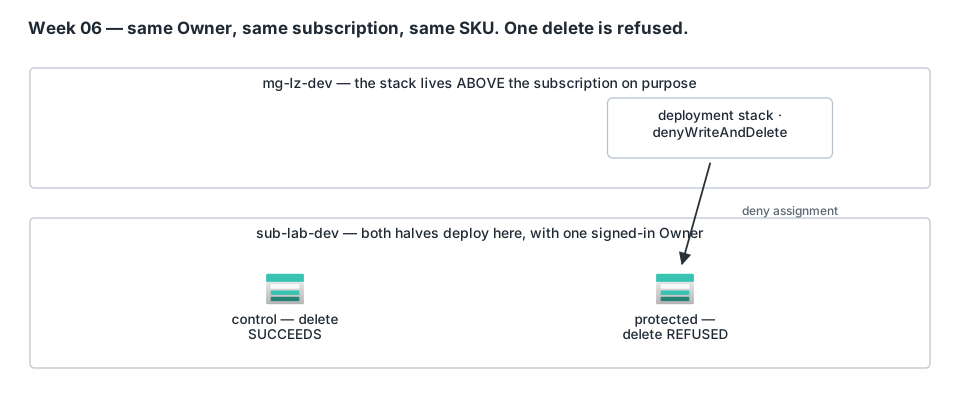
Two storage accounts. Same subscription, same region, same SKU, same TLS floor, same public access setting, same identity doing the deleting. One variable differs: a deployment stack is holding one of them.
Prerequisites
- A management group you can create a deployment stack in.
This is the unusual prerequisite and the one most likely to stop you: the
protected half is an
az stack mg createat management group scope, not a subscription. You need rights at the management group, not just inside the subscription under it. - Owner on the subscription — and here that is a test requirement rather than a deployment one. Check 5 asserts that the deletion was refused for a caller holding Owner and User Access Administrator. Run it as a limited principal and the result proves nothing, because a limited principal would have been refused anyway.
- Azure CLI 2.60+ with the
az stack mgcommands. Note thatcreateaccepts--yesandvalidatedoes not — see Troubleshooting. - Terraform ≥ 1.10 with
azurerm5.x, which builds only the control pair. There is no Terraform resource for a deployment stack. - Two resource providers:
Microsoft.ResourcesandMicrosoft.Storage. - Builds on week 01 for the management group hierarchy
the stack is scoped to (
mg-lz-devhere). Any management group works.
Every variable and the exact stack command are in the lab guide, which is the reproducible half of this write-up.
Implementation
0. How any of this gets deployed
This week is the first one in the lab that is not pure Terraform, and the reason is worth being blunt about.
Deployment stacks have no Terraform resource. I checked the
azurerm provider's own documentation tree on 20 September 2026: there are
*_template_deployment resources, and there is nothing for
Microsoft.Resources/deploymentStacks. Microsoft's own guidance says
the same thing — "To create and update a deployment stack, use the Azure
CLI, Azure PowerShell, or the Azure portal with Bicep files." Terraform is
not on that list, so this week does not pretend otherwise.
So the week splits along that line, and the split turns out to be useful:
the control
  Terraform, into sub-lab-dev.
  An ordinary storage account, no protection.

the protected
  an ARM template, deployed as a deployment
  stack created at mg-lz-dev scope, into
  sub-lab-dev, with deny settings on.
Both halves run from one script, in one command, so nothing here is typed into a terminal by hand and nothing is clicked in the portal:
./scripts/deploy.sh      # the control in Terraform, then the stack via the CLI
./scripts/validate.sh    # tries BOTH deletes, reports which one Azure refused
./scripts/cleanup.sh     # deletes the stack, then destroys the control
deploy.sh also registers Microsoft.Storage on the
target subscription before either half runs. Provider registration is
subscription-wide state and a real precondition, not a formality — a stack that
hits an unregistered provider reports a template error, which sends you looking
in the wrong file.
The Terraform half is the usual setup — state in HCP Terraform, the apply
running locally against whatever az login session is on the
machine:
The cloud {} block and provider pin are in versions.tf.
And the control itself is deliberately boring:
The control is an ordinary storage account — main.tf — deliberately matched to the stack template's SKU and kind so the only difference between the two accounts is which one a stack owns.
The control is not decoration and it is not padding. Without it, "the delete failed" has several possible explanations — a typo in the account name, a transient Azure error, a role I thought I had and didn't. With it, there is exactly one difference between the two attempts.
The workspace, read back from the HCP Terraform API rather than screenshotted:
GET /api/v2/organizations/Katta/workspaces/azure-week-06-dev

name=azure-week-06-dev  execution-mode=local  resource-count=0  terraform=1.16.3
execution-mode=local confirms HCP is the state backend and not
the runner. resource-count=0 is the teardown: the control was
destroyed, and HCP's state says so.
1. The protected half — an ARM template the stack will own
The template is subscription-scoped, and it creates its own resource group:
The protected half is an ARM template — stack/protected.json — because a deployment stack takes a template, and there is no Terraform resource for a stack.
That the stack makes its own resource group rather than reusing one Terraform created is the important detail. A resource with two owners has an ambiguous teardown — and an ambiguous teardown is precisely the failure this whole week is about avoiding. The stack owns everything it protects, right down to the container it lives in.
2. Creating the stack — and why the scope is the control
The stack is created at mg-lz-dev, a management
group, and deploys into sub-lab-dev:
az stack mg create \
  --name stack-wk06-protected \
  --management-group-id mg-lz-dev \
  --location southcentralus \
  --deployment-subscription "$SUB" \
  --template-file stack/protected.json \
  --parameters storageAccountName="$PROTECTED_SA" \
  --action-on-unmanage deleteAll \
  --deny-settings-mode denyWriteAndDelete \
  --yes
A deny assignment lives where the stack lives. Put the stack in the subscription, and an Owner of that subscription can reach the stack, delete the stack, and take the deny assignment with it — you are back to two commands. Put the stack a level up, and lifting the restriction requires rights at the management group: a different grant, held by different people, reviewed on a different cadence.
Two flags in that command carry real weight:
--deny-settings-mode denyWriteAndDelete, notdenyDelete.denyDeleteleaves a wide door open: an account whose network rules can still be rewritten, whose public access can be re-enabled and whose TLS floor can be dropped is not meaningfully protected. It just cannot be removed while being quietly ruined.--action-on-unmanage deleteAll— which matters at teardown, and is the subject of the Cleanup section below.
The deploy script runs az stack mg validate first, because a
stack that fails halfway still exists, and a half-failed stack with deny
settings on is harder to remove than one that never started.
3. What ended up deployed
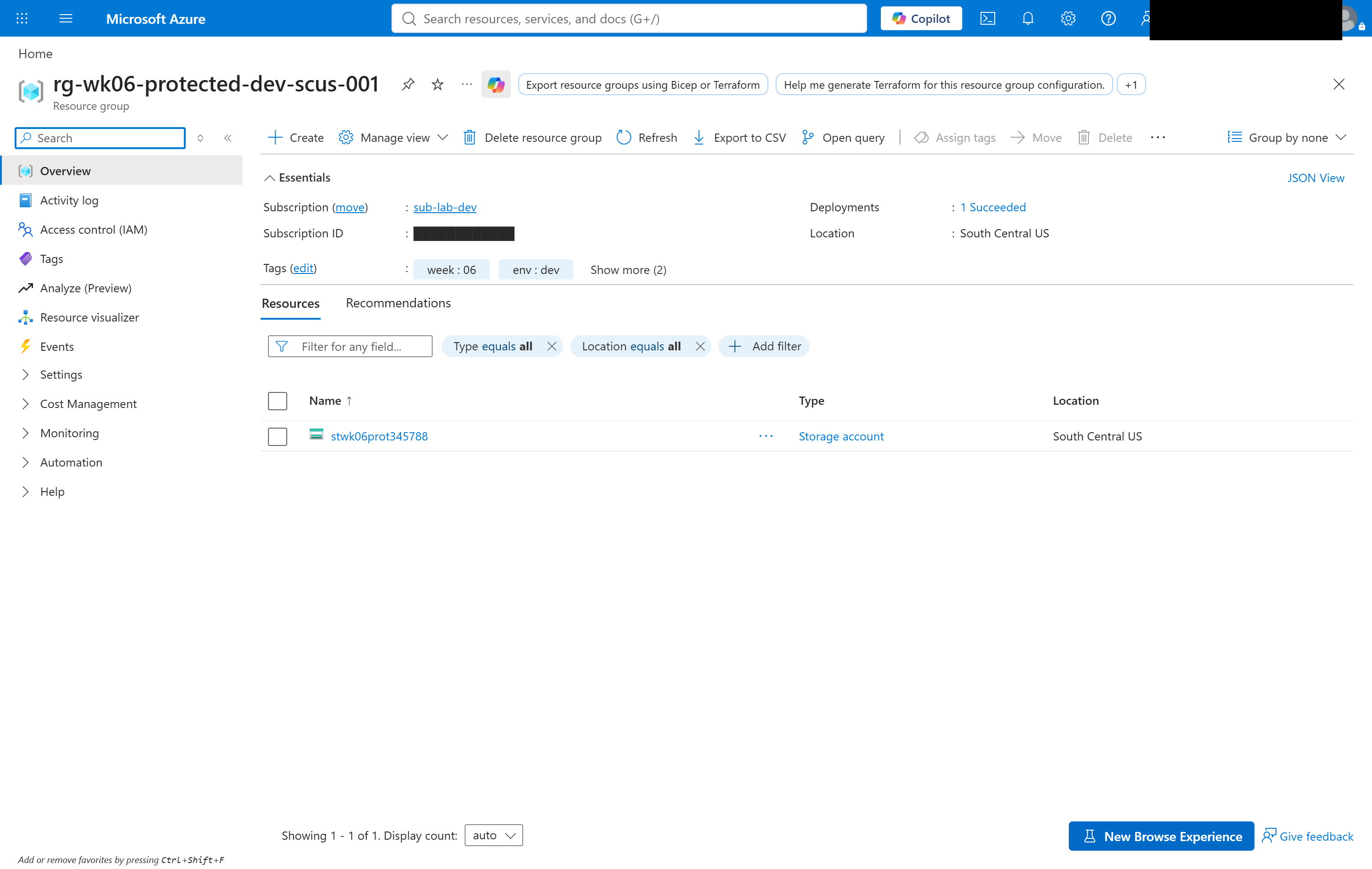
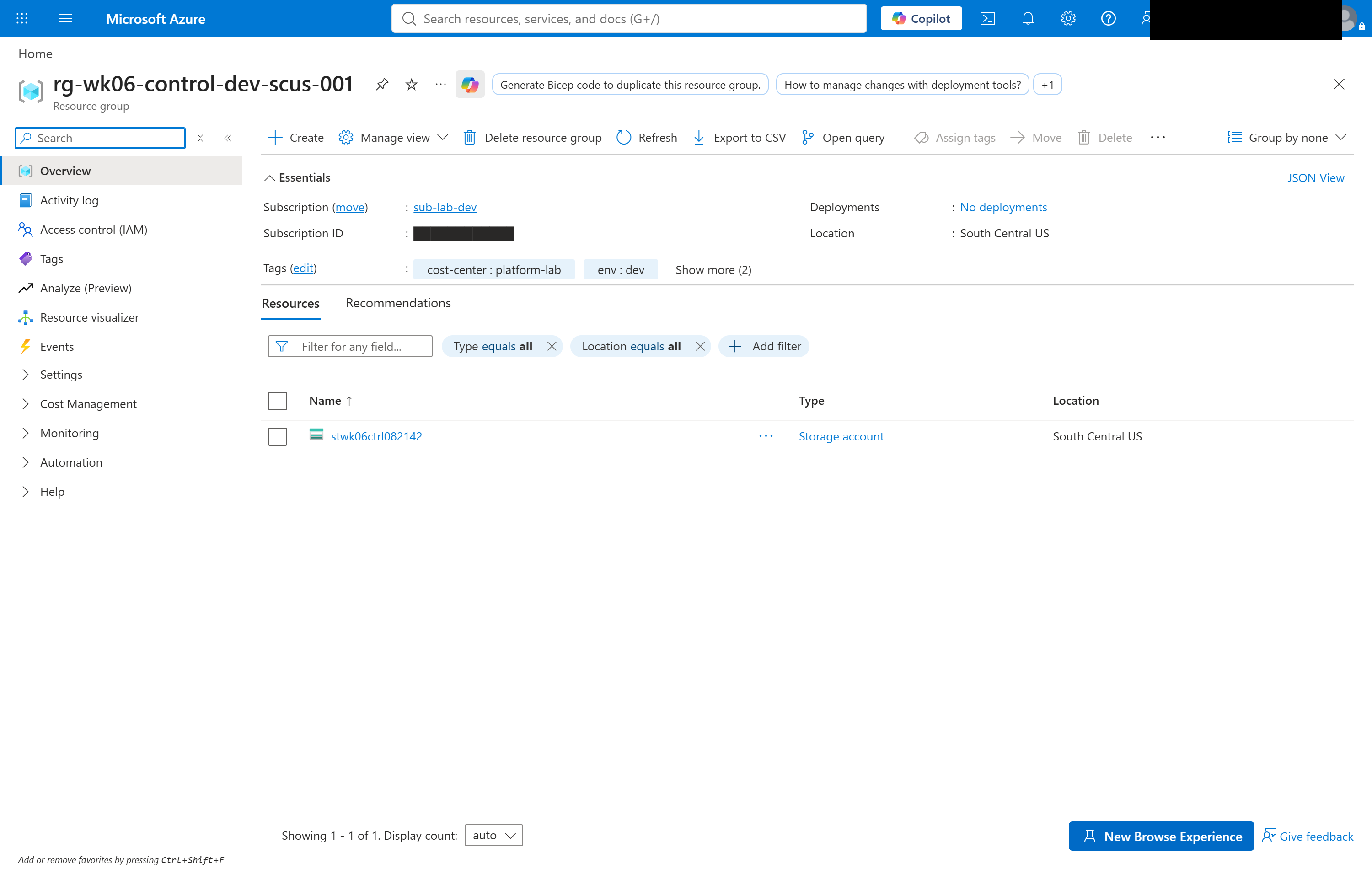
And the control — built by Terraform, not by the stack — which looks identical because it is meant to:
The difference is not in either resource group. It is here, under the subscription's Access control (IAM) → Deny assignments:
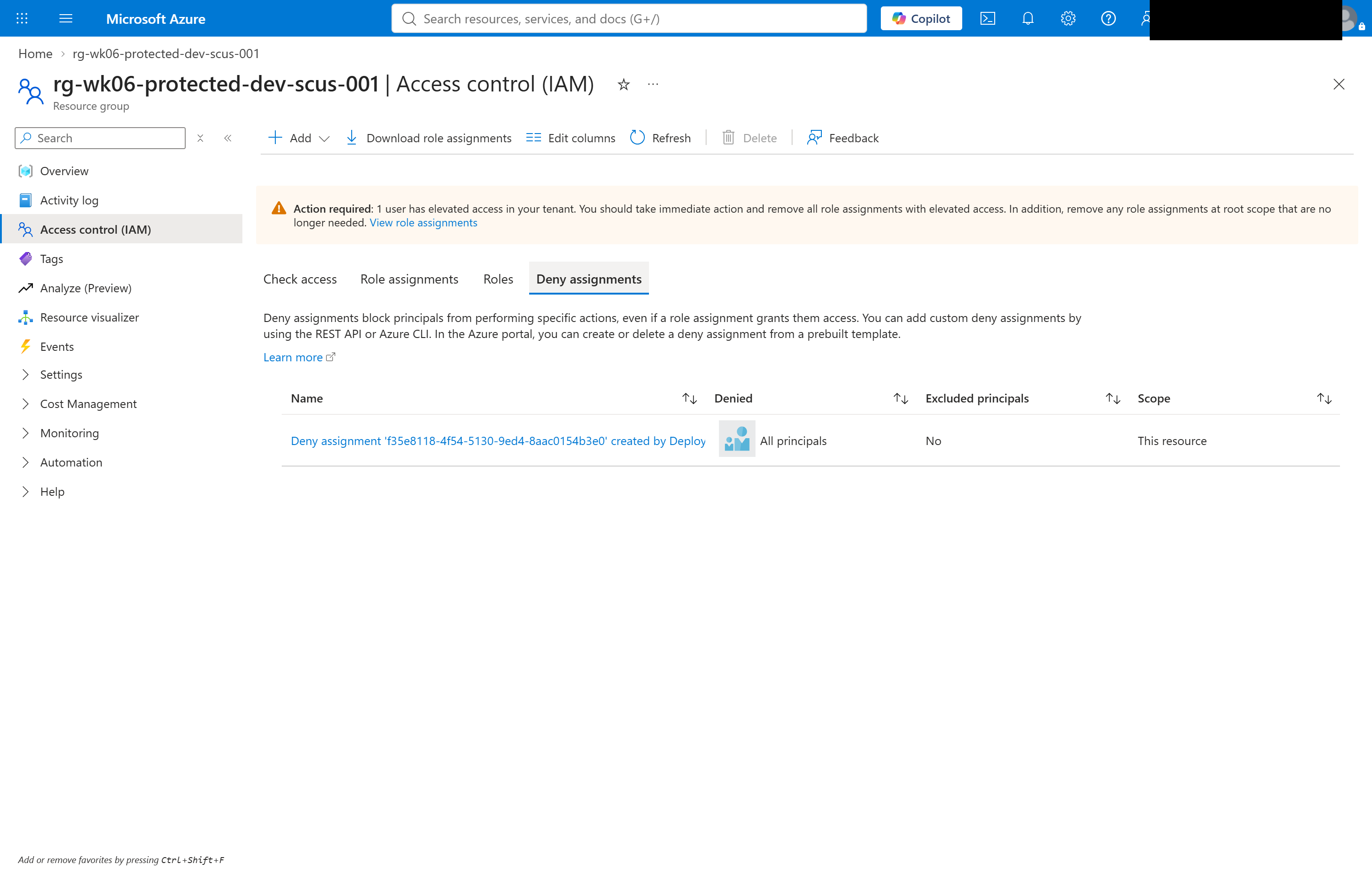
Note what that blade says: created by Deployment stack, Denied: All principals, Excluded principals: No. Nobody made it by hand, and nobody can edit it there. The stack is the only thing that changes it.
Validation and Evidence
A successful deploy proves a stack exists with deny settings on. It proves nothing about whether the deny actually stops anybody — so check 3 genuinely deletes a storage account. A test that only ever attempts the delete it expects to fail proves nothing about whether deletes work at all.
| Test | Expected | Actual | Status |
|---|---|---|---|
| The stack exists and reports managed resources | a stack at mg-lz-dev, denyWriteAndDelete | 2 managed resources, mode denyWriteAndDelete | PASS |
| Managed resources carry a deny status | every managed resource reports the deny | 2 of 2, status=managed denyStatus=denyWriteAndDelete | PASS |
| Deleting the control account | succeeds — the control for the whole experiment | deleted | PASS |
| Deleting the protected account | refused by the deny assignment | REFUSED — DenyAssignmentAuthorizationFailed | PASS |
| Who the refusal applied to | a caller holding Owner | Owner + User Access Administrator, still refused | PASS |
The third row is why the fourth means anything. Both accounts are identical and in the same subscription. The only difference is which one a stack owns.
What the five checks print
What the five checks print:
3. Deleting the CONTROL storage account succeeds
   RESULT: deleted - an ordinary account, deletable by an Owner

4. Deleting the PROTECTED storage account is refused
   RESULT: REFUSED by the stack's deny assignment
     DenyAssignmentAuthorizationFailed) The client '<signed-in user>' with
     object id '<oid>' has permission to perform action
     'Microsoft.Storage/storageAccounts/delete' ...

5. The refusal applied to an Owner, not a limited principal
   caller roles on the subscription: Owner User Access Administrator
   RESULT: the caller holds Owner and was still refused
Read check 4's error text again, slowly. Azure is not saying I lack
permission. It is saying I have permission — has
permission to perform action 'Microsoft.Storage/storageAccounts/delete' —
and refusing anyway. The deny assignment is evaluated after the role grant, and
overrides it. That one sentence is the entire week.
Check 5 exists because the result is worthless without it. "A delete was
refused" is unremarkable if the caller was a Reader. It is the whole point if the
caller holds Owner and User Access
Administrator — the role that exists specifically to let you grant
yourself things.
Security and Cost
Security
- The control outranks the subscription's Owner, which is the first time in this lab that has been true. Every previous guardrail was removable by the identity it constrained.
- The stack sits above the subscription it protects. Removing
the restriction requires rights at
mg-lz-dev, not atsub-lab-dev. denyWriteAndDelete, notdenyDelete— a resource that cannot be deleted but can be reconfigured is not protected.- The stack owns its own resource group, so there is exactly one authority over every protected resource and no ambiguity about who removes what.
- The deny assignment is not hand-made and not hand-editable. It exists because the stack exists, and it is inventoried in the portal under the subscription's IAM blade where an auditor will look for it.
Cost
Two empty Standard_LRS storage accounts. Storage bills for
capacity and transactions; these hold nothing and serve nothing. The stack, the
deny assignment and the resource groups are free.
What this week cost: $0.00. After week 5's firewall ran 47 minutes longer than planned, a week with no hourly meter in it was a deliberate choice.
Troubleshooting and Lessons
A marker file two scripts disagreed about.
- Problem: validation reported "Could not resolve both storage accounts. Run deploy.sh first." against a deploy that had succeeded ninety seconds earlier.
- Root cause:
deploy.shwrote the generated account name to.protected-storage-accountat the week root;validate.shread it fromscripts/. - Resolution: resolve the marker path from the script's own location in both scripts, rather than from the working directory.
- Lesson learned: the error pointed confidently at the wrong cause. "Run deploy.sh first" is a guess the script makes when a file is absent, and a guess in an error message is read as a diagnosis.
Sibling CLI commands that do not take the same arguments.
- Problem:
az stack mg validatefailed withunrecognized arguments: --yes. - Root cause:
az stack mg createaccepts--yes;validatedoes not. They read like one command with a different verb and are not. - Resolution: drop
--yesfrom the validate call. - Lesson learned: a shared command prefix is not a shared argument list. Check each verb's own help.
ARM rejects the JSON comment convention.
- Problem:
InvalidRequestContent: Could not find member '//' on object of type
  'Template'
. - Root cause: ARM templates have no comments, and the
common top-level
"//"key is not a schema member at template root. - Resolution: put commentary in
metadata, which is a real member. - Lesson learned: a convention that works in one JSON dialect is not portable to a schema-validated one.
Management-group stacks have no portal UI
I went looking for a portal view of the stack itself, to screenshot it. There isn't one:
This feature isn't implemented at this time.Stacks at subscription and resource group scope render in the portal. The
management group blade does not, as of 25 September 2026. This is worth knowing
before you standardise on management-group-scoped stacks: you will operate them
entirely from the CLI, and your change-review evidence has to come from
az stack mg show and the deny assignments blade, because there is no
stack page to link to.
Cleanup and Key Takeaways
Cleanup — The Hard Part
The protected resources cannot be deleted directly. That is the entire point
of the week, and it means teardown is not the usual terraform
destroy. You delete the stack, which drops the deny
assignment and then acts on what it managed:
az stack mg delete --name stack-wk06-protected \
  --management-group-id mg-lz-dev \
  --action-on-unmanage deleteAll --yes
deleteAll is not optional. The documented
default is detach: deployment stacks detach and do not delete unmanaged
resources. Omit the flag and the stack goes away, the deny assignment goes with
it, and every resource it was protecting keeps running — unowned, untracked,
still billing — while the command exits 0 and tells you nothing is wrong. On
this week that costs nothing. On a week with a firewall in it, that is the bill
that arrives a month later.
There are three documented ways the delete itself can fail, and the cleanup script handles all three rather than assuming success:
- Permission. Updating or deleting a stack whose deny setting
is anything other than
noneneeds rights at the stack's scope. Deployment Stack Contributor cannot do it; Owner at the management group can. - Stack out of sync. Azure refuses the delete rather than risk removing something unexpected. There is a bypass flag. I deliberately don't use it — it deletes whatever the managed list happens to contain, which is exactly the situation the error exists to stop.
- A resource group containing resources the stack does not manage is not removed, and neither are those resources.
So cleanup.sh checks the delete's exit code explicitly, and then
verifies against Azure that both resource groups are actually
gone before reporting clean. That is a direct correction from last week, where a
teardown script reported success while an Azure Firewall carried on billing.
References
- Deployment stacks
- Understand Azure deny assignments
- az stack mg command reference
- Lock resources to prevent changes
- Week 6 code in the lab repository
Key takeaways
- Deny assignments beat role assignments. Azure's own error message says the caller has permission to perform the action, and refuses. If you have only ever reasoned about RBAC as "what roles do I hold", this is the other half of the model.
- A guardrail at the same scope as its target is not a guardrail. Locks and policy assignments are removable by the Owner they constrain. The scope you create the stack at is the strength of the control.
- Always build the control. A test that only attempts the delete it expects to fail cannot distinguish "protected" from "broken". The unprotected twin costs nothing and turns an anecdote into evidence.
- Choose
denyWriteAndDelete. Undeletable but reconfigurable is not protected — it is just harder to clean up afterwards. - The teardown default is
detach, and it is silent. A teardown that leaves everything running while exiting 0 is worse than one that fails loudly, because nobody goes looking. - Not everything is Terraform, and that's fine. There is no azurerm resource for deployment stacks. Reaching for the CLI where the provider genuinely doesn't reach is honest; pretending otherwise produces a worse design.
Comments