📋 In This Post
Lab Overview
The problem. Ten weeks of this lab granted roles that stay granted. A role is written once and then holds until somebody writes a change to remove it, and nobody is scheduled to. That is fine for a pipeline identity whose job never changes. It is wrong for the access a person needs twice a year — the permission to read every IAM policy during an incident, say, which is indispensable that afternoon and a standing liability every other day.
Objective. Make one privileged role requestable rather than held: an entitlement on a folder that a principal may ask for, a human must approve, and Google removes on a timer.
Expected outcome. The same command, as the same principal, refused → permitted → refused, with nothing running in between. And a number for how long the role binding actually takes to leave the policy after the grant expires, because "access ended" is false for however long that lag is.
| Difficulty | Intermediate — five resources, but two prerequisites that are easy to miss and fail unhelpfully |
|---|---|
| Deployment | Terraform via HCP Terraform, plus one hand-run amendment to the pipeline's own permissions |
| Reproduce it | Lab guide — the onboarding step, the 30-minute floor, six troubleshooting entries |
| Cost | $0 — PAM has no charge and this week creates no billable resource |
Cloud Services and Concepts
| Service or tool | Purpose in this lab |
|---|---|
| Privileged Access Manager | Holds the entitlement, runs the approval workflow, and writes and removes the temporary role binding. |
| Cloud IAM | Where the grant actually lands. A PAM grant is an ordinary role binding on the folder, with an owner that takes it away. |
| Resource Manager | The folder the entitlement attaches to, and the policy the test reads. |
| Service accounts | The test subject — a principal created to hold nothing, so the before/after means something. |
| Terraform + HCP Terraform | Builds it. The entitlement, the onboarding grant and the subject are all code. |
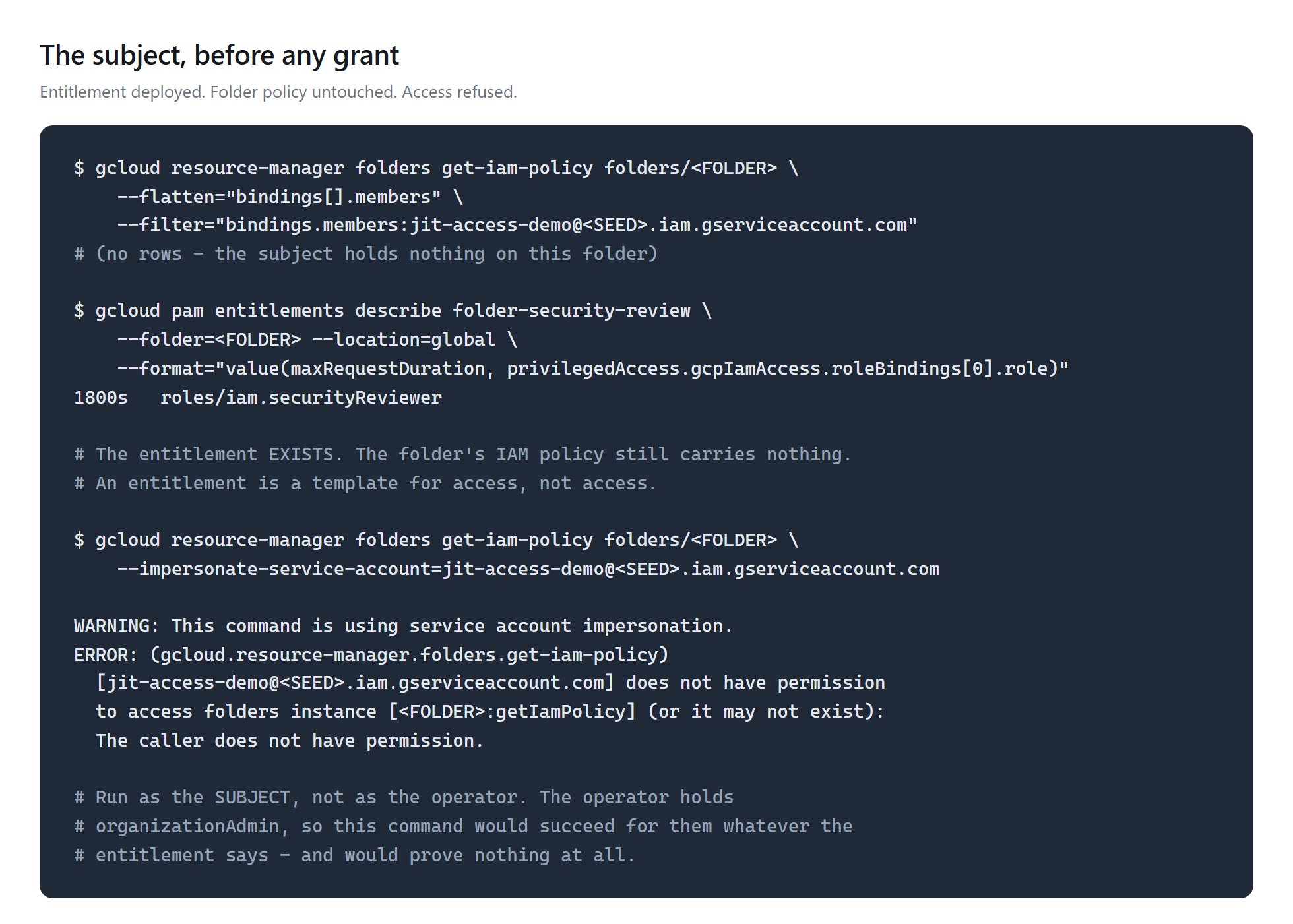
An entitlement is a template, not a grant. It describes access that may be requested: who is eligible, which roles, for how long, and who must approve. Creating one changes nobody's permissions. The folder's IAM policy is untouched until somebody requests a grant against it and an approver says yes — at which point a binding appears that nothing in the Terraform created.
The approval is only a control if two principals are involved. If the same identity requests and approves, the step is a form filled in twice. That shapes the whole design here: the requester is a service account holding nothing, and the approver is a human. Multi-party approval — a quorum rather than one person's judgement — is in Preview and requires Security Command Center Premium or Enterprise, so this lab uses the strongest version the free tier allows and says so rather than implying more.
Thirty minutes is the floor. max_request_duration
accepts 1800s to 604800s. There is no way to hand someone five minutes of
elevated access. Worth knowing before designing a workflow that assumes
short-lived elevation — and it sets the minimum cost of testing expiry at
half an hour per trial.
Architecture and Workflow
The flow
- Amend Week 02 so the pipeline may create entitlements — it cannot grant itself that.
- Enable the API, and onboard the folder, which is a separate step.
- Create a subject that holds nothing, and the entitlement.
- Confirm the subject is refused.
- Request a grant as the subject; a human approves it.
- Confirm access appeared, then measure its removal across three expiries.
The decision worth naming
The entitlement attaches to a folder, not the organization.
Creating one requires setIamPolicy on the parent. At the
organization that permission lives only in
roles/resourcemanager.organizationAdmin, which the pipeline
deliberately does not hold, because an identity that can grant itself anything
is the thing this lab's second week exists to prevent. At a folder it lives in
folderAdmin, which the pipeline does hold. Narrower is the better
answer anyway; here it is also the only answer the pipeline can execute.
Prerequisites
- Week 01's folder hierarchy and Week 02's federated pipeline.
- A Week 02 amendment granting
tf-applyroles/privilegedaccessmanager.admin. This is a separate, hand-run apply: the identity that runs every other week cannot grant itself the role this week needs. - An operator with PAM permissions on the folder, to approve
grants. Holding
organizationAdminis not enough — it does not include PAM permissions at all. privilegedaccessmanager.googleapis.com, which this week enables — and which is not the same as enabling PAM for the resource. See Troubleshooting.- Terraform 1.9+ with
hashicorp/google~> 6.0.
Implementation
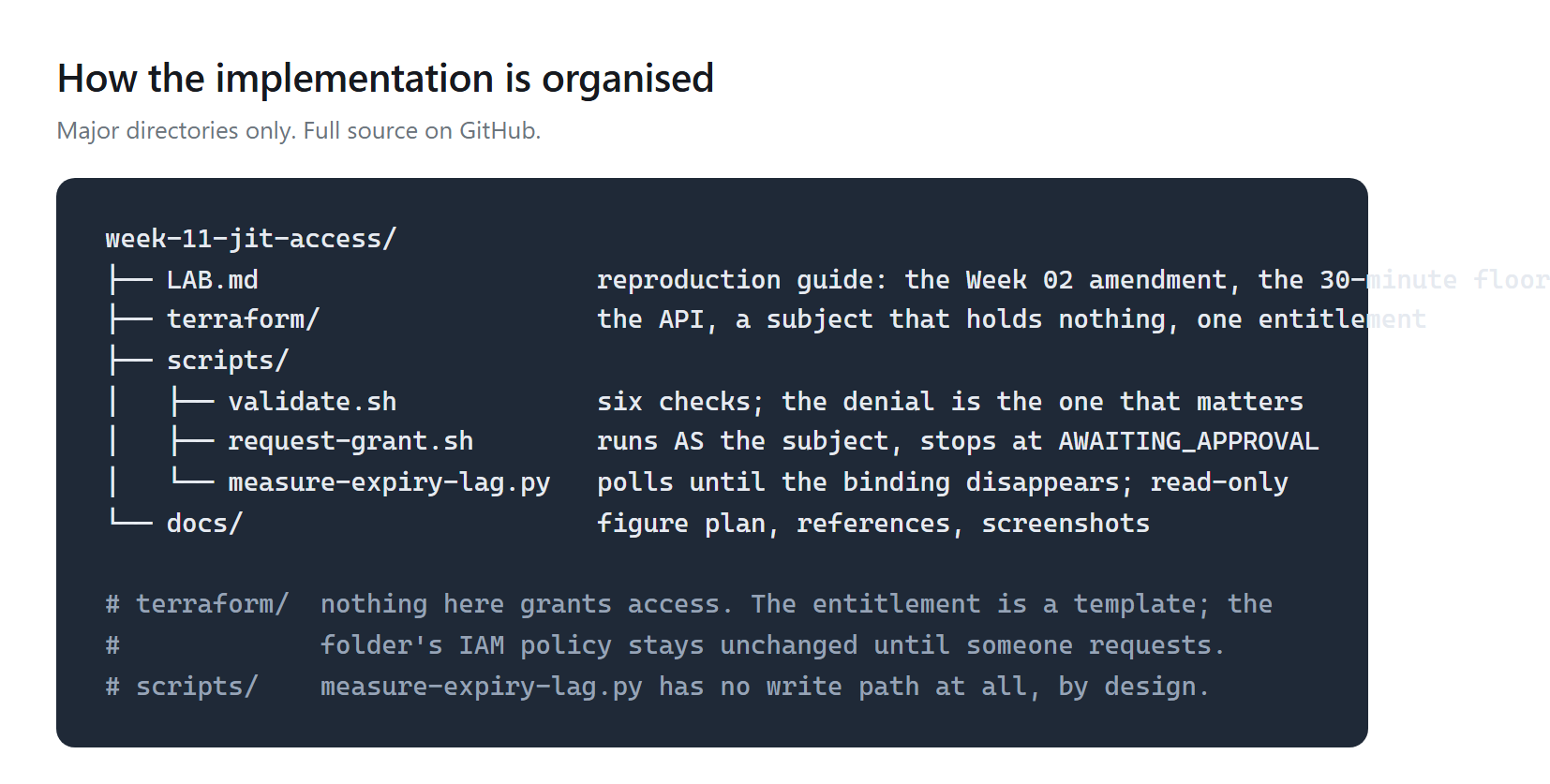
Five resources, all free. Commands are in the lab guide.
Step 1 — Onboard the folder, which the API enablement does not do
Why: because the apply fails otherwise, with
PAM has not been enabled for this resource — after the API is
already on. Ask the API what is missing rather than guessing:
gcloud pam check-onboarding-status --folder=<FOLDER> --location=global

serviceAccount: service-org-<ORG>@gcp-sa-pam.iam.gserviceaccount.com
missingPermissions:
  resourcemanager.folders.get
  resourcemanager.folders.getIamPolicy
  resourcemanager.folders.setIamPolicy
Two things in that list are worth reading twice. The service
agent is organization-scoped even though the entitlement is attached to
a folder. And the permission it needs is setIamPolicy — PAM
adds and removes grant bindings by rewriting the folder's IAM policy, so turning
PAM on hands a Google service agent the ability to change who can do what there.
That is the actual trade, and clicking Enable in the console
never says so.
Step 2 — A subject that holds nothing
Why: a revocation test run as a principal that can reach the
permission another way proves nothing. The obvious human here holds
organizationAdmin, so no entitlement could make them more able to
read a policy and no expiry could make them less.
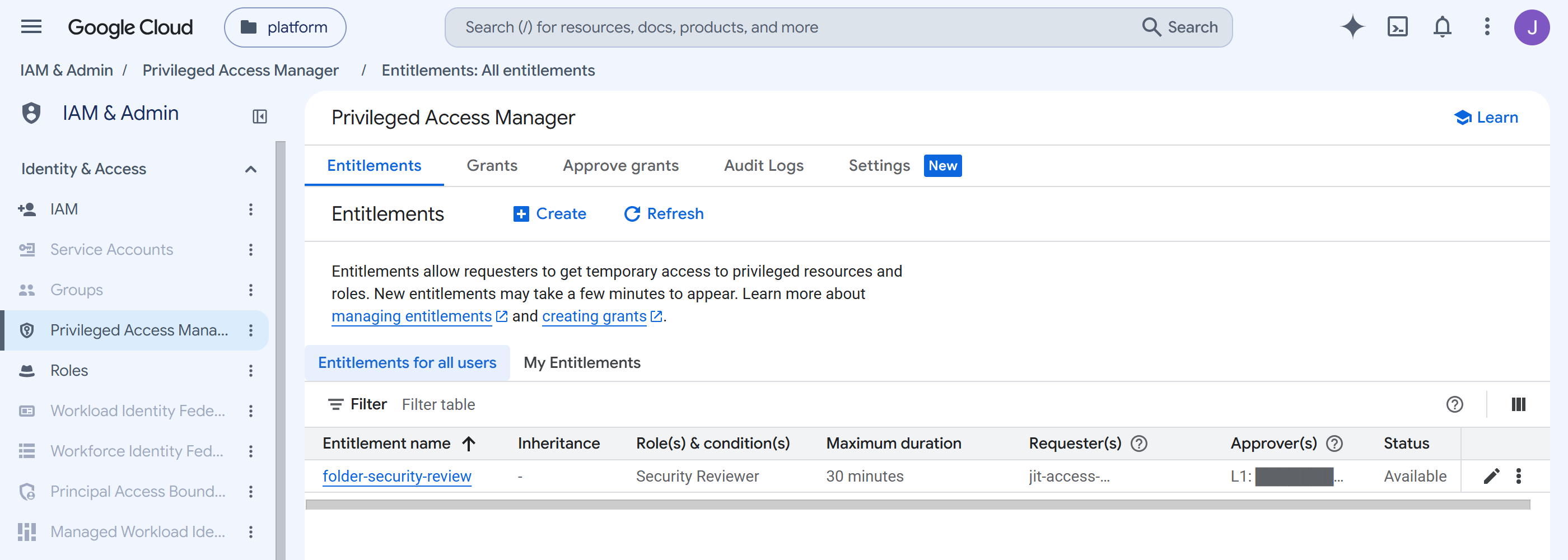
Step 3 — The entitlement
Why: eligible_users is who may ask, not
who has access; the approval workflow names a different principal entirely.
eligible_users {
  principals = ["serviceAccount:${google_service_account.jit_subject.email}"]
}

approval_workflow {
  manual_approvals {
    require_approver_justification = true
    steps {
      approvals_needed = 1
      approvers { principals = ["user:${var.operator_principal}"] }
    }
  }
}
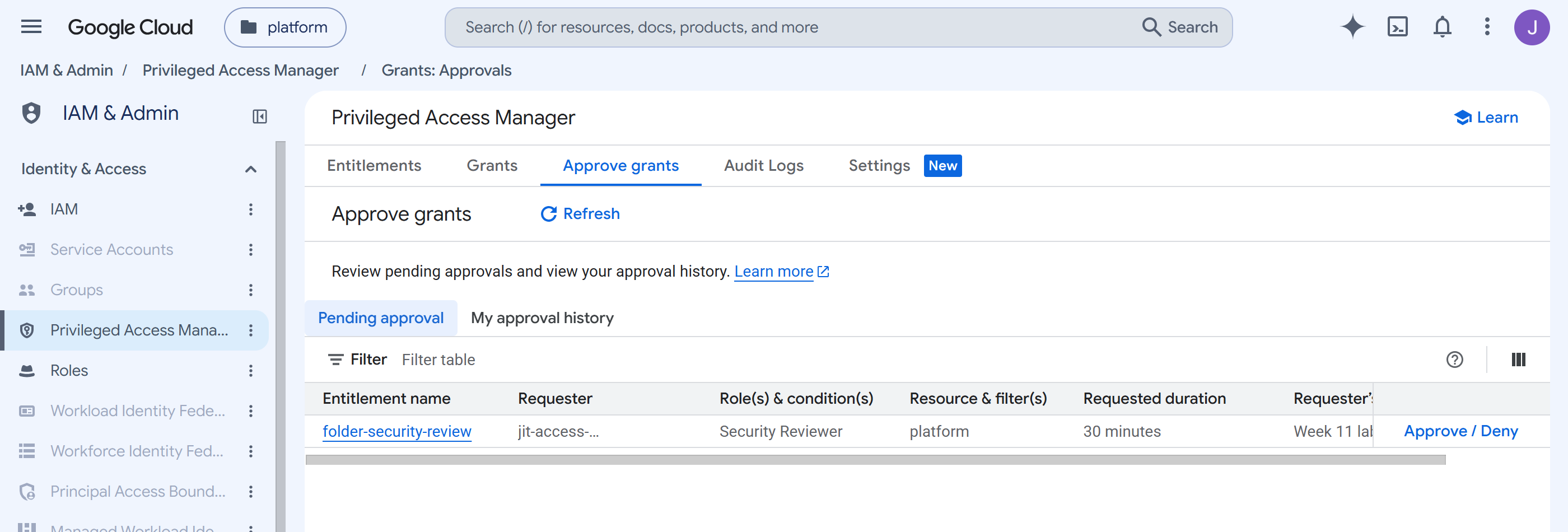
Step 4 — Request, and wait for a human
Action: request a grant as the subject, by impersonation. Expected: the request stops and waits.
Step 5 — Access appears
Expected: a binding in the folder policy that no configuration declares.
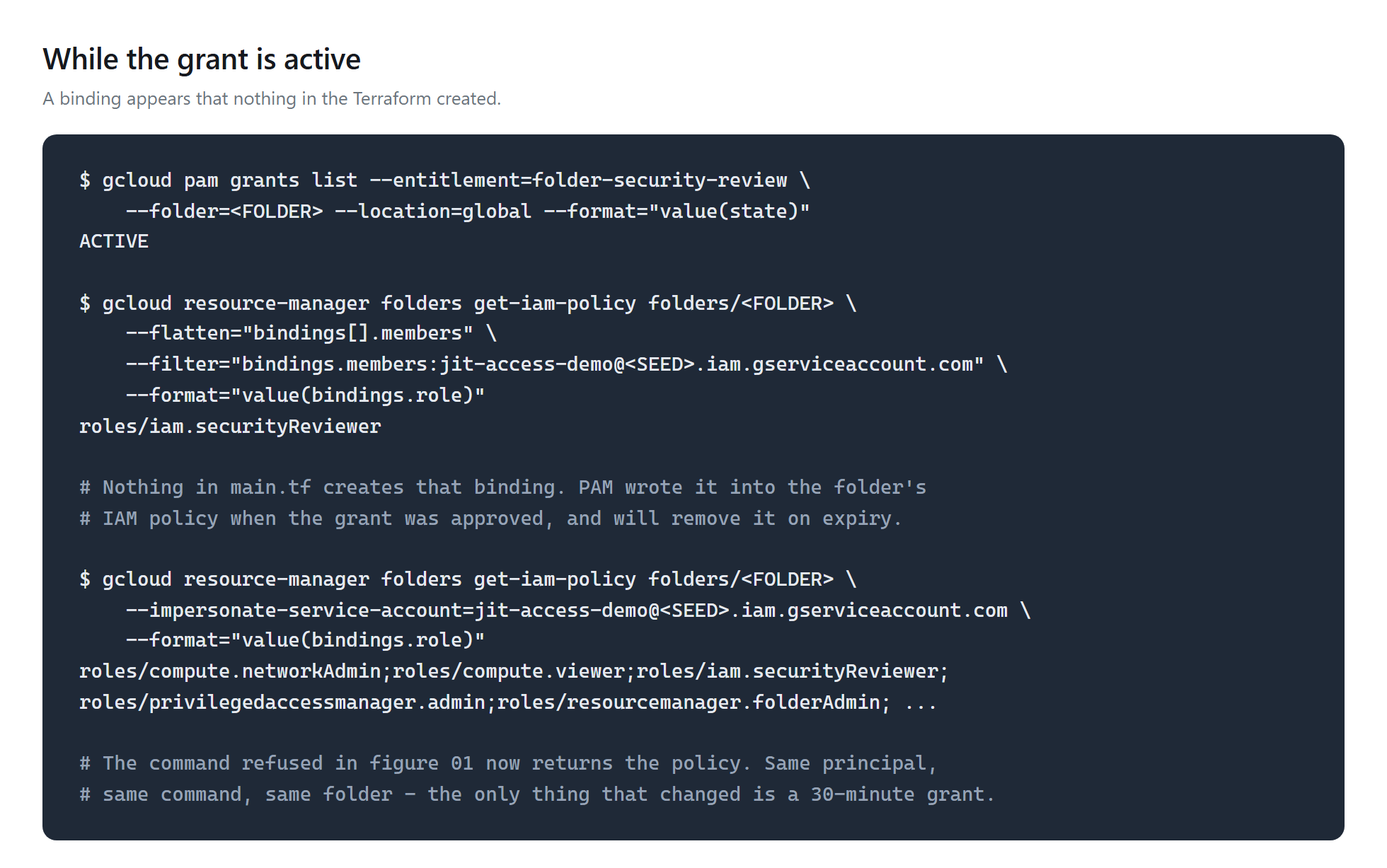
main.tf creates
that binding — PAM wrote it.Step 6 — Access ends, and nobody ends it
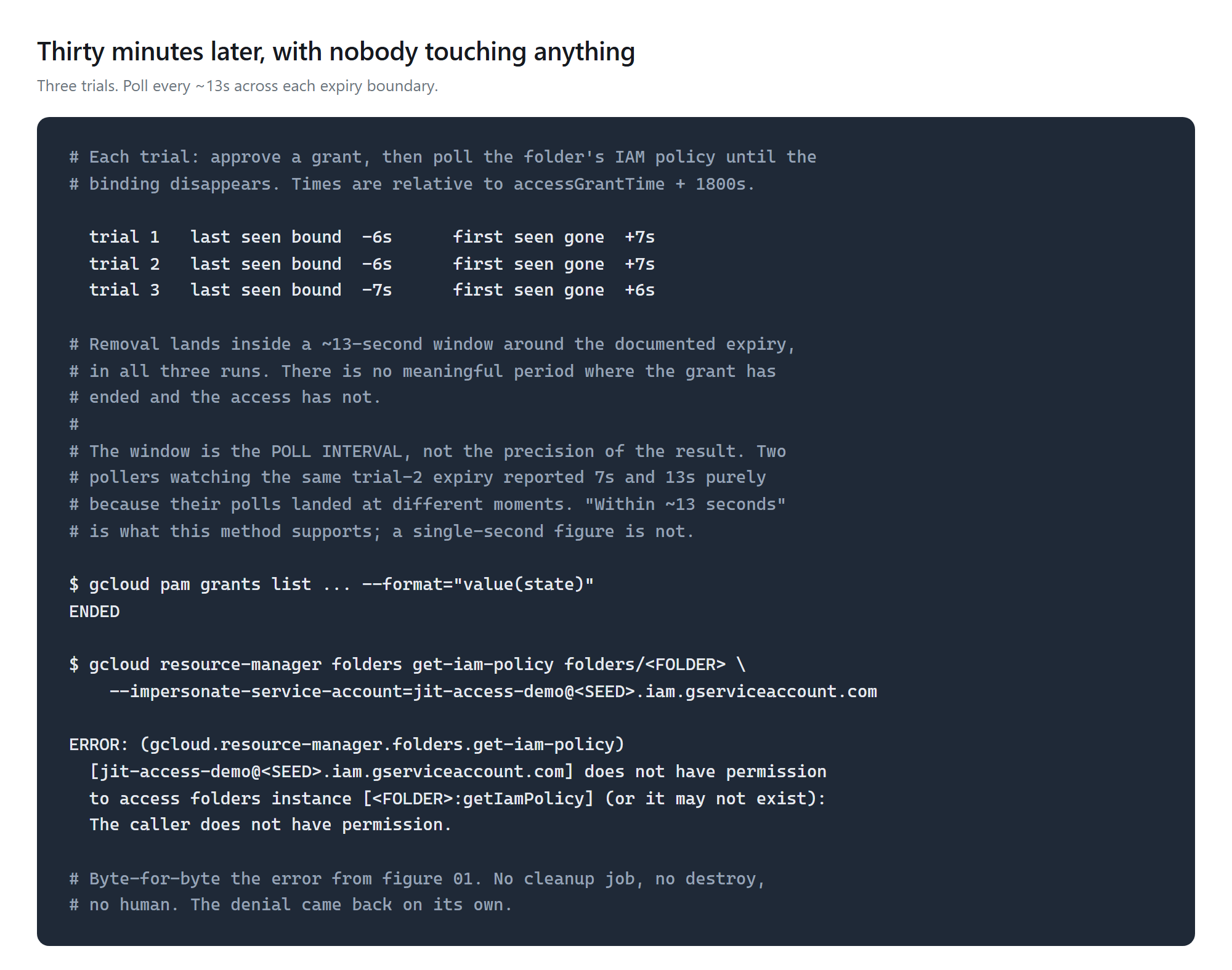
Action: poll the folder's IAM policy across the expiry boundary. Expected: the binding disappears on its own, and the denial returns.
Validation and Evidence
| Test | Expected | Actual | Status |
|---|---|---|---|
| Infrastructure deployed | 5 resources | 5 added, on the third attempt | Pass |
| Entitlement is a template, not a binding | exists; folder policy unchanged | confirmed | Pass |
| Requester and approver differ | different principals | confirmed, asserted by the validator | Pass |
| Subject holds nothing directly | no bindings anywhere | none | Pass |
| Access before the grant | refused | does not have permission | Pass |
| Approval is required | request waits | APPROVAL_AWAITED until a human acted | Pass |
| Access during the grant | permitted | policy returned | Pass |
| Who wrote the binding | PAM, not Terraform | confirmed — absent from state and config | Pass |
| Access after expiry | refused again | identical error to the first test | Pass |
| Removal lag | measured over 3 trials | binding gone within ~13s of expiry in all three | Pass |
The last row is the week. Trials ran at 23:01, 01:24 and 02:34 UTC. In each, the binding was still present about six seconds before the documented expiry and gone about six seconds after. There is no meaningful window in which the grant has ended and the access has not.
What that number is not. Two pollers watching the same expiry reported 7s and 13s, differing only in where their polls landed. The defensible claim is within roughly 13 seconds — bounded by the poll interval, not by the precision of the result.
And a limit worth stating plainly: this demonstrates the mechanism, not evidence that anything here needed it. Finding standing grants that should be entitlements is the IAM recommender's job, and recommendations for non-basic roles sit behind Security Command Center Premium — so on the free tier it would have reported nothing at all.
Security and Cost
Security decisions
| Control | Decision and trade-off |
|---|---|
| Requester holds nothing | The subject is a service account with no bindings, so the entitlement is its only route. A test run by a principal that can reach the permission another way proves nothing. |
| Requester ≠ approver | Enforced in the configuration and asserted by the validator. One identity doing both makes the approval a form filled in twice. |
| Justification required | unstructured{} rather than not_mandatory. The reason is the only part of the audit trail that records why. |
| Folder scope, not organization | Narrower, and the only scope the pipeline can write — organization-level setIamPolicy lives in a role it deliberately lacks. |
| The pipeline cannot grant itself this | privilegedaccessmanager.admin was added in the human-run layer, as a separate apply. |
| Accepted trade | Onboarding gives a Google service agent setIamPolicy on the folder. PAM cannot add and remove bindings without it, and the console's Enable button never mentions it. |
| Accepted gaps | Single-approver workflow — a quorum needs SCC Premium. And the operator holds privilegedaccessmanager.admin on the folder, granted out of band so grants could be approved at all; recorded for cleanup. |
Cost
$0. Privileged Access Manager has no charge of its own, and this week creates an API enablement, a service account, two IAM bindings and one entitlement — none of which bills. Nothing runs continuously.
Troubleshooting and Lessons
Enabling the API is not enabling PAM
Problem: the apply got past the API and failed with
Error 400: PAM has not been enabled for this resource.
Root cause: onboarding a resource is a separate step from
enabling the service. The org-scoped PAM service agent needs three permissions
on the folder, which roles/privilegedaccessmanager.folderServiceAgent
contains exactly.
Lesson: check-onboarding-status names precisely
what is missing. Run it before writing the configuration, not after the apply
fails. Note that it needs a PAM permission of its own, so an operator holding
only organizationAdmin cannot run it.
An HTTP 404 with an HTML body
Problem: entitlement creation returned a Google error page rather than an API error.
Root cause: the folders/ prefix was applied
twice, producing a request to
/v1/folders/folders/NNN/locations/global/entitlements.
Lesson: a malformed path gets a generic HTML 404 — no field named, no hint the path is wrong. Read the URL in the error rather than the message. The variable's own description was wrong too, which is how the mistake survived review.
A clean plan that never authenticated
Problem: terraform plan succeeded, then the
apply died at token exchange: "The issuer in ID Token
https://app.terraform.io does not match the expected one in config:
https://token.actions.githubusercontent.com".
Root cause: two things at once. The workspace pointed at the GitHub Actions provider, because this project has two workload identity pools and a lookup took the first match. And the plan had passed because it ran against empty state — nothing to refresh, so it never called Google at all.
Lesson: a plan over empty state does not even exercise authentication. And one item is not evidence of uniqueness — select by the property you mean, here the issuer URI, not by position.
A measurement script that destroyed its own window
Problem: the first measurement run crashed on
json.decoder.JSONDecodeError: Extra data, and by the time it was
noticed, 25 of a 30-minute window were gone.
Root cause: a helper concatenated stdout and
stderr. gcloud writes progress lines such as
Parsed [entitlement] resource: ... to stderr, so every
--format=json reply came back with prose stapled on.
Lesson: keep them separate. And a second bug in the same
function was worth more than the crash: the grant's expiry is not
timeline.requested.expireTime, which is when the request
lapses if nobody approves — 24 hours out. It is
accessGrantTime + requestedDuration. A reference point most of a day
wrong would have produced a confident, meaningless number.
Cleanup and Key Takeaways
Cleanup
terraform destroy removes the entitlement, the subject, the
impersonation binding and the service-agent grant. The API enablement stays
(disable_on_destroy = false) and costs nothing.
Then, out of band, remove the operator's folder-level
roles/privilegedaccessmanager.admin if grants no longer need
approving — it was granted by hand and Terraform will not remove it.
Ongoing charges: none.
Key takeaways
- An entitlement is not a grant. Creating one changes nobody's access. The folder's policy stays untouched until a request is approved, and the binding that appears is written by PAM rather than by your configuration.
- Access really does end on its own, and quickly — the binding was gone within roughly 13 seconds of expiry in all three trials. The feared window where the grant has ended and the access has not did not materialise.
- Enabling an API is not enabling a feature for a resource.
PAM needed its service agent granted
setIamPolicyon the folder, and that trade — a Google service agent that can rewrite who has access — is invisible if you enable it by clicking a button. - Thirty minutes is the shortest grant PAM will issue. It is a ceiling requesters can come in under, but there is no five-minute elevation.
- An approval between two of the same principal is not a control. Design the test so the requester cannot approve, or the figure proves nothing.
What production would do differently
Require multi-party approval so elevation is never one person's judgement. Write one entitlement per task rather than per role — "read IAM policies during an incident" rather than a role name — so the justification and the scope match the reason someone is asking. Alert on every request and approval, because a grant nobody notices is a standing role with extra steps. And pair it with detection: entitlements are worth most where they replace standing grants somebody identified, which needs the IAM recommender and therefore Security Command Center Premium.
References
- Lab guide — the onboarding step, the 30-minute floor, six troubleshooting entries
- Privileged Access Manager overview
- Create entitlements
- Approve or deny grants
- Policy Intelligence billing — which recommender features need SCC Premium
- Source repository
Comments