📋 In This Post
- Lab Overview
- Cloud Services and Concepts
- Architecture and Workflow
- Prerequisites
- Implementation
- Validation and Evidence
- Security and Cost
- Troubleshooting and Lessons
- Cleanup and Key Takeaways
Lab Overview
The problem. "All our resources send logs" is a claim every platform team makes and almost none can demonstrate. Diagnostic settings are per-resource, created one at a time, and silently absent on anything nobody remembered. Week 12 built detections that read a log table; this is the week that fills it.
The objective. Turn resource logging on automatically across a subscription using Azure Policy, then prove it — not by reading a compliance percentage, but by asking the workspace whether a log was actually written.
The outcome. Nine resources, seven validation checks, and 14 Key Vault audit rows in the workspace. Two of the four target resources were deliberately left untouched, and that is the result rather than a gap.
Cloud Services and Concepts
| Service | Purpose here | What it is |
|---|---|---|
| Azure Policy initiative | Turns logging on across resource types without writing a rule per type | A bundle of policy definitions assigned as one unit. Azure ships one for this job containing 69 policies for the audit category group. |
deployIfNotExists |
Creates the missing diagnostic setting rather than just reporting it | A policy effect that deploys a resource when the condition isn't met. Needs an identity to deploy as, which is why the assignment carries one. |
| Diagnostic setting | The object that routes a resource's logs to the workspace | A per-resource routing rule: these categories, to that destination. It collects only what happens after it exists. |
| Remediation task | Applies the policy to resources that already existed | A one-off job per policy. Without it, the assignment only affects resources created afterwards. |
| Log Analytics workspace | Where the logs land, and the only thing that can confirm they did | The table store behind Azure Monitor, billed per GB ingested. |
Category groups. audit and allLogs
are two preset bundles of log categories. The choice is usually described as a
volume decision; it is also a coverage decision, because a resource type
can support one and not the other. That distinction is this week's result.
Architecture and Workflow
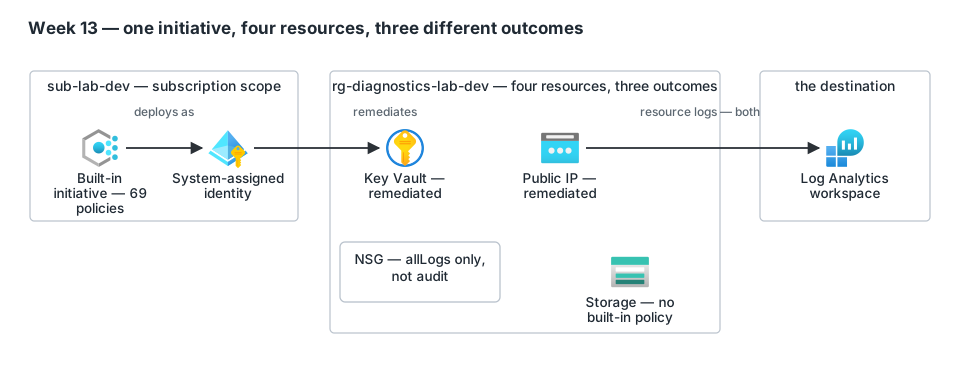
- A built-in initiative is assigned at subscription scope with a system-assigned managed identity.
- The identity is granted Log Analytics Contributor —
the role named in the policies'
roleDefinitionIds. - Policy evaluation finds which resources are missing a diagnostic setting.
- A remediation task per policy applies the setting to resources that already existed.
- Each remediated resource writes its logs to the workspace.
- A deliberate Key Vault operation generates an audit event.
- The workspace is queried for the row — the only step that proves data moved.
Three design decisions.
Assign the initiative, do not write the policies. Azure ships 69
policy definitions for audit and 139 for allLogs.
Hand-writing per-type rules would reinvent them and then rot as Azure adds
types.
Look it up by display name, not GUID. A bare GUID in a
.tf file is indistinguishable from a leaked identifier to the
repository's secret sweep — and the name says what it is.
Cap the workspace in code. The week's whole purpose is turning ingestion on, and ingestion is the largest surprise bill in Azure.
Prerequisites
- An Azure subscription where you hold Owner — the assignment creates a role assignment at subscription scope.
- Providers registered:
Microsoft.OperationalInsights,Microsoft.Insights,Microsoft.PolicyInsights,Microsoft.KeyVault,Microsoft.Storage,Microsoft.Network. - Terraform ≥ 1.10,
hashicorp/azurerm~> 5.2. - No cross-week dependency. The week builds its own workspace so the ingestion it generates is measured in isolation.
Implementation
Step 1 — Price it, and notice what the gate does not cover
Why. Week 11 of this lab shipped a cost note that missed a flat $6/month meter, so every week since runs a gate first. This week the gate passes and still does not protect you.
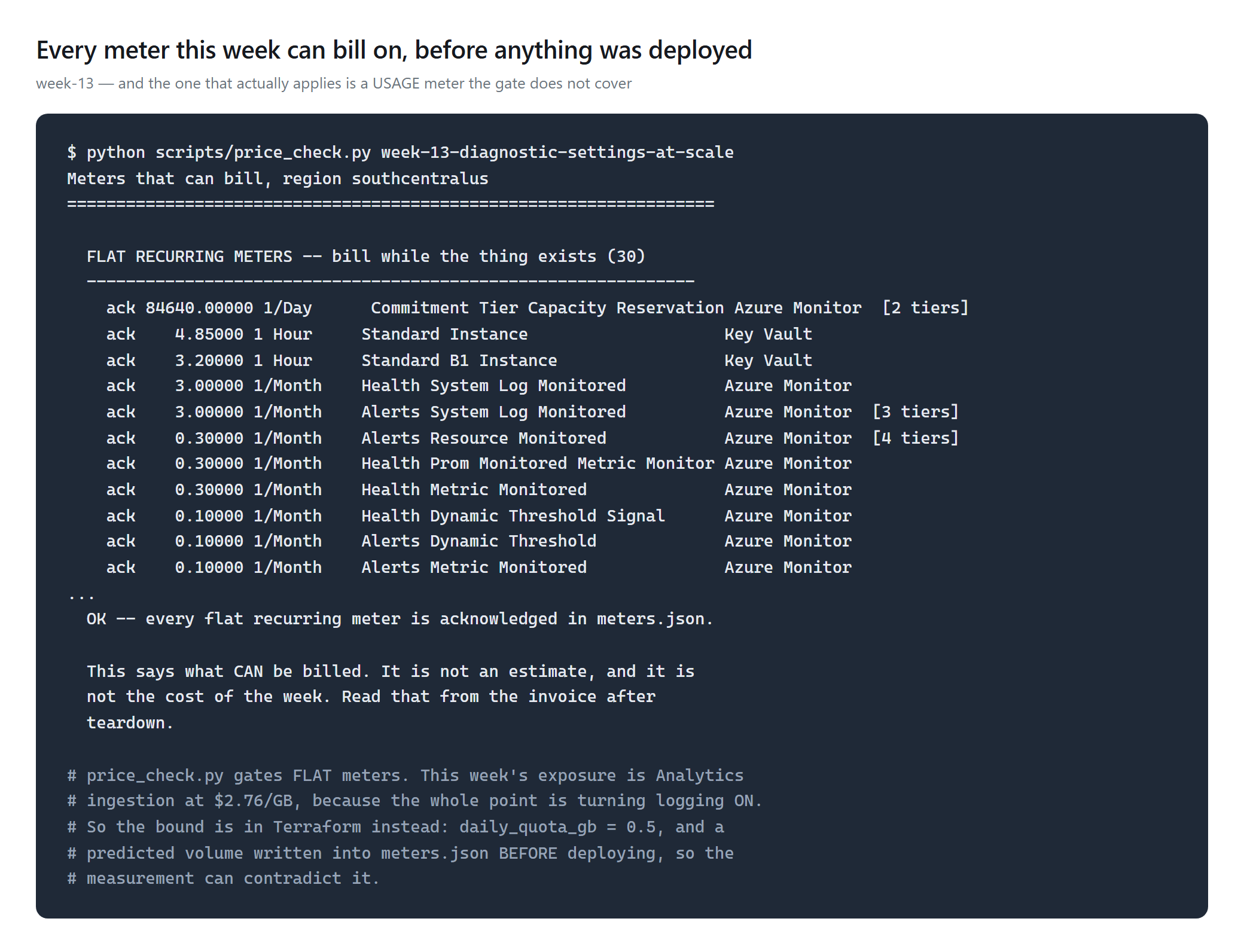
So the bound went into Terraform instead, with a prediction written down first so the measurement could contradict it:
daily_quota_gb = 0.5     # ingestion STOPS at the cap, it does not bill past it
# predicted: under 0.05 GB/day, recorded in meters.json before deploying
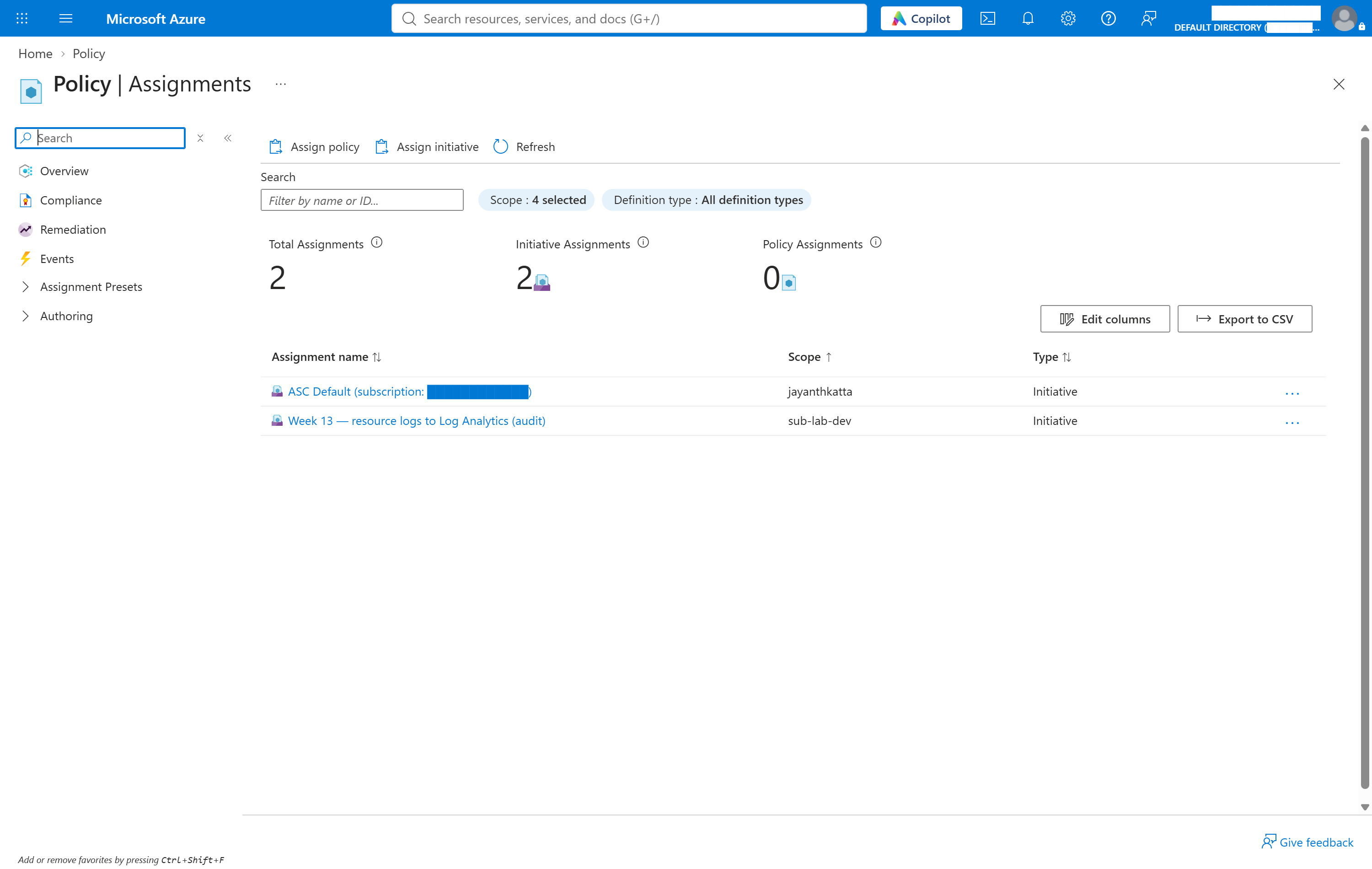
Step 2 — Assign Azure's initiative, not your own
data "azurerm_policy_set_definition" "diag_to_law" {
  display_name = "Enable ${var.category_group} category group resource logging for supported resources to Log Analytics"
}

resource "azurerm_subscription_policy_assignment" "diag" {
  policy_definition_id = data.azurerm_policy_set_definition.diag_to_law.id
  identity { type = "SystemAssigned" }
  parameters = jsonencode({ logAnalytics = { value = azurerm_log_analytics_workspace.diag.id } })
}
Step 3 — Remediate, one task per policy
Why. This is the step that gets skipped. An assignment applies to resources created after it; everything already there needs a remediation task, and for an initiative that means one per policy.
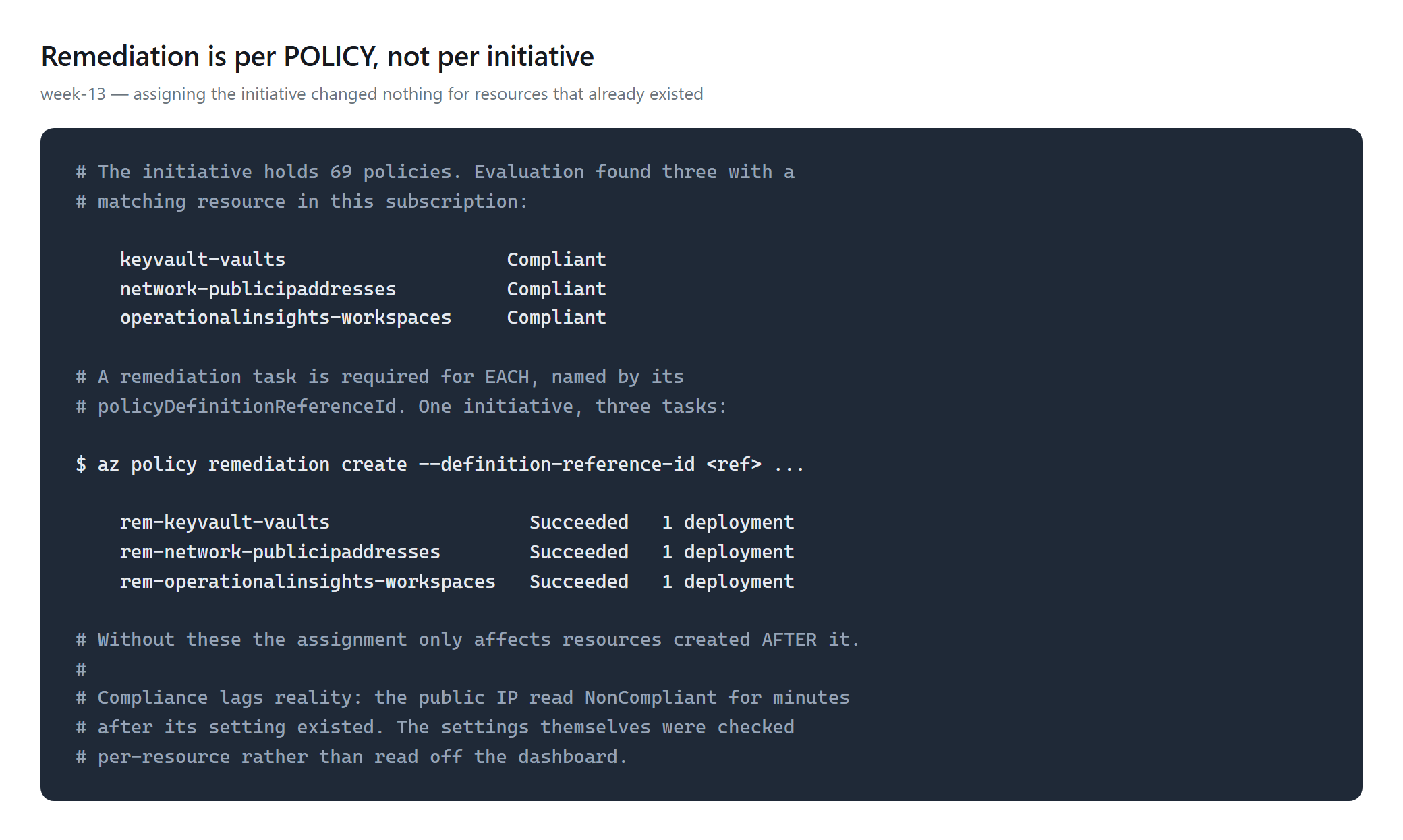
audit initiative holds 69; allLogs holds 139. In an
estate, that is the operational cost of the pattern.Validation and Evidence
| Test | Expected | Actual | Status |
|---|---|---|---|
| Workspace exists | present | law-wk13-dev-scus-001 | PASS |
| Daily ingestion cap set | capped | 0.5 GB/day | PASS |
| Setting on key vault | 1 | 1 | PASS |
| Setting on public IP | 1 | 1 | PASS |
No setting on NSG under audit | 0, by design | 0 | PASS |
| No setting on storage | 0, by design | 0 | PASS |
| Logs actually arrived | > 0 rows | 14 Key Vault audit rows | PASS |
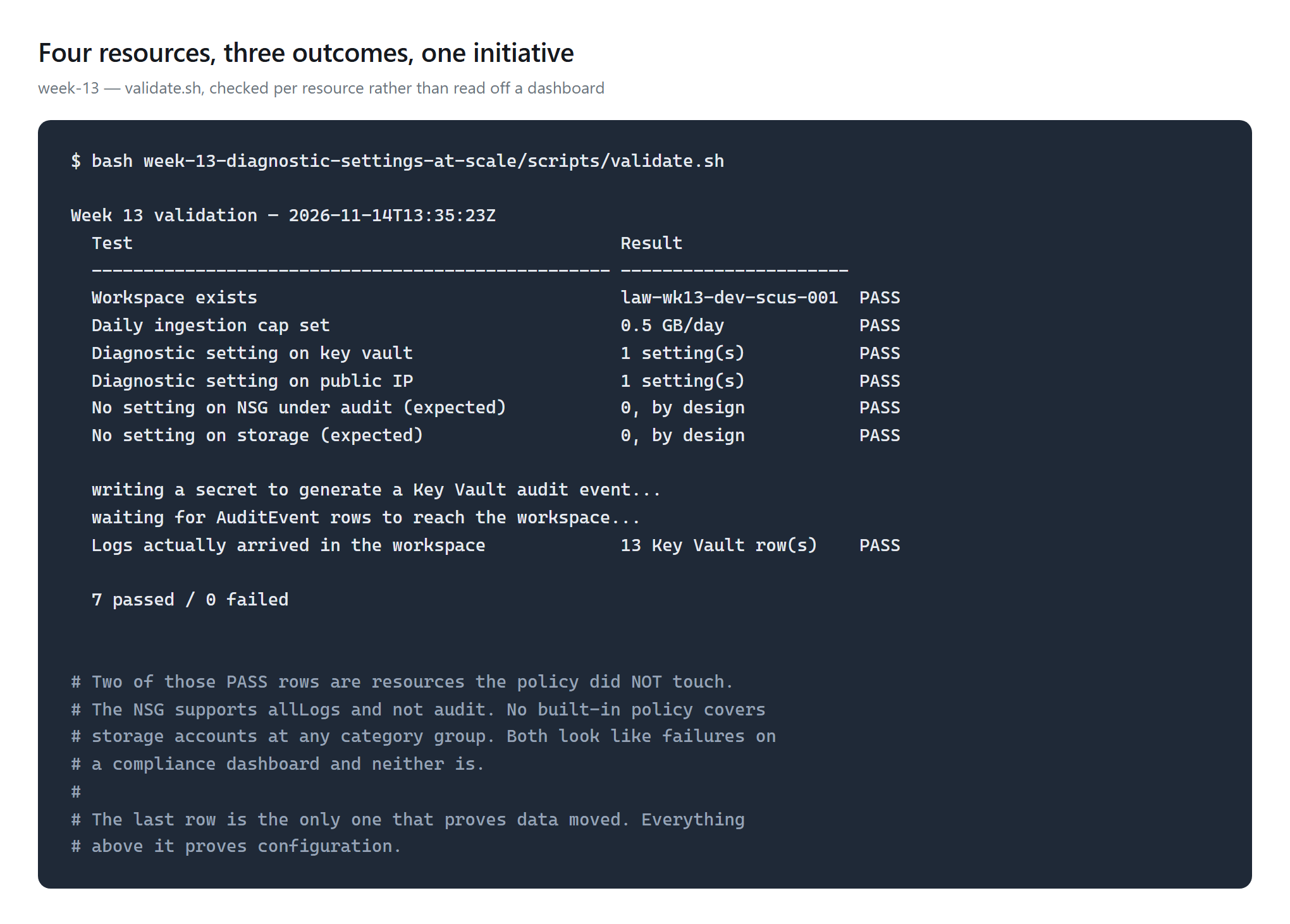
What each result proves. Rows 1–2 prove configuration. Rows 3–6 prove the initiative's coverage boundary — including where it deliberately stops. Only row 7 proves a log was written.
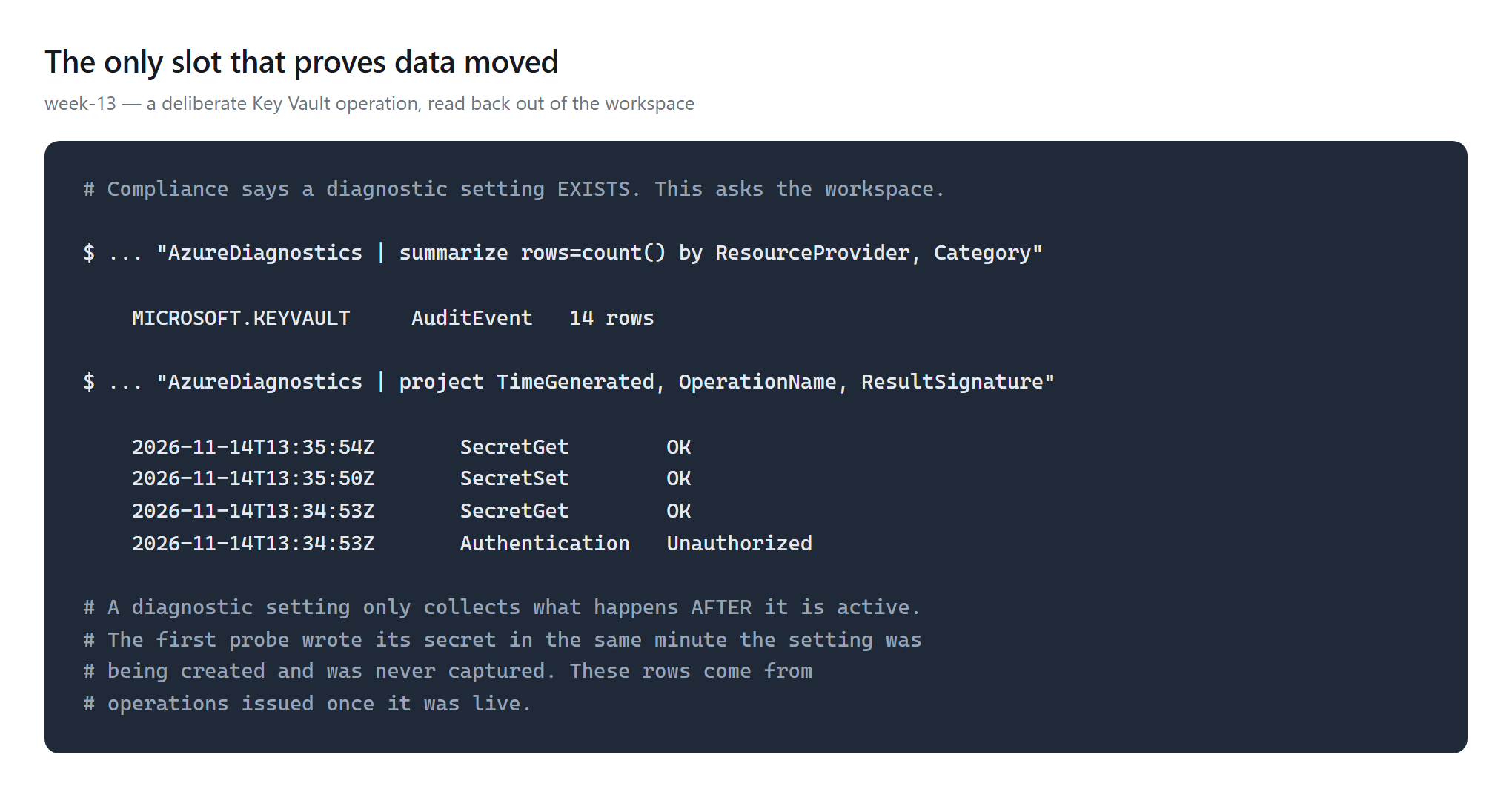
Unauthorized row is a real failed authentication the audit
log caught.Security and Cost
Security. No secrets exist in this week. The remediation
identity is system-assigned — an object that cannot hold a password
— and holds exactly Log Analytics Contributor, the role
the policies name, at the scope they are assigned to. The Key Vault uses RBAC
rather than access policies. The notable privilege is the assignment
scope itself: a subscription-scope deployIfNotExists can
create resources anywhere in the subscription, so the blast radius was
enumerated before applying — one virtual network, one route
table, one network watcher, none of them covered under audit.
Cost. Measured figure pending the invoice; this post will
carry it rather than an estimate. What is established is the complete list of
meters that could apply, written before deployment, and the three bounds:
daily_quota_gb = 0.5, the smaller category group, and an
enumerated blast radius.
One meter was worth chasing. The price API lists $4.85/hour under the Key Vault service — roughly $3,500/month. It belongs to Azure Dedicated HSM, a different product; a standard vault bills per 10,000 operations. Checked rather than assumed, which is the only reason a perfectly good resource was not dropped from the design.
Troubleshooting and Lessons
Problem. The apply failed with
UndefinedPolicyParameter: the parameter 'categoryGroup' is not defined
in the policy definition
.
Root cause. Microsoft's parameter table lists
categoryGroup among the common parameters, but that applies to the
individual policies. Queried live, these initiatives accept only
effect, diagnosticSettingName,
resourceLocationList, logAnalytics and
resourceTypeList.
Resolution. The category group is chosen by which
initiative you assign, so the variable selects the initiative by name.
Lesson. Ask the API what a thing accepts; the doc
table is a summary, not a schema.
Problem. The workspace stayed empty and the pipeline looked
broken.
Root cause. The first probe wrote its secret in the same minute
the diagnostic setting was being created. A diagnostic setting only
collects what happens after it is active, so the event was never
captured — and with nothing else touching the vault, there was nothing to
find.
Resolution. Issue the operation once the setting is live. Rows
appeared in about four minutes.
Lesson. An empty result is not a failure until you have
established that the thing you are looking for ever happened.
Problem. The public IP read NonCompliant while
its diagnostic setting demonstrably existed.
Root cause. Compliance state refreshes on its own schedule.
Lesson. Ask each resource, not the dashboard.
The validation queries settings per resource for the same reason it queries the
workspace for rows.
Problem. az monitor diagnostic-settings list
--resource <id> fails with a usage error on CLI 2.86.0 given a
valid resource ID.
Resolution. The ARM API answers normally; the validation goes
through az rest. The same class of CLI breakage as
az role assignment in week 12.
Cleanup and Key Takeaways
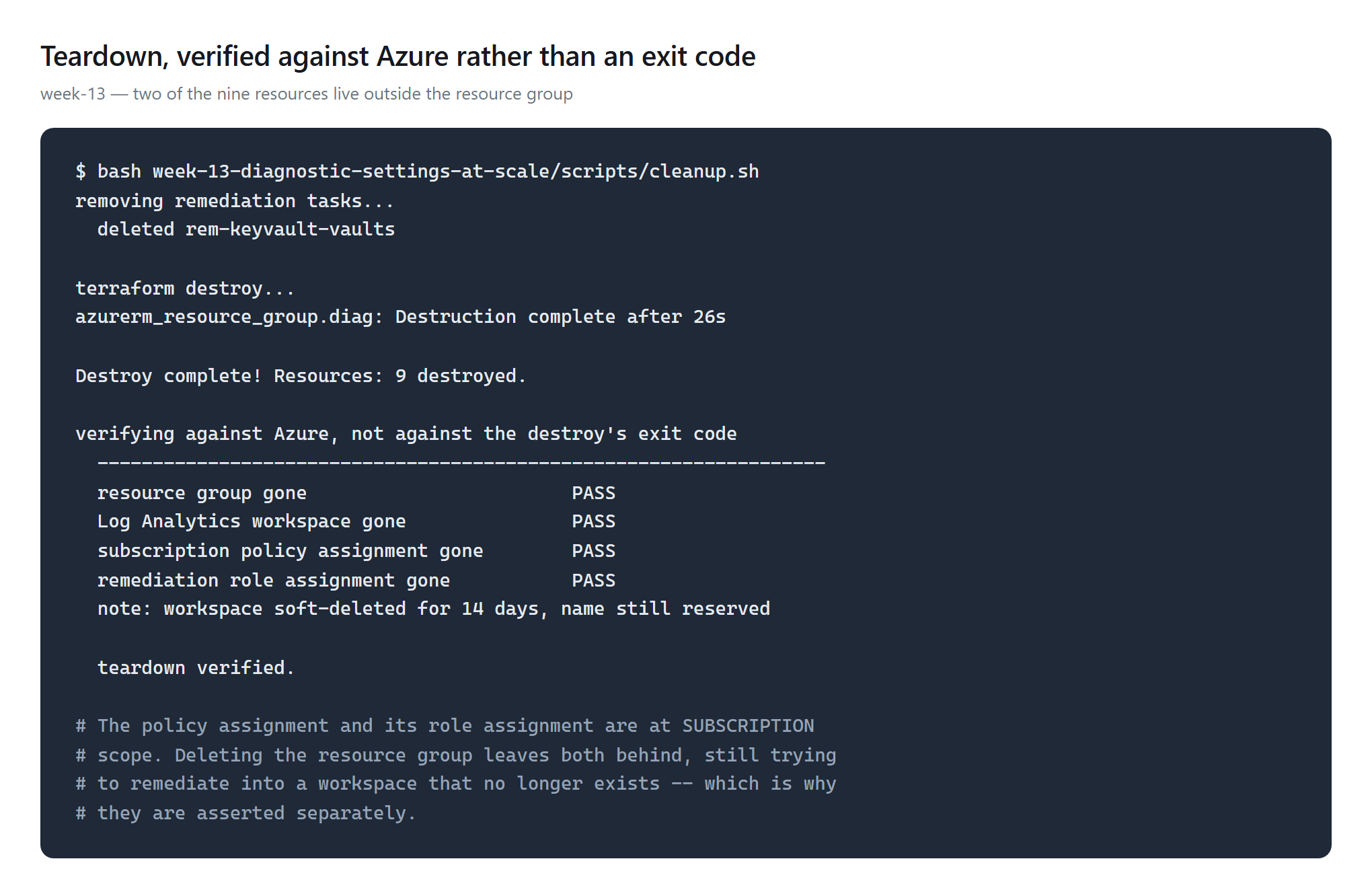
The teardown trap. The policy assignment and its role assignment are at subscription scope. Deleting the resource group removes the workspace and leaves the assignment behind — still trying to remediate into a destination that no longer exists. Both are asserted separately, against Azure rather than against the destroy's exit code.
Takeaways
- Assign Azure's initiative; don't write 69 policies. And look it up by display name, so no GUID lands in your Terraform.
- Remediation is per policy, not per initiative. Assigning it changes nothing for what already exists.
- Expected absence is a result. Two resources were never going to comply — one unsupported by the category group, one by any built-in policy. A suite that cannot say "0, by design" will report correct behaviour as failure.
- Compliance is not evidence. It says a setting exists. Ask the workspace whether a log was written.
- When the gate does not cover the risk, bound it in code. The meter that could bill here is a usage meter, so the cap went into Terraform and the prediction went into the repo before deployment.
Repository:
week-13-diagnostic-settings-at-scale
— Terraform, validation, cleanup, and the committed
meters.json recording every charge this week accepted.
Comments