📋 In This Post
- Lab Overview
- Cloud Services and Concepts
- Architecture and Workflow
- Prerequisites
- Implementation
- Validation and Evidence
- Security and Cost
- Troubleshooting and Lessons
- Cleanup and Key Takeaways
Lab Overview
The problem. Every managed database asks you to invent an administrator password at creation time. From that moment it is something someone has to store, rotate, share with a pipeline, and eventually leak. The usual answers — a key vault, a rotation policy, a secret scanner — all manage the password. None of them remove it.
The objective. Deploy a PostgreSQL flexible server that has no administrator account at all, reachable only from inside a virtual network, and prove both claims: an application logs in with a token it mints for its own identity, and the same server refuses a password. Then force a failover and measure what the application actually loses.
The outcome. Twenty Terraform resources, ten validation checks passing, and two forced failovers measured at 27.57 s and 32.16 s of client downtime. The portal's own Reset password button is greyed out, because there is nothing to reset.
Cloud Services and Concepts
| Service | Purpose here | What it is |
|---|---|---|
| Azure Database for PostgreSQL flexible server | The database, with password authentication switched off | Managed PostgreSQL where you choose the compute tier, the availability model and the networking mode |
| Microsoft Entra authentication | The only way to log in | The server accepts an Entra access token in place of a password. Three modes exist: PostgreSQL only, Entra only, or both |
| User-assigned managed identity | The database's only administrator, and the client's identity | An Azure identity with no credential attached. Azure mints tokens for it on request; there is no secret to store |
| Private endpoint | Gives the server a private IP inside the subnet | A network interface in your subnet that maps to one instance of a platform service, not the whole service |
| Private DNS zone | Resolves the public hostname to the private address | privatelink.postgres.database.azure.com, so the connection string never changes |
| NAT gateway | Outbound internet for a VM with no public IP | The explicit egress method Microsoft recommends. New virtual networks are moving to private subnets by default, so egress is something you build rather than inherit |
Two terms worth separating. Authentication is who you are; the token answers that. Network reachability is whether you can open a socket at all; the private endpoint answers that. This lab closes both doors, and they are independent — a server with Entra-only auth is still exposed to the internet unless public access is disabled.
Architecture and Workflow
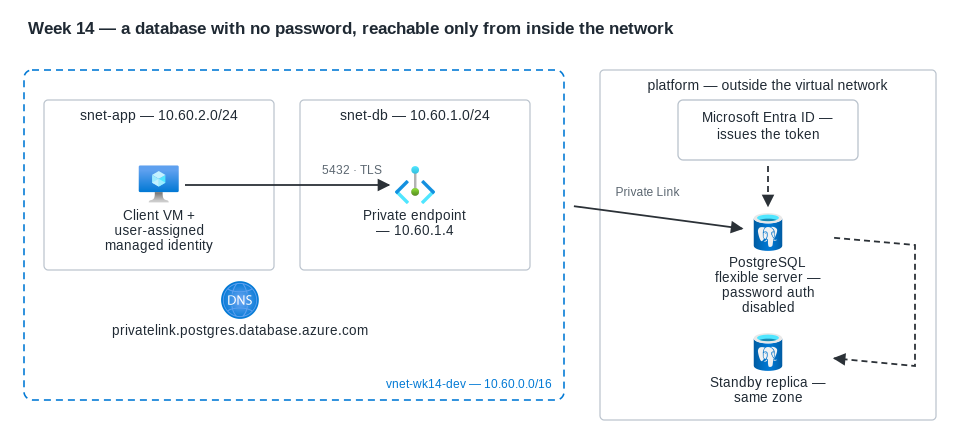
- Terraform creates the server with
administrator_loginandadministrator_passwordomitted, andpassword_auth_enabled = false. - A user-assigned managed identity is set as the server's Entra administrator — the only administrator it has.
- A private endpoint in
snet-dbtakes the address10.60.1.4; public network access on the server is disabled. - The private DNS zone rewrites the server's documented hostname to that address, so the client connects to the FQDN and never learns an IP.
- The client VM asks the instance metadata service for a token for its own
identity and passes it to
psqlas the password. - A forced failover promotes the standby; a writer on the VM logs every attempt, and the gap between the last success and the next one is the downtime.
Three design decisions.
Private endpoint, not virtual network injection. Flexible Server offers two networking modes and they are mutually exclusive at creation. Injection puts the server in a delegated subnet it can never leave — you cannot move it, and it cannot later use Private Link. Microsoft now names Private Link the recommended alternative, and its feature matrix lists high availability and Entra authentication as working as designed.
User-assigned, not system-assigned identity. The identity has to be the database's administrator, which means it must exist and be grantable before the server does. A system-assigned identity does not exist until its resource does, which would invert the dependency.
No SSH, and no public IP on the client. The VM is driven through the
Azure control plane with az vm run-command. A public IP on the
client would weaken the thing being demonstrated, so the only public address in
the week belongs to the NAT gateway and accepts nothing inbound.
Prerequisites
- An Azure subscription where you hold Owner, and a tenant where you can create a managed identity.
- Resource providers registered:
Microsoft.DBforPostgreSQL,Microsoft.Network,Microsoft.Compute,Microsoft.ManagedIdentity. - Terraform
>= 1.10,azurerm ~> 5.2, Azure CLI 2.86 or later. - A region with availability zones if you want zone-redundant HA — and see Troubleshooting, because having zones is not sufficient.
- Budget awareness. This is the first week in this lab since week 11 with real per-hour compute. Nothing here is free.
Implementation
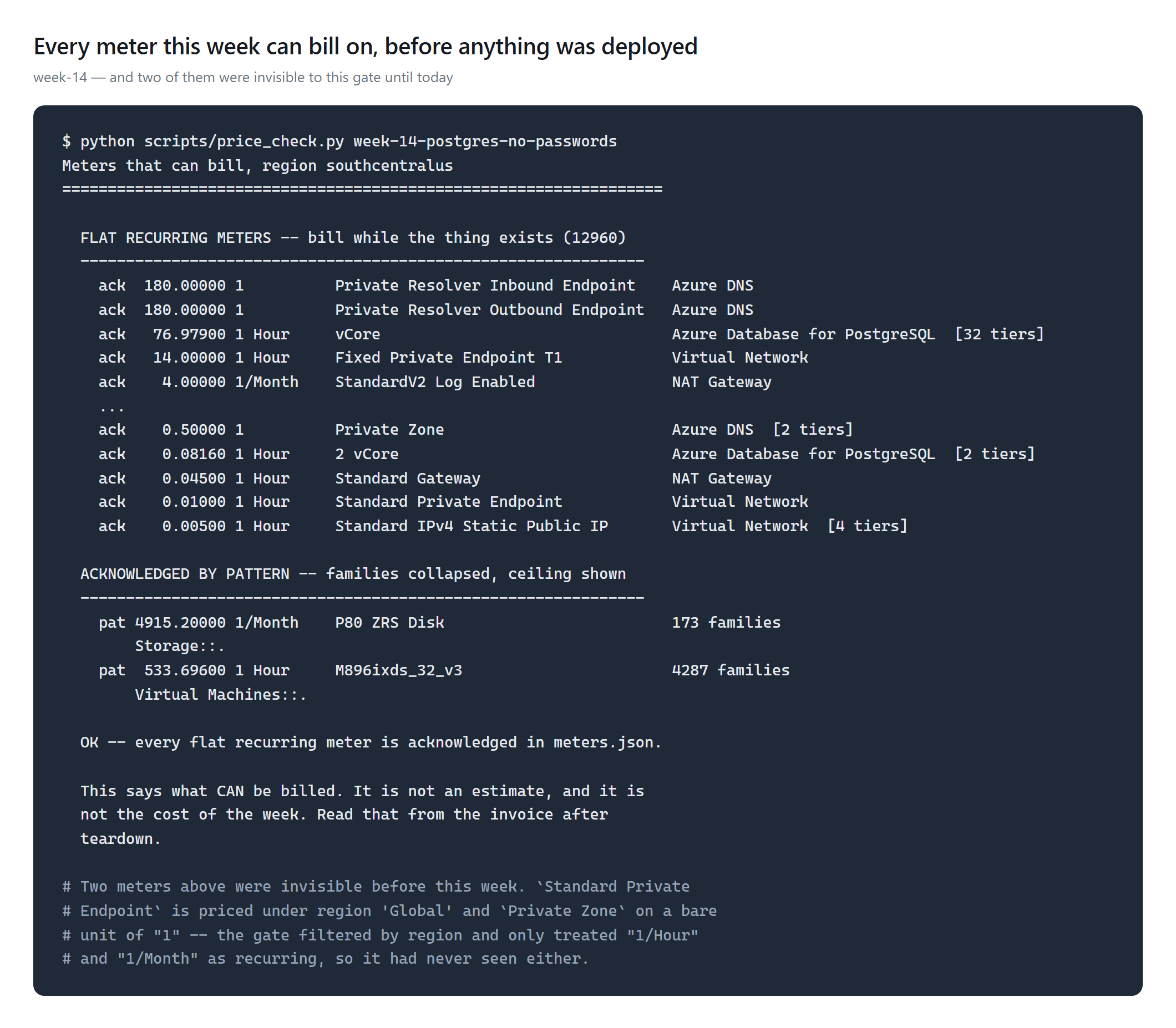
1. Enumerate what can bill, before deploying
Why. High availability doubles compute, and a per-hour meter has no equivalent of a daily cap. The gate lists every flat meter the week's services can charge on and refuses to pass until each is acknowledged in a committed file with a reason.
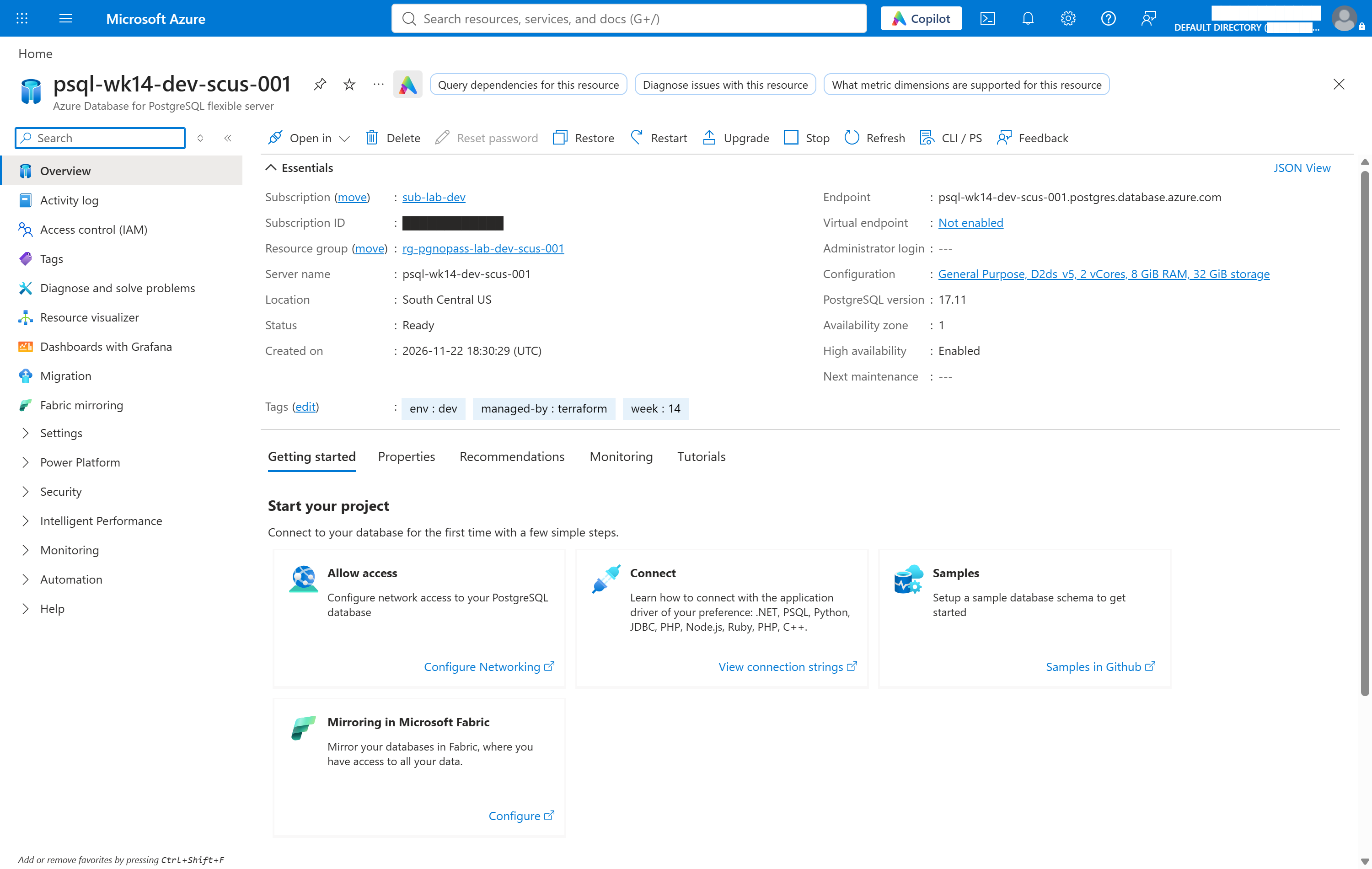
2. Create the server with no administrator
Why. Both fields are optional on the provider. Omitting them is what makes the claim structural rather than a matter of discipline.
resource "azurerm_postgresql_flexible_server" "db" {
  name     = "psql-wk14-dev-scus-001"
  version  = "17"
  sku_name = "GP_Standard_D2ds_v5"

  # No administrator_login. No administrator_password.
  public_network_access_enabled = false

  authentication {
    active_directory_auth_enabled = true
    password_auth_enabled         = false
    tenant_id                     = var.tenant_id
  }

  high_availability {
    mode = var.ha_mode
  }
}
Validation. az postgres flexible-server show --query
authConfig returns passwordAuth: Disabled, and
administratorLogin is empty.
3. Make the identity the administrator, and bring the server inside the network
resource "azurerm_postgresql_flexible_server_active_directory_administrator" "app" {
  server_name    = azurerm_postgresql_flexible_server.db.name
  object_id      = azurerm_user_assigned_identity.app.principal_id
  principal_name = azurerm_user_assigned_identity.app.name
  principal_type = "ServicePrincipal"
}

resource "azurerm_private_endpoint" "db" {
  subnet_id = azurerm_subnet.db.id

  private_service_connection {
    private_connection_resource_id = azurerm_postgresql_flexible_server.db.id
    subresource_names              = ["postgresqlServer"]
    is_manual_connection           = false
  }

  private_dns_zone_group {
    name                 = "pdzg-psql"
    private_dns_zone_ids = [azurerm_private_dns_zone.psql.id]
  }
}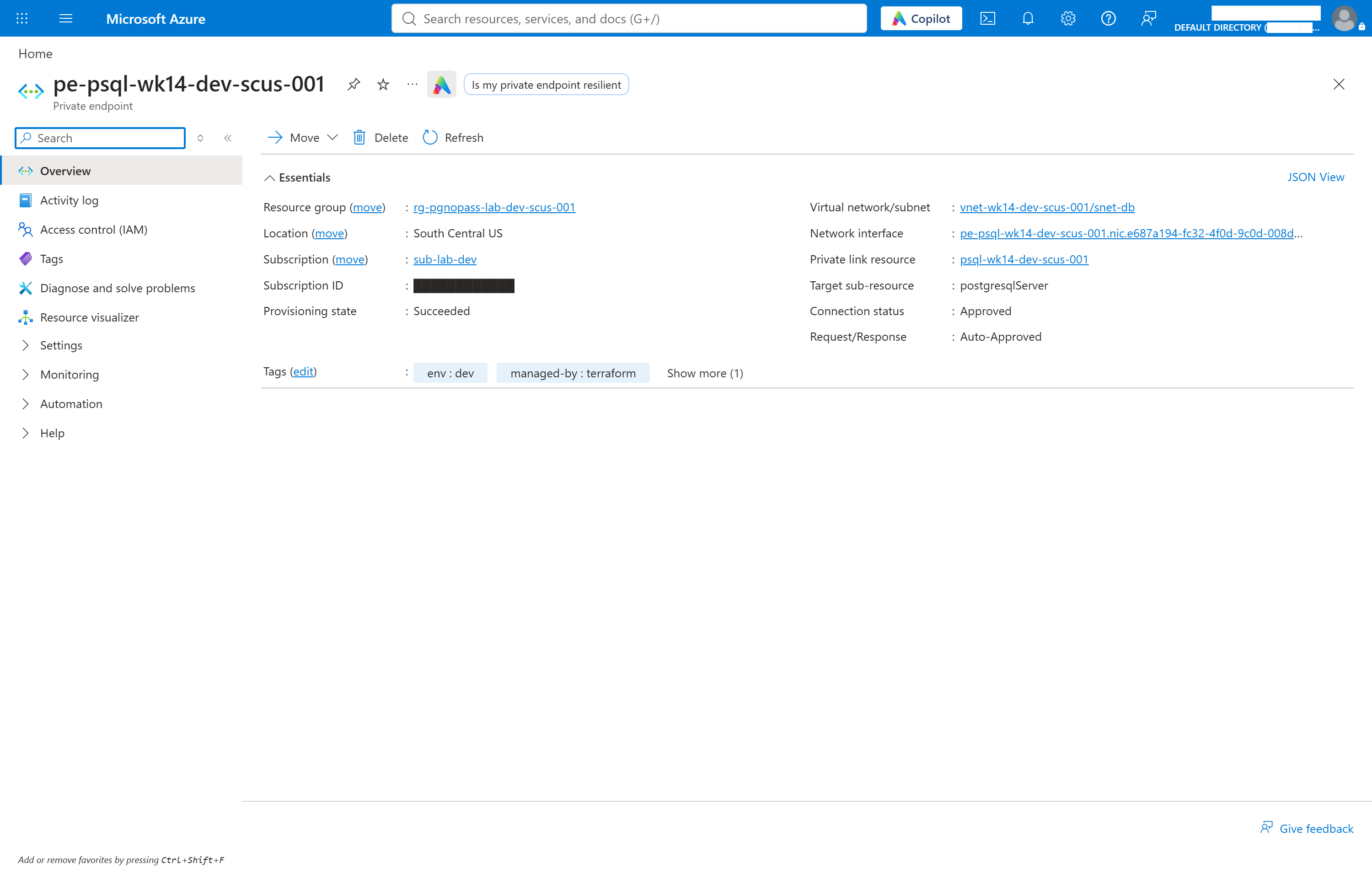
postgresqlServer, auto-approved,
in the database subnet.4. Log in with a token, and watch a password fail
Why. A successful login on its own proves only that something can get in. The control is the same server, same user, a password instead of a token.
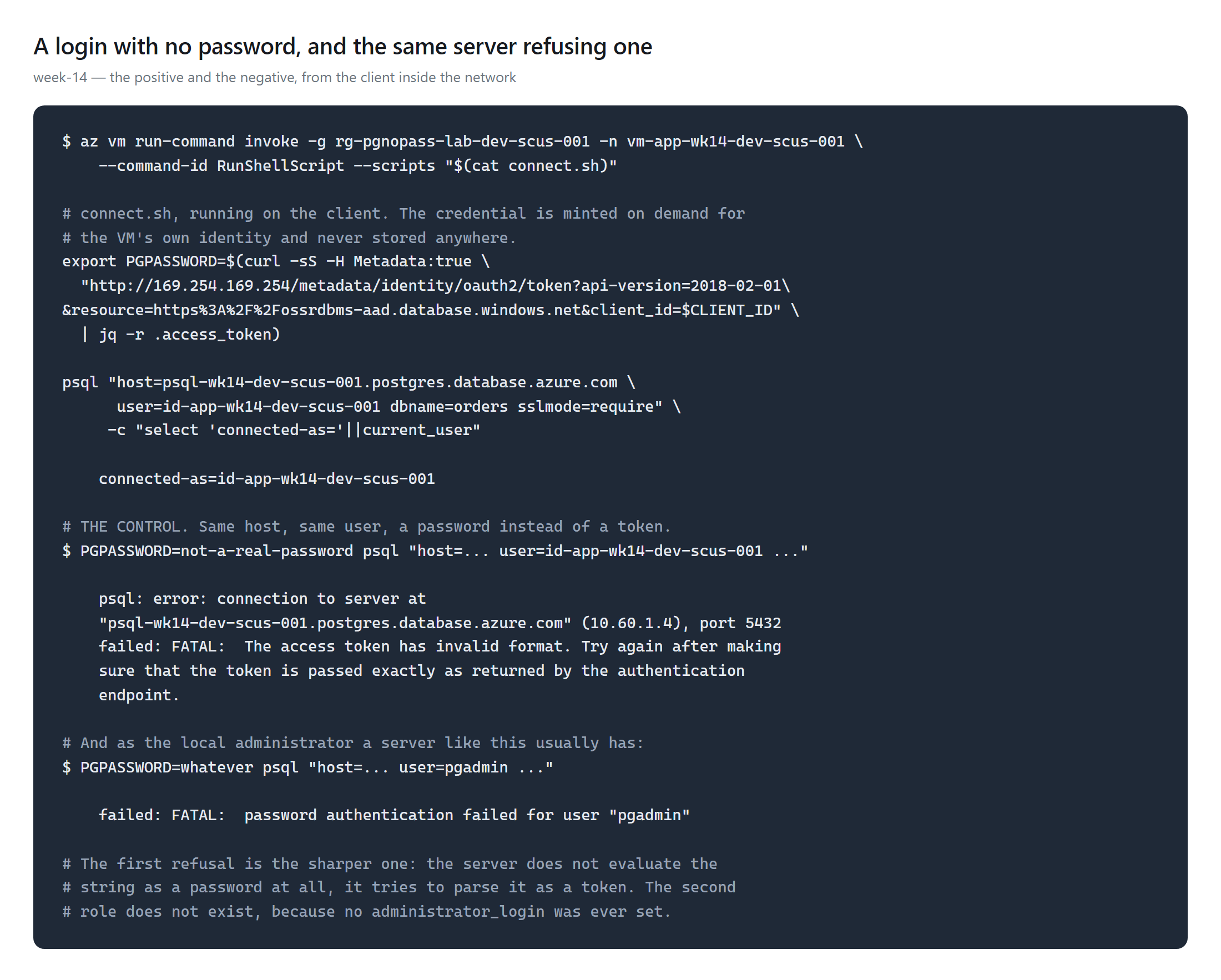
Sending a password as the managed identity returns FATAL: The access
token has invalid format — the server does not evaluate the string
as a password at all, it tries to parse it as a token. Sending one as
pgadmin returns password authentication failed,
because that role was never created.
Validation and Evidence
| Test | Expected | Actual | Status |
|---|---|---|---|
| High availability enabled | a standby exists | SameZone / Healthy | Pass |
| Password authentication disabled | Disabled | Disabled | Pass |
| Entra authentication enabled | Enabled | Enabled | Pass |
| No local administrator | empty | none | Pass |
| Public network access disabled | Disabled | Disabled | Pass |
| Private endpoint approved | Approved | Approved | Pass |
| Hostname resolves privately | a 10.60.1.x address | 10.60.1.4 | Pass |
| Identity connects with a token | a row returns | connected-as=id-app-wk14-dev-scus-001 | Pass |
| Password login refused | rejected | FATAL: The access token has invalid format | Pass |
| Write lands in the database | rows increase | 2 rows | Pass |
What the DNS row proves. The client connects to
psql-wk14-dev-scus-001.postgres.database.azure.com — the
documented public hostname — and inside the network that resolves to a
private address. Nothing in the connection string knows the private endpoint
exists, which is what makes this pattern safe to retrofit.
The failover
A forced failover is the documented way to test one — it stops the primary rather than draining it, which is what an unplanned outage looks like:
az postgres flexible-server restart -g $RG -n $SERVER --failover Forced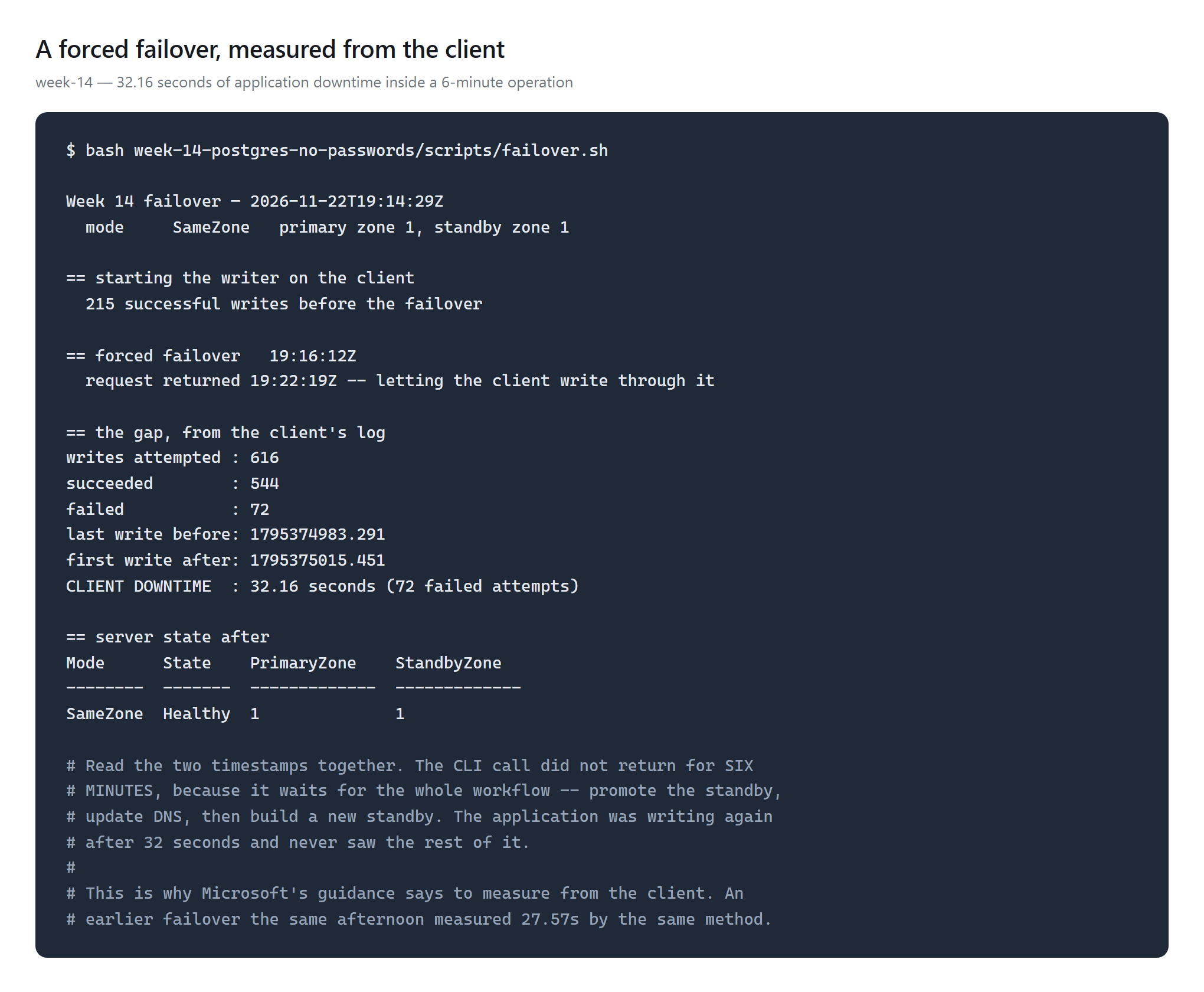
A writer on the VM inserts a row every 250 ms and logs each outcome with its own clock. Read the two timestamps together: the CLI call did not return for six minutes, because it waits for the whole workflow — promote the standby, update DNS, build a new standby. The application was writing again after 32 seconds and never saw the rest.
Microsoft's guidance says exactly this: measure the downtime from the application or client perspective, not from the operation. Quoting the operation here would have overstated the outage elevenfold. Two failovers were performed: 27.57 s and 32.16 s. Both on an idle database — a busy server replays more write-ahead log before the standby can be promoted.
Security and Cost
What is closed. No password exists on the server. No public endpoint exists. No inbound port is open on the client, which has no public IP. The only credential anywhere is a token with a bounded lifetime that the platform mints on request.
What a production deployment adds. Here the managed identity is the administrator, which suited a lab with one client. A real application gets its own principal and a PostgreSQL role granted only what it needs, with the administrator held by a group that humans join through PIM.
Cost. The tier decision is the whole story. Burstable
B1ms is $0.0204/hour and is unusable here for a reason unrelated to
money — and this was tested rather than quoted:
az postgres flexible-server create --tier Burstable --sku-name Standard_B1ms   --high-availability SameZone

ERROR: High availability is not supported for the Burstable tier.
Wanting a standby forces General Purpose, and the standby then doubles it: a twentyfold increase driven by one feature. The test was worth running because the documentation only rules out the zone-redundant case on Burstable and is silent on same-zone, while the capability API cheerfully lists both modes against every Burstable SKU — the same API that said zone-redundant was available in a region which then refused it.
| Component | Rate |
|---|---|
| PostgreSQL, 2 vCores General Purpose, with HA | $0.4104/hour |
| Client VM and its disk | $0.0995/hour |
| NAT gateway and its public IP | $0.0500/hour |
| Private endpoint, private DNS zone, storage | $0.0209/hour |
| Predicted for a three-hour window | $1.74 |
The prediction was written into the repository before deploying, so the invoice can contradict it. The resources existed from 18:21Z to 19:36Z — one hour fifteen against a three-hour budget, which at the rates above is about $0.73. The measured figure is read from the bill a day after teardown and this post is updated then; a rate card is not a cost, and that applies to the estimate in this paragraph too.
There is no cap for a per-hour meter. Week 13 could bound ingestion with a daily quota; compute has no equivalent. Left running for a day this week would cost $13.94. The only control is the clock, so deploy, validate, fail over and destroy happened in one sitting.
Troubleshooting and Lessons
The guardrail denied this week's own server.
- Problem. A deny policy assigned two scopes above the subscription
refused a deliberately small 2-vCore server with
RequestDisallowedByPolicy. - Root cause. The allowlist held
GP_Standard_D2ds_v5, the composite form Terraform and the CLI accept. ARM storessku.name = Standard_D2ds_v5with the tier in a separate field, so the list matched nothing and the policy denied every PostgreSQL server. - Resolution. Rewrite the allowlist in ARM
sku.namevalues. - Lesson. The policy had been tested the day before — with a 64-vCore server, which it refused. That is exactly what a correct policy does. A deny needs a pair: something it refuses and something it must let through.
Zone-redundant HA was refused in a region with three zones.
- Problem. Creation failed with
MultiAzHaIsOfferRestricted. - Root cause.
list-skusreportssupportedHaMode: [SameZone, ZoneRedundant]per SKU, while the same response's region-level capability readszoneRedundantHaSupported: Disabled. The region-level flag wins. - Lesson. When two fields of one API response disagree, the narrower scope is the one that decides. The HA mode was a validated variable for exactly this reason; same-zone costs the same and still carries a real failover.
I cited a retirement date that does not exist, and the publish-day check caught it.
- Problem. The NAT gateway went into the design on the belief that default outbound access was "retired for new deployments on 30 September 2025", and that a VM with no public IP therefore had no egress at all.
- Root cause. Microsoft's page says something narrower: default
outbound access is an implicit platform behaviour to avoid relying on, the
portal already creates private subnets, and for the API
version released after 31 March 2026 subnets in new
virtual networks set
defaultOutboundAccess = false. Existing networks are unchanged. - Resolution. The gateway stays — it is the recommended explicit method and costs $0.045/hour — but the justification is now the real one. Whether the client would have reached the internet without it was never tested, and the resource group is gone, so that stays untested rather than asserted.
- Lesson. Re-verifying every vendor claim on publish day is not a formality. This one had already been written into the Terraform comments, the repository README and the cost file before the check found it.
The cost gate had two blind spots, and this week found both.
- Its filter asked for one region. A private endpoint is priced
under
armRegionName: Global, as is every NAT gateway meter — so the gate had never seen two of the resources being deployed. - It only treated
1/Hourand1/Monthas recurring. A private DNS zone bills $0.50 per zone per month against a bare unit of1; so does a DNS Private Resolver endpoint, at $180 a month. - Lesson. A gate that reports clean is making a claim about its own coverage. Both holes are closed, and an ambiguous unit is now treated as recurring — the direction that costs an explanation rather than a surprise.
Cleanup and Key Takeaways
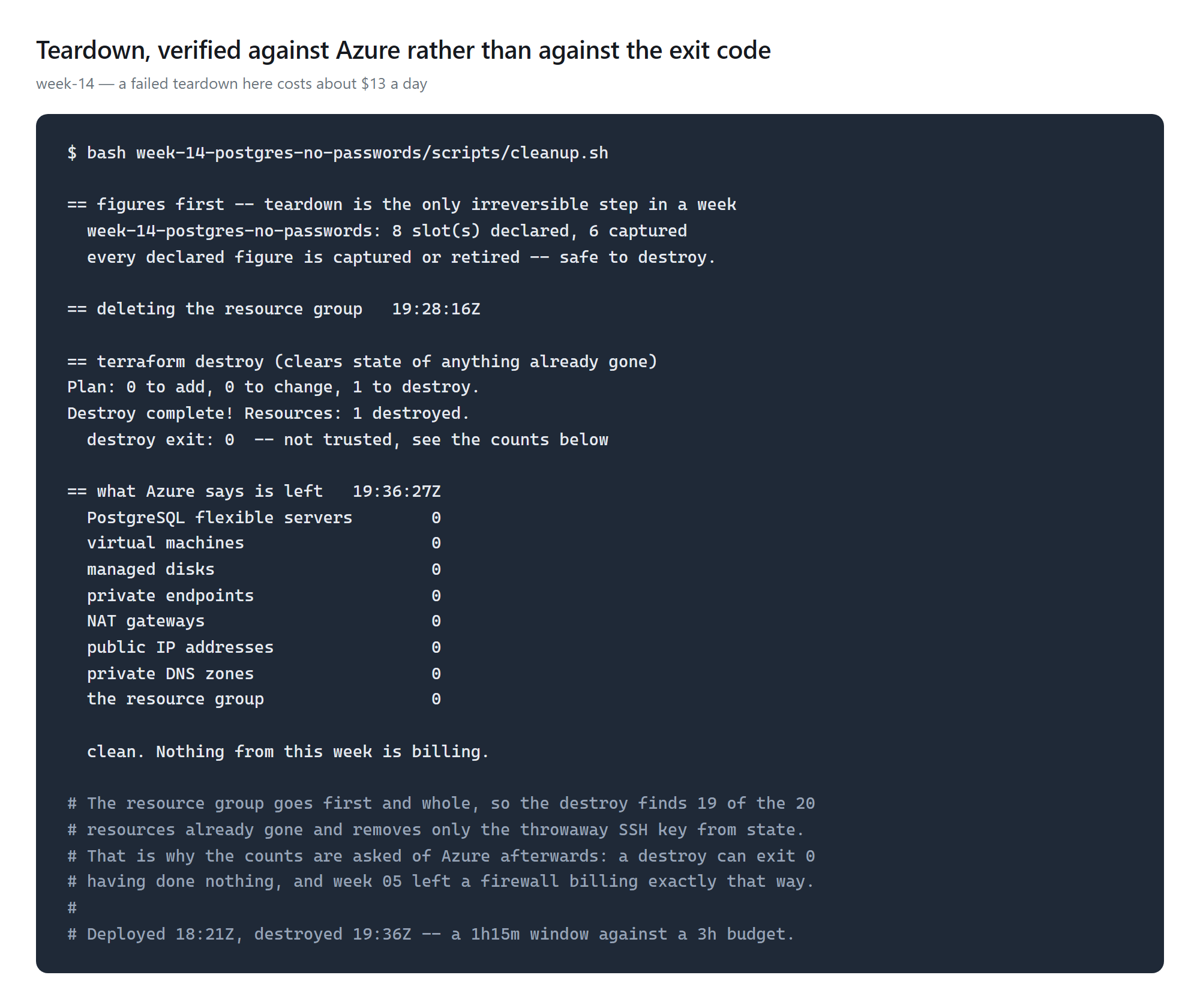
The resource group is deleted whole — it catches anything Terraform never managed — and then Azure is asked how many of each resource type remain. A failed teardown here costs about $13 a day, which is the difference between a cleanup script and a cleanup script somebody has watched work.
Takeaways.
- The strongest control over a credential is not having one.
administrator_loginis optional; omitting it removes a class of risk that no rotation policy can. - Prove a security control with a pair. A login that succeeds proves something works. Only the refusal proves the other path is closed — and that applies to deny policies as much as to logins.
- Measure availability where the user stands. The same failover was 32 seconds to the application and six minutes to the API.
- High availability is a tier decision, not a checkbox. Burstable supports none, so wanting a standby multiplied the compute bill twentyfold.
- A clean gate is a claim about coverage. This one passed while blind to meters priced globally and to anything billed on an ambiguous unit.
Repository: week-14-postgres-no-passwords
References
Comments