📋 In This Post
Why — The Problem This Solves
On 30 August I opened a bill I did not expect and asked a simple question: what is running, what is it costing, and did I leave anything behind?
Answering it took eleven separate lookups across five systems — one for what I was charged, one for who had changed what, one for what still existed, one for whether anything had alerted, one for what my infrastructure code believed. None of them talk to each other. Each one required me to already know that it was the one holding the answer.
Every one of those numbers had existed for days. A service had been billing $9.35 a day for a week. A budget alert had fired and been ignored. Anomaly detection had flagged eight cents of Security Hub and missed the sixty-one dollars sitting next to it.
The gap was never missing data. It was that interrogating the data required knowing exactly which six APIs to call, in what order, with what filters. That is a skill, and skills do not scale to three in the morning.
What makes this answerable in one question
An MCP server is a small program that exposes tools an AI client can call. The client — Claude, Cursor, anything that speaks the protocol — reads the tool descriptions, decides which fit the question, calls them, and answers in plain language. You define what exists; the model decides when to use it.
So the work is not "build an AI". The work is deciding which four questions matter, giving each one a tool, and making sure a tool cannot do damage when the model gets it wrong.
By the end of this post there is a working version of that, and the first real question I put to it found a virtual machine that had been running for six weeks which I had entirely forgotten about. It costs nothing today, because it is inside a free trial.
What You Need to Know — Skills & Tools
| Concept | What actually matters |
|---|---|
| MCP tools, resources, prompts | Three things a server can expose. Tools are functions the model may call and are what this week uses. The important part is that a tool's description is read by the model — it is input, not documentation. |
| Tool poisoning | Instructions hidden in a tool's description or parameter schema, steering the model. The operator never sees them in the client UI. The specification is blunt about it: tool descriptions “should be considered untrusted, unless obtained from a trusted server”. This is why the permissions matter more than the code. |
| Streamable HTTP | The remote transport. The 2026-07-28 revision made the protocol core stateless, requires an Mcp-Method header on every request so a gateway can route without parsing the body, and lets list results carry a TTL. |
| SigV4 vs OAuth | Two ways to authorise an MCP client. SigV4 reuses an AWS identity you already have and costs nothing to run. OAuth works with any off-the-shelf client. You pick one and lose something either way. |
| Metered read APIs | Most describe/list calls are free. ce:GetCostAndUsage is $0.01 per request, and each page counts separately. Knowing which reads cost money is the whole skill here. |
| Least privilege per tool | Not per server. Each IAM statement maps to exactly one tool, so reading the policy tells you what the server can do without reading the code. |
Architecture — How It Fits Together
One Lambda, one endpoint, one cache, and four read paths into the account. Nothing here bills while nobody is asking.
The agent reads and recommends — and the policy is what makes that true
It would be easy to claim this server is safe because the code only reads. Code can be changed; a policy is checked by AWS on every call. The role has five statements, and the whole thing fits on one screen:
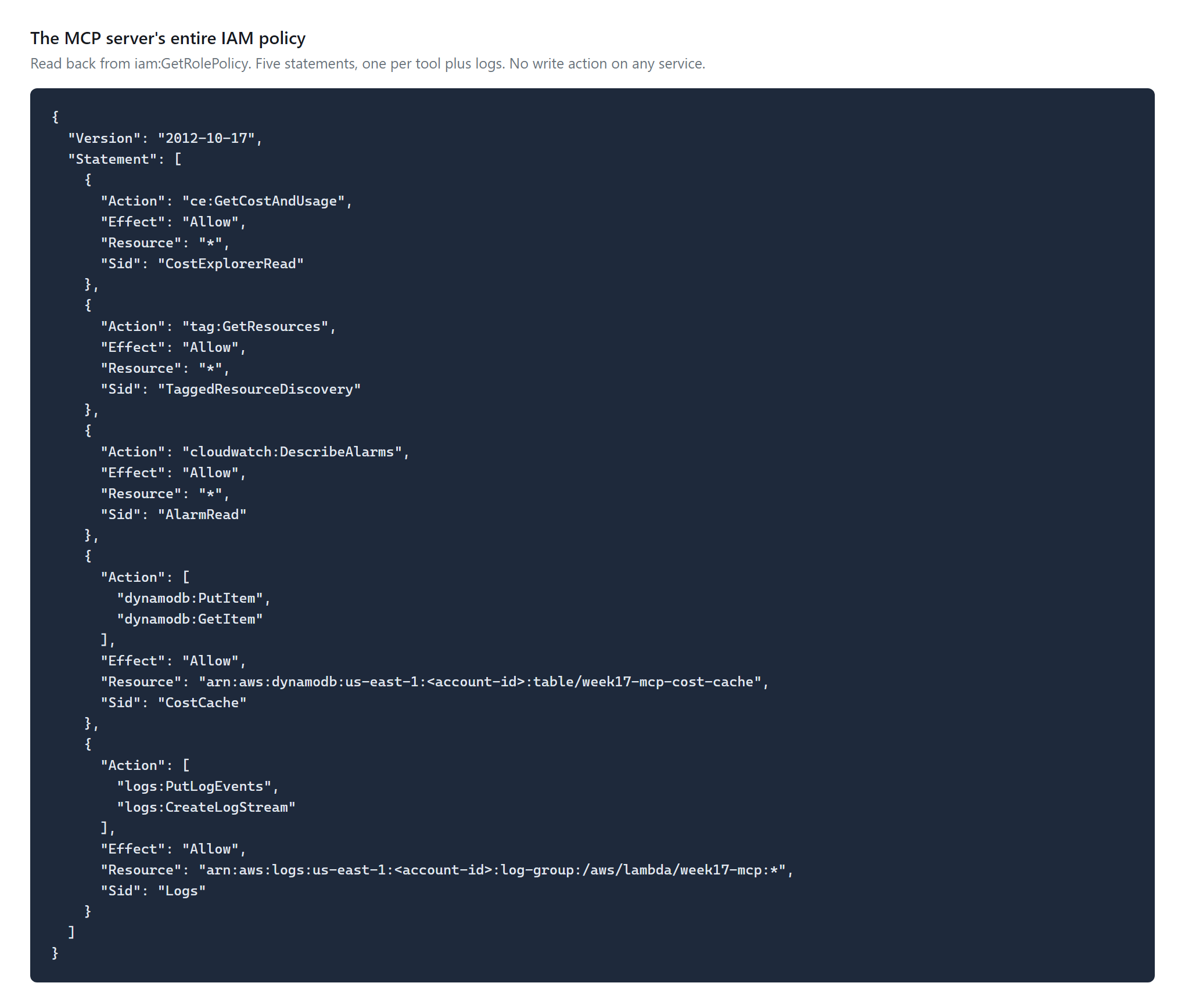
Writing this section is what caught my own overstatement. I had said in three separate files that the role holds no write action of any kind. It holds one: dynamodb:PutItem on its own cache table. The accurate claim is narrower and still worth making — there is no write on anything the server reports on. A model manipulated through a poisoned description can fill a cache. It cannot change the account.
How We Built It — Step by Step
Step 1 — Decide what the data source is, because the planned one was gone
The roadmap wrote this week down a year ago as an MCP server over the lab's own operational data — Athena, CloudWatch, Config — making Weeks 10 to 16 agent-consumable.
Four days before starting it, I destroyed Weeks 11 through 16. Their thirty-day free trials had expired and they had begun billing. That teardown took the Glue databases, the Config recorder and the Security Hub findings with it. The server would have had nothing to read.
Rebuilding data I had just deliberately removed would have been absurd, so the topic stayed and the data source changed: live control-plane state instead of stored history. It cannot evaporate, and it answers the question that actually cost me money.
Step 2 — Choose where it runs, and reject the obvious answer
Bedrock AgentCore Runtime is purpose-built for hosting agents and MCP servers, and it is the wrong choice here. It bills $0.0895 per vCPU-hour and $0.00945 per GB-hour in one-second increments, for sessions that can live up to 14 days.
That is the same shape as the charge that motivated this week: a meter with no natural stopping point. For a server answering occasional sub-second questions, a Lambda behind a Function URL costs nothing while idle. AgentCore Runtime is right for a long-lived stateful agent. This is not that.
The same logic ruled out API Gateway. It is the correct production answer — it works with any MCP client — but it adds an hourly-shaped service and a Cognito user pool to a server that answers a handful of questions a day.
Step 3 — Write four tools, and be honest about which one costs money
Three of the four are free to call. One is not:
| Tool | Answers | Cost per call |
|---|---|---|
get_daily_cost | What am I being charged for, by service, day by day | $0.01 |
list_running_resources | What is actually deployed right now | free |
find_untagged_resources | What has no owner | free |
get_alarm_state | Is monitoring actually working | free |
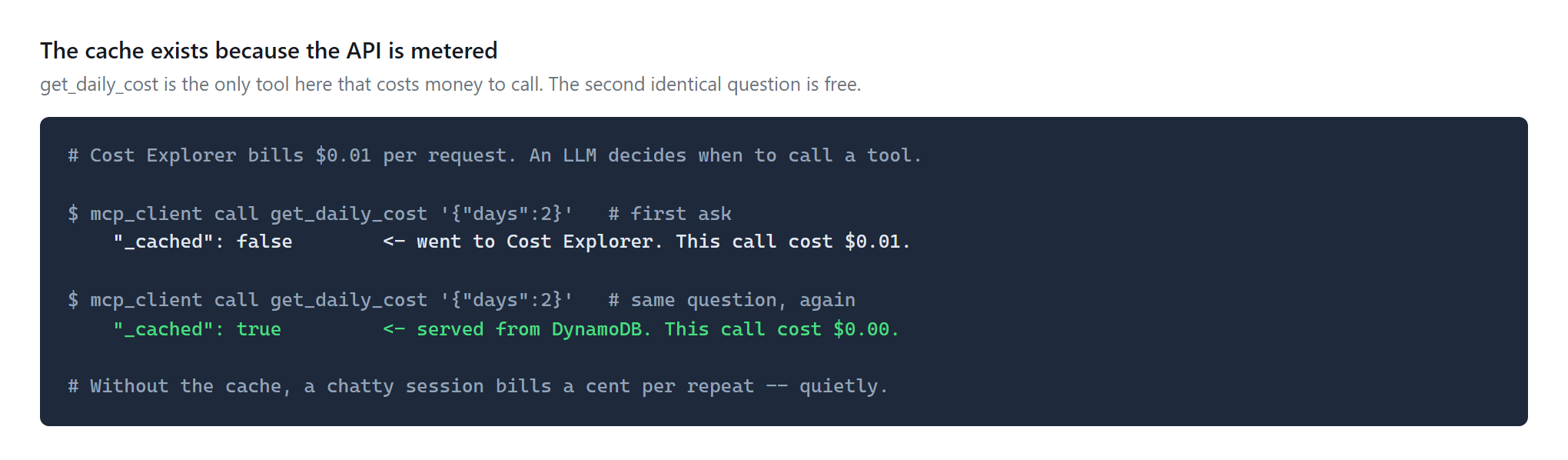
That one cent drives a design decision that would otherwise look like over-engineering. An LLM decides when to call a tool. Ask about spend three times in a conversation and a naive server pays three times. So the cost tool is cached in DynamoDB with a TTL, and the cached answer is marked so you can see it happen.
What an MCP server actually is, in code
Less than people expect. The whole protocol surface is a JSON-RPC handler with four cases:
if method == "initialize":              # name, version, protocol version
if method == "tools/list":              # the tools, and their descriptions
if method == "tools/call":              # run one, return its result
if method.startswith("notifications/"): # return NOTHING AT ALL
That last line is the one to get right. A notification carries no id and must receive no response — replying to one is a protocol error that some clients treat as fatal. Nothing visibly breaks while you are testing by hand, which is exactly why it bites later.
A tool is four fields. Three of them the model reads:
{"name": "get_daily_cost",
 "description": ("Cost per day, broken down by AWS service, for the last N days. "
                 "Use this to answer what an account is being charged for. "
                 "Cached for an hour because the underlying API bills per request."),
 "inputSchema": {"type": "object",
                 "properties": {"days": {"type": "integer", "minimum": 1, "maximum": 90}}},
 "fn": lambda a: tool_daily_cost(a.get("days", 7))}
The description is not documentation. It is the text a model reads to decide whether this tool answers the question in front of it. Write it as an instruction to a colleague who cannot see your code, and put the cost in it if the tool costs money — mine says so, and that is the only reason a model has any chance of being frugal with it.
Everything else is ordinary: the Lambda handler parses the request body, dispatches on method, and returns JSON. There is no framework here and none is needed.
Step 4 — Deploy it
HCP Terraform, VCS-driven, same as every week in this series. Seven managed resources.
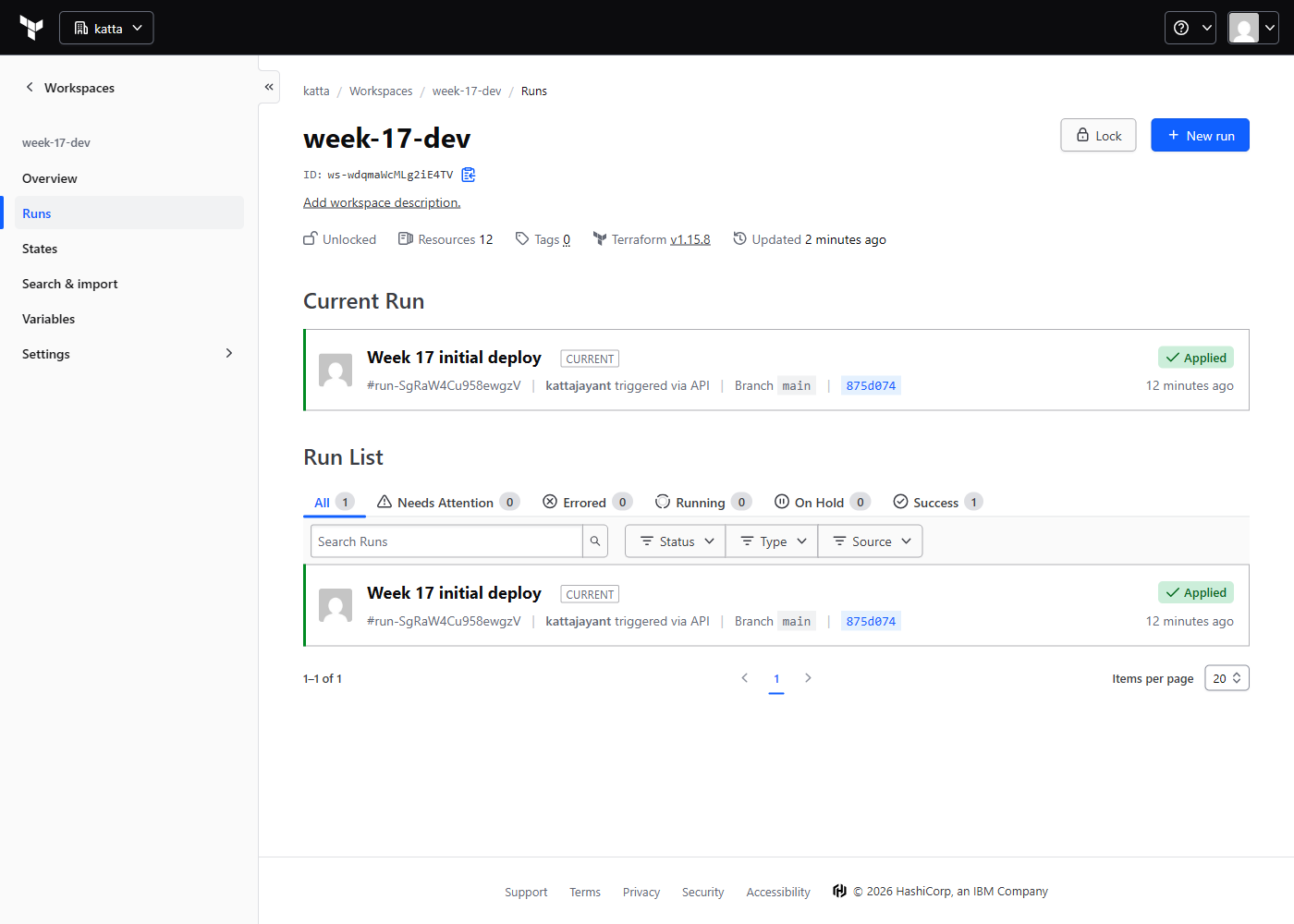
That discrepancy is worth a second look rather than a shrug. Listing the state showed twelve entries: seven managed resources and five data sources. Two of those data sources — aws_caller_identity and aws_region — I had declared out of habit and never referenced. They came out.
Verifying it actually works
Three things had to be true, and each is a different kind of proof.
The auth boundary holds. An unsigned request must never reach application code:
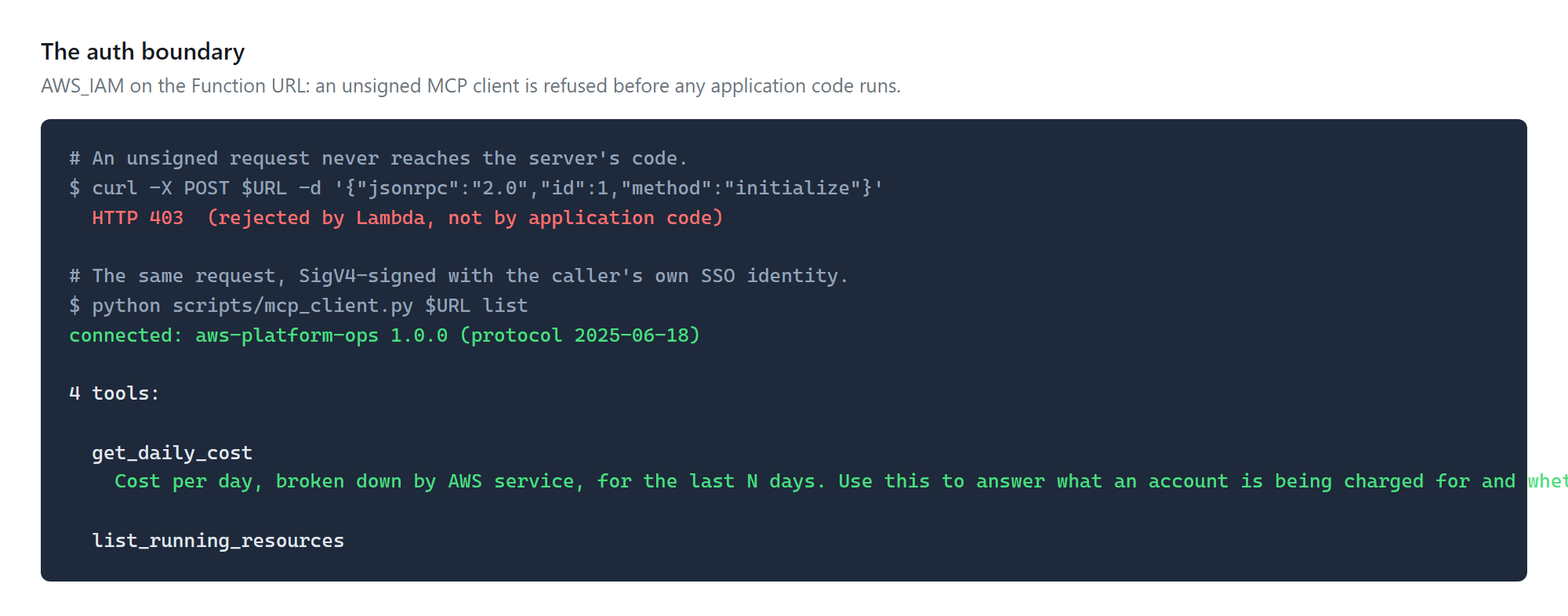
The protocol is correct, including the boring parts. MCP notifications carry no id and must receive no response — returning one is a protocol error some clients treat as fatal. That path is easy to get wrong because nothing visibly breaks in casual testing.
The cache actually caches. The same question asked twice — the second answer arrives free, and says so:
It answers the question that started the week. Not a synthetic query — the actual one:
Read this screenshot for what it is. The client here is a script that signs requests, and its ask command is a keyword router — it matches on the word “running” and picks a tool. No model chose anything in this one. That separation is deliberate: it proves the transport and the tools work, independently of whether an agent can choose between them. The next step proves the other half.
Step 5 — Put a real AI client in front of it
Everything above proves the server works. It does not prove the thing the week is actually about, which is asking a question in English and having something decide what to do with it.
The obstacle is the auth choice. Claude Desktop, Cursor and every other off-the-shelf MCP client speak plain Streamable HTTP and cannot produce an AWS SigV4 signature, so they are refused at the door by the same control that makes the endpoint free to run.
The fix is a 60-line stdio bridge. The client launches it as an ordinary local MCP server; it reads JSON-RPC on stdin, signs each message, forwards it over HTTPS, and writes the response back. The client never learns AWS was involved, and the server never sees an unsigned request.
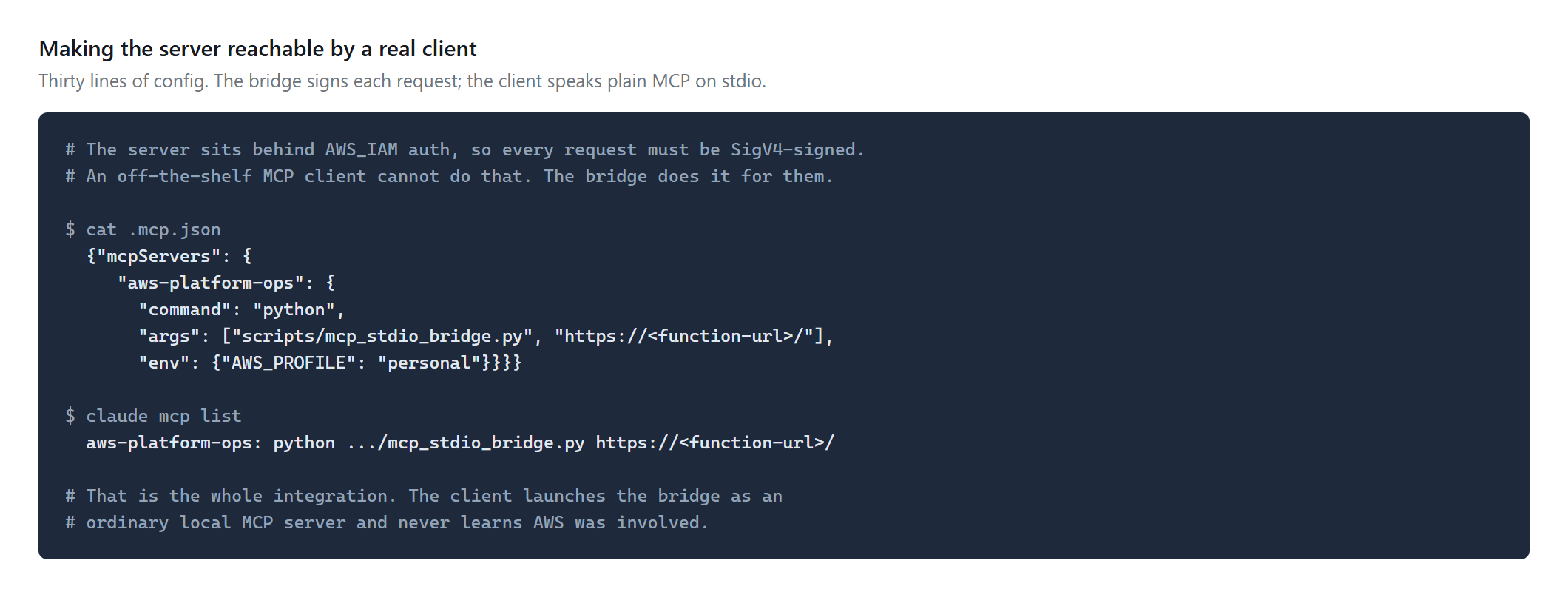
One detail in that bridge matters more than its length: stdout carries the protocol and nothing else. Every diagnostic goes to stderr. A single stray print corrupts the stream and the client reports something unhelpful about malformed JSON.
And then the actual question, with no keywords and no routing table:
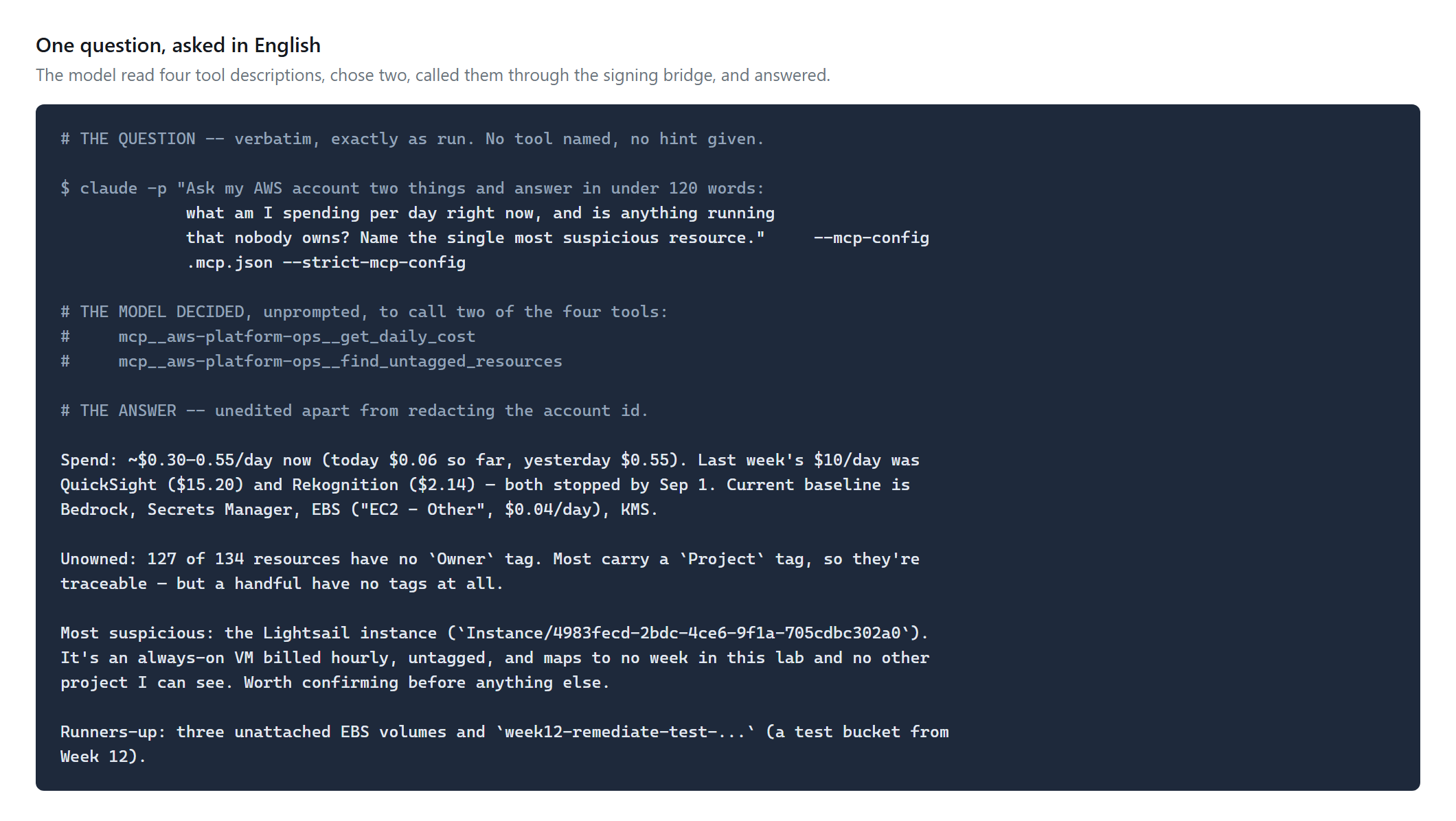
It found something I did not know about. A Lightsail instance, running since 23 July, six weeks, costing nothing — because it is inside a free trial. When that lapses it becomes $7 a month. Nobody asked it to look for that. It read four tool descriptions, decided which two fitted the question, and reported the thing that best matched “running that nobody owns”.
That is the third time this pattern has caught me: Security Hub, GuardDuty and QuickSight all cost $0 on the day they were created and started billing thirty days later. A free trial is not a free service, and it is the hardest kind of cost to remember, because there is nothing to notice.
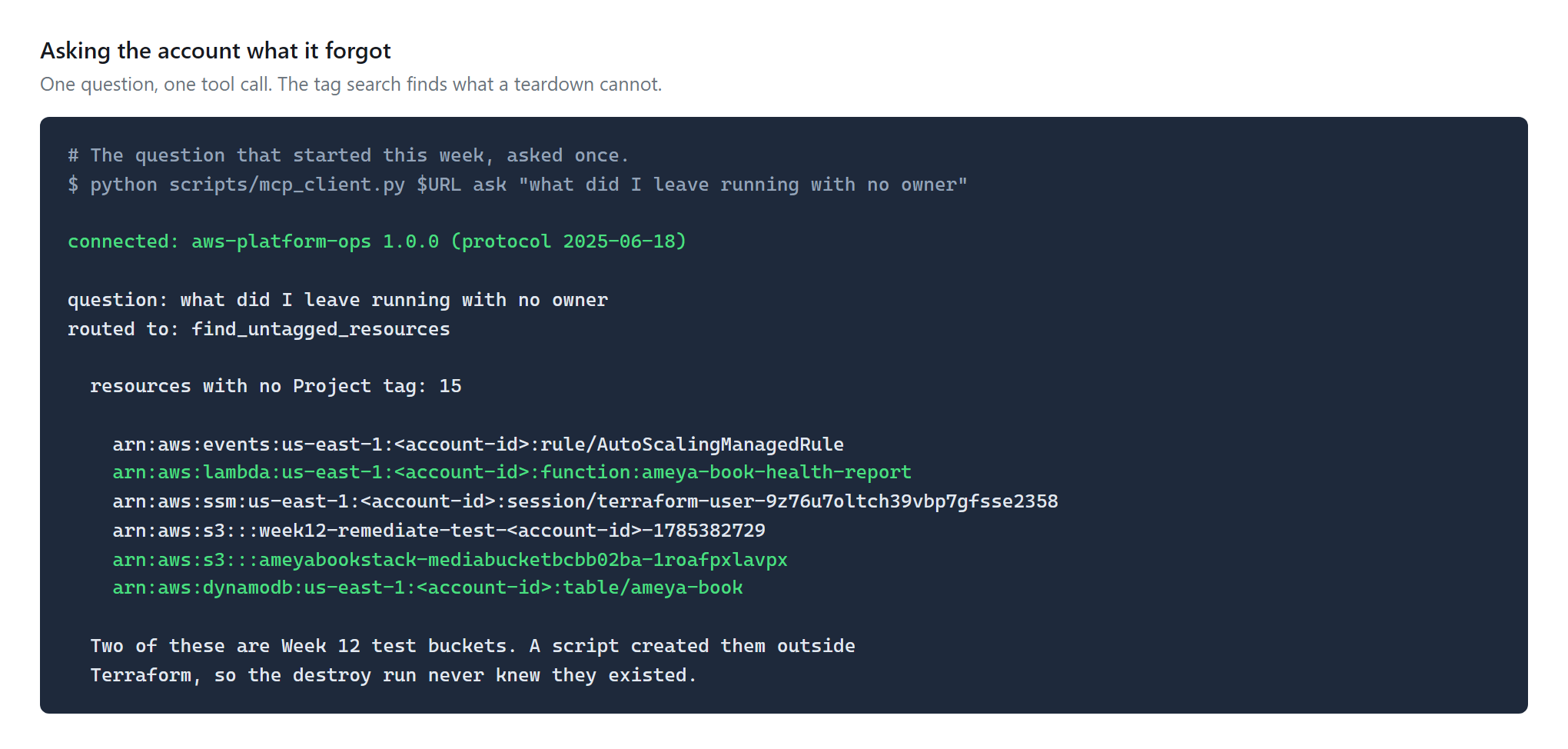
Finding those two buckets is the moment the week justified itself. They had survived a teardown I had personally verified, because I verified it against Terraform's idea of the world rather than the account's.
Challenges — What Actually Went Wrong
1. I published a claim about my own security model that was not true
Three files — the handler docstring, the Terraform comment and the README — said the role holds no write action of any kind. Then I rendered the policy as a screenshot and read it, and there was dynamodb:PutItem in the fourth statement.
It is a scoped write to the server's own cache, and it is architecturally fine. The claim was not. What is uncomfortable is why it survived: I wrote it while designing, it was true of the design I had in my head, and I never re-read it against the thing I actually built.
The fix that worked was not proofreading. It was rendering the artefact as evidence. Describing a policy lets you describe the policy you meant; showing it forces the one that exists.
2. The console would not show the proof, and chasing it was the wrong instinct
The IAM console lists a policy name and hides its body behind an expand control that is an icon, not a link. My first attempt drove the browser to click it by text, which quietly did nothing and produced a screenshot that looked fine and proved nothing.
Pulling the document from iam:GetRolePolicy and rendering it is better evidence anyway: it is the policy, not a rendering of the policy, and it reproduces.
3. Two data sources that did nothing
aws_caller_identity and aws_region went in early because most modules need them. This one did not — every ARN it needs is returned by the resources themselves. They cost nothing and would have sat there forever, counted in the resource total, implying a dependency that did not exist.
4. The free trial that shaped the whole week
This week exists because Weeks 11 and 12 ran five weeks past their publish dates. They were not forgotten through carelessness — they were invisible. Security Hub, GuardDuty and Config all carry thirty-day free trials. They cost nothing on the day they were built, and started billing on day thirty-one, long after attention had moved on.
A service that is free today and metered next month is the hardest kind of thing to remember. That is precisely the sort of question this server now answers in one call.
Security — Controls at Every Layer
- No write on anything the server reports on — the only write in the role is
dynamodb:PutItemagainst its own cache table. A model steered by a poisoned tool description can fill a cache; it cannot change the account. That turns a destruction risk into a disclosure one - IAM scoped per tool, not per server — each statement maps to exactly one tool, so the policy reads as a list of capabilities rather than a permission surface
- The cache write is scoped to one table ARN, not to DynamoDB generally
AWS_IAMauth on the Function URL — every request must be SigV4-signed by a principal allowed to invoke it, and Lambda rejects the rest before any application code runs- Tool descriptions are treated as model input — they say what the tool answers and what it costs, and nothing else. Anything written there is read by the model on every call
- Explicit log retention — the log group Lambda would have created implicitly never expires, which accrues storage quietly and forever
- The tag search is part of teardown — because a destroy run only removes what Terraform knows about, and this week found two resources that proves the point
Cost
Prices as of September 2026 — verify at the Cloud Financial Management pricing page.
| Item | Rate | This build |
|---|---|---|
| Cost Explorer API | $0.01 / request, each page counts | the only metered read |
| Lambda | per request, sub-second calls | effectively free at this volume |
| DynamoDB | on-demand | effectively free at this volume |
| CloudWatch alarm × 1 | $0.10 / alarm / month | $0.10 / month |
| Lambda Function URL | no hourly charge | $0 idle |
| Total spent this week | $0.13, read from Cost Explorer | |
| Destroyed | $0 |
The cheapest architecture was also the most restrictive
Choosing a Function URL over API Gateway removed every idle charge and the entire Cognito surface. It also means an off-the-shelf MCP client that speaks plain HTTP cannot connect — it gets a 403 before the protocol starts, because it has no idea how to sign an AWS request.
For a personal account where the only caller is me, that trade is obviously right. For a platform team where the callers are twelve engineers' laptops, it is obviously wrong. The interesting part is that the cost difference and the compatibility difference are the same decision.
Cleanup
Queue a destroy from HCP, then verify against AWS rather than against the run status:
./scripts/cleanup.shIt checks Lambda, IAM, DynamoDB, alarms and log groups by name prefix, and then does a tag search for Week=17. The prefix checks find what was named predictably; the tag search finds what was not.
That second check exists because of a specific failure. Week 12's teardown reported success and left two S3 buckets behind — a shell script had created them outside Terraform, so destroy had no idea they existed. A destroy run tells you Terraform removed what it knew about. It tells you nothing about what it never knew.
References
- Model Context Protocol specification, 2026-07-28 — the current revision
- What changed in the 2026-07-28 spec — stateless core, routable headers, authorization hardening
- awslabs/run-model-context-protocol-servers-with-aws-lambda — the four auth paths, including SigV4
- AWS's own MCP servers — worth checking before writing one
- Bedrock AgentCore pricing — Runtime and Gateway rates
- Cloud Financial Management pricing — the $0.01 per Cost Explorer request
- This week's code
Key Takeaways
- The bottleneck was never the data. Every number I needed on 30 August already existed. What was missing was a way to ask without knowing which API held the answer
- Know which reads are metered. Almost every describe/list call is free; Cost Explorer is a cent a request. When a model decides call frequency, one metered API changes the architecture
- A tool description is model input. It is not documentation for humans that the model happens to see — it is the thing the model reads to decide what to do
- Permissions are the security model, not code. Code can change between reviews; a policy is enforced on every call
- Render the artefact instead of describing it. Showing the policy caught a false claim I had written three times and read past twice
- Verify a teardown against the provider, not against Terraform. The two disagree exactly when it matters
What I'd do differently in production
This is a personal account with one caller, and several decisions above are only correct because of that. If you are building the same thing for a team, these are the five that change — and the first is the one that changes everything else.
- API Gateway with an OAuth provider instead of SigV4 on a Function URL. The 2026-07-28 revision hardened that path specifically — issuer validation per RFC 9207, issuer-bound client credentials, Client ID Metadata Documents for registration. SigV4 is right for one operator and wrong for a team, because it forces every caller to hold AWS credentials and rules out every off-the-shelf client
- Check what already exists before writing anything. AWS publish more than sixty MCP servers covering most of their services. Writing your own earns its keep when the question is specific to your estate — mine reads a tagging convention that only means something here — and is wasted effort when it is not
- A spend guard on the metered tool. The cache limits repeats, but nothing stops a client asking for ninety distinct day-ranges. A counter per session, or a hard daily cap, belongs in front of anything billed per request
- Tool results scoped by the caller's own identity, not the server's role. Right now every caller sees the whole account because there is one caller. With several, the server should assume a role derived from who is asking — otherwise the first person to connect inherits everything the server can see
- Structured output rather than JSON text blobs. The tools return formatted JSON inside a text block, which works and is what most servers do. Typed results would let a client render them without re-parsing
- Alarm on the cost tool's call rate, not just on errors. A server that starts answering cost questions in a loop is not broken in any way an error metric can see
Comments