Why — The Problem This Solves
Your orders app calls your rates app. How do you control who is allowed to make that call?
Almost everyone does it with network rules: a security group, a CIDR range, "anything in this subnet can reach port 8080 over there". That controls addresses, not identities. Anything that lands in that subnet can make the call, and the rule cannot tell your orders app from a compromised test box sitting beside it.
You also cannot write the sentence you actually mean. "Only the orders service may call rates" is not expressible in a security group. "This IP range may connect" is.
VPC Lattice moves the check from the address to the identity. This week builds one service that only a named IAM role may call, and then tries to call it as the wrong one.
Not App Mesh. App Mesh shut down on 30 September 2026 and cannot be created. Lattice is where AWS points instead, and that is the only reason App Mesh appears here at all.
What You Need to Know — Skills & Tools
Amazon VPC Lattice is a managed switchboard for traffic between your own applications. Normally, connecting two apps in different VPCs means peering the networks, opening security group rules in both directions, and giving each app the other's load balancer address. Do that across a dozen teams and you get a web of peering connections and rules nobody can audit. Lattice replaces that: each VPC attaches to a shared service network, each application registers as a service, and anything attached can reach anything registered — subject to policy. It is the service AWS now points to for this job, after App Mesh was retired on 30 September 2026.
A service network is the switchboard itself. It owns nothing and runs nothing; it is a named meeting point that VPCs attach to and services register with. Attaching a VPC is free and is what removes the need for peering — the VPC gains the ability to resolve and reach every service on the network, with no route tables or gateways involved. A service network is also the first place you can apply an access policy, which makes it the natural boundary for "everything in this organisation" or "everything in this environment".
A service is one callable application on that switchboard. The name is
confusing: it is not your code, it is the Lattice object that fronts your code. Each
one gets a stable DNS name — something like
rates-0a1ee.vpc-lattice-svcs.us-east-1.on.aws — that resolves only inside a
VPC attached to the same network. Callers use that name instead of an IP address or a load
balancer endpoint, so the backend can move, scale or change type without anyone updating
config.
A listener and a target group are the routing underneath. The listener says which port and protocol the service answers on; the target group says what is actually behind it. Targets can be IP addresses, EC2 instances, an Application Load Balancer, or a Lambda function. That last option is why this build has no load balancer and no servers at all — the service forwards straight to a function, and you pay for neither idle compute nor an idle ALB.
An auth policy is where Lattice stops being a networking feature and starts being a security one. It is an IAM policy document — the same JSON shape as an S3 bucket policy — attached to a service or a service network, naming which identities may call it. Because it is IAM, it can express things a security group cannot: a specific role, a specific HTTP method, a specific path, callers from a named organisation. The check happens in AWS before the request reaches your application, so your code does not implement it and cannot forget to.
auth_type is a separate switch, set independently on the
service and on the service network, that decides whether that policy is consulted at all. It
takes two values: AWS_IAM means evaluate the policy, NONE means skip
this layer entirely. The policy and the switch are two different things, and
they can disagree — a perfectly written policy sitting on a layer whose switch is off is
simply not read. That gap is the finding this week is built around, so it is worth holding on
to now.
SigV4 signing is how a caller proves who it is. It is the same signing the AWS CLI performs on every command you run: the caller hashes the request together with its credentials, and AWS verifies the result. A request without a signature is not rejected for being malformed — it is simply treated as coming from anonymous, which your policy can allow or refuse like any other principal.
Everything is built with Terraform, run through HCP Terraform with OIDC so no static AWS keys exist anywhere, and the callers are Lambda functions so the week needs no servers to demonstrate a networking control.
Architecture — How It Fits Together
authType set to
NONE makes its layer wave everything through.The two callers are identical in every way a network can observe: same VPC, same two
subnets, same security group, byte-identical code. One has the role
orders-client attached, the other has stranger. That is the entire
experiment.
How We Built It — Step by Step
What we deployed
| What | Count | Its job |
|---|---|---|
| Service network + VPC association | 2 | The switchboard, and the consumer VPC attached to it. The association is free |
| Service, listener, target group, attachment | 4 | The thing being called |
| Service network ↔ service association | 1 | Puts the service on the switchboard |
| Auth policies | 2 | Layer one: org and source VPC. Layer two: named role and GET only |
| Lambdas | 3 | The protected service, and two callers that differ only by role |
| IAM roles + policies | 6 | orders-client, stranger, backend |
| VPC, 2 subnets, 1 security group | 4 | One network, shared by both callers on purpose |
| Log groups | 3 |
24 resources. No NAT gateway, no internet gateway, no load balancer. The callers reach the service through the VPC association, which costs nothing.
Where we started
How we wrote it
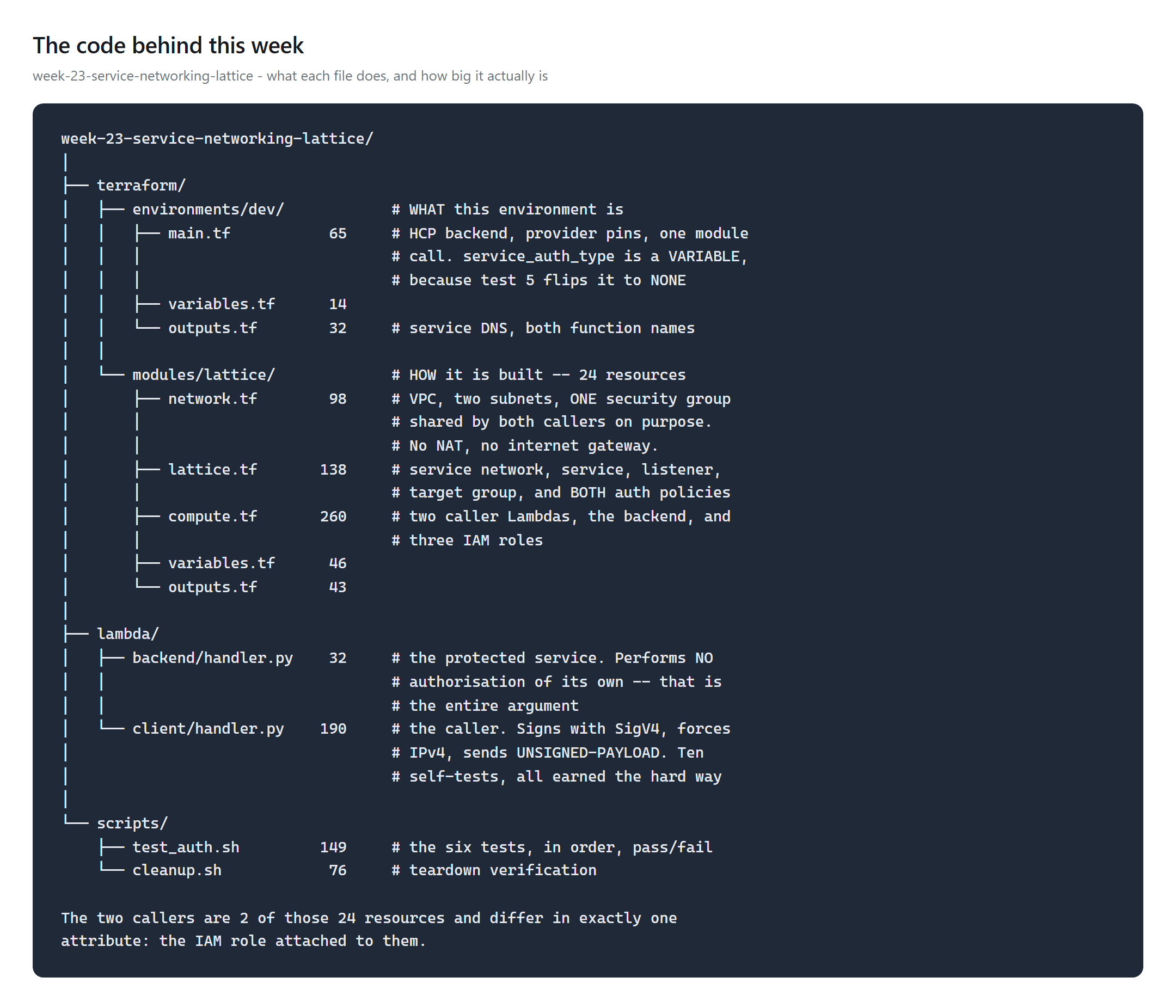
One detail will cost you an afternoon: the SigV4 service name for calling through
Lattice is vpc-lattice-svcs, while vpc-lattice is the control plane
API. Sign with the wrong one and the 403 is indistinguishable from a policy denial.
How we deployed it
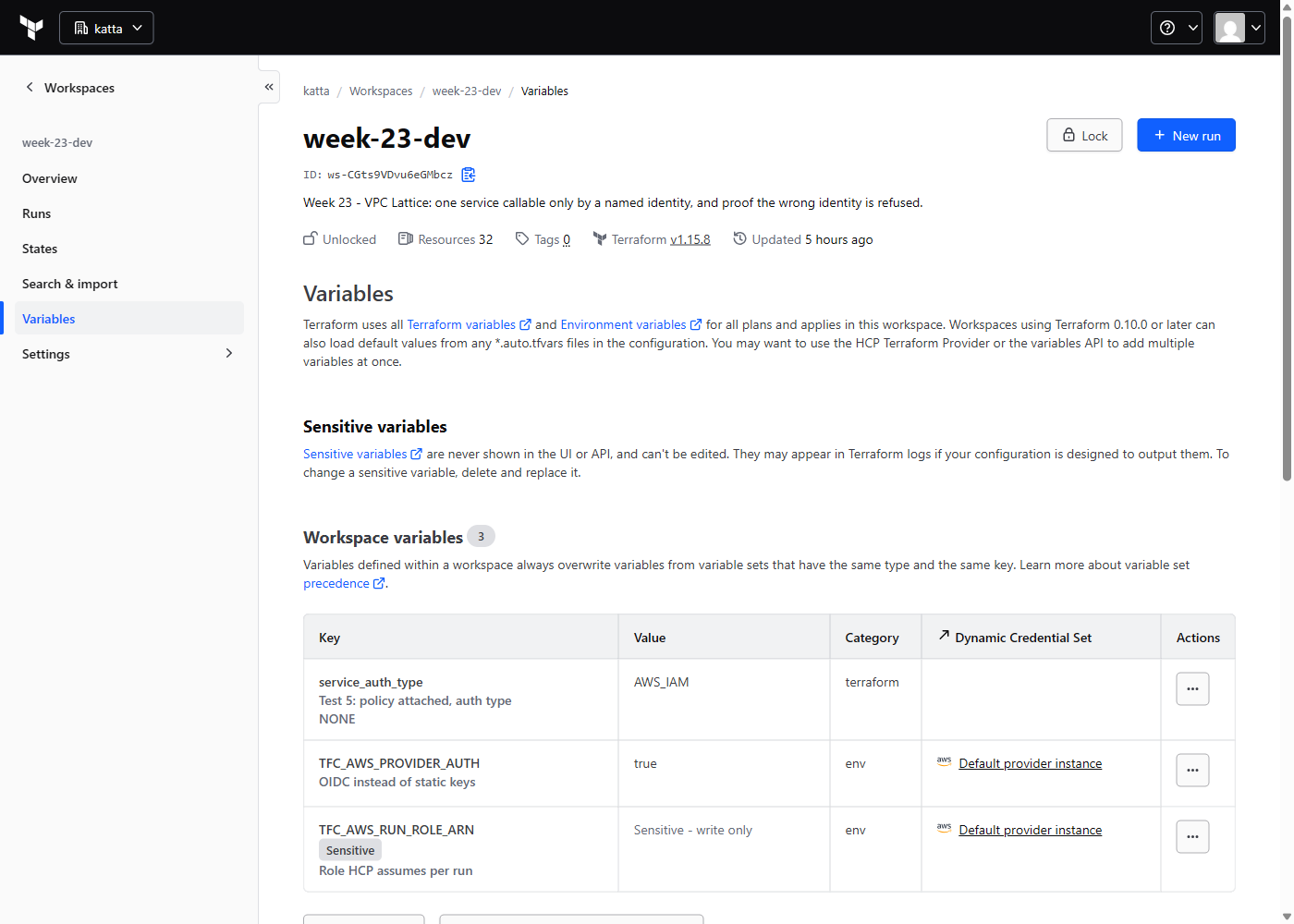
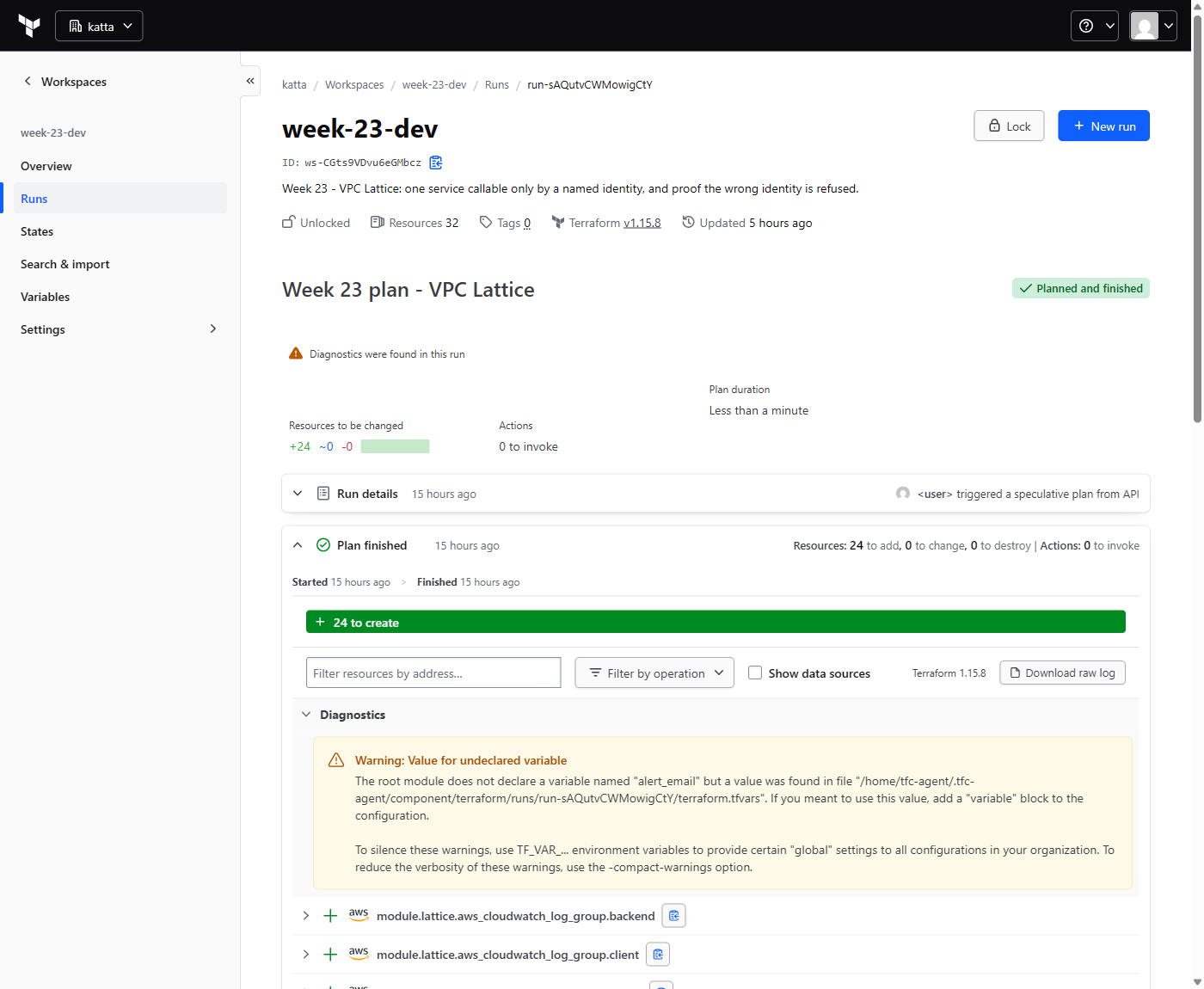
auth_type
being set on both the service network and the service.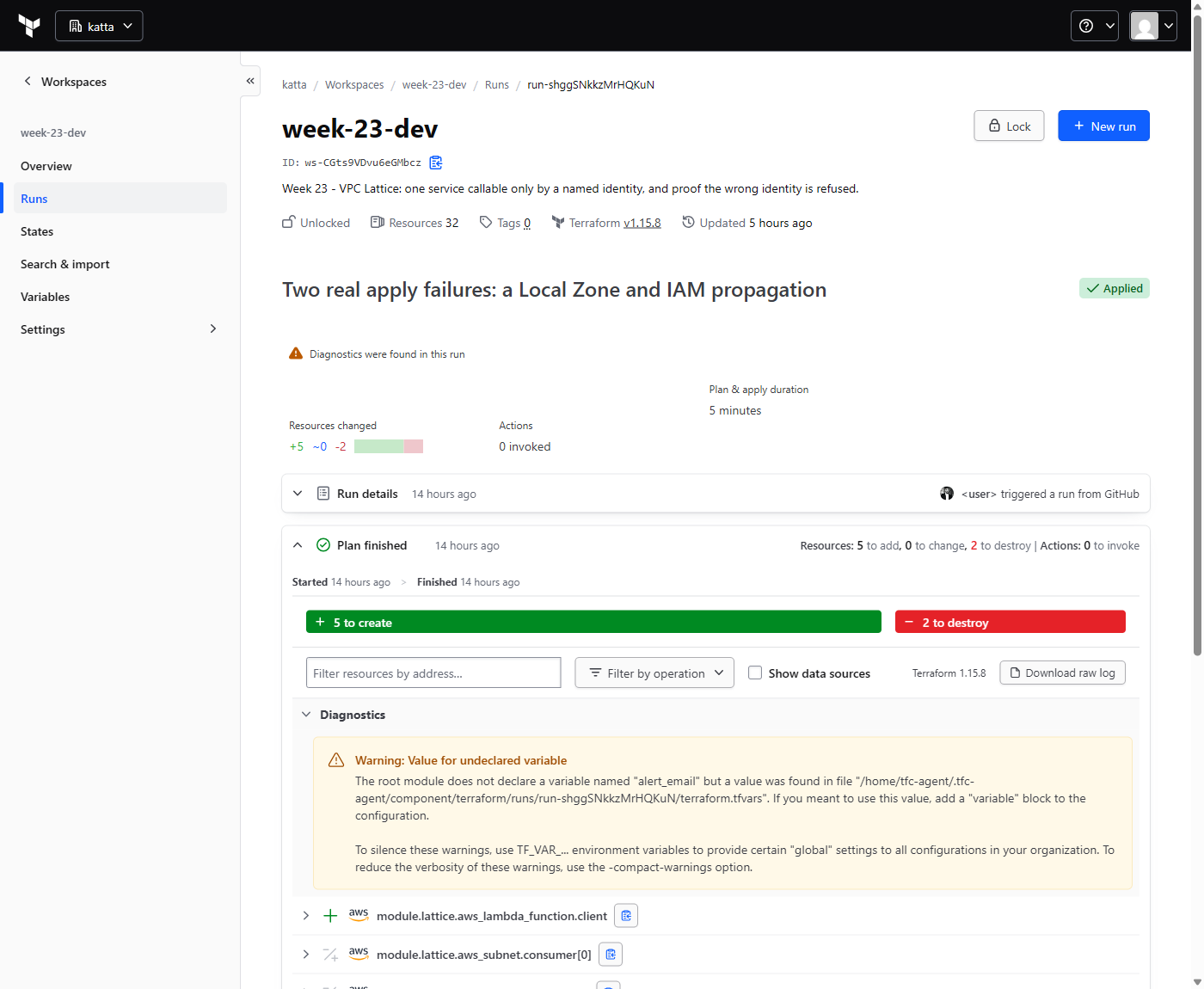
What appeared in the console
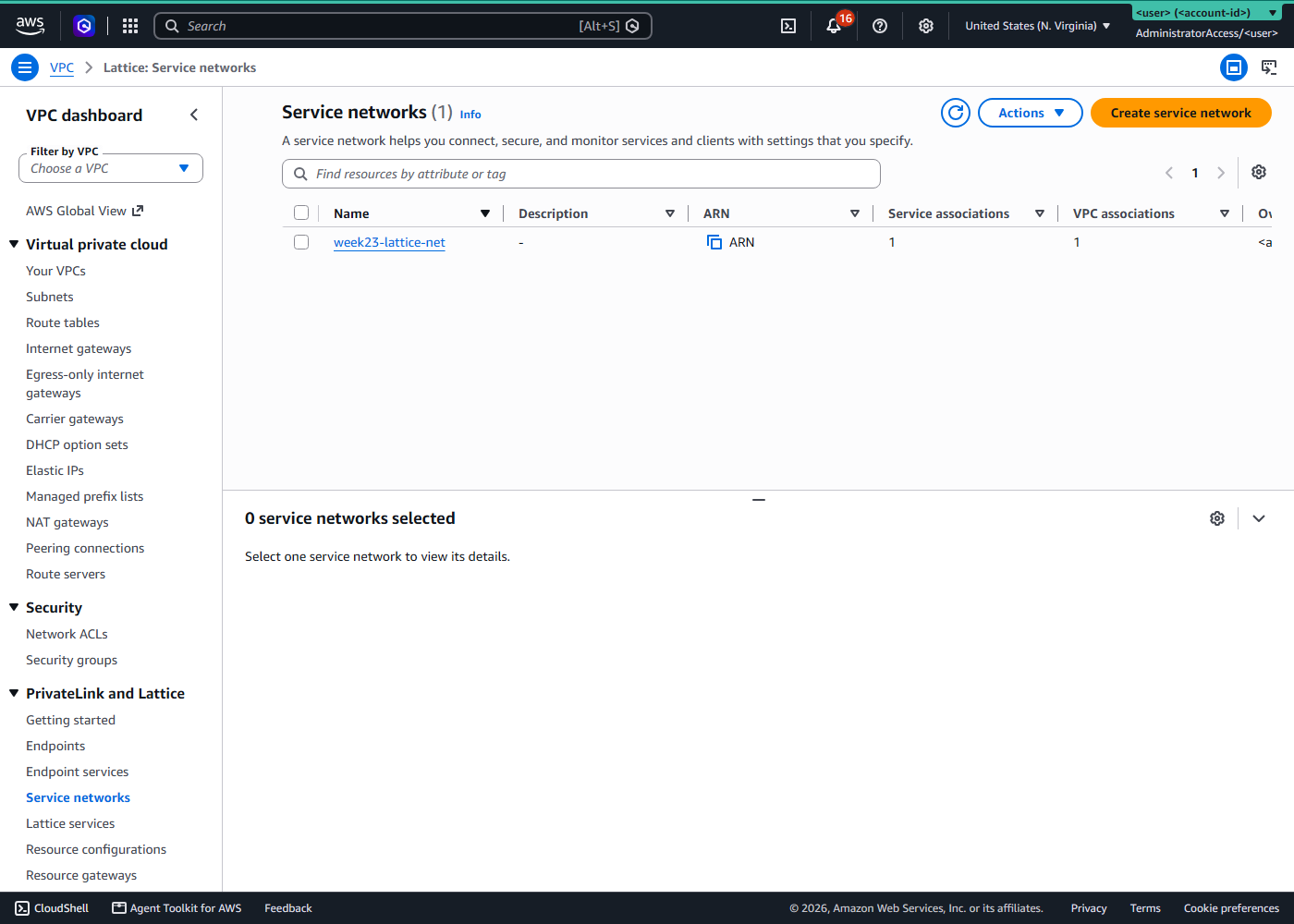
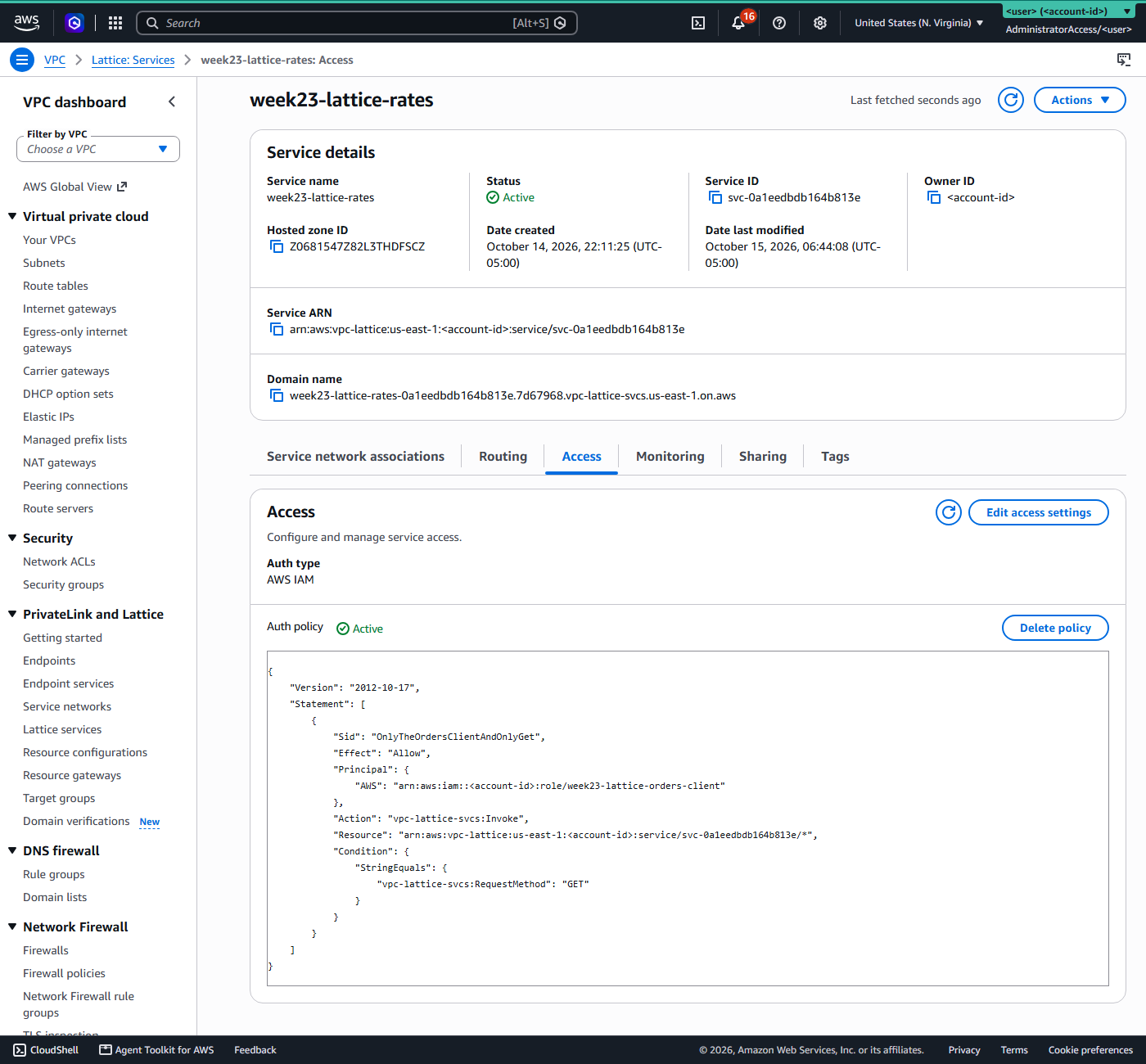
AWS IAM,
the policy Active, and inside it one role and one method. The service
network carries a second policy of its own, and each object has its own
authType deciding whether that policy is read at all.How we tested it
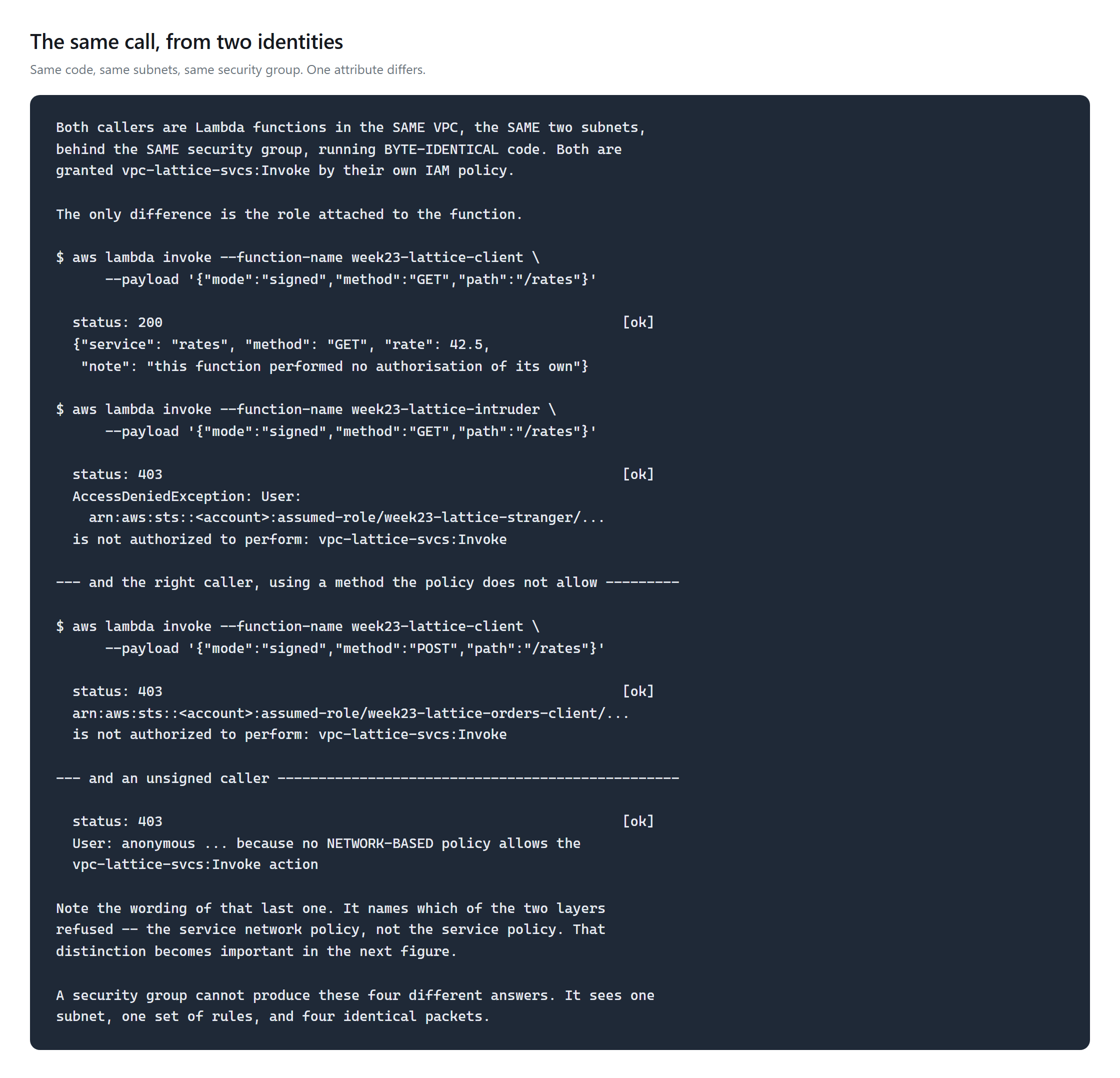
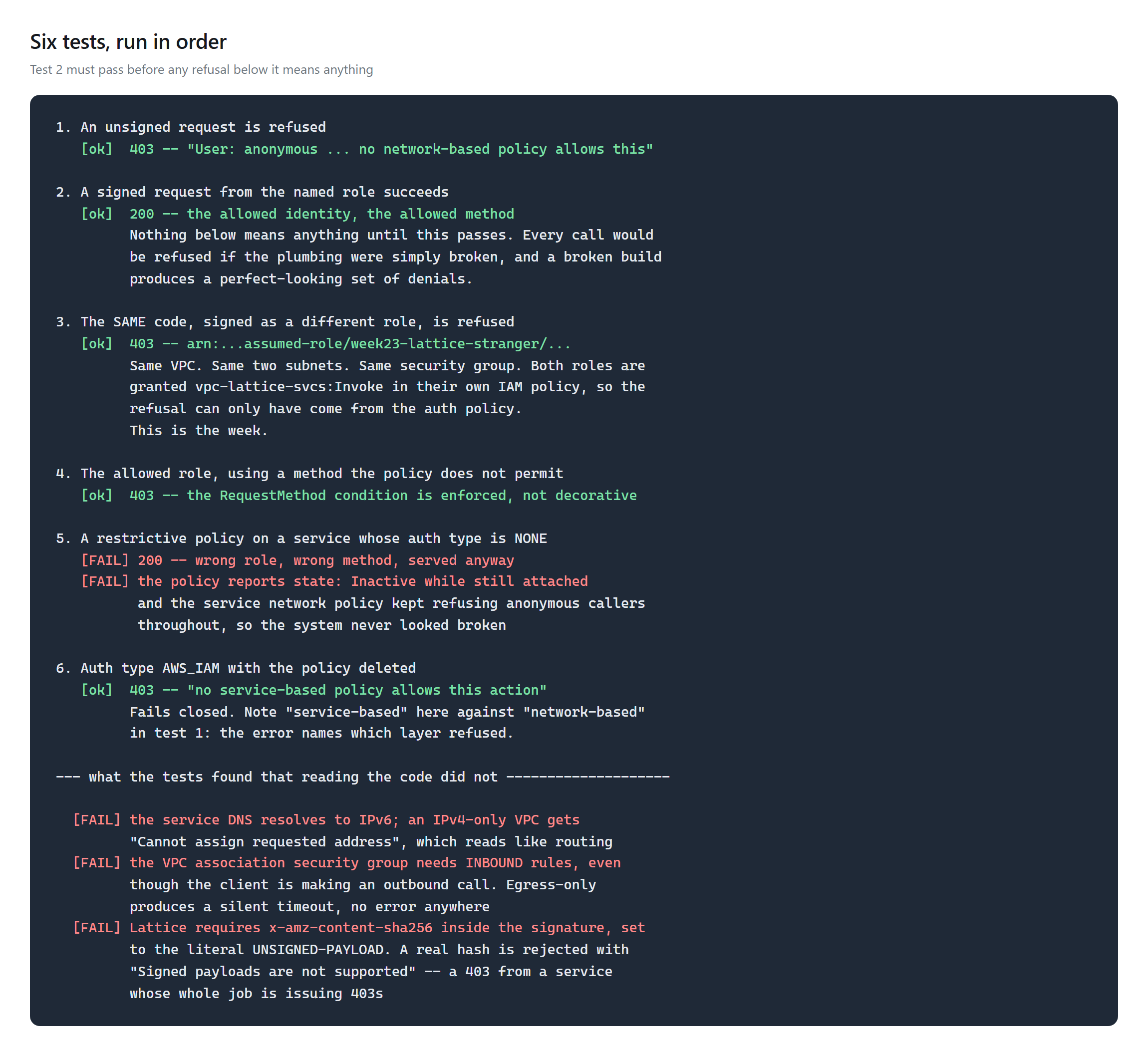
Order matters: the allowed call must return 200 before any refusal counts, because a broken
build produces a flawless-looking set of denials. And the refusal only means something because
the stranger role is granted vpc-lattice-svcs:Invoke in its
own IAM policy — without that, a 403 would prove the identity policy said no, not the
auth policy.
Challenges — What Actually Went Wrong
The policy that was attached, visible, and inert
Set auth_type to NONE and leave the policy exactly as it was. The
policy naming one role and one method stays attached. It stays in the console. It reports
state: Inactive, a field almost nobody queries.
The wrong role, using the wrong method, gets a 200.
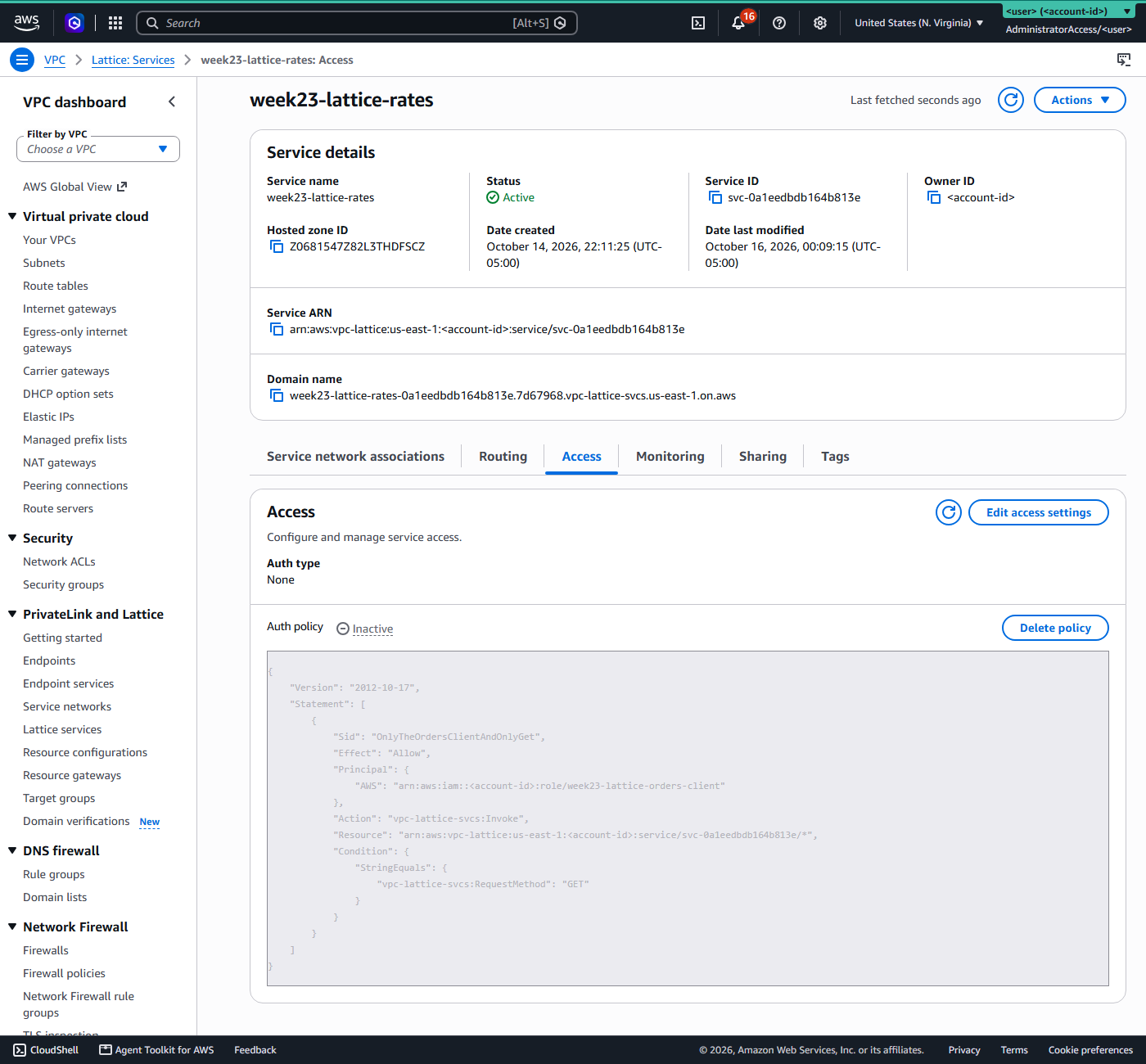
None, the policy reads Inactive, and the console greys the document out rather than removing it. The service still reports Status: Active at the top of the page.In Terraform this is easy to write by accident: auth_type is optional
on both the service and the service network, and the auth policy is a separate resource that
does not set it. Omit it and you get the default, which is NONE.
And the system still looked healthy
This is the part I did not expect. With the service policy inert, the service network policy carried on refusing anonymous callers. The error even names the layer:
User: anonymous ... because no network-based policy allows
the vpc-lattice-svcs:Invoke action
So the service was never fully open. Spot-check it from outside the VPC, get a 403, and conclude the controls are fine — while inside the VPC the wrong identity is being served.
A half-disabled two-layer control looks healthier than a fully disabled one, because something is still saying no. That is worse than an obvious failure, not better.
Deleting the policy outright, with auth_type left at AWS_IAM,
fails closed as documented — and reports no service-based policy, naming the
other layer. Those two phrases are a genuinely useful diagnostic.
Three that cost an evening before any of that
- An opted-in Local Zone.
data.aws_availability_zonesreturnedus-east-1-dfw-1a, a subnet landed in it, and Lambda refused to attach an ENI there. Filtering onzone-typefixes it portably. - The VPC association security group needs inbound rules. The client makes an outbound call, so an egress-only group looks obviously right. It produces no error at all — requests simply time out, which sends you hunting for a routing problem.
- Lattice wants
x-amz-content-sha256set toUNSIGNED-PAYLOAD. Omit it and you getIncompleteSignatureException. Supply a real hash and you getSigned payloads are not supported. Both are 403s from a service whose entire job is issuing 403s, which is a bad costume for a signing bug to wear.
Security — Controls at Every Layer
- Two layers, both deny-by-default. The network policy sets the coarse boundary, the service policy the fine one. Both must allow.
- Check
authType, not just the policy. An attached policy proves nothing.get-auth-policyreturns astatefield and it is the only place the difference shows. - The security group is deliberately permissive and shared by both callers. If it were doing the authorisation, both would get the same answer. It is in the build to show what it cannot do.
- No public endpoint. The service DNS resolves only inside an associated VPC.
- Least privilege, with one deliberate exception — the
strangerrole is grantedInvokeso its refusal proves the right thing. - The honest limit: Lattice authorises who is calling, not what they send. An allowed caller can still send something harmful. This replaces network-position trust, not input validation.
Cost
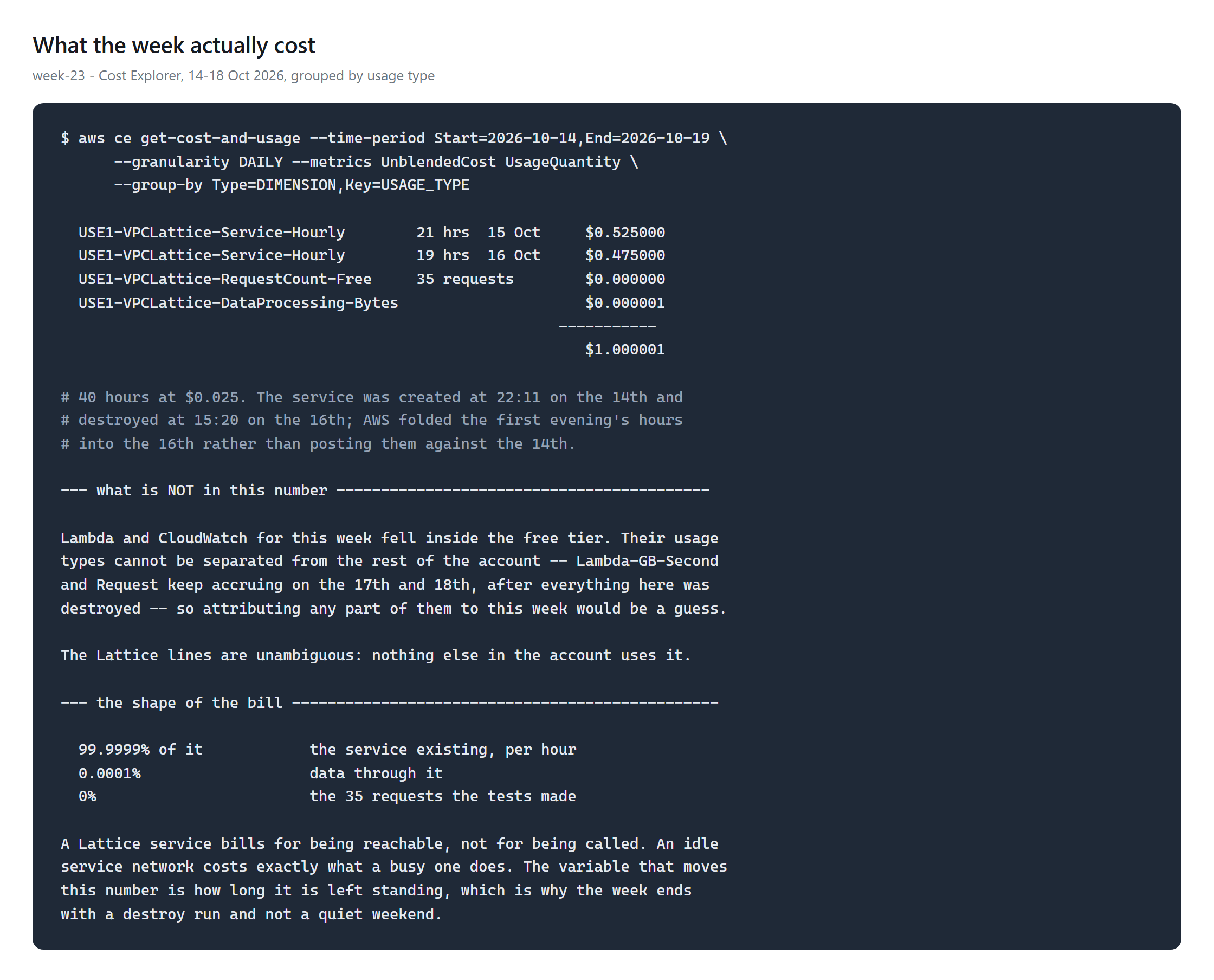
$1.00. Forty hours of a service existing, at $0.025 an hour. The 35 requests the tests made were free, the data they carried came to $0.000001, and associating the VPC with the service network cost nothing at all.
That shape is the thing worth taking away. A Lattice service bills for being reachable, not for being called — an idle service network costs exactly what a busy one does. The only variable that moves the number is how long it is left standing, which is why the week ends with a destroy run rather than a quiet weekend.
Two honest caveats on the figure. The service was created at 22:11 on the 14th and
destroyed at 15:20 on the 16th; AWS folded that first evening's hours into the 16th
rather than posting them against the 14th, so the daily split reads 21 and 19 rather
than matching the clock. And Lambda and CloudWatch are not in the total: this week's
usage fell inside the free tier, and their usage types cannot be separated from the
rest of the account — Lambda-GB-Second keeps accruing on the 17th and
18th, after everything here was destroyed. Attributing a share of them to this week
would be a guess, so the number covers only what is unambiguously Lattice.
Cleanup
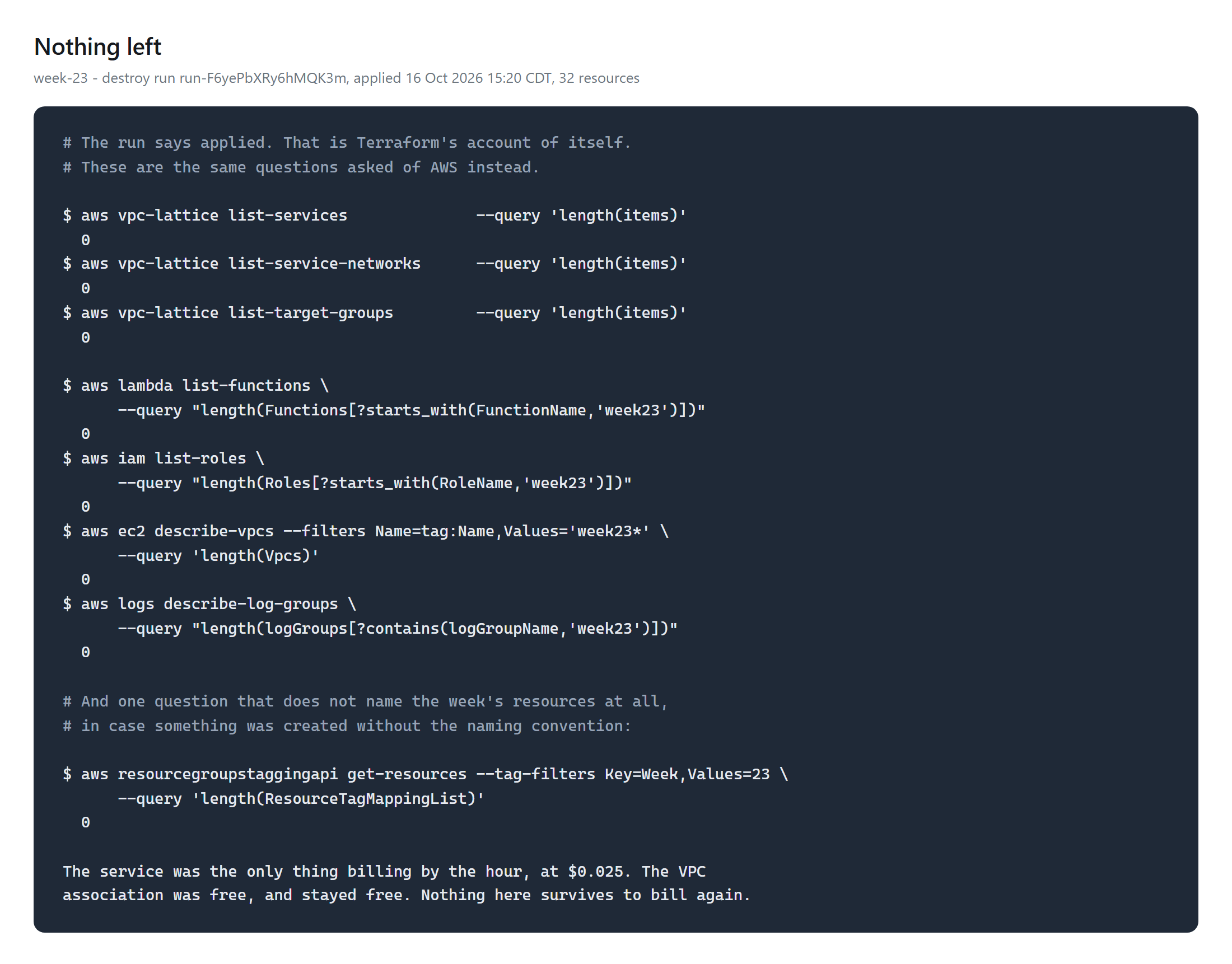
A VPC cannot be deleted while a service network association survives, so a half-finished destroy leaves a VPC that looks orphaned and is not. The teardown checks service networks, services, both association types, target groups, the VPC, the Lambdas, the log groups and the IAM roles, rather than trusting the destroy to have been complete.
The workspace is connected to version control, and HCP refuses a terraform
destroy from a laptop for exactly that reason — the destroy has to be a run
with an id someone can look up later. This one is
run-F6yePbXRy6hMQK3m, 32 resources.
References
Key Takeaways
- Identity is checkable, network position is not. Two functions in the same subnet behind the same security group got 200 and 403, and the only difference was the role.
- An attached policy is not an enforced policy. Check
authTypeand the policy'sstate, because the document looks correct either way. - A half-disabled control is more dangerous than a broken one. One layer kept refusing, so the system kept looking healthy while the other served the wrong caller.
- Test the refusal, and test the allow first. Every denial is meaningless until a legitimate call has succeeded — a broken build denies everything beautifully.
Comments