Business Challenge
A security team decides to get systematic about IAM. They turn on Access Analyzer across the organisation, in every Region, with every analyzer type available, and route the findings into the ticketing system. This is a good instinct and the setup takes an afternoon.
Six weeks later three things have happened. The findings queue is longer than when they started, because the analyzers keep producing and the team keeps triaging. A role that has demonstrably not been used in a year is still in the queue, unresolved, because nobody is confident enough to delete it. And there is a line item on the bill that grew with the number of Regions the platform team enabled, which nobody predicted because the first analyzer they turned on was free.
The queue is long for a structural reason rather than a staffing one. It contains two kinds of statement that look identical in a ticket and are not remotely the same claim. One kind says this policy allows an entity outside your zone of trust to reach this resource — a proof about a document, true right now, actionable immediately. The other says nobody used this permission during the tracking period — a statement about the past, which is evidence rather than proof, and which a quarterly batch job can falsify.
Working those two through one queue at one confidence level produces exactly what happened: the proofs get treated with the same hesitancy as the observations, and the observations get treated with the same finality as the proofs. Neither gets resolved.
External access analyzers are free and AWS requires one in every Region you use. Unused access analyzers are charged per analyzer, and their findings do not vary by Region at all. A team that learns the first rule during setup and applies it to the second pays for N copies of one answer — and because the free analyzer came first, nothing in the experience signals that the rule changed.
Architecture
Start with the concept everything else hangs off. When you enable IAM Access Analyzer, you create an analyzer for your entire organization or your account. The organization or account you choose is known as the zone of trust for the analyzer, and any access to resources by principals within your zone of trust is considered trusted.
That single choice determines what counts as a finding. Set the zone of trust to an account and every cross-account grant inside your own organisation is external. Set it to the organisation and those disappear. Neither is wrong; they answer different questions, and picking the account scope by accident is the usual reason a first run produces hundreds of findings that are all intended.
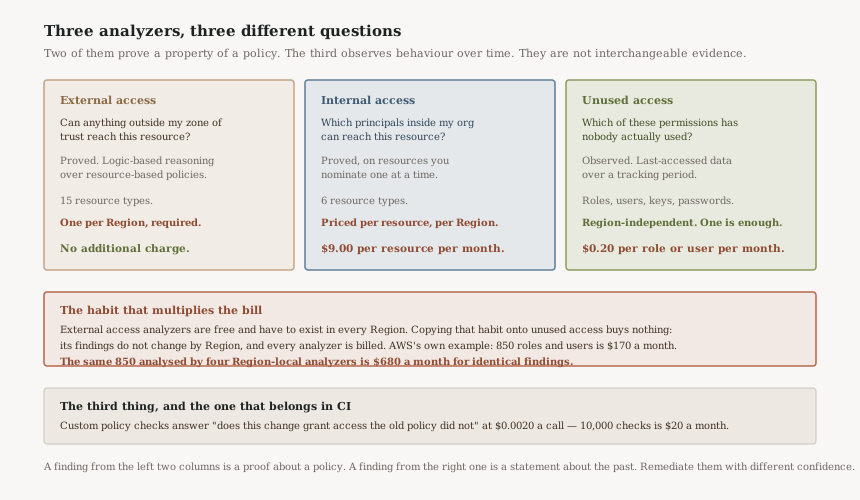
External access: a proof, per Region, for free
Access Analyzer identifies resources shared with external principals by using logic-based reasoning to analyze the resource-based policies in your AWS environment. This is not pattern matching and not log analysis — it is automated reasoning over the policy document, which is why a finding is a statement about what the policy permits rather than about what has happened.
It is responsive: if you add a new policy or change an existing policy, IAM Access Analyzer analyzes the new or updated policy within about 30 minutes. And it carries the constraint that decides your deployment shape: for external access, IAM Access Analyzer analyzes only policies applied to resources in the same AWS Region where it's enabled. One analyzer covers one Region. A Region without one is simply unexamined, silently, and the console gives no hint that a Region is missing.
It also covers a specific list — fifteen resource types for external access, from S3 buckets and IAM roles to DynamoDB tables and RDS snapshots. "Access Analyzer is clean" means clean for those types. It is a strong statement, not a total one.
Unused access: an observation, Region-independent, priced per principal
The unused access analyzer answers the opposite question and gets its answer a different way. It monitors IAM roles and users continuously, and the findings highlight unused roles, unused access keys for IAM users, and unused passwords for IAM users, plus unused services and actions for principals that are still active.
The tracking period is the setting that defines what "unused" means, and it has an edge that is easy to miss. The analyzer will only evaluate permissions for IAM entities that have existed for the entire tracking period, and you can enter a value between 1 and 365 days. AWS's own illustration: if you set a tracking period of 90 days, only permissions that are at least 90 days old will be analyzed, and findings will be generated if they show no usage during this period.
Read that twice, because it cuts both ways. A ninety-day window is a reasonable definition of unused — and it also means a role created last week, with every permission in the account, is not analysed at all. The tracking period is simultaneously a sensitivity dial and a blind-spot window, and the newest principals are always in the blind spot.
Two other properties matter for scoping. Service-linked roles aren't analyzed for unused access activity and they aren't included in the total number of IAM roles analyzed, which is both a coverage gap and a discount. And crucially: for unused access, findings for the analyzer do not change based on Region. Creating an unused access analyzer in each Region where you have resources is not required.
Why This Architecture Holds Up
It separates proof from evidence, which is what makes remediation possible
An external access finding can be actioned on its own. The reasoning engine has established what the policy permits; no further investigation changes that. An unused access finding cannot — it tells you nobody exercised a permission in a window, which is a strong hint and not a fact about whether the permission is needed. Once a team names that difference, the external queue starts clearing at the speed of change control and the unused queue turns into a periodic campaign with an owner, which is what it always was.
The zone of trust makes "intended" expressible
Most access-review tooling drowns in intended access. Access Analyzer's answer is to make the boundary a first-class input rather than a filter applied afterwards: everything inside the zone is trusted by definition and generates nothing. That is why an organisation-scoped analyzer is usually the right first deployment — it starts from a findings list that means something instead of one that has to be triaged down to meaning.
The same engine is available before deployment, not only after
Custom policy checks are the same technology pointed at a policy that does not exist yet: similar to external access findings, custom policy checks are built on Zelkova. That is the property that makes them worth putting in CI — a check answering "does this pull request grant access the previous version did not" is the same class of answer as the analyzer's, delivered before the merge rather than thirty minutes after the deploy.
Their failure mode is the right way round, too. In rare cases, IAM Access Analyzer isn't able to fully determine whether a policy statement grants new or specified access. In those cases, it errs on the side of declaring a false positive by failing the custom policy check. An occasional unnecessary failed build is the correct price for a gate that does not wave through a widening it could not evaluate.
Key Architecture Decisions
This is the decision with a number attached. Unused access analysis is $0.20 per IAM role or IAM user per month for every unused access analyzer you enable, and AWS is explicit that creating unused access analyzers across multiple Regions will result in you being charged for each analyzer. AWS's own example prices an organization with 850 IAM roles and users at $170 per month.
The arithmeticFour Region-local analyzers over that same estate is $680 per month — four times the cost for findings the documentation states do not change by Region. The reason this happens is not carelessness: external access analyzers genuinely do need to exist per Region, they are free, and they are what a team turns on first. The per-Region habit is learned in a context where it is correct and free, and then carried into one where it is neither.
The failure mode of the free analyzer is not cost, it is a coverage gap that produces no signal. A Region with no external access analyzer reports nothing, which is indistinguishable in a dashboard from a Region with nothing wrong. Since these analyzers cost nothing, there is no reason for the deployment to be selective — every enabled Region, without exception, created by the same mechanism that enables Regions.
Concrete ruleCreate them from the landing zone, in a StackSet or the equivalent, targeting all Regions and driven off the account baseline rather than a ticket. Then add a check that asserts the count of external access analyzers equals the count of enabled Regions, because the thing you are guarding against is an absence.
A short tracking period brings newer principals into scope sooner and produces more findings that a quarterly or annual process will contradict. A long one is quieter and leaves recently created principals unanalysed for longer. The number to reason from is not a security preference but the period of the slowest legitimate job in the estate — the quarter-end reconciliation, the annual audit export, the disaster-recovery drill.
The trapWhatever the period, the newest principals are the blind spot, and newly created over-permissioned roles are exactly the population you most want to see. Cover that gap somewhere else — a custom policy check at creation time, or an alert on role creation — rather than by shortening the tracking period until the findings become noise.
At $0.0020 per API call, AWS's example of 10,000 calls each month is $20 per month — which is to say a check on every policy change in a busy estate costs less than the meeting to discuss whether to have one. Three checks are available: against a reference policy, against a list of actions or resources, and for public access.
The limitation that matters hereCustom policy checks can't check whether an account is a member of a specific AWS organization, therefore they can't compare new access based on condition key values for the aws:PrincipalOrgId and aws:PrincipalAccount condition keys. That is directly awkward given that the right way to write a trust policy for your own estate is an organisation condition. The check cannot tell that your organisation condition narrows anything, so those policies need review by a human or by a rule of your own.
Which analyzer answers which question
| Analyzer | The question | Evidence | Regions | Price |
|---|---|---|---|---|
| External access | Can anything outside the zone of trust reach this resource? | Proof over the policy | One per Region, required | No additional charge |
| Internal access | Which principals inside the organisation can reach this resource? | Proof, on resources you nominate | Per resource, per Region | $9.00 per resource per month |
| Unused access | Which permissions has nobody used? | Observation over the tracking period | Region-independent — one is enough | $0.20 per role or user per month |
| Policy validation | Is this policy well formed and conventional? | Grammar and best-practice checks | n/a | No additional charge |
| Custom policy checks | Does this change grant access the old version did not? | Proof, before deployment | n/a | $0.0020 per call |
At $9.00 per resource monitored per Region per month it is priced to be pointed at specific things rather than switched on broadly — AWS's own example of 38 resources across five accounts comes to $342 per month. That pricing is a design hint: nominate the handful of resources where "which of our own people can reach this" is a question worth continuous proof, and answer it for everything else with the external analyzer and a review.
Reference: the check that belongs on every policy pull request
The reference-policy check, run against the previous version of a policy. It answers one question — does this change widen access — and it is the only check in this post that runs before the policy exists in the account.
aws accessanalyzer check-no-new-access \
  --existing-policy-document file://policy-main.json \
  --new-policy-document file://policy-proposed.json \
  --policy-type IDENTITY_POLICY \
  --query 'result' --output text

# PASS  -> no new access; merge
# FAIL  -> the response names the Sid of the widening statement
When it fails, the response includes the statement ID of the statement responsible, which is the argument for giving every statement a Sid even though the element is optional. Without one you get a zero-based statement index and a diff to read by eye; with one, the build failure names the thing that caused it.
Closing Thought
The previous post in this series argued for reading every trust policy in the account, and that is a finite exercise worth doing once. It is not worth doing every week, which is the honest limit of any manual review: it establishes a baseline and then decays from the moment it finishes.
What Access Analyzer offers is not a replacement for that reading but a way to keep its conclusion true. The external analyzer re-derives the boundary conclusion within about thirty minutes of every policy change. The custom policy check moves the same conclusion earlier still, into the pull request. Between them, the question "has anything widened since we last looked" stops requiring anyone to look.
The thing to keep straight is what each finding is claiming. A proof about a policy and an observation about a window are both useful and they are not the same kind of statement, and a queue that mixes them will resolve neither. Split them, give the unused campaign an owner and a cadence, let the external findings flow at the speed of change control — and create exactly one unused access analyzer, because the second one costs the same as the first and tells you nothing new.
Security & Identity — AWS Organizations as an identity boundary: delegated administration, the management account's exemptions, and why the account you run the organisation from should not be the account you run anything else from.
Official AWS Reference
- AWS Documentation — Using AWS Identity and Access Management Access Analyzer
- AWS Documentation — Create an IAM Access Analyzer unused access analyzer
- AWS Documentation — Checks for validating policies
- AWS Documentation — IAM Access Analyzer supported resource types
- AWS Documentation — IAM Access Analyzer policy generation
- AWS Pricing — IAM Access Analyzer
Comments