Business Challenge
Four posts on Azure Policy have built a particular set of reflexes: a definition states a rule, an assignment binds it to a scope, exclusions carve holes, and layered rules resolve to the most restrictive outcome. Azure RBAC presents an almost identical surface — a definition, an assignment, a scope in the same management group hierarchy — and then behaves differently in the one way that matters most.
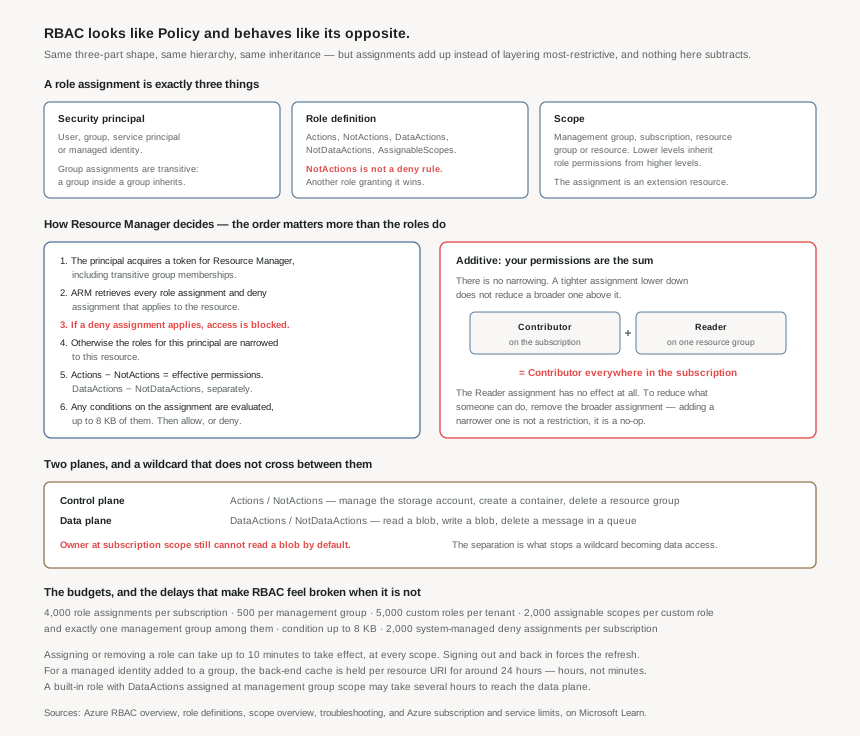
Azure RBAC is an additive model. Effective permissions are the sum of the role assignments. Microsoft's own example is the one worth memorising: a user granted Contributor at subscription scope and Reader on a resource group inside it ends up with Contributor across the subscription, and the Reader role assignment has no impact.
That single property invalidates the most common access-review instinct there is. The move that feels like tightening — "give them Reader on the sensitive resource group" — does nothing while a broader assignment exists further up. There is no scope-down, no override, no most-restrictive resolution. To reduce what somebody can do, the broader assignment has to be removed.
Three more properties of the model produce the rest of the surprises, and each one is documented rather than obscure:
NotActionsis not a deny rule. It subtracts from a wildcard within one role definition. If a second role grants the same action, the user is allowed to perform it. A role that excludes something is not a control that prevents it.- Control plane access does not reach the data. Owner at subscription scope can create, read and delete a storage account and still cannot read a blob inside it by default.
ActionsandDataActionsare separate lists, and the separation exists precisely so that a wildcard does not become data access. - Changes are not immediate. Assigning or removing a role can take up to 10 minutes to take effect. For a managed identity's group membership, the back-end cache is held per resource URI for around 24 hours.
Only two mechanisms remove access once a role assignment grants it: removing that assignment, or a deny assignment — a separate object that Resource Manager evaluates before role assignments and which blocks outright. Deny assignments are the subject of post #21 and are largely system-managed. Until then, treat every role assignment as permanent grant-by-addition, because that is what it is.
Architecture
Three elements, and the one that is usually chosen carelessly
A role assignment is a security principal, a role definition and a scope. The principal can be a user, a group, a service principal or a managed identity, and group assignments are transitive — a user in a group that is a member of another group holds that outer group's assignments.
Scope is one of four levels — management group, subscription, resource group, resource — structured parent to child, where lower levels inherit role permissions from higher levels. Since permissions only add, the scope chosen for an assignment is the whole of its blast radius, and it is the element most often picked for convenience. Subscription scope is where the portal lands you; it is rarely where the requirement lives.
The role definition is a collection of permissions with four action lists and an assignability list:
| Property | What it holds | The part that catches people |
|---|---|---|
Actions | Control plane actions the role allows, as {Company}.{ProviderName}/{resourceType}/{action} strings. | A wildcard includes actions defined in the future, as Azure adds new resource types. |
NotActions | Actions subtracted from a wildcard in Actions. Actions − NotActions = effective control plane permissions. | Not a deny. A second role granting the action wins. |
DataActions | Data plane actions — read a blob, write a blob, read a queue message. | Entirely separate from Actions. A control plane wildcard grants none of these. |
NotDataActions | Subtracted from DataActions the same way. | Same non-deny caveat as NotActions. |
AssignableScopes | Where the definition may be assigned. Built-ins use the root scope "/", meaning everywhere. | A custom role may name at most one management group, and custom roles with DataActions cannot be assigned at management group scope at all. |
The Contributor definition is the clearest illustration of how the subtraction is meant to be read. Its Actions is a single wildcard — manage everything — and its NotActions removes Microsoft.Authorization/*/Write, Microsoft.Authorization/*/Delete and Microsoft.Authorization/elevateAccess/Action, among others. That is the entire mechanism separating "can manage all resources" from "can grant themselves and others more access". It is one list in one definition, and it is not enforced against any other role the same principal might hold.
The evaluation order, which is where deny assignments live
Resource Manager's sequence is published, and reading it settles most access arguments faster than inspecting roles does:
- The principal acquires a token for Resource Manager. The token includes group memberships, including transitive ones.
- The call is made, and Resource Manager retrieves all the role assignments and deny assignments that apply to the resource.
- If a deny assignment applies, access is blocked. Evaluation stops.
- Otherwise, the role assignments are narrowed to this principal and this resource.
- Effective permissions are computed:
Actions − NotActions, and separatelyDataActions − NotDataActions. - If the action is not included, access is denied. If it is, any conditions on the assignment are evaluated — up to 8 KB of them — and access follows the result.
Two things are worth extracting from that. Deny assignments are evaluated before anything a role grants, which is what makes them the only real subtraction in the system. And conditions are evaluated last, on an assignment that has already granted the action — they narrow a grant, they do not create one.
The two planes
Authorization for all control plane API calls is handled by Resource Manager; authorization for data plane calls is handled by either a resource provider or Resource Manager. That split is the reason a subscription Owner cannot read blob data by default, and Microsoft's worked example states the consequence bluntly: to read the blobs, that Owner would have to retrieve the storage access keys and use them.
Which is the sentence to sit with, because it describes the failure mode rather than the control. The separation holds only while access keys are not the way in — the documentation conditions it on the container's authentication method being Microsoft Entra User Account and not Access Key. An estate that has not disabled key-based access to storage has a data plane boundary that anyone with control plane rights can walk around, using a documented, single-step procedure. RBAC's plane separation is real, and it is only as real as the key policy underneath it.
Role assignments are extension resources, and that shapes the tooling
A role assignment is an extension resource in Resource Manager — it exists as an extension of the thing it applies to, and its ID is that resource's ID plus /Microsoft.Authorization/roleAssignments/{roleAssignmentId}. Its name is a GUID, globally unique across every subscription, and the properties of an existing role assignment cannot be changed.
That immutability is what produces the most common infrastructure-as-code failure in this area. Deploy a role assignment for a managed identity, delete and recreate the identity, redeploy with the same assignment name, and the deployment fails with RoleAssignmentUpdateNotPermitted — because the same name with a different principal ID reads as an update, and updates are not allowed. The documented fix is to derive the name deterministically from what defines the assignment, using guid(scope, principalId, roleDefinitionId), so a genuinely different assignment gets a genuinely different name.
A second deployment-time trap comes from replication. Creating a principal and immediately assigning it a role can fail with PrincipalNotFound, because the principal was created in one region and the assignment may be processed in another that has not caught up. Setting principalType to User, Group or ServicePrincipal on the assignment is the documented remedy, and it belongs in every template that creates an identity and grants it access in the same deployment.
Why This Architecture Holds Up
Scope is the design, because scope is all the containment there is
With no subtraction available, the only way to bound what a principal can do is to choose the narrowest scope that satisfies the requirement, once, at assignment time. Every broader assignment is permanent containment lost until somebody removes it — and removals are the part of access management that never gets prioritised.
This is where the management group design from post #1 pays out or does not. A hierarchy whose groupings match how teams actually own things allows an assignment at a level that is both broad enough to be maintainable and narrow enough to be meaningful. A hierarchy that mirrors an org chart forces a choice between assigning too high or assigning per subscription, and the second one meets a limit.
The budgets, and what they push you toward
| Where | What | Maximum |
|---|---|---|
| Subscription | Role assignments | 4,000 |
| Management group | Role assignments | 500 |
| Tenant | Custom roles | 5,000 |
| Custom role | Assignable scopes | 2,000 |
| Custom role | Management groups in AssignableScopes | 1 |
| Role assignment | Condition size | 8 KB |
| Subscription | System-managed deny assignments | 2,000 |
A subscription allows 4,000 ÷ 500 = 8 times as many assignments as a management group, which is the opposite of the shape most estates need — the higher scope, where a single assignment does the most work, has the smaller budget. Read together, the two numbers say: do not put per-person assignments at management group scope, and do not put per-person assignments anywhere.
Assign to groups, not to people. It is the standard advice and the limits make it structural rather than stylistic: one assignment per group per scope, with membership managed in the directory, keeps an estate inside both budgets indefinitely. One assignment per person per resource group does not.
The lifecycle events that silently break access
Four documented behaviours turn ordinary infrastructure work into an access incident, and none of them raise an error at the time:
- Deleting a principal leaves the assignment behind. It shows as Identity not found with an Unknown type — a permission grant to a principal that no longer exists, accumulating quietly in every access review.
- Moving a resource does not move its role assignments. An assignment made directly on a resource becomes orphaned; the documented practice is to remove it before the move and re-create it after.
- Transferring a subscription to a different Microsoft Entra directory permanently deletes every role assignment, with no migration to the target directory. Managed identities have to be recreated by hand as well. This is a rebuild, not a move.
- The last Owner assignment on a subscription cannot be removed by default, to avoid orphaning it. Worth knowing before a cleanup script meets it.
The first two are the ones to automate against: a periodic sweep for assignments with unresolvable principals, and a rule that role assignments live in the same template as the resource they extend so a move recreates them.
"Privileged" has a definition you can audit against
Microsoft publishes exactly which actions make a role privileged: the wildcard *, */write, */delete, and the write and delete actions on roleAssignments, roleDefinitions and denyAssignments. That is a machine-checkable definition, and it is more useful than the informal habit of treating Owner and User Access Administrator as the privileged set and stopping there.
The query worth running against any estate: which principals hold a role containing any of those actions, at which scope, and how many of them are groups with membership nobody has reviewed. The answer is usually longer than expected, because Microsoft.Authorization/roleAssignments/write is the permission that lets a principal grant itself everything else — and it is the exact permission Contributor's NotActions exists to withhold.
Key Architecture Decisions
The shape that works
| Decision | What to do | Why |
|---|---|---|
| Who gets assignments | Groups, always. Individual assignments only for break-glass, documented and time-bound | Assignments are transitive for groups, and the per-scope budgets are consumed by assignments rather than by people. |
| Scope | The narrowest level that satisfies the requirement, chosen deliberately rather than accepted from the portal | Permissions only add. A broad assignment cannot be narrowed later by anything except its own removal. |
| Reducing someone's access | Remove the broader assignment. Never add a narrower one and call it done | Contributor at subscription plus Reader on a resource group is Contributor. The narrower assignment has no impact. |
| Data access | Assign data plane roles explicitly, and disable key-based access to storage | Plane separation holds only while access keys are not an alternative route. Otherwise a control plane wildcard reaches the data in one documented step. |
| Role assignments in IaC | Name them guid(scope, principalId, roleDefinitionId) and set principalType |
Assignment properties are immutable, so a reused name reads as a forbidden update; and a new principal may not have replicated when the assignment is created. |
| Referencing roles | Use the role ID, not the display name | Renaming a role does not change its ID, and built-in role IDs are the same across clouds. |
| Custom role scoping | AssignableScopes at management group or subscription; assign narrowly. Never a resource instance |
Access is decided by the assignment, not by AssignableScopes — and a role per resource burns the 5,000-per-tenant budget. |
| Pipelines that grant then act | Allow for up to 10 minutes of propagation; for managed identity group membership, allow hours | Both delays are documented, and both look exactly like a permissions bug when they are not. |
| Resource moves and directory transfers | Remove and re-create assignments around a move; treat a directory transfer as a full rebuild of access | Assignments do not follow a moved resource, and a directory transfer deletes all of them permanently. |
| Auditing privilege | Query for the documented privileged actions, not for role names | *, */write, */delete and the roleAssignments, roleDefinitions and denyAssignments writes are the published definition, and custom roles can hold them without an alarming name. |
Closing Thought
The two governance systems in Azure look alike on purpose — definition, assignment, scope, inheritance — and it would be reasonable to expect them to compose the same way. They do not, and the difference is not a detail of implementation. Policy answers what may exist and resolves conflicts by taking the most restrictive answer, because a resource either meets a standard or does not. RBAC answers who may act and resolves them by taking the union, because a person's permissions are the collection of things they have been trusted with.
Both are the right choice for their question, and holding them in one mental model is what causes the mistakes. The Policy habit of adding a narrower rule to tighten an outcome is, in RBAC, an action with no effect whatsoever — and it is an action that feels responsible while producing an access review that reports work done and access unchanged.
The check that cuts through it: for any principal you are worried about, do not read their role names. List every assignment that applies to them at every scope above the resource, and ask what the union grants. That is what Resource Manager will do, and it is the only calculation that matches what actually happens.
#19 goes through the built-in roles worth knowing and the ones routinely misused — why Contributor is the wrong default for most teams, what User Access Administrator actually unlocks, and the data plane roles that have to be granted separately because a control plane role will never imply them.
Comments