Business Challenge
#109 ended on an asymmetry: FIS supplies the mechanism that stops an experiment, and you supply the alarm that decides when. The guardrail is “a mechanism to stop an experiment if it reaches a threshold that you define as an Amazon CloudWatch alarm”.
So it is worth knowing precisely how that alarm behaves, and the answer is more interesting than it fires when the metric breaches. An alarm has three states rather than two, the default handling of absent data lands in the third one, and the action at the end of it is not checked by anything.
Four treatments are available for absent datapoints, and they produce genuinely different
verdicts: notBreaching – Missing data points are treated as
“good” and within the threshold,
breaching – Missing data points are treated as “bad” and
breaching the threshold,
“ignore – The current alarm state is maintained”, and
“missing – If all data points in the alarm evaluation range are
missing, the alarm transitions to INSUFFICIENT_DATA.”
“The default behavior is missing.”
Which means the out-of-the-box answer to the data stopped arriving is INSUFFICIENT_DATA, and INSUFFICIENT_DATA is not ALARM. An alarm action attached to the ALARM transition does not fire. For an FIS stop condition that is the whole guardrail: an experiment that broke the thing producing the metric has silenced its own guardrail, and the experiment runs on.
AWS is careful about the ambiguity rather than hiding it: “This might indicate that your resource is inactive, and might not necessarily mean that there is a problem.” True — and it might. INSUFFICIENT_DATA is the absence of a judgement, not a judgement of health, and on a dashboard it is simply a different colour.
FixChoose the treatment deliberately for every alarm that drives an action, and write the reason next to it. For an alarm guarding a destructive experiment or a failover, breaching is usually the honest choice: if you cannot see the system, assume the worst. AWS makes the opposite recommendation for a specific case worth respecting — for EC2 alarms taking stop, terminate, reboot or recover actions it recommends treating missing data as missing and triggering only in ALARM, because there the false positive destroys a healthy instance.
“CloudWatch doesn't test or validate the actions that you specify, nor does it detect any Amazon EC2 Auto Scaling or Amazon SNS errors resulting from an attempt to invoke nonexistent actions. Make sure that your alarm actions exist.”
Two failures in one sentence. The action is not validated when you create the alarm, and errors from invoking a nonexistent action are not detected when it fires. So an alarm can be correctly configured, evaluate correctly, transition correctly, and deliver nothing — with no error recorded against the alarm and nothing in its history to distinguish that from a successful notification.
The usual way in is ordinary: an SNS topic deleted during a cleanup, a scaling policy renamed, an account migration that moved a topic ARN. The alarm keeps working. The pager stops.
FixTest the delivery path, not the alarm. SetAlarmState forces an alarm into any state and the change “lasts only until the next alarm comparison occurs”, which makes it a cheap end-to-end check: force ALARM, confirm something arrived at the other end, let it settle back. An alarm nobody has ever seen fire is an alarm whose action has never been proven, and that is the common case for the alarms that matter most.
“An alarm invokes actions only when the alarm changes state. The exception is for alarms with Auto Scaling actions. For Auto Scaling actions, the alarm continues to invoke the action once per minute that the alarm remains in the new state.”
So one alarm has two action semantics. An SNS notification is edge-triggered: one message per transition. An Auto Scaling action is level-triggered: once a minute for as long as the state persists. That is the correct design for each — you want one page and continuous scaling — but it means reasoning about what happens while this alarm is in ALARM has a different answer depending on what is attached.
And the tool for reducing alarm noise cannot be the tool that acts: “Composite alarms can send Amazon SNS notifications when they change state … but can't perform EC2 actions or Auto Scaling actions.” So a composite that correctly identifies a real problem out of five noisy signals can page a human and cannot scale the fleet. Remediation stays on the individual metric alarms, which are the noisy ones.
FixKeep two layers and know which is which: metric alarms carry the actions, composite alarms carry the notifications. Where you want a composite's judgement to drive remediation, the path is the composite notifying something that acts — an SNS topic into Lambda or an SSM automation — rather than attaching an Auto Scaling action that the API will accept conceptually and the composite cannot perform.
Architecture
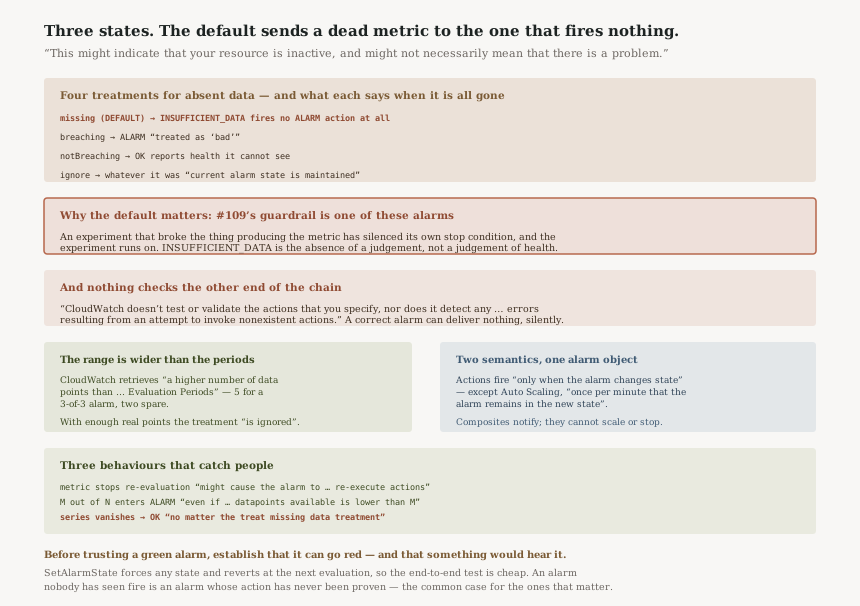
Four treatments, and what each says when the data is all gone
| Treatment | What AWS says | State when every point is missing |
|---|---|---|
missing (default) |
“the alarm transitions to INSUFFICIENT_DATA” | INSUFFICIENT_DATA — fires no ALARM action |
breaching |
treated as “bad” and breaching the threshold | ALARM |
notBreaching |
treated as “good” and within the threshold | OK — reports health it cannot see |
ignore |
“The current alarm state is maintained” | Whatever it was before |
notBreaching is the one to be careful with. An alarm that treats absent data as healthy
will sit in OK through a total outage of whatever produced the metric, which is indistinguishable on
a dashboard from a system that is genuinely fine.
One namespace overrides the default
“Alarms that evaluate metrics in the AWS/DynamoDB namespace default to ignore
missing data.”
A sensible special case — DynamoDB metrics like ThrottledRequests only emit when the
thing happens, so treating silence as missing would leave those alarms permanently in
INSUFFICIENT_DATA. It is also a per-namespace exception to a documented global default, which is the
kind of thing that makes what does this alarm do when data stops a question you have to answer
per alarm rather than per account.
The evaluation range is wider than the evaluation periods
“Whenever an alarm evaluates whether to change state, CloudWatch attempts to retrieve a higher number of data points than the number specified as Evaluation Periods.” For an alarm with Evaluation Periods and Datapoints to Alarm both at 3, CloudWatch retrieves the 5 most recent points — two more than it needs.
The consequence is the useful part: “In this case, the value you set for how to treat missing data is not needed and is ignored.” If enough real datapoints exist anywhere in the wider range, your missing-data setting never comes into play. So the setting is not a knob that shapes normal operation — it is a fallback that only engages when data is genuinely sparse, which is exactly when nobody is watching.
Two behaviours that catch people
A stopped metric can re-fire actions. “CloudWatch alarms might repeatedly re-evaluate the last set of data points for a period of time after the metric has stopped flowing. This re-evaluation might cause the alarm to change state and re-execute actions, if it had changed state immediately before the metric stream stopping.” AWS's mitigation is to use shorter periods. Worth knowing if an action is not idempotent.
An alarm can reach ALARM on fewer datapoints than M. “alarms are designed to always go into ALARM state when the oldest available breaching datapoint during the Evaluation Periods number of data points is at least as old as the value of Datapoints to Alarm”, and in that case “the alarm goes into ALARM state even if the total number of datapoints available is lower than M”. An M-out-of-N alarm is not a strict counter; it has deliberate logic to avoid both false positives and indefinite silence, and the second half of that logic surprises people who read 2 out of 3 literally.
For multi-series alarms, a vanished contributor reports OK
Metrics Insights alarms over several time series add a case the single-metric rules do not cover:
“If a time series is not retrieved by the query anymore, it will transition to OK no matter
the treat missing data treatment”, with
“the StateReason specifies that the aforementioned contributor was not found
with the message, “No data was returned for this contributor”.
No matter the treat missing data treatment is the phrase to notice. A host that disappears from the query — terminated, renamed, stopped reporting — becomes OK, even on an alarm configured to treat missing data as breaching. The whole-query case behaves differently: “At alarm level, if the query returns an empty result (no time series at all), the treat missing data treatment is applied.” So losing one contributor is OK and losing all of them is breaching, if you configured it that way.
Limits worth knowing
“There is no limit to the number of alarms that you can create”, which is unusual and removes the main excuse for under-alarming. The bounded things are time: “CloudWatch preserves alarm history for 30 days”, and “The maximum evaluation period is seven days for alarms with a period of at least one hour (3600 seconds)” — 168 hourly periods. Thirty days of history is the one to plan around if alarm behaviour ever features in a post-incident review.
One structural limit: “Creating cross-account composite alarms is not supported.” A composite cannot span accounts, so an organisation-wide judgement built from per-account alarms has to be assembled somewhere other than in a composite.
Why This Architecture Holds Up
Three states is more honest than two
A binary alarm would have to call absent data either healthy or broken, and both are wrong often enough to matter. A third state that means I cannot tell is the correct model, and making it the default is defensible: an alarm that cannot see should not assert. The cost is that a dashboard full of green and grey reads as fine, and grey is not fine.
The wider evaluation range is a real kindness
Retrieving more datapoints than needed, and using the missing-data treatment only when real data runs out, means intermittent telemetry does not constantly flip alarm states. The premature-alarm logic is the same instinct. Both are the service absorbing messiness rather than passing it to you, and both are invisible when they work.
Giving Auto Scaling level-triggered actions is correct
Scaling needs continuous pressure while a condition holds, and notification needs exactly one message per transition. Implementing both semantics behind one alarm object is the right trade even though it makes the object harder to describe. The alternative — one semantics for everything — would break one of the two use cases.
Key Architecture Decisions
| Decision | Choose this | Because |
|---|---|---|
| Alarm guarding a destructive action or failover | breaching, deliberately |
The default sends it to INSUFFICIENT_DATA, which fires nothing |
| EC2 alarm taking stop, terminate, reboot or recover | missing, and trigger only in ALARM |
AWS recommends it — here a false positive destroys a healthy instance |
Using notBreaching |
Only where silence genuinely means health | Otherwise the alarm reports OK through an outage of the metric source |
| Proving an alarm works | SetAlarmState and confirm delivery |
Nothing validates the action exists, and nothing reports it failing |
| Composite alarm driving remediation | Notify something that acts | Composites cannot perform EC2 or Auto Scaling actions |
| Non-idempotent alarm actions | Shorter periods | A stopped metric stream can re-evaluate and re-execute actions |
| Multi-series alarms on a fleet | Alarm on the aggregate too, not only per contributor | A vanished contributor goes to OK regardless of the missing-data setting |
| Alarm behaviour in a post-incident review | Capture history within 30 days | That is how long CloudWatch keeps it |
The audit worth running
List the alarms that have actions attached, and check their missing-data treatment.
Anything on the default, missing, goes quiet rather than loud when its telemetry stops.
For most dashboards that is right. For a guardrail — an FIS stop condition, a failover trigger,
a circuit breaker — it is backwards, and it is the default.
Then force one of your most important alarms into ALARM and watch what arrives. If
nothing does, you have found the failure in challenge 2, and the only way to find it is to look.
SetAlarmState reverts at the next evaluation, so the test is cheap.
Finally, look for composite alarms with remediation expectations attached to them. A composite cannot scale or stop an instance. If somebody drew an architecture where it does, the remediation is not happening and nothing is reporting that either.
Closing Thought
The run of posts before this one kept finding instruments whose output was narrower than it read: an index that answers partially, a compliance status that is an estimate, a guardrail that is an alarm somebody wrote. This post is the floor underneath all of them, because that alarm is where most of those controls bottom out.
And the floor has a specific shape. Not-in-ALARM is two states, one of which means nothing is known. The default handling of absent data lands there. The action at the end of the chain is unvalidated and its failure unreported. None of that is hidden — every sentence above is from the documentation — but none of it is visible from the alarm's colour, which is the only thing most people ever look at.
So the habit is the same one this series keeps arriving at, applied one level lower: before trusting a green alarm, establish that it can go red, and that something would hear it.
Reliability — CloudWatch Synthetics canaries: what a canary proves that a metric alarm cannot, why a passing canary and a healthy service are different claims, and what happens to the canary's own alarm when the canary stops running.
Official AWS Reference
- Configuring how CloudWatch alarms treat missing data — the four treatments and their exact behaviour, that
missingis the default, theAWS/DynamoDBnamespace exception, the wider evaluation range and when the treatment is ignored, the re-evaluation after a metric stops flowing, the premature-alarm logic that can enter ALARM on fewer than M datapoints, the EC2 stop/terminate/reboot/recover recommendation, and the Metrics Insights rules where a vanished contributor goes to OK - Using Amazon CloudWatch alarms — that actions fire only on state change except Auto Scaling actions which repeat once per minute, that CloudWatch neither validates alarm actions nor detects errors invoking nonexistent ones, that composite alarms cannot perform EC2 or Auto Scaling actions, the INSUFFICIENT_DATA note about inactive resources, 30-day alarm history, no limit on alarm count, the seven-day maximum evaluation period, and that cross-account composite alarms are unsupported
- Stop conditions for AWS FIS — that an FIS stop condition is a CloudWatch alarm you define, which is what makes this post's alarm semantics load-bearing for #109
- Alarm evaluation window — further reading on sliding versus wall clock evaluation windows, which changes whether the wider evaluation range applies; no claims in this post are drawn from it
Comments