Business Challenge
#89 ended on a deferral: conditional forwarding “is supported using Azure DNS Private Resolver”, and nothing in private zones themselves reaches on-premises. This is that piece, and it is the first thing in three posts that is a managed replacement for something people used to build out of virtual machines.
“Azure DNS Private Resolver is a fully managed, highly available service that enables secure and seamless DNS resolution between Azure virtual networks and on-premises environments—without the need to deploy, manage, or patch custom DNS servers.”
And the client side is unchanged: “You don't need to change any DNS client settings on your virtual machines to use the Azure DNS Private Resolver.”
That second sentence is the one to hold on to, because it is also a condition. The resolver works by inserting itself into the resolution path that Azure-provided DNS already follows — and as the order below shows, a virtual network configured with custom DNS servers never reaches that path at all.
One prerequisite sits outside DNS entirely: “DNS resolution between Azure virtual networks and on-premises networks requires Azure ExpressRoute or a VPN.” The resolver answers queries over private connectivity; it does not create it. Everything from #73 through #76 is the substrate this assumes.
Architecture
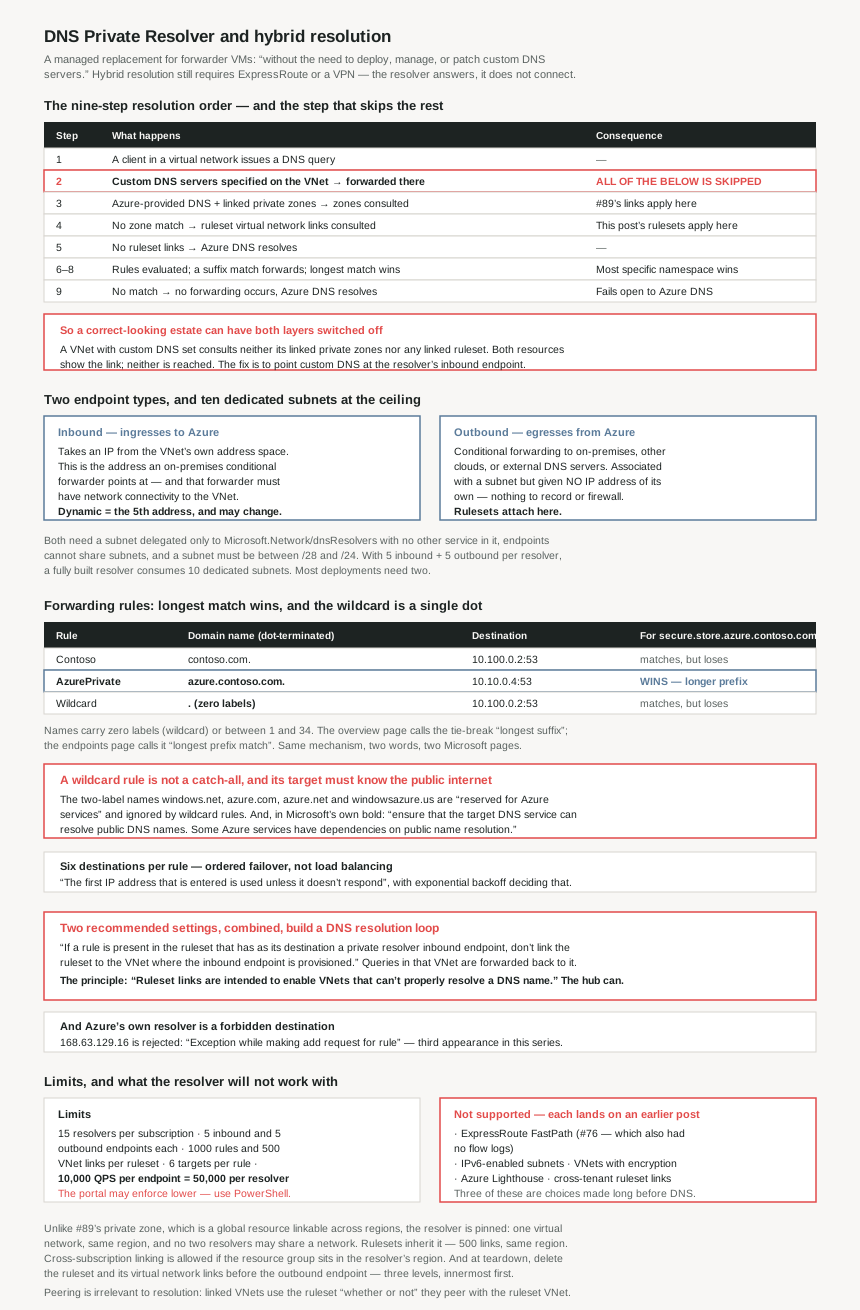
The resolution order, and the step that bypasses it
| Step | What happens | Consequence |
|---|---|---|
| 1 | A client in a virtual network issues a DNS query | — |
| 2 | “If you specify custom DNS servers for this virtual network, the query is forwarded to the specified IP addresses” | Everything below is skipped |
| 3 | With Azure-provided DNS and private zones linked to the same virtual network, “these zones are consulted” | #89's links apply here |
| 4 | No private zone match → “Virtual network links for DNS forwarding rulesets are consulted” | This post's rulesets apply here |
| 5 | No ruleset links → Azure DNS resolves | — |
| 6–8 | Rules evaluated; a suffix match forwards; “if multiple matches are present, the longest suffix is used” | Longest match wins |
| 9 | “If no match is found, no DNS forwarding occurs and Azure DNS is used” | Fails open to Azure DNS |
Limits
| Resource | Limit |
|---|---|
| DNS private resolvers per subscription | 15 |
| Inbound endpoints per resolver | 5 |
| Outbound endpoints per resolver | 5 |
| Forwarding rules per ruleset | 1000 |
| Virtual network links per ruleset | 500 — same region only |
| Outbound endpoints per ruleset | 2 — same resolver instance |
| Rulesets per outbound endpoint | 2 |
| Target DNS servers per forwarding rule | 6 — ordered failover, not load balanced |
| QPS per endpoint | 10,000 |
Those compose into useful totals: 6000 forwarding destinations expressible in one ruleset, and 50,000 queries per second of inbound capacity per resolver. And a footnote worth reading twice: “Different limits might be enforced by the Azure portal until the portal is updated. Use PowerShell to provision elements up to the most current limits.”
Why This Architecture Holds Up
Because custom DNS on the virtual network bypasses everything
Step 2 of the resolution order is the single most consequential sentence in this material, and it is phrased as a neutral branch rather than a warning:
“If you specify custom DNS servers for this virtual network, the query is forwarded to the specified IP addresses.”
Steps 3 through 9 — private zone lookup, ruleset links, forwarding rules, the fallback to Azure DNS — are downstream of not having taken that branch.
So a virtual network with custom DNS servers configured does not consult its linked private DNS zones through this path, and does not consult any forwarding ruleset linked to it. Both of those are configurations that look correct in the portal: the zone shows the link, the ruleset shows the link, and neither is reached.
This is the explanation for a specific and common confusion. #89's entire access model is the virtual network link, and a link is necessary but not sufficient — the virtual network also has to be using Azure-provided DNS for the link to be consulted. An estate that standardised on custom DNS servers years ago, pointing at domain controllers, has private zone links that do nothing until something forwards to Azure on their behalf.
Which is precisely one of the two documented designs below: “Inbound endpoints… can be configured as custom DNS for a VNet. This configuration can replace instances where you're using your own DNS server as custom DNS.” The resolver's inbound endpoint is the thing you point custom DNS at so that steps 3 onward happen again.
Because the match is longest-prefix, and the two pages call it different things
The overview page says “if multiple matches are present, the longest suffix is used.” The endpoints and rulesets page says “If multiple rules are matched, the longest prefix match is used.” Same mechanism, opposite word, two Microsoft pages.
The worked example settles which description is operationally useful:
| Rule name | Domain name | Destination |
|---|---|---|
| Contoso | contoso.com. | 10.100.0.2:53 |
| AzurePrivate | azure.contoso.com. | 10.10.0.4:53 |
| Wildcard | . | 10.100.0.2:53 |
“A query for secure.store.azure.contoso.com matches the AzurePrivate rule… and also the Contoso rule… but the AzurePrivate rule takes precedence because the prefix azure.contoso is longer than contoso.”
Either word describes it if you know what is being compared — the more specific namespace wins, which is how DNS has always worked and the same principle #78 established for route tables. The reason to notice the discrepancy is that it makes the documentation unsearchable in one direction: someone looking for “suffix” behaviour will not find the page with the example, and vice versa.
Note also the . in that third row. The wildcard rule is a single dot — a namespace with “zero labels (for wildcard)”, against “between 1 and 34 labels” for everything else — and the domain name is “dot-terminated”, so contoso.com. rather than contoso.com.
Because a wildcard rule does not catch what you think it catches
A catch-all rule is the natural way to send everything unresolved to an on-premises DNS service, and it has two documented behaviours that will surprise whoever writes it. The first is an exclusion list:
“Certain domains are ignored when using a wildcard rule for DNS resolution, because they're reserved for Azure services… The two-label DNS names… (for example: windows.net, azure.com, azure.net, windowsazure.us) are reserved for Azure services.”
So the dot rule is not actually a catch-all. Azure carves out its own service namespaces and resolves them itself, which is a sensible safety mechanism and is invisible from the rule definition. It also means you cannot use a wildcard rule to intercept or redirect Azure service names, whether you wanted to for inspection, for an air-gapped environment, or by accident.
The second behaviour is the one that can take an application down, and the documentation sets it in bold:
“If you include a wildcard rule in your ruleset, ensure that the target DNS service can resolve public DNS names. Some Azure services have dependencies on public name resolution.”
That is the same shape as #79's forced tunnelling problem, moved from routing to naming. Sending all unmatched DNS to an internal resolver that only knows internal names breaks every Azure service that resolves a public hostname to function — and the failure is not in your application's own names, so it presents as unrelated platform breakage.
Because two correct-looking settings build a resolution loop
This is flagged as Important on the endpoints page and repeated in the design-options section, which is usually a sign it happens:
“If a rule is present in the ruleset that has as its destination a private resolver inbound endpoint, don't link the ruleset to the VNet where the inbound endpoint is provisioned. This configuration can cause DNS resolution loops… This configuration leads to forwarding of DNS queries in myeastvnet for azure.contoso.com back to myeastvnet, thus causing a loop.”
Both halves are individually reasonable. A rule forwarding a private zone's namespace to an inbound endpoint is the documented way to let spokes resolve a zone they are not linked to. Linking the ruleset broadly — to every virtual network, including the hub — is the obvious way to make a ruleset authoritative everywhere. Put them together and the hub forwards its own queries to itself.
The stated principle is the thing to design from: “Ruleset links are intended to enable VNets that can't properly resolve a DNS name to resolve the name through forwarding.” A ruleset link is a remedy for networks that lack a path, not a policy to apply uniformly. The hub already has the path; linking it there is what closes the circle.
There is a narrower version of the same warning: “Don't use the private resolver's inbound endpoint IP address as a forwarding destination for zones that aren't linked to the virtual network where the private resolver is provisioned.” Forwarding to an inbound endpoint only works if that endpoint's own virtual network can resolve the name, which is why: “The VNet with the private resolver must also be linked from any private DNS zones for which there are ruleset rules.”
Because the platform address is forbidden as a destination
168.63.129.16 makes its third appearance in this series, and this time as a prohibition:
“You can't enter the Azure DNS IP address of 168.63.129.16 as the destination IP address for a rule. Attempting to add this IP address outputs the error: Exception while making add request for rule.”
#83 found it as the immutable source of every load balancer health probe, and the reason dual-NIC appliances need policy routing. #88 found that a virtual network must not use the Microsoft-owned range containing it. Here, pointing a forwarding rule at it is rejected outright — sensibly, since forwarding Azure's resolver to Azure's resolver is the loop above in its purest form. The error message is worth memorising because it says nothing about why.
Because six destinations are a failover list, not a pool
Up to 6 target DNS servers per rule reads like load distribution. It is not:
“If multiple DNS servers are entered as the destination for a rule, the first IP address that is entered is used unless it doesn't respond. If the first DNS Server does not respond, the next DNS Server on the list is used for the next attempt. An exponential backoff algorithm is used to determine whether or not a destination IP address is responsive.”
So order matters, the first entry carries all the traffic, and the rest are standby. Two consequences. A list of six healthy DNS servers does not spread load — if the first one is undersized, adding five more changes nothing until it fails. And failover is governed by an exponential backoff whose timings are not published, so the recovery behaviour after a transient failure is not something you can put a number on. This is the same shape as #83's flapping-probe penalty: a deliberate, unquantified wait.
Because every endpoint needs its own dedicated subnet, and there can be ten
The subnet rules are strict and they compound. Both endpoint types require a subnet “delegated to Microsoft.Network/dnsResolvers” that “can't be used for other services”, with “no other service running in the subnet”. Then: “Multiple DNS resolver endpoints can't share a subnet… a single DNS resolver endpoint can only use a single subnet.”
With 5 inbound and 5 outbound endpoints per resolver, a fully built resolver consumes ten dedicated subnets, none of which can host anything else. Sizing is bounded at both ends — “a minimum of /28 address space or a maximum of /24” — with the guidance that “A /28 subnet is sufficient to accommodate current endpoint limits” and “a subnet size of /27 to /24 can provide flexibility if these limits change.”
In a hub whose addressing was planned before any of this existed — and #77 found hubs already carry mandated subnets they cannot avoid — ten additional single-purpose subnets is a real claim on the hub's address space. Most deployments need one inbound and one outbound, so two; the ceiling matters only when planning the range.
One asymmetry between the two endpoint types is easy to miss and affects documentation: “An outbound endpoint is associated with a subnet, but isn't provisioned with an IP address like the inbound endpoint.” There is no outbound address to record or firewall.
Because the inbound address is the fifth one, and may not stay
The inbound endpoint is the address an on-premises conditional forwarder points at, which makes its stability a hybrid-DNS dependency rather than an Azure detail:
“If you choose a dynamic IP address, the fifth available IP address in the subnet is assigned. For example, 10.10.0.4 is the fifth IP address in the 10.10.0.0/28 subnet… If the inbound endpoint is reprovisioned, this IP address could change, but normally the 5th IP address in the subnet is used again.”
“Could change, but normally… is used again” is not a guarantee, and the thing on the other end of it is a conditional forwarder in someone else's DNS infrastructure, often change-controlled separately. Static is available, with one restriction: “If you select static, you can't choose a reserved IP address in the subnet.” For an address that will be written into on-premises configuration, static is the option that matches the dependency.
Because the two designs differ in who must link the private zone
Both documented designs solve “a spoke needs to resolve a private zone”, and they put the zone link in different places:
| Ruleset links — distributed | Inbound endpoint as custom DNS — centralised | |
|---|---|---|
| Spoke needs a private zone link? | No — “the spoke vnet doesn't need to be linked to the private DNS zone” | — |
| Hub needs a private zone link? | Yes — the resolver's VNet must be linked from any zone the ruleset references | Yes — “the VNet where the inbound endpoint exists must be linked to the private zone” |
| How spokes reach it | A rule forwarding the zone's namespace to the hub's inbound endpoint | Custom DNS on the spoke pointing at the inbound endpoint |
| Suits | Traffic “spread across your Azure network”; one ruleset controls every linked VNet | Traffic “mostly to a hub VNet… controlled from a central location” |
| Loop risk | Yes — do not link the ruleset to the hub | Lower — but if a ruleset is linked to the hub, “all DNS traffic sent to the inbound endpoint is processed by the ruleset” |
The ruleset-link design has the better property for #89's one-registration-zone constraint: a spoke resolves the zone without consuming its single private-zone registration link, because the resolution happens in the hub. The custom-DNS design has the better property for an estate that already uses custom DNS everywhere, because it replaces the forwarder rather than fighting it.
And in both, peering is irrelevant to resolution — the same decoupling #89 found: “The peering connection shown in the diagram is not required for name resolution. VNets that are linked from a DNS forwarding ruleset use the ruleset… whether or not the linked VNet peers with the ruleset VNet.”
Because the resolver is pinned to one network, and the exclusions hit this series
The resolver is less portable than the zones it serves. #89's private zone is a global resource linkable across regions; the resolver is the opposite: “A DNS resolver can only reference a virtual network in the same region… A single DNS resolver can reference only one virtual network, and multiple DNS resolvers can't share the same virtual network.” Rulesets inherit it — 500 links, “in the same region”, and “can't be linked to a virtual network in another region.”
Cross-subscription is allowed with a caveat that reads like a portal artefact but is load-bearing: “You can also link a ruleset to a virtual network in another Azure subscription. However, the resource group specified must be in the same region as the private resolver.” Cross-tenant is not: “Cross-tenant linking of Rulesets isn't supported.”
The remaining exclusions each land on something earlier in this series:
| Not supported | Where it bites |
|---|---|
| “DNS private resolver doesn't support Azure ExpressRoute FastPath” | #76 — and FastPath already had no flow logs. It now also has no private resolver. |
| “You can't use IPv6 enabled subnets” | The third IPv6 gap this series has met, after Azure Firewall's unsupported DNAT and vHub firewall. |
| “VNets with encryption enabled don't support Azure DNS Private Resolver” | A virtual network feature chosen for compliance excludes the managed DNS service entirely. |
| “isn't compatible with Azure Lighthouse” | Managed-service-provider estates. The docs even say how to check: look for Service provider offers. |
One deletion-ordering rule belongs with these, because it is the kind of thing discovered at teardown: “You can't delete an outbound endpoint unless you first delete the DNS forwarding ruleset and the virtual network links under it.” Three levels, innermost first.
Key Architecture Decisions
| Decision | Choose | Because |
|---|---|---|
| A virtual network that already has custom DNS servers | Point custom DNS at the inbound endpoint | Step 2 of the resolution order short-circuits private zone links and rulesets alike. Both will show as linked and neither will be consulted. |
| Which design for spokes resolving a hub's private zone | Ruleset links for distributed, inbound-as-custom-DNS for centralised | They differ in who must link the zone. The ruleset design leaves the spoke's single registration link free, per #89. |
| Linking the ruleset to the hub | Do not, if a rule targets that hub's inbound endpoint | Documented DNS resolution loop. Ruleset links are “intended to enable VNets that can't properly resolve a DNS name” — the hub already can. |
| A catch-all forwarding rule | Only if the target resolves public names | Microsoft's own bolded warning. Some Azure services depend on public resolution, and the breakage appears outside your own namespaces. |
| Expecting a wildcard rule to catch everything | It will not | windows.net, azure.com, azure.net and windowsazure.us are reserved and ignored by wildcard rules. |
| The inbound endpoint IP that on-premises will point at | Static | A dynamic address is the fifth in the subnet and “could change” on reprovision. The dependent config lives in someone else's change control. |
| Several destinations on one rule | Order them — it is failover, not balancing | The first address carries all traffic unless it stops responding, with an unpublished exponential backoff deciding that. |
| Hub address planning | Reserve /28 per endpoint, and know the ceiling is ten |
Endpoints cannot share subnets and the subnet is delegated exclusively. Most deployments need two; the maximum is five inbound plus five outbound. |
| Forwarding to Azure's own resolver | Not possible | 168.63.129.16 is rejected as a destination with “Exception while making add request for rule” — a message that explains nothing. |
| Multi-region hybrid DNS | One resolver per region, per virtual network | A resolver references exactly one virtual network in its own region, resolvers cannot share one, and rulesets cannot link across regions. |
| Provisioning at the documented limits | Use PowerShell, not the portal | The footnote says the portal may enforce different limits until updated. |
| If the estate uses FastPath, IPv6 subnets, VNet encryption or Lighthouse | Check before designing around the resolver | All four are explicit incompatibilities, and three of them are choices made for performance or compliance reasons long before DNS came up. |
| Tearing down a resolver | Ruleset and links first, then the outbound endpoint | The outbound endpoint cannot be deleted until both are gone. |
Closing Thought
The resolver is the first thing in this DNS sequence that is unambiguously a replacement rather than a layer: it exists so that nobody has to run a pair of virtual machines whose only job is conditional forwarding. Judged against that, it does the job, and the nine-step resolution order is a genuinely clear specification of behaviour that most DNS products leave implicit.
What makes it an architecture decision is that the order has a trapdoor at step 2. Specify custom DNS servers on a virtual network and the private zone links of #89 and the forwarding rulesets of this post are both skipped, with no error and no indication in either resource that it is being ignored. Two posts' worth of configuration, correct in every detail, reachable only if a third setting elsewhere is left alone. That is the thing to check first in any estate where DNS does not behave as the diagrams say it should.
The one I would write into a runbook, though, is the loop. A rule pointing at an inbound endpoint is the documented way to let spokes resolve a zone. Linking a ruleset everywhere is the obvious way to make policy uniform. Both are recommended practice in isolation and together they send the hub's queries back to the hub — and the documentation is explicit enough about it, twice, that the only way to hit it is to not have read that paragraph. The underlying principle is the useful part and it generalises past DNS: a forwarding rule is a remedy for a network that cannot resolve something, not a policy to apply to networks that already can.
#91 moves from resolution to the thing that most often needs it: private endpoints — what they actually change about an Azure service, and why the DNS consequences are the hard part.
Official Azure Reference
- Azure DNS Private Resolver overview — the managed replacement for custom DNS servers and the unchanged client settings, the nine-step resolution order including the custom-DNS-server branch and the longest-suffix tie-break, the ExpressRoute or VPN prerequisite, data residency, inbound and outbound endpoint purposes and their dedicated delegated subnets, ruleset and rule composition, the full limits table with its portal-lag footnote, and the virtual network, subnet, outbound endpoint, ruleset and other restrictions including FastPath, IPv6 subnets, VNet encryption and Azure Lighthouse
- Azure DNS Private Resolver endpoints and rulesets — peering not being required for name resolution, inbound endpoint addressing with the static restriction and the fifth-address dynamic behaviour, the outbound endpoint having no IP address, ruleset association counts and the same-region link rule with cross-subscription allowance, the requirement that the resolver's VNet be linked from any referenced private zone, the rule property table with dot-terminated names and the zero-to-34 label range, the longest-prefix-match worked example, the resolution loop warning, the wildcard public-resolution warning, ordered failover across destinations with exponential backoff, the reserved two-label Azure namespaces ignored by wildcard rules, the rejection of
168.63.129.16as a destination, and the two design options - Resolve Azure and on-premises domains — the end-to-end hybrid walkthrough this post summarises (no claims drawn from it)
- Private resolver architecture — the centralised and distributed DNS architectures with configuration examples (no claims drawn from it)
- Azure services DNS zone configuration — the list of reserved Azure namespaces a wildcard rule ignores (no claims drawn from it)
- Name resolution for VMs and role instances — how specifying custom DNS servers on a virtual network works (no claims drawn from it)
Comments