Business Challenge
Yesterday's post was about EC2 recovering an instance by moving it to another host. An Auto Scaling group answers the same impairment differently: it throws the instance away and launches a new one. Both mechanisms watch the same status checks, so the obvious worry is that they race each other.
They do not, and the reason is worth knowing. But three other things about this decision are genuinely surprising, and each of them is a default rather than a design choice you made.
“In the console, by default, the health check grace period is 300 seconds when you create an Auto Scaling group. Its default value is 0 seconds when you create an Auto Scaling group using the AWS CLI or an SDK. A value of 0 turns off the health check grace period.”
The AWS console defaults the Auto Scaling health check grace period to 300 seconds, while the
AWS CLI, SDK, and CloudFormation default to 0 seconds when the value is omitted —
CloudFormation states “Default: 0 seconds” for
HealthCheckGracePeriod outright. However, the HashiCorp AWS Terraform provider's
aws_autoscaling_group resource defines its own default of 300 seconds.
Infrastructure as Code tools therefore do not all inherit the same default, and the effective
value should be checked for each tool.
Which makes this a worse trap than a single wrong default would be. Two stacks that both look like they say nothing about the grace period can behave differently from each other, and the only way to know is to read the value back off the group.
“By default, Amazon EC2 Auto Scaling ignores the results of the Elastic Load Balancing health checks.” The same sentence appears for VPC Lattice, and the EBS health check must likewise be turned on.
Only one source is on without being asked for: “The Amazon EC2 status checks do not require any special configuration and are always enabled.” So the common belief — my group is behind an ALB, so a failing target gets replaced — is false unless somebody enabled it. The ALB stops sending traffic; the group keeps the instance.
“if Amazon EC2 Auto Scaling detects that an instance is no longer in the running state, this situation is treated as an immediate failure.” And the grace period does not cover it either: “During the health check grace period, if Amazon EC2 Auto Scaling detects that an instance is no longer in the Amazon EC2 running state, it immediately marks the instance Unhealthy and replaces it.”
Which means stopping an instance to look at it is not a debugging step inside an Auto Scaling group. It is a termination request.
Architecture
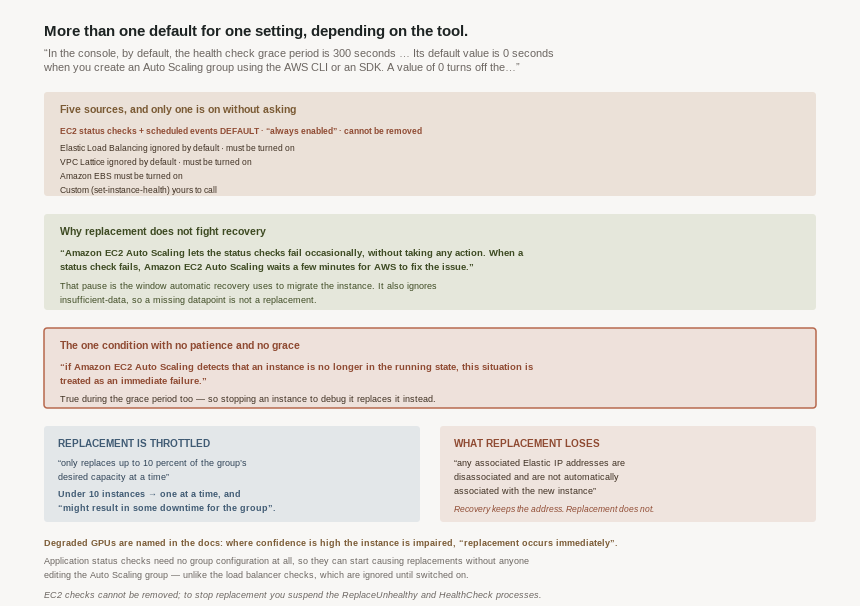
Five sources, one default
An instance starts optimistic: “All instances in an Auto Scaling group start with a Healthy status. Instances are assumed to be healthy unless Amazon EC2 Auto Scaling receives notification that they are unhealthy.” Health is the absence of bad news, and the question is who is allowed to deliver it.
| Source | On by default? | What it reports |
|---|---|---|
| EC2 status checks and scheduled events | Yes — always enabled, cannot be removed | Instance not running, or status impaired |
| Application status checks | Yes, once created in EC2 — no group configuration | HTTP or HTTPS response from your application |
| Elastic Load Balancing | No — ignored by default | Target reported unhealthy by the load balancer |
| VPC Lattice | No — ignored by default | Target reported unhealthy by VPC Lattice |
| Amazon EBS | No — must be turned on | Volumes unreachable or failing I/O status checks |
| Custom | Only when you call it | Whatever you decide |
The second row is the asymmetry worth noticing. Application status checks “extend the Amazon EC2 status check signal to your application” and “are created and managed in Amazon EC2, not in Amazon EC2 Auto Scaling”, and the documentation is explicit that no additional group configuration is required. So a team that adds an application status check in EC2 has changed the replacement behaviour of every Auto Scaling group containing those instances, without touching a group.
Compare that with the load balancer, which is the reverse: configured on the group, and ignored until it is. Two application-level signals, opposite defaults.
Why replacement does not fight recovery
This is the question the last post left open, and the answer is a deliberate pause:
“Amazon EC2 Auto Scaling lets the status checks fail occasionally, without taking any action. When a status check fails, Amazon EC2 Auto Scaling waits a few minutes for AWS to fix the issue. It does not immediately mark an instance Unhealthy when its status for the status checks becomes impaired.”
Waits a few minutes for AWS to fix the issue is EC2 automatic instance recovery, named obliquely. The group knows that a system status check failure is the kind of thing the platform repairs on its own, so it holds off. If recovery succeeds, the instance comes back as a reboot, the status check passes, and no replacement happens. The two mechanisms are sequenced, not racing.
And the group is tolerant in a second way that matters for anyone who read the post on absent signals: “Additionally, EC2 Auto Scaling doesn't mark the instance as Unhealthy if a status check returns insufficient-data.” Missing data is not treated as failure here. That is the right call for a replacement decision — the opposite of the right call for an alarm that exists to detect absence — and it is worth seeing the same question answered differently in two places for good reasons.
The exception that ignores all of it
“However, if Amazon EC2 Auto Scaling detects that an instance is no longer in the running state, this situation is treated as an immediate failure. In this case, it immediately marks the instance as Unhealthy and replaces it.”
The documented states that qualify are stopping, stopped,
shutting-down and terminated. There is no patience here and no grace
period, because the condition is not ambiguous: a stopped instance is not coming back by itself.
The operational consequence is the one people learn the hard way. Inside an Auto Scaling group, stop the instance and have a look at it is a replacement. The documented way to do that is Standby: “Amazon EC2 Auto Scaling does not perform health checks on instances that are in the Standby state until you put the instances back in service.”
Scheduled events, and degraded GPUs by name
“If one of your instances is affected by a scheduled event, Amazon EC2 Auto Scaling considers the instance to be unhealthy and replaces it. In cases where Amazon EC2 Auto Scaling has high confidence that the instance is impaired (for example, degraded GPUs), replacement occurs immediately. In other cases, Amazon EC2 Auto Scaling waits for the scheduled event to begin.”
Degraded GPUs appear in the documentation as the example of high confidence, and it is the right place to be careful. An Auto Scaling group will replace such an instance immediately, which is a different answer from the reboot that EC2 documents as the remedy for a GPU memory error. On accelerated capacity the two differ a great deal in cost: a replacement is a relaunch into a pool that may be tight, and the group makes that choice on its own confidence rather than on a reboot recommendation.
Which is a reason to know whether your accelerated instances are in an Auto Scaling group at all, and if they are, whether you want the group deciding that.
The grace period, and what it does not do
“The health check grace period specifies the minimum amount of time (in seconds) to keep a new instance in service before terminating it if it's found to be unhealthy.” It covers “Newly launched instances”, instances returning from Standby, and instances you manually attach.
Its purpose is narrow: it stops the group killing an instance that has entered
InService but has not finished starting your application, because the load balancer's
checks begin at registration rather than at readiness. Five minutes is the console default; zero is
the API, CLI and CloudFormation default; and a tool layered on top may substitute its own, as the
Terraform provider does.
Both directions are warned about. Zero means no protection. And
“Setting this value too high reduces the effectiveness of the Amazon EC2 Auto Scaling
health checks” — a long grace period is a window in which a genuinely broken
instance serves traffic. The documentation's preferred answer avoids the trade entirely: use
lifecycle hooks so an instance only reaches InService when it is actually ready, and
then zero is correct rather than dangerous.
Replacement is rate-limited, and small groups lose
“Amazon EC2 Auto Scaling only replaces up to 10 percent of the group's desired capacity at a time”, and it defers to scaling in progress: “If a scaling activity is in progress and your Auto Scaling group is less than its desired capacity by 10 percent or more, Amazon EC2 Auto Scaling waits for the in-progress scaling activity before replacing the unhealthy instances.”
That throttle is protective at scale and awkward below it: “If the size of an Auto Scaling group is small enough that the resulting value of 10 percent is less than one, Amazon EC2 Auto Scaling instead replaces the unhealthy instances one at a time. This might result in some downtime for the group.” Ten percent of a group of three is not a whole instance, so a group of three replaces serially and AWS says plainly that you may see downtime.
What replacement throws away
“When your instance is terminated, any associated Elastic IP addresses are disassociated
and are not automatically associated with the new instance.” Attached EBS volumes are
detached, or deleted depending on DeleteOnTermination.
Set that beside recovery, which preserves the instance ID, the private address, the Elastic IP and the attached volumes. The same impairment, handled by two mechanisms, leaves you in materially different places — and the one that keeps your identity is the one that does less.
Why This Architecture Holds Up
The pause is the right design, and it is undocumented as such
Waiting a few minutes on an impaired status check, rather than replacing immediately, is what makes recovery and replacement composable instead of competing. It is a genuinely good piece of design. The only criticism is that the documentation describes it as patience rather than naming the mechanism it is waiting for, so the relationship has to be inferred.
Treating insufficient-data as not-unhealthy is correct here
Terminating an instance is expensive and irreversible; failing to terminate one is recoverable on the next check. With that asymmetry, refusing to act on a missing datapoint is right — which is the exact opposite of the correct setting for an alarm whose job is to notice silence. The lesson is that missing-data policy follows the cost of the action, not a house style.
The opt-in load balancer check is defensible; the split default is not
Requiring opt-in for the load balancer check is reasonable: attaching a load balancer should not silently hand it the power to terminate your instances. What is hard to defend is the grace period having different defaults in the console and the API. The console value encodes the knowledge that new instances need time; the API omits it, and the API is how almost all production groups are created.
Key Architecture Decisions
| Decision | Take | Why |
|---|---|---|
| Grace period in IaC | Set it explicitly, always — never rely on the default | The API, CLI and CloudFormation default is 0, which turns the protection off, while some tools substitute their own default |
| Grace period versus lifecycle hooks | Prefer hooks and a short or zero grace period | A long grace period is a window where a broken instance serves traffic |
| Load balancer health checks | Turn them on deliberately, and know you have | Ignored by default, so an unhealthy target is not replaced |
| Debugging an instance in a group | Standby, never stop | Not running is an immediate failure that the grace period does not cover |
| Accelerated instances in a group | Decide whether immediate replacement is what you want | Degraded GPUs are documented as high confidence, so replacement is immediate |
| Small groups | Expect serial replacement and size for it | Below ten instances the 10 percent throttle becomes one at a time, with possible downtime |
The audit worth running
-
Every Auto Scaling group whose
HealthCheckGracePeriodis0and that has no launch lifecycle hook. Those groups can terminate an instance that was still booting. -
Every group attached to a load balancer whose health check type does not include
ELB. Somebody believes those instances get replaced on an ALB failure. - Every group containing accelerated instances, checked against whether immediate replacement on a degraded GPU is the behaviour you want.
- Any runbook step that says stop the instance. Inside a group, that is a replacement.
Closing Thought
The three posts before this one were about signals: a fifth status check, an aggregate metric that quietly gained a new contributor, and a recovery mechanism that acts on exactly one of them. This one is about what happens when a different system is watching the same signals with a different remedy, and the pleasant surprise is that AWS thought about the interaction. The group waits a few minutes precisely so the platform can fix the host first.
What is not thought through is the defaults. One setting with two values depending on which door you came through is the kind of thing that produces an incident nobody can reproduce in the console, because in the console it genuinely behaves differently. If you take one thing from this post, make it the audit: read the effective grace period back off every group, rather than inferring it from the tool that created them, and find the ones where it is zero with nothing else protecting a booting instance.
And keep the contrast from yesterday in view. Recovery preserves the instance and its addresses; replacement discards both and gives you a clean one. Neither is better. But only one of them keeps the Elastic IP that something else in your estate may be pointing at, and the group will not warn you before it lets go.
Reliability — Amazon EC2 Auto Scaling lifecycle hooks: what the Pending:Wait and Terminating:Wait states actually pause, the heartbeat timeout and what happens when it expires, why a hook is the documented alternative to a long health check grace period, and how a hook that never completes holds a scaling activity open.
Official AWS Reference
- About the health checks for your Auto Scaling group — the health check types and which require turning on, that EC2 status checks need no special configuration and are always enabled, that any state other than
runningor animpairedstatus makes an instance unhealthy, that Auto Scaling lets status checks fail occasionally and waits a few minutes for AWS to fix the issue and does not act oninsufficient-data, that a non-running instance is an immediate failure, how application status checks extend the EC2 signal with no group configuration, the scheduled-event behaviour including degraded GPUs as the high-confidence example, that Elastic Load Balancing and VPC Lattice results are ignored by default, connection draining before termination, the 10 percent replacement throttle and the one-at-a-time fallback with possible downtime, that EC2 status checks cannot be removed andReplaceUnhealthyandHealthCheckmust be suspended instead, that Elastic IP addresses are disassociated on termination, and that Standby instances are not health checked - Set the health check grace period for an Auto Scaling group — the definition of the grace period, the 300-second console default against the 0-second CLI and SDK default and that 0 turns it off, which instances the grace period applies to, that a non-running instance is replaced immediately even during the grace period, and that setting the value too high reduces the effectiveness of the health checks
- Health checks for instances in an Auto Scaling group — that instances start
Healthyand are assumed healthy until Auto Scaling is notified otherwise, the five notification sources, and that an unhealthyInServiceinstance is replaced to maintain desired capacity - Amazon EC2 Auto Scaling lifecycle hooks — further reading on the documented alternative to a long grace period; no claims in this post are drawn from it
- Temporarily remove instances from your Auto Scaling group — further reading on Standby, the supported way to take an instance out of service to debug it; no claims in this post are drawn from it
- Suspend and resume Amazon EC2 Auto Scaling processes — further reading on suspending
ReplaceUnhealthyandHealthCheck; no claims in this post are drawn from it
Comments