Business Challenge
The previous six posts went through the balancing services one at a time: #95 and #96 on Load Balancer, #97 and #98 on Application Gateway, #99 on Front Door, #100 on Traffic Manager. Each one makes sense on its own. The question that actually arrives on a Tuesday is which one a given application should sit behind, and that question is answered badly more often than any of the configuration questions are.
It is answered badly in a specific way. Someone reaches for the service they already know, extends it past the job it was designed for, and the design works — right up to the failure it cannot survive. The documented examples of this are worth reading before you argue about SKUs.
A regional service fronting global backends
You can point Application Gateway at backends in other regions through global VNet peering, cross-region Private Link, or just their public IPs. Microsoft documents this and then says what it costs: it “introduces a regional single point of failure” and “incurs extra latency because traffic is forced through one region before going to another and then back again.” The configuration is legal. The resulting architecture has one region whose loss is total, which is precisely what multi-region deployment was for.
A DNS service asked to behave like a proxy
Traffic Manager “load balances only at the domain level”, and the guidance states the consequence plainly: “for that reason, it can't fail over as quickly as Azure Front Door”, because of “DNS caching and systems that ignore DNS time-to-live (TTL) values.” A profile with a 30-second TTL still cannot promise a 30-second failover, because the thing that caches the answer is not yours.
Both mistakes come from treating the choice as a feature comparison. It is not. It is two questions with four answers, and then a third question about whether one service is enough.
Architecture
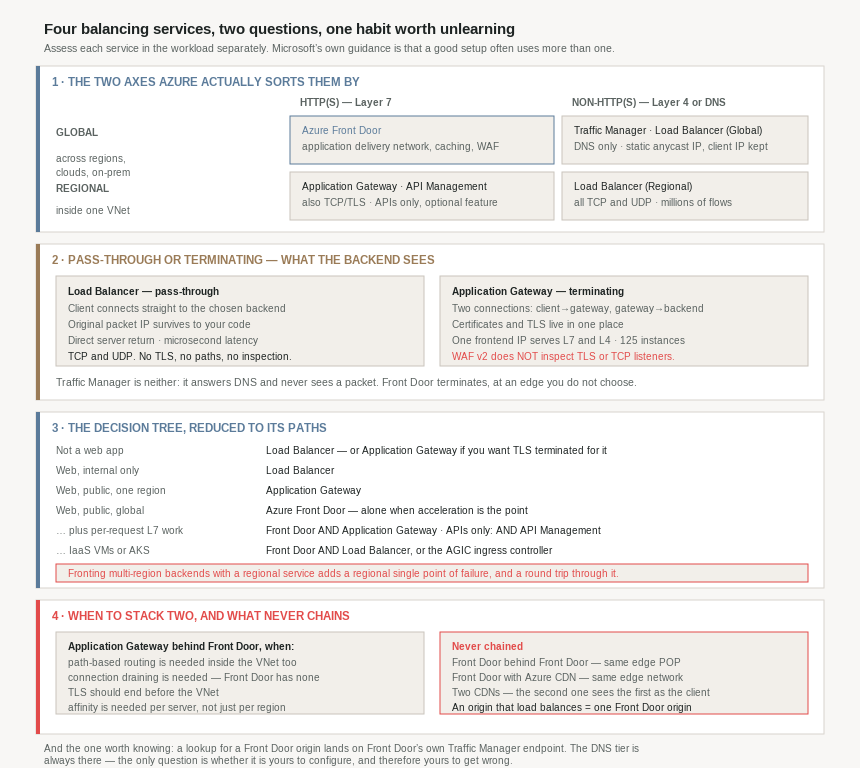
The two axes, and nothing else
Microsoft's own categorisation is two-dimensional: “global versus regional and HTTP(S) versus non-HTTP(S).” Global services “provide a single control plane that routes user traffic to available back ends globally” and balance between stamps or scale units in different regions; regional services balance “between VMs, containers, or clusters within a region in a virtual network.” The HTTP(S) services are Layer 7 and accept only HTTP(S), with SSL offload, WAF, path-based balancing and session affinity; the non-HTTP(S) services are Layer 4 TCP and UDP, or DNS-based.
| Service | Global or regional | Recommended traffic |
|---|---|---|
| API Management | Regional or global | HTTP(S) APIs only |
| Application Gateway | Regional | HTTP(S), TCP, & TLS |
| Application Gateway for Containers | Regional | HTTP(S) |
| Azure Front Door | Global | HTTP(S) |
| Load Balancer | Regional or global | Non-HTTP(S) |
| Traffic Manager | Global | Non-HTTP(S) |
Two rows in that table are routinely misread. Load Balancer is listed as “regional or global”, which surprises people who have only ever deployed it inside a virtual network — there is a global tier, and it is good. And “non-HTTP(S)” is a recommendation, not a restriction: Traffic Manager and Load Balancer “can distribute any traffic type, including HTTP(S)”, they simply “don't provide Layer-7 capabilities.” Putting a web application behind Load Balancer is allowed and sometimes correct. It just means no paths, no WAF, no certificate handling.
What a “web application” means here
The decision tree's first branch is whether this is a web application, and the definition is narrower and more useful than “it speaks HTTP”. It qualifies if it needs at least one of three things: a routing decision made on Layer 7 data such as a URL path, inspection of the communication payload such as an HTTP request body, or TLS handling. An HTTP service that needs none of those three is, for this purpose, not a web application — and Load Balancer is the right answer for it.
The detail that reframes the whole question
Front Door does not replace the DNS tier; it contains one. From the Front Door FAQ: “A name resolution request for an origin behind Azure Front Door lands on Front Door's Traffic Manager endpoint. Front Door's Traffic Manager profiles consume numerous health and availability signals from the PoPs worldwide” before returning the unicast address of the chosen point of presence.
So the comparison is never “DNS-based or not”. There is always a DNS-based selection in front of a global application. The question is whether it is Microsoft's, tuned against signals from its own edge, or yours — with your TTL, your probe interval and the #100 failure modes to own.
Why This Architecture Holds Up
Because pass-through and terminating decide what your code can see
This is the distinction that survives every SKU change, and the documentation names both halves. A passthrough load balancer is one “where a client directly establishes a connection with a backend server that is selected by the load balancer's distribution algorithm”. A terminating load balancer is one “where a client establishes a connection with the load balancer (proxy) and a separate connection is initiated from load balancer to the backend server.”
Load Balancer is the first. It “preserves the original IP of the packet”, so “the original IP is available to the code running on the virtual machine”, and with direct server return “the backend instance sends the response packet directly back to the client's IP address.” Application Gateway is the second, which is what lets it hold the certificate, read the path and run a WAF — and what means your backend sees the gateway, not the client, unless the application reads a forwarded header.
Neither is better. But if a compliance control, a rate limiter or an allowlist runs on the backend and keys on client IP, a terminating proxy quietly breaks it, and the breakage is invisible in a functional test.
Because Application Gateway now covers Layer 4, with one exception that matters
Application Gateway proxies TCP and TLS as well as HTTP, and “the same application gateway deployment can support Layer 7 and Layer 4 protocols” behind one frontend IP, autoscaling “up to 125 instances”. That genuinely collapses two services into one for a mixed estate, and the backends can be anywhere — same virtual network, peered network, remote FQDN, or on-premises.
The WAF covers the listener you were not worried about
“A WAF v2 SKU gateway allows the creation of TLS or TCP listeners and backends to support HTTP and non-HTTP traffic through the same resource. However, it does not inspect traffic on TLS and TCP listeners for exploits and vulnerabilities.”
One resource, one WAF SKU, one bill — and inspection on some listeners and not others. An architecture diagram that shows “WAF” on the gateway is telling the truth about the HTTP listeners and a lie about the TCP ones. See #86 for what the WAF does cover.
Two more things to know before consolidating onto the Layer 4 proxy: the backend draining timeout is 30 seconds and not configurable — “a user-defined draining value is not supported” — and “a configuration update (PUT) on Application Gateway ends the active connections after the default draining timeout period.” For HTTP that is a blip. For a long-lived TCP session it is a disconnect every time someone changes a rule. And the Ingress Controller “works only with L7 proxy through HTTP(S) listeners”, so AKS ingress is not part of this consolidation.
Because the global Load Balancer tier exists and almost nobody uses it
For a non-HTTP global application, the instinct is Traffic Manager, because DNS is the only global mechanism most people associate with Layer 4. There is another: Standard Load Balancer has a global tier whose frontend is “a static anycast global IP address”, which “is static and advertised across most Azure regions.” Its backend pool is other load balancers.
The health model is the interesting part. The global tier's probe “gathers information about availability of each regional load balancer every 5 seconds” — twelve evaluations a minute — and “if one regional load balancer drops its availability to 0” it is taken out of rotation. No DNS cache sits in front of that decision, because the address never changes. Compare the #100 arithmetic, where a 30-second interval and three tolerated failures put 120 seconds of probing before the answer even changes, and the TTL after that.
It is not a drop-in, and the limitations are the reason it is rare rather than default:
- Public frontends only. “An internal frontend isn't currently supported”, and “you can't add a private or internal load balancer to the backend pool.”
- Geo-proximity only. One algorithm. No weights or priorities at the global layer — the regional load balancer's distribution mode makes the final choice.
- Home region is a deployment constraint, not a dependency. You may only deploy it in one of ten listed home regions, but “if a home region goes down, traffic flow is unaffected”, and backends may live in any public region.
- No outbound rules. Outbound stays on the regional load balancer or a NAT gateway — see #96.
- No upgrade path. “You can't upgrade regional load balancers to the global tier”; it has to be created as global. Decide before you build, not after.
- No ICMP, so ping fails by design, and no NAT64, so frontend and backend must share an address family.
Because the right answer is frequently two services
The guidance says to “assess each service individually” and that “an effective setup often uses more than one type of load balancing solution.” Half the paths through the official decision tree end in a pair. The Front Door FAQ lists exactly when Application Gateway belongs behind Front Door: when you want path-based balancing inside the virtual network and not only globally; when you need connection draining, “which Front Door doesn't support”; when you want TLS processing offloaded so only HTTP travels inside the virtual network; and when you want affinity “at both the regional and the server level” — Front Door pins a session to a region, Application Gateway pins it to a server.
There is a matching list of things that must not be stacked, and all three have the same cause — shared infrastructure. One Front Door profile cannot sit behind another, because “both profiles/endpoints use the same Azure edge POP.” Front Door and Azure CDN “aren't compatible with each other, because they share the same network of Azure edge sites.” And a third-party CDN in the chain costs you last-mile acceleration and breaks client-IP access control, because the second CDN “identifies the first CDN's exit node as the client IP.”
One modelling rule follows from all of this and is easy to get wrong: if an origin already load balances — an Application Gateway, or a PaaS service with a balancer in front — then the Front Door origin group has one origin, and “your origin takes care of failover and load balancing between origins that Front Door doesn't see.” Listing the individual servers gives Front Door a health view it cannot act on correctly.
Because the timings are not symmetrical
Each service has a change-propagation profile, and they differ by more than an order of magnitude. Front Door treats every configuration update as a global operation: a single change “might take up to 15 minutes”, back-to-back changes “can extend the total deployment time to approximately 30 minutes” — twice the single-operation window — and a custom certificate can take “up to an hour”. Operations submitted while the first is propagating are queued, not merged.
Against that, Traffic Manager routing-method changes “are applied within one minute without any downtime”. If your failover runbook involves changing configuration rather than letting health checks act, those two numbers decide which service the runbook can target. And Front Door's two fixed client timeouts are worth writing down because neither can be changed: 5 seconds to receive headers after the connection is established, and a 90-second keep-alive — eighteen times the header window.
Key Architecture Decisions
| Decision | Choose | Because |
|---|---|---|
| Non-HTTP, one region | Load Balancer | All TCP and UDP, millions of flows, microsecond latency, client IP preserved. |
| Non-HTTP, one region, but TLS should terminate at the edge | Application Gateway TLS/TCP proxy | Centralised certificates for non-HTTP workloads; accept the fixed 30-second drain. |
| Non-HTTP, multi-region | Load Balancer global tier | Static anycast IP, 5-second health evaluation, no DNS cache in the failover path. |
| Non-HTTP, multi-region, internal frontend needed | Traffic Manager, or regional stamps | Global tier is public-frontend only and cannot hold internal backends. |
| Web app, internal only | Load Balancer | The decision tree's first branch; no public exposure to protect. |
| Web app, public, one region | Application Gateway | Regional Layer 7 with WAF, path routing and TLS offload. |
| Web app, public, global, acceleration matters | Azure Front Door | Edge caching and traffic acceleration; a CDN that load balances. |
| Web app, public, global, plus per-request L7 work in the VNet | Front Door and Application Gateway | Front Door's path routing is global only; Application Gateway's is inside the network. |
| APIs only, already using API Management | Front Door and API Management | Its balancing is an optional feature; “don't use it solely for load balancing.” |
| Global, and failover speed is the requirement | Front Door over Traffic Manager | Traffic Manager “can't fail over as quickly” — caching and TTL-ignoring resolvers. |
| Backend must see the real client address | Load Balancer (either tier) | Pass-through preserves the packet IP; a terminating proxy does not. |
| Front Door origin sits behind its own balancer | One origin in the group | That origin owns failover; Front Door cannot see inside it. |
| Private origins behind a global HTTP front end | Front Door Premium with Private Link | Standard and classic need a public IP or publicly resolvable name. |
| Multi-region backends, tempted by one regional gateway | Don't | A regional single point of failure plus a forced round trip through that region. |
Closing Thought
The comparison tables make this look like a four-way choice between peers. It is not. It is a stack with a layer for each question the traffic raises — which region, which stamp, which server, and whether anyone reads the request on the way — and the services are the layers, not the alternatives.
That is why the DNS detail is the one I would keep. A lookup for a Front Door origin lands on Front Door's own Traffic Manager endpoint. The tier you were deciding whether to use is already running underneath the service you picked instead. Choosing Front Door over Traffic Manager is not choosing proxy over DNS; it is choosing to let Microsoft operate the DNS layer against signals from its own edge, rather than operating it yourself with a TTL and a probe interval you have to defend.
The two questions, and the one that follows
Global or regional? HTTP(S) or not? That picks a service in a minute. Then: does any single layer have to answer more than one of “which region”, “which server” and “what is in this request”? If it does, you are about to extend a service past its design, and the official decision tree already has a two-service path for what you are describing.
Next in the series, the diagnostics: Network Watcher's connection troubleshoot and packet capture — the tools you reach for when one of these layers is dropping traffic and the dashboard says everything is healthy.
Official Azure Reference
- Load balancing options, Azure Architecture Center — the two categorisation axes, the six-service summary table, the five selection factors, the decision tree and its definitions, the warning about regional services fronting global backends, the passthrough and terminating definitions, and the Gateway Offloading note
- Application Gateway TCP/TLS proxy overview — the Load Balancer versus Application Gateway comparison, the 125-instance autoscale ceiling, direct server return, the single-endpoint mixed-protocol model, the WAF v2 inspection gap on TLS and TCP listeners, the fixed 30-second draining timeout, and the AGIC restriction
- Azure Front Door FAQ — the Front Door versus Application Gateway scope difference, unicast routing and the Traffic Manager endpoint underneath it, the four reasons to put Application Gateway behind Front Door, the chaining prohibitions, the 15- and 30-minute propagation windows, the 5-second header and 90-second keep-alive timeouts, purge batching, domain fronting and the 421 response, and the one-origin rule for balanced origins
- Global load balancer, Azure Load Balancer — the static anycast frontend, the 5-second regional health evaluation, two-stage geo-proximity routing, client IP preservation, the ten home regions and the independence of the home region, and the limitation list covering internal frontends, outbound rules, the absent upgrade path, NAT64 and ICMP
- What is Azure Load Balancer? — the SKU and tier model behind the regional and global rows of the summary table (no claims drawn from it)
- What is Traffic Manager? — the DNS-level service the global HTTP path also runs on internally (no claims drawn from it)
Comments