Business Challenge
The previous post found that a scale-in protected instance is exempt from its maximum instance lifetime, with no timeout and no escalation. That makes this setting load-bearing in a way its name does not suggest, and the obvious next question is what else it covers.
The documented answer is: scale in, and a short list of things that are not scale in. The use case AWS names is specific — “A common use case for this feature is scaling container-based workloads” — and the default is off: “By default, instance scale-in protection is disabled when you create an Auto Scaling group. This means that Amazon EC2 Auto Scaling can terminate any instance in the group.”
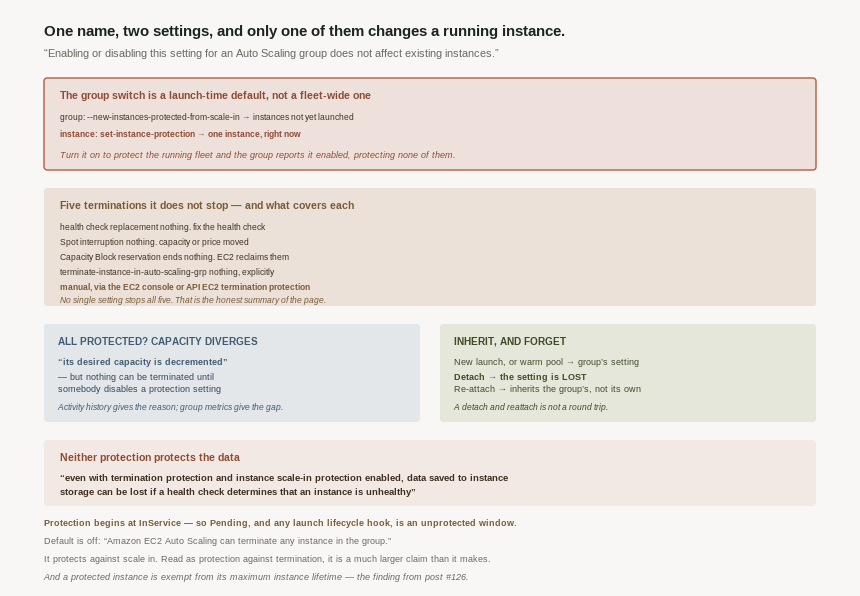
“When you enable it, all new instances launched by the group will have instance scale-in protection enabled.” And then, as its own sentence:
“Enabling or disabling this setting for an Auto Scaling group does not affect existing instances.”
Those two sentences are the whole trap. An operator who turns the group setting on in order to stop a running instance being terminated has changed what happens to instances that do not exist yet. The console shows the group as having instance scale-in protection enabled, and every instance currently in service is still terminable.
The same applies in reverse. Turning the setting off does not unprotect anything already running, which is the version of this that produces a group nobody can scale in.
The per-instance control is a separate operation:
“By default, an instance gets its instance scale-in protection setting from its Auto
Scaling group. However, you can enable or disable instance scale-in protection for individual
instances after they launch.” That is set-instance-protection, and it is
the only thing that changes a running instance.
“Instance scale-in protection does not protect Auto Scaling instances from the following” — and the list is worth reading as a list, because each entry is a way a protected instance disappears.
| Not protected from | What covers it instead |
|---|---|
| Health check replacement | Nothing — fix the health check |
| Spot Instance interruptions | Nothing — capacity or price moved |
| A Capacity Block reservation ending | Nothing — EC2 reclaims the instances |
terminate-instance-in-auto-scaling-group | Nothing, explicitly |
| Manual termination via the EC2 console, CLI or API | EC2 termination protection |
Two of those are worth quoting exactly. On Spot: “Spot Instance interruptions. A Spot Instance is terminated when capacity is no longer available or the Spot price exceeds your maximum price.” On Capacity Blocks: “A Capacity Block reservation ends. Amazon EC2 reclaims the Capacity Block instances even if they are protected from scale in.”
So the protection covers the terminations Auto Scaling chooses to make for capacity reasons. It does not cover the terminations anybody else makes, or the ones Auto Scaling makes for health.
“If all instances in an Auto Scaling group are protected from scale in, and a scale in event occurs, its desired capacity is decremented. However, the Auto Scaling group can't terminate the required number of instances until their instance scale in protection settings are disabled.”
The group now has a desired capacity below its actual capacity, and will stay that way until somebody unprotects an instance. Activity history is where the reason appears: “Could not scale to desired capacity because all remaining instances are protected from scale in.”
The divergence itself is measurable. Auto Scaling publishes
GroupDesiredCapacity —
“The number of instances that the Auto Scaling group attempts to maintain”
— alongside GroupInServiceCapacity, the capacity units actually running, so
the gap can be expressed with metric math and alarmed on. The catch is the reporting criterion
both carry: “Reported if metrics collection is enabled”, and
“Group metrics are available at one-minute granularity at no additional charge, but
you must enable them.”
So a group without metrics collection enabled has only the activity-history entry, and the cost is real — you are running more instances than the group is now trying to run, indefinitely. A later scale-out from that decremented desired capacity also starts from the wrong number.
Architecture
Two settings, one name
The confusion this feature generates comes from the group property and the instance property sharing a name while doing different jobs. They are better read as a template and a value.
| Group setting | Instance setting | |
|---|---|---|
| Set with | --new-instances-protected-from-scale-in | set-instance-protection |
| Affects | Instances launched from now on | One named instance, now |
| Affects running instances | No | Yes |
| Survives a detach | n/a | No — reattaching inherits the group's |
The CLI flag name is the clearer of the two:
--new-instances-protected-from-scale-in says exactly what it does, and the console label
— Enable instance scale-in protection — does not.
When protection starts
“Instance scale-in protection starts when the instance state is”
InService. That matters for the window before it: an instance in Pending,
or sitting in a launch lifecycle hook, is not yet protected. For a group whose instances take a long
time to initialize — the warm pool and lifecycle hook cases from posts #122 and #123 —
that window is not short.
What inherits, and what forgets
“When Amazon EC2 Auto Scaling launches a new instance or moves an instance from a warm pool into the Auto Scaling group, the instance inherits the instance scale in protection setting of the Auto Scaling group.”
So a warm pool instance picks up the group's setting at the moment it joins the group, not at the moment it was created. A group whose setting changed while instances sat in the warm pool will see them arrive with the new setting.
Detaching is the one that loses information: “If you detach an instance that is protected from scale in, its instance scale in protection setting is lost. When you attach the instance to the group again, it inherits the current instance scale in protection setting of the group.”
A detach-and-reattach is therefore not a round trip. An instance individually protected, detached for investigation and put back, comes back with whatever the group's default is — which for most groups is unprotected.
Which control covers which termination
The two protections are frequently discussed together and they do not overlap. The documentation is
unusually direct about it:
“To protect Auto Scaling instances from manual termination, enable Amazon EC2 termination
protection. (This does not prevent Amazon EC2 Auto Scaling from terminating instances or manual
termination through the” terminate-instance-in-auto-scaling-group command.
Read as a matrix: scale-in protection stops Auto Scaling's capacity-driven terminations and nothing else. EC2 termination protection stops a human with the EC2 console and nothing else. Neither stops a health check replacement, a Spot interruption, a Capacity Block ending, or the Auto Scaling termination API. There is no setting that stops all of them, and that is the honest summary of this page.
The data the protections do not protect
The page closes with a note that is easy to skim and is the most consequential sentence on it: “even with termination protection and instance scale-in protection enabled, data saved to instance storage can be lost if a health check determines that an instance is unhealthy or if the group itself is accidentally deleted.”
Both protections are about the instance, and neither is about the data. If an instance holds state that matters, the protections are not the mechanism — the documented advice is to back it up. This is the same shape as the maintenance policy finding in post #125: a setting that reads like a durability guarantee and is scoped to one class of event.
Why This Architecture Holds Up
The group setting not affecting running instances is defensible
The alternative is a single API call that changes the terminability of every instance in a group at once, including instances somebody had deliberately unprotected. A launch-time default cannot do that, and the per-instance call is explicit about which instance it changes. The design is right; the console label is what makes it surprising.
A short list of exclusions beats a vague promise
Five named cases, each with a reason, is the most useful form this could take. A health check replacement is a correctness action rather than a capacity one; a Spot interruption and a Capacity Block ending are not Auto Scaling's decisions to make; and a human calling the termination API has said what they want. Each exclusion follows from who is making the decision, which is why the list is memorable rather than arbitrary.
Decrementing desired capacity anyway is the lesser evil
The alternative is a scale-in event that fails and leaves desired capacity where it was, which would make the group's target a function of whether protection happened to be set at that moment. Decrementing keeps the target meaning what the scaling policy asked for, and the shortfall is observable from two directions: activity history for the reason, and the group metrics for the gap. It is the right call and it needs the monitor wiring up, because an activity-history message is not an alarm and the metrics are not reported until somebody enables them.
Key Architecture Decisions
| Decision | Take | Why |
|---|---|---|
| Protecting an instance that is already running | Use set-instance-protection |
The group setting does not touch existing instances |
| Protecting against a human with the EC2 console | EC2 termination protection, separately | Scale-in protection does not cover it |
| Relying on it for Spot or Capacity Block instances | Do not | Both reclaim protected instances by design |
| Instances holding state that matters | Back it up; do not rely on either protection | A health check replacement still loses instance storage |
| Detaching a protected instance | Re-apply protection after reattaching | The setting is lost on detach and inherited on attach |
| Groups where everything may end up protected | Enable group metrics and alarm on desired versus in-service | Desired capacity decrements with nothing else reporting it |
| Maximum instance lifetime as a compliance control | Audit this setting against it | Protection exempts an instance from the lifetime entirely |
The audit worth running
- Every group whose scale-in protection setting was changed, against the launch times of its current instances — anything older than the change has the old behaviour.
- Every individually protected instance, for whether anybody still remembers why. There is no expiry on this setting and no owner recorded on it.
- Every group that has ever logged the all-protected message, for a desired capacity that is still below its actual size — and every such group for whether group metrics collection is on at all, since without it the gap is not being measured.
- Every protected instance in a group with a maximum instance lifetime, which is the intersection post #126 identified.
Closing Thought
Eight posts into Auto Scaling, this is the one whose behaviour is most completely described by its name, once you read the name carefully. It protects against scale in. Everything surprising about it follows from people reading it as protection against termination, which is a much larger claim.
The finding I would act on is the group setting. It is the only one here that fails silently in the direction of less safety: you make a change intending to protect a running fleet, the group reports the setting as enabled, and nothing you were trying to protect is protected. Every other behaviour on the page announces itself eventually — an instance disappears, or activity history says the group could not scale. That one just quietly does not apply.
Official AWS Reference
- Use instance scale-in protection to control instance termination — the container-workload use case, that protection is disabled by default and Auto Scaling can otherwise terminate any instance, that the group setting applies to new instances only and does not affect existing ones, that protection starts at
InService, the per-instance setting and how it overrides the inherited one, the five terminations protection does not cover including Spot interruptions and a Capacity Block reservation ending, that EC2 termination protection covers manual console termination and explicitly not the Auto Scaling termination API, what detaching and reattaching does to the setting, what a newly launched or warm-pool instance inherits, the decremented desired capacity and the activity-history message when every instance is protected, and the instance-storage data loss that survives both protections - Amazon CloudWatch metrics for Amazon EC2 Auto Scaling — the
AWS/AutoScalinggroup metrics, the definitions ofGroupDesiredCapacityandGroupInServiceCapacity, that every group metric is reported only if metrics collection is enabled, and that group metrics are one-minute granularity at no additional charge but must be enabled - Replace Auto Scaling instances based on maximum instance lifetime — further reading on the control this setting exempts an instance from, covered in the previous post; no claims in this post are drawn from it
- Health checks for instances in an Auto Scaling group — further reading on the replacement path that scale-in protection does not cover; no claims in this post are drawn from it
- Design your applications to gracefully handle instance termination — further reading linked from the page as the context for the container-workload use case; no claims in this post are drawn from it
Comments