Business Challenge
The last post noted in passing that a warm pool can stop an instance before its user data finishes. That caveat turns out to be the central thing to understand about warm pools, and it sits next to a sizing default that can provision far more instances than anyone intended.
It is also the only feature in this run of posts whose documentation opens by arguing against itself.
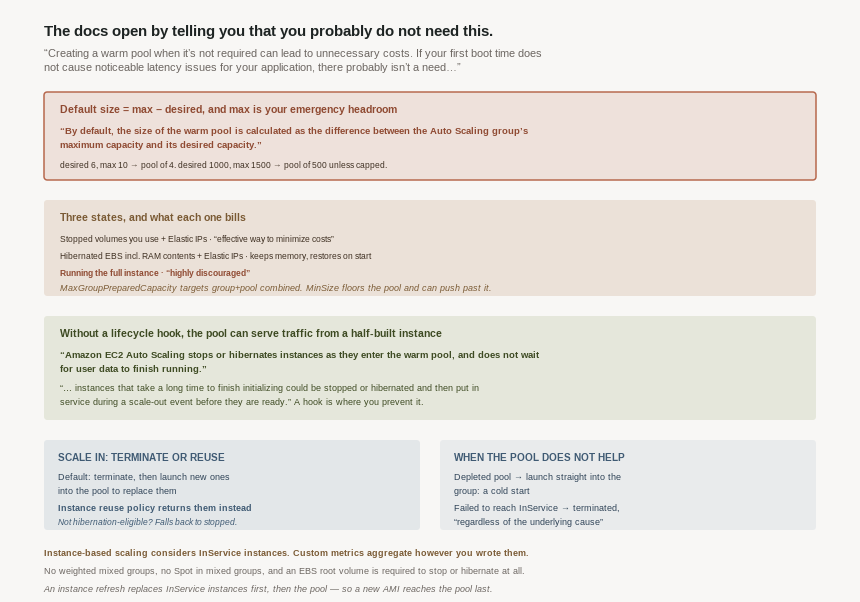
“Creating a warm pool when it's not required can lead to unnecessary costs. If your first boot time does not cause noticeable latency issues for your application, there probably isn't a need for you to use a warm pool.”
That is the first thing on the page, before the feature is explained. It is a narrow tool for a specific fault — instances that take a long time to boot, for example because they “need to write massive amounts of data to disk” — and the honest reading is that most groups should not have one.
“By default, the size of the warm pool is calculated as the difference between the Auto Scaling group's maximum capacity and its desired capacity.”
Maximum capacity is normally headroom: the ceiling you set so an emergency spike has somewhere to go. Deriving the pool from it means enabling a warm pool provisions instances from capacity you specifically did not intend to run. The documentation's own large example makes the point — a group of 1,000 with a maximum of 1,500 would otherwise keep 500 instances “reserved for future use inside the warm pool”, where a pool of 100 is what you actually wanted.
“Amazon EC2 Auto Scaling stops or hibernates instances as they enter the warm pool, and does not wait for user data to finish running.”
And the consequence, stated plainly: “If you add a warm pool to your Auto Scaling group without a lifecycle hook, instances that take a long time to finish initializing could be stopped or hibernated and then put in service during a scale-out event before they are ready.”
A feature bought because instances boot slowly will, misconfigured, interrupt exactly those slow boots and then serve traffic from the result.
Architecture
Sizing: one derived default and two explicit controls
| Setting | Behaviour |
|---|---|
| Default size | maximum capacity − desired capacity. Desired 6, maximum 10 gives a pool of 4 |
MaxGroupPreparedCapacity | Target combined capacity of the group and its pool. Pool size becomes this value minus desired capacity, subject to MinSize — so combined capacity can exceed it |
MinSize | Floors the pool. “There is no minimum size set by default” |
The name invites a misreading, and the API reference is the precise statement:
MaxGroupPreparedCapacity
“Specifies the maximum number of instances that are allowed to be in the warm pool or in
any state except Terminated for the Auto Scaling group.” It bounds the combined
set — group plus pool — not the pool alone. The pool size is then the difference between
that value and desired capacity.
And it is a target rather than a hard ceiling, because the floor wins:
“If the desired capacity of the Auto Scaling group is higher than the
MaxGroupPreparedCapacity, the capacity of the warm pool is 0, unless you specify a value for
MinSize.” So with both set, a busy group can push combined capacity above
MaxGroupPreparedCapacity. That is usually what you want — without the floor, the
pool empties exactly when you most wanted a warm start — but it means the setting does not cap
what you pay for.
One consequence worth knowing if you are trying to reason about cost: “The size of the warm pool is dynamic. Only when MaxGroupPreparedCapacity and MinSize are set to the same value does the warm pool have an absolute size.”
What each state actually bills
| State | You pay for | AWS's view |
|---|---|---|
Stopped | The volumes you use and the Elastic IP addresses attached | “an effective way to minimize costs” |
Hibernated | EBS volumes “including storage for the RAM contents”, and Elastic IPs | Keeps memory; restores RAM on start |
Running | The instance, in full | “highly discouraged” |
Hibernation is the interesting middle. It “signals the operating system to save the contents of your RAM to your Amazon EBS root volume”, so a warm start restores a process that was already running rather than one that has to start. The cost is EBS storage for the whole of RAM, which on memory-heavy instances is not trivial — an instance parks as much EBS as it has memory. That is the trade: pay for memory on disk to avoid paying for memory in RAM.
Why a lifecycle hook matters more here than anywhere else
The previous post treated hooks as a readiness mechanism for the main group. In a warm pool they are load-bearing in a second way: “In a warm pool configuration, lifecycle hooks delay instances from being stopped or hibernated and from being put in service during a scale-out event until they have finished initializing.”
Two delays, not one. The hook holds the instance before it is stopped on the way into the pool, and holds it again before it goes into service on the way out. Remove the hook and both protections go, which is why the documentation's warning is about a sequence rather than a single event: the instance is stopped mid-bootstrap, then later resumed and put into service, and the half-finished initialization is now baked into a running member of the group.
There is a related detail for anyone relying on user data to re-run after the pool restart. The
script does not run again by default; it needs the MIME multi-part form with
cloud_final_modules set to [scripts-user, always]. So an instance that was
interrupted mid-script does not get a second attempt unless you asked for one.
Scale-in: terminate, or return to the pool
“By default, Amazon EC2 Auto Scaling terminates your instances when your Auto Scaling group scales in. Then, it launches new instances into the warm pool to replace the instances that were terminated.”
So the default behaviour pays the full initialization cost twice: once for the instance you just threw away, and again for its replacement in the pool. An instance reuse policy changes that — “If you want to return instances to the warm pool instead, you can specify an instance reuse policy” — and for a workload whose boot is expensive enough to justify a warm pool at all, reuse is almost certainly what you want.
One caveat if you reuse into hibernation: “If they don't, when instances return to the warm pool, they will fallback to being stopped instead of being hibernated.” The fallback is silent, so a group you believe is hibernating may be stopping, with the warm start you were paying RAM-on-disk for quietly absent.
How scaling policies treat pool instances
“While instances are in the warm pool, your scaling policies only scale out if the metric value from instances that are in the InService state is greater than the scaling policy's alarm high threshold.”
That is the right design for the instance-based case: a stopped instance contributing zero CPU to a target-tracking average would suppress scaling exactly when it is needed.
The scope is worth stating carefully, though. AWS's documented instance-based scaling behavior
considers instances in the InService state rather than warm pool instances. However,
custom scaling metrics must be designed to exclude warm pool instances where appropriate, since
their aggregation depends on the metric implementation. A policy tracking a queue depth, a
business-level counter, or anything you publish yourself is aggregated the way you wrote it, and
nothing about the warm pool changes that.
Where the pool silently does not help
- Depletion. “If your warm pool is depleted when there is a scale-out event, instances will launch directly into the Auto Scaling group (a cold start).” The failure mode of a warm pool is the behaviour you had before you built it, which makes it easy not to notice.
-
Failed launches. An instance that cannot reach
InServiceis “considered a failed launch and terminated. This applies regardless of the underlying cause, such as an insufficient capacity error or any other factor.” - Weighted and Spot mixed groups. “Warm pools aren't supported with weighted mixed instance groups”, and a mixed instances policy must be On-Demand only.
- Instance store roots. Stopping or hibernating requires “an Amazon EBS volume as its root device”.
- AMI updates. “An instance refresh first replaces InService instances. Then it replaces instances in the warm pool” — so the pool is the last place a new image lands, and a pool built from the previous AMI keeps serving warm starts until the refresh reaches it.
Why This Architecture Holds Up
Opening with a warning is the most useful thing on the page
A feature page that begins by telling you when not to adopt the feature is doing something rare. Warm pools solve a genuine problem for a narrow set of workloads and cost money continuously for everyone else, so putting the disqualifying question first is better engineering writing than any amount of guidance further down.
Excluding the pool from scaling metrics is quietly correct
It would have been easy to let pool instances appear in group metrics and much harder to debug.
Scoping scaling decisions to InService instances keeps the pool a pure latency
optimisation with no effect on when the group grows.
Making reuse opt-in is defensible, if expensive by default
Returning a scaled-in instance to the pool means reusing an instance that has served traffic, with whatever state that left behind. Defaulting to terminate-and-relaunch is the conservative choice. It does mean the default pays the initialization cost twice, so for most warm pool workloads the opt-in is the one you want — but the default errs towards a clean instance, which is the right direction to err.
Key Architecture Decisions
| Decision | Take | Why |
|---|---|---|
| Whether to have a warm pool | Only if first boot time causes measured latency problems | AWS's own opening guidance, and the pool bills continuously |
| Pool size | Set MaxGroupPreparedCapacity, and MinSize with it; set both equal for a fixed pool |
The default is max minus desired, which is your emergency headroom; only equal values give the pool an absolute size |
| Pool state | Stopped unless restoring RAM genuinely saves the boot |
Hibernation bills EBS for the whole of RAM; Running is discouraged outright |
| Lifecycle hook | Strongly recommended where instances need initialization before stopping, hibernating or entering service; set the heartbeat timeout, completion conditions and DefaultResult deliberately |
Without one the pool can interrupt bootstrap and then serve traffic from the instance — but a hook's presence alone does not guarantee initialization completed |
| Scale-in | Instance reuse policy, if the workload tolerates a reused instance | The default pays the initialization cost twice per scale-in |
| Monitoring | Alarm on cold starts and on pool size reaching zero | A depleted pool degrades to the behaviour you had before, invisibly |
The audit worth running
-
Every warm pool with no
MaxGroupPreparedCapacityset, compared against the group's maximum capacity. That difference is what you are paying for. Where it is set, checkMinSizetoo, since the floor can carry combined capacity above it. - Every warm pool without a launching lifecycle hook. Those pools can stop instances mid-bootstrap.
-
Every pool configured for
Hibernated, checked against the hibernation prerequisites, since the fallback toStoppedis silent. -
Any group whose user data is long-running and does not use
cloud_final_modules: [scripts-user, always], because an interrupted script will not re-run.
Closing Thought
Four posts into the Auto Scaling material, a pattern in the defaults is hard to miss. The health
check grace period defaults differently depending on which tool you use. A lifecycle hook's
DefaultResult defaults to ABANDON. A warm pool's size defaults to your
emergency headroom, and its scale-in behaviour defaults to paying for initialization twice. None of
these are wrong, exactly; each is defensible in isolation. But the aggregate effect is that an Auto
Scaling group assembled from defaults behaves in ways nobody chose.
The warm pool is the clearest case, because the cost is continuous rather than conditional. A group with desired 6 and maximum 10 quietly keeps four instances' worth of volumes and addresses, forever, on the strength of a checkbox. That is a small bill, and it is also the shape of a large one at a thousand instances.
So the useful discipline with this feature is the one its own documentation opens with: establish
that first boot time is actually hurting you, with a number, before adding a pool. And if you add
one, add a lifecycle hook in the same change for any instance that needs initialization before being
stopped, hibernated or put into service — configuring the heartbeat timeout, the completion
condition and the DefaultResult rather than accepting the defaults. A hook is not an
AWS requirement and its presence alone does not prove initialization finished; it is the only place
you get to say so.
Reliability — Amazon EC2 Auto Scaling instance refresh: what a rolling replacement actually checks before moving on, how minimum healthy percentage and the instance warmup interact, what a checkpoint pauses, and why a refresh can roll forward onto an AMI that was never meant to ship.
Official AWS Reference
- Decrease latency for applications with long boot times using warm pools — the opening warning that a warm pool when not required leads to unnecessary costs, the definition of a warm pool and of a warm start, the default size as maximum minus desired capacity with the 6-and-10 and 1,000-and-1,500 examples, the
MaxGroupPreparedCapacityandMinSizesettings and that there is no default minimum, the three pool states with what each bills and thatRunningis highly discouraged, how lifecycle hooks delay instances from being stopped or hibernated and from being put in service, that Auto Scaling does not wait for user data to finish running and can interrupt it, the default terminate-and-relaunch scale-in behaviour and the instance reuse policy with its hibernation fallback, that scaling policies only scale out on the metric from instances in theInServicestate, cold starts on a depleted pool, failed launches being terminated regardless of cause, the weighted and Spot mixed-group limitations, the EBS root volume requirement, and that an instance refresh replacesInServiceinstances before pool instances - Use lifecycle hooks with a warm pool in Auto Scaling group — further reading on the warm pool wait states and supported notification targets; no claims in this post are drawn from it
- Amazon EC2 Auto Scaling lifecycle hooks — further reading on the hook mechanism covered in #122, which this feature depends on; no claims in this post are drawn from it
- Hibernation prerequisites — further reading on the requirements an instance must meet before the
Hibernatedpool state is available; no claims in this post are drawn from it - Use an instance refresh to update instances in an Auto Scaling group — further reading on the mechanism that updates pool instances last; no claims in this post are drawn from it
Comments