Business Challenge
#98 was about settings AWS accepts and ignores. This one is about a result AWS reports accurately that is read as something larger. Restore testing is described precisely:
“Restore testing, a feature offered by AWS Backup, provides automated and periodic evaluation of restore viability, as well as the ability to monitor restore job duration times.”
Read what the mechanism does: “When the scheduled time in your plan arrives, AWS Backup starts restore jobs based on your plan and monitors the time taken to complete the restore.” It runs the restore and it times it. Nothing in that sentence inspects the result.
That is not a gap AWS hides. It is the next sentence, and the word that matters is the first one: “Optionally, you can use Restore testing validation to confirm the restore test results.”
Validation is not a setting. It is an integration you build: “You have the option of creating an event-driven validation that runs when a restore testing job completes.” And the first step is unambiguous about whose code it is:
“First, create a validation workflow with any target supported by Amazon EventBridge, such as AWS Lambda.”
AWS gives a sample handler. The entire substance of it is a comment:
// TODO: Validate the resource. Everything around that line is plumbing — read the
event, call putRestoreValidationResult with a status you decided. AWS supplies the
wiring and the place to put your judgement; what counts as a working restore is yours, because only
you know what this database is supposed to contain.
There is a practical wrinkle worth knowing before you start:
“You can use Lambda layers to use the latest SDK (because
PutRestoreValidationResult is not available through the Lambda
SDK).” The function that reports your result needs an SDK the runtime does not
ship with.
And the result is final: “Once a validation status is set, it cannot be changed.”
FixDecide before you build the plan whether you are measuring restore duration or restore correctness. Both are legitimate; they are different projects. Duration is a plan and a schedule. Correctness is an EventBridge rule, a Lambda, a layer, and a definition of “working” that someone has to write down.
“During a restore test, backup data is temporarily restored. By default, this data is deleted after the test is complete.”
Keeping it is opt-in and bounded: “If you plan to run validation, select retain for a specific number of hours and input a value from 1 to 168 hours, inclusive.” Then the cleanup runs: “Once the optional validation completes or the validation window closes, AWS Backup deletes the resources involved with the restore test.”
So on a default plan there is a window in which a human could have looked at the restored database, and it closes automatically. That is the right default — leaving restored production data lying around is its own problem, and the deletion is the feature. It does mean the artefact that would answer whether it was any good is gone by the time anyone asks.
One failure mode in the cleanup is worth guarding:
“If a user removes this tag, AWS Backup cannot delete the resource at the end of the
testing period and the user will have to delete it manually instead.” The tag is
awsbackup-restore-test, and a tidy-up script that strips unrecognised tags will turn a
self-cleaning test into a bill.
If you are running validation, set the retention window to the time your validation actually needs and no longer. If you are not, accept that the test is a timing measurement and say so in whatever report consumes it. Add awsbackup-restore-test to the exclusion list of any tag-hygiene automation before the first test runs.
No eligible recovery point, no test, no complaint. “If no recovery point for a protected resource is eligible, AWS Backup does not include that protected resource in the test.” The resource is in the plan, the plan runs, the resource is not tested, and the run does not fail. This is the same shape as #90: nothing reported is not the same as nothing wrong.
A schedule that quietly halves. “AWS Backup evaluates cron expressions between 00:00 and 23:59. If you create a restore testing plan for “every 12 hours” but provide a start time of later than 11:59, it will only run once per day.” The plan still says every 12 hours.
Tags select the resource, not the recovery point. AWS calls this out directly: “Tag conditions apply only to protected resource selection, matched against the protected resource’s latest recovery point. AWS Backup does not use them to choose which recovery point to restore.” With the consequence stated: “As a result, the restored recovery point might not match the tag conditions used for protected resource selection.”
A plan scoped by tier=critical therefore picks resources whose latest recovery point
carries that tag, then restores a recovery point chosen by date and algorithm — which may be
an older one that never had it.
Reconcile the count. Compare the protected resources you expect in a plan against the restore jobs it actually produced, every run. A test that quietly covered eleven of fourteen resources reports the same green as one that covered fourteen.
Architecture
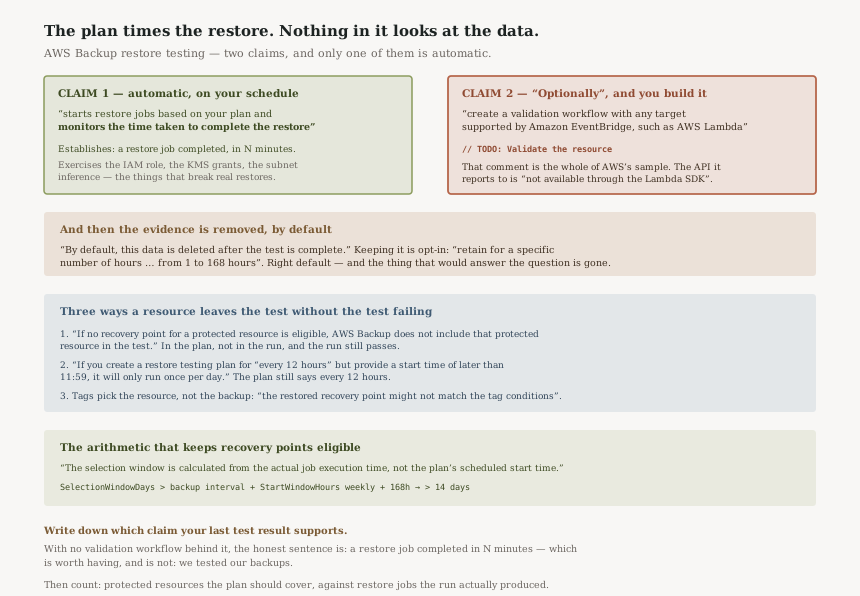
Two claims, and only one is automatic
| The claim | What establishes it | Who builds it |
|---|---|---|
| A restore job completed, and took N minutes | The restore testing plan itself — it “monitors the time taken to complete the restore” | AWS, on your schedule |
| The restored resource is usable | “an event-driven validation that runs when a restore testing job completes” | You — EventBridge rule, Lambda, a layer for the SDK, and a definition of working |
The gap between those rows is the whole post. A compliance report built on the first row is honest only if it says what the first row says. AWS’s own framing of the output is careful about this: the results show “the successful completion of restore test scenarios or the restore job completion time” — completion, and duration.
The selection window has to outrun the schedule
Recovery point eligibility is where resources silently fall out, and the cause is arithmetic rather than configuration. The window does not start when you think:
“The selection window is calculated from the actual job execution time, not the
plan’s scheduled start time. Because jobs can start anywhere within the
StartWindowHours period, set SelectionWindowDays to be greater than your backup
frequency interval plus your StartWindowHours value to avoid edge-case recovery point
exclusions.”
Put numbers on it. Weekly backups and the maximum start window — “Min: 1 hour; Max: 168 hours (7 days)” — give 7 days plus 7 days, so a selection window of 14 days is the floor and anything at or below it can exclude a resource on an unlucky run. The ceiling is generous at “Max selection window days: 365 days”, so there is no reason to run close to the edge.
What the restore test is genuinely good at
Duration is not a consolation prize. A restore that works but takes nine hours fails an four-hour recovery time objective just as completely as one that errors, and nothing except a periodic timed restore will tell you that number as your data grows. AWS wires this into Audit Manager through a control for whether “a restored resource completed within your target restore time”.
It also exercises the path: the IAM role, the KMS grants, the subnet and parameter inference. The troubleshooting list is almost entirely permissions and networking — a role “not authorized”, a KMS key the restore role cannot reach, a missing default subnet. Those break real restores at the worst moment, and a scheduled test finds them on a Tuesday.
Why This Architecture Holds Up
Leaving validation to the customer is the correct division
AWS cannot know what a working restore means for your application. A healthy EC2 instance might be one that answers a health check — AWS even suggests that example — but for a database it is row counts, for a filesystem it is a checksum, and for a ledger it is a balance that reconciles. A generic validator would either be trivial or wrong. Giving you the event, the hook and the result API is the right boundary.
Deleting the restored resource by default is right, even though it costs the evidence
The alternative default — leaving a restored copy of production data in place until somebody remembers it — creates a second copy of your most sensitive data on a schedule. Deletion by default is the safe failure. The retention option exists precisely for the case where you have built something to look at it.
Documenting the tag-selection mismatch is the kind of honesty that is easy to omit
“the restored recovery point might not match the tag conditions used for protected resource selection” is a sentence that makes the feature look worse and a reader safer. It would have been very easy to leave out, and anyone relying on tag scoping for a compliance sample needs it.
Key Architecture Decisions
| Decision | Choose this | Because |
|---|---|---|
| What the plan is for | State it explicitly: duration, or correctness | Only the first is automatic; the second is a Lambda nobody has written yet |
| Retention before cleanup | 0 if not validating; the validation’s real duration if you are | Up to “168 hours” is available, and a restored copy of production data is not something to hold idly |
| Recovery point algorithm | Random, for routine health | AWS suggests it “to gauge the general health of recovery points”; latest-only tests the one most likely to work |
| Selection window | Comfortably above backup interval plus start window | The window runs from actual execution time, and the ceiling is 365 days — there is no reason to be tight |
| Where tests run | A dedicated account | AWS’s own wording: “Recommended best practice is to designate an account to be used for restore tests” |
The audit worth running
Open your last restore test result and write down which of the two claims it supports. If there is no validation workflow behind it, the honest sentence is a restore job completed in N minutes — which is worth having, and is not we tested our backups.
Then count. Take the protected resources the plan should cover and compare them with the restore jobs the last run produced. Any difference is a resource with no eligible recovery point, and it left without a sound.
Then check the schedule did what it says. If the plan is sub-daily, confirm the start time is before 11:59 — otherwise it runs once a day while continuing to describe itself as more.
Closing Thought
The valuable thing about restore testing is not that it proves your backups are good. It is that it converts a belief you were never going to check into a number that arrives on a schedule, and it fails loudly on exactly the things that silently break real restores — a role that cannot be assumed, a KMS key out of reach, a subnet that no longer exists.
What it does not do is look at the data, and it never claimed to. The documentation says “optionally” and hands you an EventBridge event and an API. The gap is only dangerous when a report written from the first claim gets read as the second.
That is the same reading error as #98, approached from the other side. There, settings were accepted and ignored. Here, a result is accurate and small. In both cases the fix is the same: read what the service says it measured, not what the green tick suggests.
Reliability — Amazon EBS snapshots: what the incremental chain actually stores, why deleting a snapshot rarely frees what you expect, and how the Recycle Bin changes a deletion you meant.
Official AWS Reference
- Restore testing — what a plan evaluates and times, the optional nature of validation and its absence from the console, the default deletion of restored data and the 1 to 168 hour retention option, the silent exclusion of resources with no eligible recovery point, the cron evaluation window, the selection window arithmetic, the tag-condition mismatch, and the plan quotas
- Restore testing validation — the event-driven workflow the customer builds, the EventBridge rule on restore job COMPLETED, the sample Lambda handler and the commented-out line standing in for your check, the note that PutRestoreValidationResult is not in the Lambda SDK, and the finality of a validation status once set
- Restore testing inferred metadata — further reading on the restore parameters AWS infers and how to override them; no claims in this post are drawn from it
- AWS Backup Audit Manager controls and remediation — further reading on the restore time control referenced above; no claims in this post are drawn from it
Comments