Business Challenge
The requirement is usually handed down rather than designed: nothing leaves the cloud estate without passing the corporate perimeter. Azure's own framing agrees it is normal — forced tunnelling “lets you redirect or ‘force’ all Internet-bound traffic back to your on-premises location via S2S VPN tunnel for inspection and auditing. This is a critical security requirement for most enterprise IT policies.”
The starting position is the opposite: “By default, Internet-bound traffic from your workloads and VMs within a virtual network is sent directly to the Internet.” So this is a change you make deliberately, and #78 established the mechanism — a 0.0.0.0/0 route whose next hop is not the internet.
What makes it an architecture post rather than a configuration note is that the consequences are almost all of the form “something that worked stops working, and the symptom does not name forced tunnelling”. The worst of them inverts the purpose:
“With forced tunneling configured, Internet-bound traffic might be SNATed to one of the firewall private IP addresses in the AzureFirewallSubnet. This SNAT hides the source address from your on-premises firewall.”
You routed everything to the perimeter so it could attribute and inspect traffic. By default it sees every flow coming from one of a handful of firewall addresses instead.
That is not a bug so much as a collision between two reasonable defaults, and it has a fix with its own commitment attached. The rest of this post is that fix and the other six things that change.
Architecture
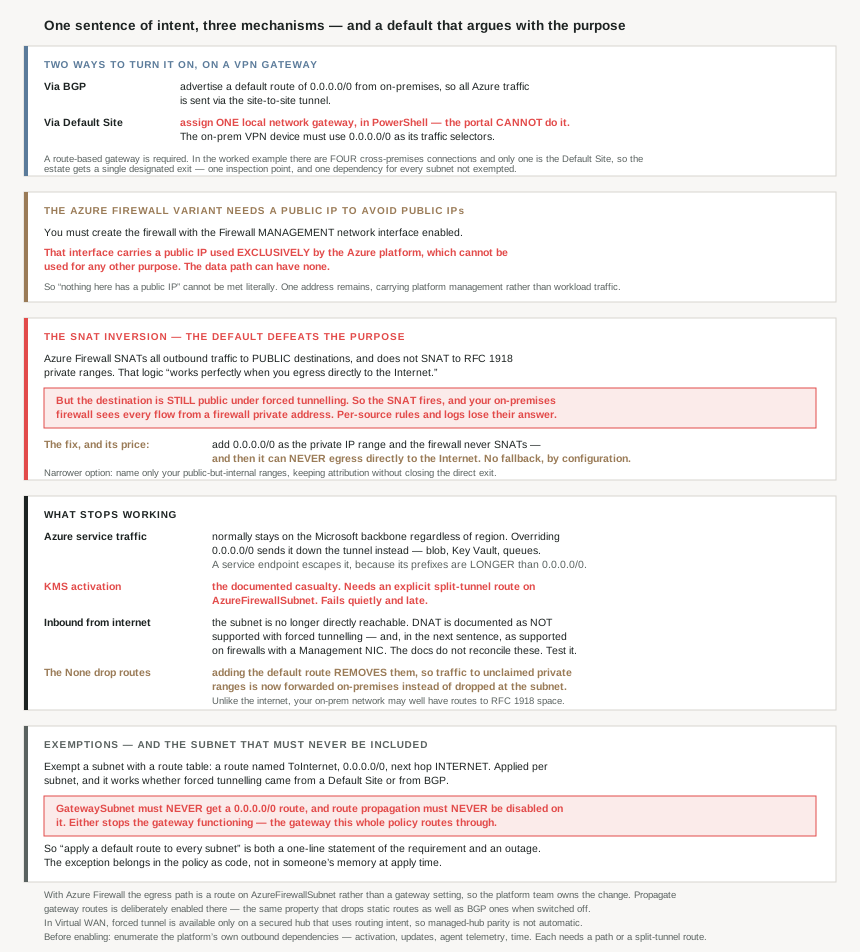
Two ways to turn it on, and only one of them is in the portal
| Via BGP | Via Default Site | |
|---|---|---|
| What you do | “advertise a default route of 0.0.0.0/0 via BGP from your on-premises location to Azure” | Assign one local network gateway as the gateway's Default Site |
| Portal? | BGP configuration | No — “The Default Site can’t be configured using the Azure portal” |
| Also requires | BGP on the gateway | “the on-premises VPN device must be configured using 0.0.0.0/0 as traffic selectors” |
The Default Site route is a Set-AzVirtualNetworkGatewayDefaultSite call with a -GatewayDefaultSite parameter, and the gateway must be route-based — the worked example builds it with -VpnType "RouteBased", which is consistent with everything #73 found about policy-based gateways being a dead end.
Being PowerShell-only matters more than it sounds. A setting that cannot be seen in the portal is a setting that does not appear in a portal-based review, and this one changes the egress path of an entire virtual network. Anyone auditing why traffic is leaving via on-premises will not find the cause on the gateway's blade.
One structural detail from the worked example that is easy to miss: there are “four cross-premises connections: DefaultSiteHQ, and three branches”, and exactly one of them is the default site. So however many site-to-site connections a gateway carries, forced tunnelling designates a single one as the way out. That is a deliberate concentration — one inspection point — and also a single dependency for every subnet that has not been exempted.
The Azure Firewall variant needs a public IP to avoid using public IPs
Doing this with Azure Firewall in the hub, which is the #77 topology, is a different mechanism with a hard prerequisite: “to support this configuration, you must create an Azure Firewall with the Firewall Management network interface enabled.”
And that interface is not optional plumbing you can leave unaddressed:
“When you enable the Management network interface, it creates a management interface with a public IP address that Azure Firewall uses for its operations. The public IP address is used exclusively by the Azure platform and can’t be used for any other purpose.”
The data path can go without one — “You can configure the tenant data path network without a public IP address” — so the shape is: no public egress for your traffic, one public address for Azure's own control traffic.
That is a reasonable design and an awkward conversation. A requirement phrased as “nothing in this environment has a public IP” cannot be met literally while forced tunnelling is in use, and the honest answer is that the remaining address carries platform management rather than workload traffic. #69's point applies: a public IP in the estate is a public IP in the estate, and #77 already noted that the hub's firewall and gateway addresses need DDoS protection whether or not anything is published.
Why This Architecture Holds Up
Because the SNAT default defeats the purpose, and the fix is a one-way commitment
Azure Firewall's SNAT rule is sensible in isolation: “Azure Firewall provides automatic SNAT for all outbound traffic to public IP addresses. Azure Firewall doesn’t SNAT when the destination IP address is a private IP address range per IANA RFC 1918. This logic works perfectly when you egress directly to the Internet.”
The trouble is that under forced tunnelling the destination is still a public address — some site on the internet — even though the next hop is now your own network. So the SNAT fires, and the on-premises firewall receives everything from a firewall private address instead of from the workload. Every per-source rule, every attribution in a log, every “which VM did that” question loses its answer.
The documented remedy is deliberately blunt:
“You can configure Azure Firewall to not SNAT regardless of the destination IP address by adding 0.0.0.0/0 as your private IP address range. With this configuration, Azure Firewall can never egress directly to the Internet.”
Read that as a pair. Declaring the whole address space private is what preserves source addresses, and it also removes the firewall's ability to ever reach the internet on its own. If your forced tunnel breaks — a VPN gateway failure, a circuit down, an on-premises outage — there is no fallback path, by configuration. That is usually the intended posture for an inspect-everything policy, but it should be a decision taken knowingly rather than a side effect of wanting readable logs.
There is a narrower version of the same setting for estates that use public ranges internally: “If your organization uses a public IP address range for private networks, Azure Firewall SNATs the traffic… However, you can configure Azure Firewall to not SNAT your public IP address range.” Naming just those ranges keeps source attribution for internal traffic without giving up the direct exit.
Because inbound stops, and the documentation says two things about DNAT
#78 established the general rule: override 0.0.0.0/0 and “you can no longer directly access resources in the subnet from the internet”, because the next hop has to process inbound traffic first. For a virtual appliance that means a list of five prerequisites, including being internet-accessible with its own public IP and able to “network address translate and forward, or proxy the traffic”.
For Azure Firewall specifically, the forced tunnelling page states it more strongly, and then qualifies it in the next sentence:
| Statement | Quoted |
|---|---|
| The prohibition | “DNAT isn’t supported with forced tunneling enabled. Firewalls deployed with forced tunneling enabled can’t support inbound access from the Internet because of asymmetric routing.” |
| The exception | “However, firewalls with a Management network interface still support DNAT.” |
Those two sentences sit together on the page, and forced tunnelling requires a Management network interface — so on a straight reading the exception covers every firewall the prohibition applies to. The documentation does not reconcile them, and I am not going to invent a mechanism that would. The practical conclusion is narrower than either sentence: if a design depends on publishing a workload inbound through a force-tunnelled firewall, that is the thing to prove in a test deployment rather than to assume from the page.
Because Azure's own services go down the tunnel too
The default 0.0.0.0/0 route has a property worth restating, because forced tunnelling discards it: “If the destination address is for an Azure service, Azure routes the traffic directly to the service over the Azure backbone network… It doesn’t matter which Azure region” either side is in.
Once you override that route: “Azure sends all traffic to the next hop type specified in the route, including traffic destined for public IP addresses of Azure services that aren’t enabled service endpoints.”
So blob storage reads, Key Vault calls and queue polls now leave Azure, cross your VPN or circuit, traverse your perimeter, and come back. That is a latency change, a bandwidth charge on the tunnel, and a load on the on-premises firewall — all for traffic between two Azure services that was never going near the internet.
The escape is the one #78 described, and it works by specificity rather than by exemption: “When you enable a service endpoint… traffic to the service doesn’t route to the next hop type in a route with the 0.0.0.0/0 address prefix. The address prefixes for the service are longer than 0.0.0.0/0.”
Which produces a tension worth naming rather than resolving silently. Service endpoints are how you keep Azure service traffic off the tunnel — and #78 also found that service-endpoint routes cannot be overridden by any route table. So every endpoint you enable to protect the tunnel is also a destination your perimeter will never inspect. Forced tunnelling and service endpoints are both defensible, and they pull in opposite directions on exactly the same traffic.
Because named things stop working, and KMS is the documented one
The clearest evidence that this breaks real functionality is that Microsoft's own split-tunnelling example is a repair rather than an optimisation: “you can configure Azure Firewall to direct all traffic to your on-premises network while routing traffic to the Internet for KMS activation, ensuring the KMS server is activated. You can do this by using route tables on the AzureFirewallSubnet.”
Windows activation is not a service anyone remembers to test after a routing change, and an unactivated VM does not fail immediately or loudly. It is the canonical example of the shape this post is about: a platform dependency on a public endpoint, broken by a policy that never mentioned it, surfacing weeks later as something that looks unrelated.
The general lesson is to enumerate the platform's own outbound dependencies before the change, not after. Anything the VM talks to that is not your application — activation, update services, agent telemetry, time — is a candidate, and each one either needs a path through the perimeter that works or an explicit split-tunnel route.
Because adding the default route also removes routes you did not write
Carried from #78 because it applies with full force here, and because forced tunnelling is the most common reason anyone adds this route: “Azure removed the routes for the 10.0.0.0/8, 192.168.0.0/16, and 100.64.0.0/10 address prefixes… when the UDR for the 0.0.0.0/0 address prefix was added.” The same happens for a default route whose next hop is the virtual network gateway.
Those were the routes dropping traffic to private ranges the virtual network does not claim. With them gone, that traffic matches 0.0.0.0/0 and is forwarded down the tunnel to your on-premises network — which, unlike the internet, quite possibly has routes to RFC 1918 space. A policy intended to inspect internet traffic has quietly created a path from Azure to private address space that was previously dropped at the subnet.
Because the gateway subnet has to be exempted from the policy that depends on it
Exempting a subnet is straightforward and documented: a route table with “the route for next hop type Internet… 0.0.0.0/0” named ToInternet, assigned to that subnet. In the worked example the Frontend subnet gets it while “Mid-tier and Backend subnets continue to have Internet traffic force tunneled”, and the technique is mechanism-agnostic: “These steps apply to forced tunneling that has been configured either by specifying a Default Site, or… via BGP.”
The subnet that must never receive the route is the one carrying the gateway that makes forced tunnelling work:
“don’t associate a route table to the gateway subnet that includes a route with a destination of 0.0.0.0/0. Doing so can prevent the gateway from functioning properly.”
And: “Route propagation shouldn’t be disabled on GatewaySubnet. If this setting is disabled, the gateway doesn’t function.”
So “apply a default route to every subnet” — the most natural way to express this policy as code — takes down the tunnel the policy routes through. The exception has to be written into the policy, not remembered at apply time, and it is the same exception #77 needed for the hub.
The gateway subnet in the worked example is 10.1.200.0/27, which is 32 addresses, and it is worth noting that the three consecutive posts covering this ground quote three different minimums for the same subnet — /27 here and on the gateway SKU page, /26 in the hub-and-spoke guidance. #77 reconciled that: /26 is the hub-specific recommendation because a hub is where additional ExpressRoute circuits land.
Because the Azure Firewall path runs through a subnet route table, not a gateway setting
One last mechanical difference that decides who owns the change. With a VPN gateway, forced tunnelling is a property of the gateway — a default site, or a BGP advertisement arriving from on-premises. With Azure Firewall it is a route on a subnet: “you can create a default route on the AzureFirewallSubnet with your VPN gateway as the next hop to get to your on-premises device. Or you can enable Propagate gateway routes to get the appropriate routes to the on-premises network.”
That makes the firewall's egress path a route-table change inside the hub, which the platform team owns, rather than a gateway or on-premises BGP change, which may not be theirs. And the Propagate gateway routes option is the same property #78 found drops static routes as well as BGP ones when disabled — here it is being deliberately enabled, on a subnet where the default route is the whole point.
For Virtual WAN the feature exists but is gated: “Forced tunnel is available for Azure Firewall deployments in the Virtual WAN hub (secured Virtual hub) that utilize routing intent.” So a secured hub without routing intent is not a place this works, which is worth checking before a managed-hub design assumes parity with the customer-managed one.
Key Architecture Decisions
| Decision point | Choose | Because |
|---|---|---|
| On-premises firewall needs the real source address | Set 0.0.0.0/0 as the private IP range |
Otherwise the firewall SNATs to its own private address and hides it. |
| Doing that | Accept that direct egress is gone for good | With that range set, Azure Firewall can never egress directly to the internet. |
| Only internal traffic needs attribution | Name just your public-but-internal ranges | Keeps source addresses without closing the direct exit. |
| Forced tunnelling with Azure Firewall | Enable the Firewall Management network interface | It is a documented requirement for the configuration. |
| A “no public IPs” requirement | Say that one remains, for platform management | The management interface’s address is Azure’s and cannot be removed or reused. |
| Choosing a configuration method on a VPN gateway | Default Site, or BGP if on-premises already advertises | Both are supported; the exemption technique is the same either way. |
| Using Default Site | Expect PowerShell and a documented runbook | It cannot be configured or seen in the portal. |
| Auditing why egress leaves via on-premises | Check the Default Site, not just route tables | A gateway-level setting invisible to a portal review. |
| The on-premises VPN device | Configure 0.0.0.0/0 traffic selectors |
Stated requirement for Default Site forced tunnelling. |
| Gateway type | Route-based | The documented configuration builds a RouteBased gateway. |
| Multiple site-to-site connections | Know that one is the exit | Exactly one connection is the Default Site, whatever the count. |
| Expressing the policy as code | Write in the GatewaySubnet exception |
A default route there, or disabled propagation, stops the gateway working. |
| Before enabling it | Enumerate the platform’s outbound dependencies | KMS activation is the documented casualty; it fails quietly and late. |
| Keeping KMS working | Split-tunnel route on AzureFirewallSubnet |
Microsoft’s own worked example for this. |
| Azure service traffic | Decide deliberately whether it tunnels | Overriding the default route captures Azure public endpoints too. |
| Keeping storage or Key Vault off the tunnel | Service endpoints | Their longer prefixes escape the default route. |
| Doing that under an inspect-everything policy | Record it as an exception | Service-endpoint routes cannot be overridden, so the perimeter never sees that traffic. |
| Publishing a workload inbound | Prove it in a test deployment | DNAT is documented as unsupported and as supported with a management NIC. |
| Exempting a subnet | Route table, 0.0.0.0/0, next hop Internet |
The documented split-tunnel pattern, per subnet. |
| After adding the default route | Re-check effective routes for the private ranges | The None drop routes are removed, so that traffic now tunnels. |
| Relying on a fallback if the tunnel fails | Don’t, if SNAT is fully disabled | That configuration removes the direct path by design. |
| Virtual WAN secured hub | Confirm routing intent is in use | Forced tunnel there is available only with routing intent. |
Closing Thought
Forced tunnelling is the clearest example in this series of a control whose implementation argues with its intent. The point is to let a perimeter see and attribute everything leaving the estate. The default behaviour of the component you route through replaces the source address with its own, so the perimeter sees everything and can attribute none of it. The fix exists, it is one setting, and it also permanently removes the firewall's ability to reach the internet without the tunnel. Both halves of that are reasonable; neither is obvious from the feature's name.
The second thing to internalise is the breadth of what a default route captures. It is not “internet traffic” in the sense a security policy means — it is everything not matched by a more specific route, which includes Azure's own services talking to each other over the backbone, and, because the None drop routes disappear with it, private address space the virtual network never claimed. The policy says internet; the mechanism says everything else.
And the detail I would put at the top of a change plan: the subnet carrying the gateway must be exempted from the policy that routes through that gateway. Written as code, “apply a default route to every subnet in the virtual network” is a one-line statement of the requirement and also an outage. That exception, and the list of platform dependencies that need a path out — activation being the documented one — are the two things worth settling before the change rather than diagnosing after it.
#80 takes the protocol that has been quietly doing half this work: BGP on Azure gateways — what Azure advertises and accepts by default, what the ASN rules actually permit, and why enabling it changes which routes win.
Official Azure Reference
- About forced tunneling for site-to-site — what forced tunnelling redirects and why, the two configuration methods, and the subnet-level exemption approach
- Configure forced tunneling for S2S connections using Default Site — the PowerShell-only Default Site requirement, the traffic selector requirement, the route-based gateway and worked subnet layout, and the exact
ToInternetroute table steps - Azure Firewall forced tunneling — the Management network interface requirement and its platform-owned public IP, the SNAT behaviour that hides source addresses and the
0.0.0.0/0private-range remedy, the DNAT statements, the KMS split-tunnel example, and the Virtual WAN routing intent condition - Azure virtual network traffic routing — what overriding
0.0.0.0/0does to Azure service traffic and inbound access, the removal of the None drop routes, and the gateway subnet prohibitions - Azure Firewall SNAT private IP address ranges — the configuration behind the SNAT remedy above (no claims drawn from it)
- Internet access patterns in Virtual WAN — the secured hub routing intent path referenced above (no claims drawn from it)
Comments