Business Challenge
A fintech company has 12 AWS accounts managed by a single platform engineer running a bespoke Python script that calls Organizations and Service Catalog APIs. New account requests take two weeks: manual email approval, manual SCP attachment, manual baseline Terraform apply, manual IAM Identity Center assignment. Three engineers are waiting on accounts right now.
Six months from now, that same platform engineer estimates they will have 60 accounts. The script won't scale. There is no drift detection. When someone manually modifies a guardrail or deletes a baseline IAM role in an account, nobody knows until an audit. The platform team's answer is to build a proper account vending machine — an internal tool with its own database, approval workflow, and Terraform pipeline.
That project is scoped at four months. The real answer takes three weeks with Control Tower and AFT.
Account vending is a solved problem. The interesting engineering is above the vending layer: the SCPs that encode your security posture, the baseline customizations that make accounts production-ready on day one, and the developer experience that makes self-service feel fast. Control Tower + AFT handle the vending. Build the layer above it.
Architecture
Control Tower with AFT has three distinct layers. Understanding which layer owns which responsibility is what separates a clean implementation from one that fights itself.
Layer 1: Control Tower landing zone
Control Tower sets up the foundational structure: a management account, a Log Archive account, an Audit account, and an OU hierarchy. It deploys mandatory guardrails — preventive controls (Service Control Policies that block disabling CloudTrail, for example) and detective controls (AWS Config rules that alert on non-compliant resource configuration). It also wires up IAM Identity Center for centralised authentication across accounts.
Control Tower owns the landing zone baseline. You do not manage the Log Archive and Audit accounts directly — Control Tower configures them and alerts you if they drift. Your OU structure lives here, and SCPs attach at the OU level.
Controls come in three types, each with a different enforcement mechanism:
Preventive controls
Implemented as SCPs. Block actions before they happen. Example: deny deletion of CloudTrail trails. Cannot be bypassed by account-level administrators because SCPs are enforced by Organizations before IAM evaluation.
Detective controls
Implemented as AWS Config rules. Detect non-compliant state after it exists and surface it in the Control Tower dashboard. Do not block actions — they report drift. Example: detect if S3 bucket public access block is disabled.
Proactive controls
Implemented as CloudFormation hooks. Evaluate resource configurations before a CloudFormation stack creates or updates them, blocking non-compliant infrastructure before it deploys. Only applies to CloudFormation-managed resources.
Guidance categories
Each control has a guidance level: mandatory (always enabled, cannot be disabled), strongly recommended (off by default, one-click to enable), or elective (off by default, opt-in for specific OUs). Mandatory controls cover the non-negotiable security baseline.
Layer 2: Account Factory for Terraform (AFT)
AFT is a Terraform module — not a separate AWS service — that runs in a dedicated AFT management account inside your landing zone. It replaces Control Tower's built-in Account Factory (which uses Service Catalog) with a Git-driven, Terraform-native pipeline. When you merge an account request into the account-request repository, a CodePipeline runs, calls the Control Tower Account Factory API to provision the account, and then runs your customisations.
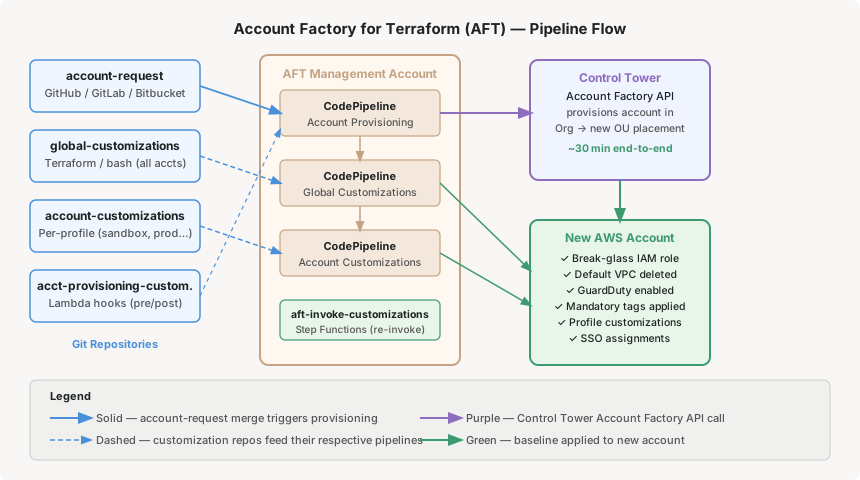
The four AFT repositories
AFT works with four Git repositories. Each has a distinct scope:
One Terraform file per account to be provisioned. Contains account name, email, OU placement, SSO user assignments, and a pointer to which account-customisation profile to apply. Merging a new file triggers account creation. AFT uses Jinja templating to build the account configuration from these inputs.
Example useAdd a file for a new team requesting a sandbox account. Specify account_customizations_name = "sandbox". Merge to main. Account exists within 30 minutes.
Terraform, Python, or bash that runs in every account AFT provisions, every time. This is where baseline configuration lives: the break-glass IAM role, the security tooling Lambda, the default VPC deletion, the CloudWatch log retention policy, the mandatory resource tags.
Key pointGlobal customizations run after every account provisioning event — including when you re-invoke for an existing account. Keep them idempotent.
Per-profile Terraform/scripts that run only for accounts that reference that profile name. One folder per profile (e.g. sandbox/, production/, data-platform/). A sandbox account gets relaxed SCPs and no VPC peering. A production account gets WAF, GuardDuty with S3 protection, and a pre-wired VPC attached to the Transit Gateway.
Lambda-based hooks that run during the provisioning phase itself, before customizations. Used for pre-provisioning validation (does this account name already exist?) and post-provisioning steps that must happen before Terraform runs (e.g. accepting a Resource Access Manager share into the new account).
AFT's default VCS is AWS CodeCommit, but CodeCommit is no longer available to new AWS customers (closed July 2024). For new AFT deployments, you must configure an external VCS provider — GitHub, GitLab, or Bitbucket. AFT supports all three via native CodePipeline source integrations. Set this at deployment time; migrating after the fact is painful.
Why This Architecture Holds Up
The fintech company's bespoke vending script had no drift detection and no idempotency. When an engineer manually changed a guardrail in a dev account, it stayed changed. Control Tower's detective controls surface that drift in the dashboard within 24 hours. The mandatory preventive controls make the highest-risk actions (disabling CloudTrail, modifying the log archive) impossible from inside the account, regardless of what IAM permissions exist.
Drift detection is built in
Control Tower runs continuous compliance checks via AWS Config rules across all enrolled accounts. Non-compliant resources surface in the landing zone dashboard by account and OU. You do not build this — it comes with the mandatory baseline.
Re-invoke propagates changes retroactively
When you update global-customizations, you re-invoke against all existing accounts using the aft-invoke-customizations Step Function. A new security baseline rolls out to 60 accounts in parallel, without touching each account manually. AFT runs at most 5 customization pipelines concurrently and queues the rest.
SCPs are the enforcement layer, not Terraform
Terraform can be bypassed — someone with console access can click around it. SCPs cannot be bypassed by account-level IAM in a member account, including its root user — with one exception worth knowing: the management account is not governed by them. AWS states plainly that “the root user and any administrators in the management account can perform work that controls would otherwise deny”, and calls the exception intentional, so that the management account cannot lock itself out. Run no workloads there. Your non-negotiable security posture (no public S3 buckets in prod, no IAM access keys for human users) lives in SCPs, not in resource Terraform that someone can delete.
Account provisioning time is bounded
An AFT-provisioned account with global and account customizations completes in 30–45 minutes. That is the ceiling, not an average. A self-built vending machine has no such guarantee — a failed step means a partially-provisioned account in an unknown state with no automated remediation path.
Key Architecture Decisions
1. OU design drives your SCP blast radius
SCPs attach at the OU level and inherit downward. The most consequential architectural decision in a Control Tower deployment is your OU hierarchy, not your account naming convention. A flat structure (Sandbox OU, Non-Prod OU, Prod OU) gives you coarse SCP control. A deeper structure (Prod/Finance, Prod/Engineering, Prod/Data) gives you fine-grained policy without per-account SCP management. Design the OU hierarchy to match your policy segmentation requirements before provisioning a single account.
2. AFT requires Terraform 1.6.1 or later
AFT explicitly requires Terraform version 1.6.1 or later. If your organisation standardises on an older Terraform version, you will need a separate Terraform installation in the AFT management account, or a version manager. This is a real constraint — confirm it before committing to AFT.
3. The AFT management account is a high-trust target
The AFT management account runs CodePipeline with cross-account roles that can deploy Terraform into every account it manages. It is one of the highest-privilege environments in your landing zone. Apply the same hardening you apply to your management account: no human IAM users, MFA enforced on the root, CloudTrail enabled, access logged, and a separate on-call process for changes to its configuration. Do not use it for anything else.
4. Global customizations must be idempotent
Every time you re-invoke AFT customizations, global-customizations runs again in every targeted account. If your global customization creates a resource without checking for existence (a Terraform resource without a lifecycle { ignore_changes } block, or a bash script with no guard), re-invocations will either fail or create duplicates. Write every global customization step assuming it will run ten times in the same account.
5. Start with elective controls disabled
Control Tower ships with hundreds of elective controls. Enabling them all on day one against existing accounts will generate a flood of compliance findings, most of which are expected deviations (legacy resources that predate the landing zone). Enable mandatory controls from day one. Enable strongly recommended controls as you enroll accounts. Add elective controls one at a time with a remediation plan ready for the findings they will generate.
Closing Thought
The fintech company's platform engineer finished the AFT deployment in 11 days. Day one through four was landing zone setup and OU design. Day five through eight was AFT deployment and the four repository structure. Day nine through eleven was the global-customizations baseline (break-glass role, GuardDuty enable, default VPC delete, mandatory tags). The first account request merged on day twelve and provisioned in 34 minutes.
The bespoke vending script project was descoped. The four months of engineering went to the layer above the vending machine: the developer portal that calls the account-request API, the Slack integration that notifies account owners when provisioning completes, and the cost anomaly alerting that fires into the new account on day one. That is the interesting work. Control Tower and AFT are infrastructure for that work, not the work itself.
Compute — Graviton + Spot mixed instance groups: how to build cost-optimised Auto Scaling groups that use Graviton as the primary instance family with Spot diversification, and what the real-world failure modes look like when Spot capacity tightens.
Official AWS Reference
- AWS Control Tower User Guide — landing zone setup and Account Factory
- About controls in AWS Control Tower — including the management account exception
- Deploy AWS Control Tower Account Factory for Terraform — prerequisites and the Terraform version constraint
- Account customizations — re-invoke customizations and the concurrency limit
- Alternatives for version control of source code in AFT
Comments