Business Challenge
The feature does what the name says: “After you enable block public access for snapshots in a Region, any attempt to publicly share snapshots in that Region is automatically blocked.” It is free, it is one setting, and it closes a real exposure.
The care is needed in two places. What it does to snapshots that are already public, and how far the setting reaches — because the answers are not the ones you learned from S3.
There are two modes, and the difference is entirely about history:
“Block all sharing — Blocks all public sharing of your snapshots. Users in the account can't request new public sharing. Additionally, snapshots that were already publicly shared are treated as private and are no longer publicly available.”
“Block new sharing — Blocks only new public sharing of your snapshots … However, snapshots that were already publicly shared, remain publicly available.”
So block all sharing looks like remediation. The considerations say precisely what it is instead:
“Enabling block public access for snapshots in block all sharing mode does not change the permissions for snapshots that are already publicly shared. Instead, it prevents these snapshots from be publicly visible and publicly accessible. Therefore, the attributes for these snapshots still indicate that they are publicly shared, even though they are not publicly available.”
Two consequences follow, and both bite. An inventory script that reads snapshot attributes will report those snapshots as public — and it will be right, because they are. And the masking is only as durable as the setting: “If you later disable block public access or change the mode to block new sharing, these snapshots will become publicly available again.”
FixTreat block all sharing as containment, not as the fix. Use it to stop the bleeding, then go and actually revoke the public permission on each snapshot it is masking — the attribute tells you which ones those are. Until you do, the exposure is one setting change away from returning, and it will not be in anyone's change log as a data exposure.
S3's block public access is the one most teams met first, and #40 quoted its scope: “When you apply block public access settings to an account, the settings apply to all AWS Regions globally.”
The snapshot setting is the opposite: “Block public access for snapshots is a Regional setting. It applies to all snapshots in the Region in which it is enabled. You need to enable block public access for snapshots in each Region in which you want to prevent the public sharing of your snapshots.”
One call for S3 across the world; one call per Region for snapshots, including the Regions nobody uses, which are exactly where an unnoticed public snapshot would sit.
And on already-public resources the three diverge again, though not in the way the headline
sentences suggest. S3 says
“Block public access settings don't alter existing policies or ACLs”, and that
is about preservation, not about effective access — two of its four settings restrict
access that existing policies and ACLs already grant.
RestrictPublicBuckets
“restricts access to an access point or bucket with a public policy to only AWS service
principals and authorized users within the bucket owner's account”, and
“Enabling this setting doesn't affect existing access point or bucket policies, except
that Amazon S3 blocks public and cross-account access derived from any public access point or
bucket policy”. IgnorePublicAcls does the same for ACLs:
“Enabling this setting doesn't affect the persistence of any existing ACLs”,
while the ACLs stop being honoured.
So S3 and EBS snapshots both restrict existing public access while leaving the grant in place. AMIs are the outlier in the other direction: “enabling block public access does not affect your AMIs that are already publicly available; they remain publicly available.”
Where S3 and snapshots genuinely differ is what they then tell you. S3 reports the
effective state —
“GetBucketAcl returns an ACL that reflects the access permissions that
Amazon S3 is enforcing, rather than the actual ACL that is associated with the bucket”
— while a snapshot's attributes report the stored state and
“still indicate that they are publicly shared”. Same design, opposite answer
from the API, and that is what decides whether your inventory script is reassured or alarmed.
Do not carry an assumption from one of these to another. Write down, per feature, whether it is Regional and what it does to what is already public; those two answers determine everything about how you roll it out and what your evidence looks like afterwards.
The snapshot setting has a stated limit that is not a subtlety:
“Block public access for snapshots does not prevent the public sharing of EBS-backed AMIs. If you enable block public access for snapshots, users can still publicly share EBS-backed AMIs. If an EBS-backed AMI is publicly shared, users with access to that AMI can create volumes from its associated snapshots.”
The snapshot data reaches the public through the AMI, with the snapshot setting on and reporting success. AWS names the remedy in the same bullet — the separate block public access for AMIs — which is also Regional: “block public access for AMIs must be disabled in each Region in which the AMI will be publicly shared.”
One more gap worth stating plainly, because the name invites the wrong reading: “Block public access for snapshots does not prevent private snapshot sharing.” Sharing a snapshot with a named external account is untouched. The setting is about the public group, not about egress.
FixEnable both settings, in every Region, or you have enabled neither in any meaningful sense. And if your concern is data leaving the organisation rather than data becoming world-readable, neither setting addresses it — that is a job for an SCP or a resource control policy on the sharing API.
Architecture
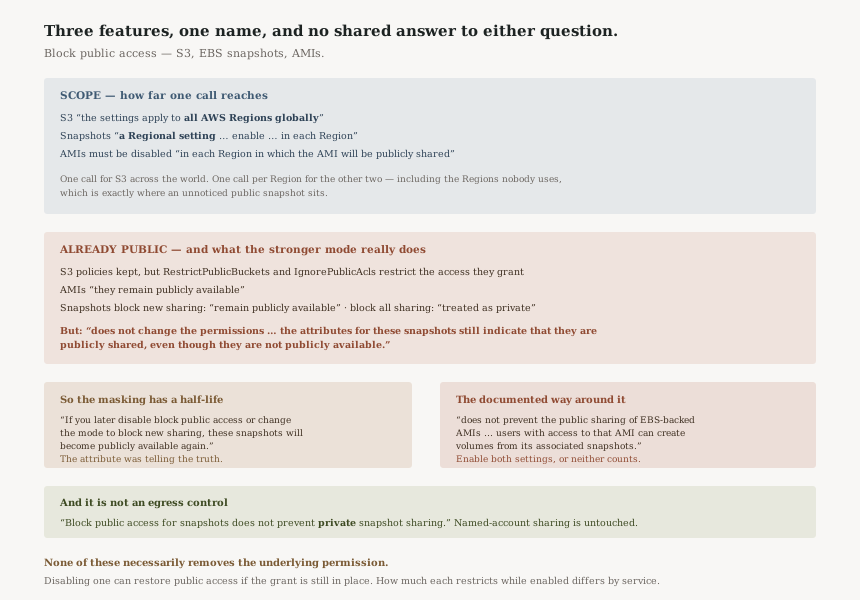
The same name, three behaviours
| S3 | EBS snapshots | AMIs | |
|---|---|---|---|
| Scope | “all AWS Regions globally” | “a Regional setting” — enable per Region | Per Region |
| Already public | Policies kept, access restricted by RestrictPublicBuckets and IgnorePublicAcls |
Block all sharing: “treated as private”. Block new sharing: “remain publicly available” | “they remain publicly available” |
| Permissions actually changed? | No | No — “does not change the permissions” | No |
| What the API reports | Effective — “the access permissions that Amazon S3 is enforcing” | Stored — attributes “still indicate that they are publicly shared” | Stored |
The bottom row is the one constant: none of these controls necessarily removes the underlying public permission. Disabling one can therefore restore public access if the original grant is still in place. What differs is how much each one restricts while enabled, and that depends on the service and on which settings are turned on — S3's four are independent, and only two of them touch access that an existing policy or ACL already grants.
Where the setting lives, and who can move it
“Block public access is an account-level setting. It applies to all users, including administrator users, in the account. You can't enable block public access for snapshots at the organization level.”
That reads like a gap and has an answer in the next bullet: a declarative policy “allows you to apply the setting across multiple Regions simultaneously, as well as across multiple accounts simultaneously”, and it changes who holds the switch — “When a declarative policy is in use, you can't modify the setting directly within an account.”
For an estate of any size that is the only version worth deploying. Set per account and per Region, this is a control that drifts the moment a new account or a new Region appears; set by declarative policy, it arrives with them.
Why the masked state is worse than it sounds
Consider the sequence. A snapshot is shared publicly in 2024. Block public access goes on in block all
sharing mode in 2026, and the snapshot stops being reachable. An audit in 2027 reads snapshot attributes,
sees public, and raises a finding. Somebody investigates, confirms the data is not
reachable, and closes it as a false positive.
It was not a false positive. The permission is still there, and the only thing standing between it and the internet is a setting that a future cleanup, a Region rebuild, or a declarative policy change can flip. The attribute was telling the truth.
Why This Architecture Holds Up
Not changing permissions is the right default, even though it surprises
A setting that silently rewrote the ACLs of every public snapshot in a Region would be a far more dangerous thing to enable. Keeping the permission and gating access means enabling the control is reversible and auditable, and it means AWS never destroys configuration you did not ask it to destroy. The cost is that remediation and containment look identical from the outside, which is why the documentation says so twice.
Regional scope is consistent with the resource
Snapshots and AMIs are Regional resources; S3 buckets sit in a global namespace. Each setting matches the shape of what it protects, which is defensible even though it means the operational burden differs. The lesson is not that the snapshot setting is worse — it is that the name promises a uniformity the services do not have.
Naming the AMI bypass in the feature's own considerations is good practice
It would have been easy to leave the AMI path to a security bulletin. Putting “does not prevent the public sharing of EBS-backed AMIs” in the considerations list of the feature it bypasses is the difference between a reader who enables one setting and a reader who enables two.
Key Architecture Decisions
| Decision | Choose this | Because |
|---|---|---|
| How to apply it | Declarative policy, not per account | It covers “multiple Regions” and “multiple accounts simultaneously”, and removes the in-account switch |
| Which mode | Block all sharing, then revoke | It is containment with a known half-life; the permission survives it |
| Region coverage | Every Region, including unused ones | The setting is Regional, and an unused Region is where an unnoticed public snapshot lives |
| AMIs | Enable block public access for AMIs as well | Otherwise a public AMI reaches the same snapshot data by a documented path |
| Preventing data leaving the org | An SCP or RCP on the sharing calls | Neither setting touches private sharing to named accounts |
The audit worth running
List snapshots whose attributes say public, in every Region, and do not stop at the block public access setting. If the setting is on in block all sharing mode, that list is your remediation backlog rather than a list of exposures — but it is a backlog, and today it is being held closed by one boolean.
Check both settings, per Region, in every account. Snapshots and AMIs are separate switches on separate pages protecting the same bytes.
Then ask who can turn either off. Under a declarative policy the answer is a short list in the management account. Without one, it is every administrator in every account, and the control is a convention rather than a guarantee.
Closing Thought
The pattern across all three of these settings is the same, and it is worth holding onto beyond EBS: a block is a gate in front of a permission, not a change to it. That is good engineering — reversible, non-destructive, auditable — and it means that we blocked public access and nothing is public describe different states.
The snapshot documentation is unusually direct about the consequence, to the point of telling you that your own attributes will disagree with your own security posture. That sentence is the whole post, and it is in the considerations list of a free feature most people enable without reading.
#101 was about a lock that defends existence and not readability. This is about a block that defends reachability and not permission. Both are narrow guarantees described precisely, and both are read as wider than they are.
Security & Identity — AWS Organizations declarative policies: what makes them different from an SCP, which settings they can hold, and what it means that an account can no longer change a value locally.
Official AWS Reference
- Block public access for Amazon EBS snapshots — the two modes and what each does to snapshots already shared, the statement that permissions are not changed and that attributes still indicate public sharing, the re-exposure on disabling, the Regional and account-level scope, declarative policies, the absence of protection for private sharing and for EBS-backed AMIs, and the no-cost note
- Make your AMI publicly available for use in Amazon EC2 — block public access for AMIs not affecting AMIs already public, the per-Region requirement, and the two-year default deprecation date for public AMIs
- Blocking public access to your Amazon S3 storage — the global Region scope and the statement that the settings do not alter existing policies or ACLs, used for the comparison above
- Declarative policies in AWS Organizations — further reading on applying the setting across accounts and Regions; no claims in this post are drawn from it
- Understand block public access for AMIs — further reading on the AMI-side setting; no claims in this post are drawn from it
Comments